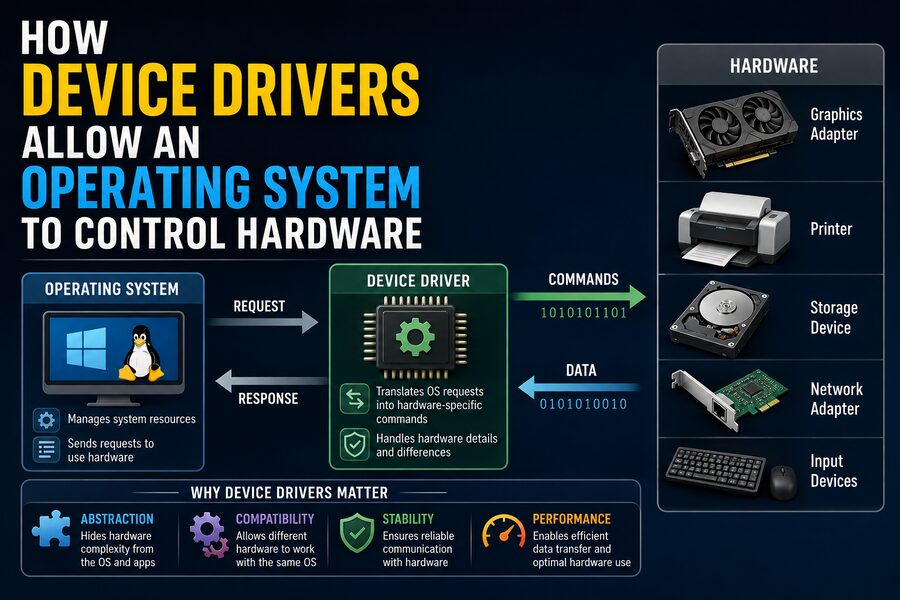

A modern computer contains many different hardware components: processors, graphics cards, keyboards, printers, storage drives, Wi-Fi adapters, webcams, sound devices, Bluetooth radios, and much more. Each device has its own electronics, registers, communication protocols, timing requirements, and capabilities. 🖥️🔧
The operating system must somehow control all of this hardware without requiring every application to understand exactly how each individual device works.
That is the job of a device driver.
A device driver is specialized software that acts as an intermediary between the operating system and a particular piece of hardware. It translates general requests from the operating system into commands that the hardware understands, while also translating hardware events and data back into a form the operating system can use.
Without drivers, an operating system might recognize that a device is physically connected but have no practical way to operate it.
Device drivers therefore form one of the most important layers in modern computer architecture. 🧠⚙️
🧩 What Is a Device Driver?
A device driver is a software component that enables an operating system to communicate with and control a hardware device.
Suppose you connect a printer to a computer.
An application such as a word processor does not normally need to know:
- How the printer’s motors move paper
- How ink nozzles are activated
- Which USB commands the printer expects
- How its internal memory is organized
- How status errors are reported
Instead, the application asks the operating system to print a document.
The operating system passes the relevant request to the printer driver.
The driver then translates that request into instructions appropriate for the specific printer. 🖨️
This separation makes computing dramatically easier.
🏗️ The Hardware–Software Communication Chain
A simplified communication path might look like this:
Application → Operating System → Device Driver → Hardware
For example, when a music application plays a sound:
🎵 Music application
⬇️
🧠 Operating system audio subsystem
⬇️
🔊 Audio device driver
⬇️
🎛️ Sound hardware
The sound application does not need to control the audio chip directly.
Instead, it uses operating-system interfaces.
The OS communicates with the driver, and the driver knows exactly how to operate the hardware.
This layered architecture allows the same application to work with many different hardware models.
🌉 Drivers Act Like Translators
One useful way to think about a device driver is as a translator.
The operating system speaks in relatively general commands.
For example:
“Read this block of data.”
or:
“Send this network packet.”
or:
“Display these pixels.”
The physical device may require something far more specific.
A storage controller might require command codes to be written into special hardware registers.
A graphics processor may require data to be placed inside command buffers.
A Wi-Fi adapter might need carefully structured packets sent through a bus interface.
The driver translates between these two worlds. 🔄
That is why different pieces of hardware often require different drivers even when they perform similar functions.
🧠 Why Doesn’t the Operating System Control Every Device Directly?
In theory, an operating system could contain built-in code for every hardware device ever created.
In practice, that would be nearly impossible.
Thousands of manufacturers produce countless hardware models, and new devices appear constantly.
Each may behave differently.
If the operating system had to know every implementation detail itself, its codebase would become enormous and extremely difficult to maintain.
Drivers solve this problem through modularity.
Instead of redesigning the entire operating system for every new device, developers can provide a new driver that conforms to the operating system’s driver framework.
The OS provides standard interfaces.
The driver handles device-specific details. 🧩
⌨️ A Keyboard Example
Consider what happens when you press a key.
The physical keyboard detects the key press electronically.
It sends information to the computer, perhaps through USB or Bluetooth.
The keyboard driver receives the incoming data and interprets it.
The operating system then converts that information into a keyboard event.
Finally, the active application receives the event.
The process might resemble:
Key pressed → Keyboard hardware → Driver → OS input system → Application
When you type the letter A, the text editor does not directly communicate with electrical circuits inside the keyboard.
The driver hides those low-level details. ⌨️⚡
🖱️ How a Mouse Driver Works
A mouse provides another simple example.
The physical device reports information such as:
- Horizontal movement
- Vertical movement
- Button presses
- Scroll-wheel activity
The driver interprets these values and provides them to the operating system’s input subsystem.
The operating system then updates the pointer position and distributes mouse events to applications.
More advanced gaming mice may require specialized drivers to support additional capabilities such as:
🎮 Programmable buttons
💡 RGB lighting
🎯 Adjustable sensitivity
📊 Polling-rate configuration
🧠 On-device profiles
A basic generic driver may operate the mouse, while the manufacturer’s driver unlocks additional features.
🖥️ Graphics Drivers Are Especially Complex
Graphics drivers are among the most sophisticated device drivers in modern computers.
A graphics processing unit, or GPU, is effectively a highly specialized parallel computer.
Applications and operating systems may request operations such as:
🎨 Rendering 3D graphics
🎬 Decoding video
🖼️ Displaying images
🧮 Performing GPU computations
🖥️ Managing multiple displays
The graphics driver translates high-level graphics commands into instructions the GPU can execute.
For a video game, communication might involve:
Game → Graphics API → OS/driver → GPU
Graphics APIs include technologies such as Direct3D, Vulkan, Metal, and OpenGL.
The driver implements the hardware-specific behavior needed to connect those APIs to a particular GPU architecture.
This explains why updated graphics drivers can sometimes improve game performance or fix visual bugs. 🎮🚀
💾 Storage Drivers
Hard drives, solid-state drives, and storage controllers also depend on drivers.
When an application opens a file, it usually works with filenames and folders.
The physical storage device, however, deals with lower-level operations such as reading and writing blocks of data.
A storage driver helps connect these layers.
For example:
Application requests file → File system locates data → Storage driver issues command → SSD retrieves data
Modern storage interfaces may include:
- SATA
- NVMe
- USB storage
- SCSI
- Specialized RAID controllers
Each involves particular command structures and hardware behavior.
Drivers shield most software from those technical differences. 💽
🌐 Network Drivers
Network adapters require drivers as well.
When a browser sends data over the internet, it does not directly manipulate the circuitry of an Ethernet or Wi-Fi adapter.
Instead, the operating system’s networking stack prepares packets.
The network driver then communicates with the hardware.
The adapter physically transmits the information over:
📡 Wi-Fi radio waves
🔌 Ethernet cables
🌐 Other supported network technologies
Incoming data travels in the opposite direction.
The adapter receives it, the driver reports it to the OS networking stack, and the operating system eventually delivers it to the correct application.
🧱 Hardware Registers
At a lower level, many devices expose special memory locations known as registers.
Registers can control specific hardware functions.
For example, a register might indicate:
Start operation
Another might contain:
Current status
Another could point to:
Location of data in memory
Drivers often read from and write to these registers to control the device.
Instead of every application needing to know the address and meaning of each hardware register, the driver encapsulates that knowledge.
This abstraction greatly improves reliability and portability. 🧠
🔌 How Drivers Communicate With Hardware
Hardware devices can be connected to a computer through many different buses and interfaces.
Examples include:
🔌 PCI Express
💾 SATA
⚡ USB
📡 Bluetooth
🧠 I²C
🔧 SPI
The driver understands how to communicate with the device through the appropriate interface.
For a USB device, the driver may send commands through USB endpoints.
For a PCIe device, it may interact with memory-mapped registers and DMA buffers.
The operating system provides lower-level services that help drivers perform these operations safely.
⚡ Interrupts: How Hardware Gets the CPU’s Attention
Drivers do not always need to continuously ask hardware whether something happened.
Hardware can signal important events using interrupts.
An interrupt tells the processor:
“Something requires attention.”
For example, a network adapter might generate an interrupt when a packet arrives.
The sequence could be:
📡 Packet arrives
➡️ Network adapter receives it
➡️ Hardware generates interrupt
➡️ CPU runs interrupt-related code
➡️ Driver processes received data
➡️ OS delivers packet to networking stack
Interrupts allow the CPU to perform other work instead of constantly checking every device.
This is much more efficient. ⚡
🚚 Direct Memory Access
High-speed devices often need to transfer large quantities of data.
Having the CPU manually copy every byte would waste processing power.
Instead, many systems use Direct Memory Access, or DMA.
DMA allows a hardware device to transfer data directly to or from system memory with limited CPU involvement.
A driver might:
- Allocate an area of memory.
- Tell the device where that memory is located.
- Start the transfer.
- Allow the hardware to move the data.
- Receive an interrupt when the operation finishes.
This is extremely important for:
🎮 GPUs
🌐 Network cards
💾 SSDs
🎥 Video devices
🔊 Audio hardware
DMA contributes significantly to modern computer performance.
🧠 Drivers and the Operating System Kernel
Many important drivers interact closely with the kernel, the central part of an operating system.
The kernel manages critical resources including:
- CPU scheduling
- Memory
- Processes
- Hardware access
- Security boundaries
Some drivers run in kernel mode, where they have powerful access to system resources.
This makes them fast and capable—but also potentially dangerous.
A serious bug in a kernel-level driver can crash an entire operating system. 💥
This is one reason poorly written drivers have historically been associated with system instability.
🛡️ User-Mode Drivers
Not every driver needs unrestricted kernel access.
Modern operating systems increasingly allow certain drivers or driver components to run in user mode.
User-mode software has fewer privileges.
If a user-mode driver fails, the operating system may be able to terminate or restart it without crashing the entire machine.
This can improve security and reliability.
However, some high-performance or low-level devices still require kernel-level components.
Operating-system designers must balance:
⚡ Performance
🔐 Security
🛡️ Stability
🧩 Compatibility
📦 Generic vs. Manufacturer-Specific Drivers
Operating systems often include generic drivers for common hardware.
For example, plugging in a simple USB keyboard may work immediately without manually installing anything.
This happens because the operating system already understands standardized USB keyboard behavior.
Generic drivers can provide basic functionality for many devices.
However, manufacturer-specific drivers may support advanced features.
A printer’s standard driver might support ordinary printing, while the manufacturer’s package might also provide:
🖨️ Advanced print-quality settings
📊 Ink monitoring
📑 Duplex controls
🎨 Color management
🔧 Maintenance functions
This is why specialized hardware sometimes works partially before its official driver is installed.
🏷️ How the OS Knows Which Driver to Use
When hardware is discovered, the operating system needs to identify it.
Many buses allow devices to report identifiers.
For example, PCI devices commonly provide vendor and device IDs.
USB devices can provide vendor IDs, product IDs, and class information.
The operating system compares these identifiers with the drivers it has available.
If it finds a match, it loads or activates the appropriate driver.
Conceptually:
Hardware detected → Device identified → Matching driver located → Driver loaded → Device initialized
This process often happens automatically. 🔍
🔄 Plug and Play
Modern operating systems use Plug and Play technologies to simplify hardware installation.
When a compatible device is connected, the OS may automatically:
- Detect the device.
- Identify its type.
- Locate an appropriate driver.
- Allocate hardware resources.
- Initialize the device.
- Make it available to applications.
Older computers often required users to configure hardware settings manually.
Modern driver frameworks have made hardware installation dramatically easier. 🔌✅
🔐 Why Driver Security Matters
Because drivers may operate with significant system privileges, they are important security targets.
A vulnerable driver could potentially allow malicious software to:
⚠️ Access protected memory
🔓 Bypass security controls
💾 Read sensitive data
🧠 Gain elevated privileges
💥 Crash the operating system
Operating-system vendors therefore use security measures such as driver signing.
A digital signature helps verify that a driver comes from a recognized source and has not been modified unexpectedly.
Many modern operating systems restrict unsigned kernel-level drivers.
This reduces the risk of malicious or poorly controlled software gaining deep access to the system.
📝 What Is Driver Signing?
A signed driver contains cryptographic information used to verify its authenticity and integrity.
The operating system can check whether:
- The driver was signed by a trusted authority.
- The driver has changed since it was signed.
- The signature satisfies system security policies.
Driver signing does not guarantee that software contains no bugs.
However, it provides an important trust mechanism.
It is especially valuable because kernel drivers have unusually powerful access to a computer.
🔄 Why Drivers Need Updates
Hardware does not necessarily change after you buy it, so why do drivers receive updates?
Because the software controlling the hardware can be improved.
Driver updates may:
🐞 Fix bugs
🚀 Improve performance
🛡️ Patch security vulnerabilities
🎮 Add compatibility with new software
⚙️ Enable hardware features
🖥️ Support operating-system updates
🔋 Improve power management
Graphics drivers are a particularly visible example.
GPU manufacturers often release drivers optimized for newly released games or updated graphics technologies.
⚠️ Why a Bad Driver Can Cause Problems
Drivers operate close to hardware, so bugs can have serious consequences.
A malfunctioning driver may cause:
❌ Device failures
🐌 Poor performance
💥 System crashes
🔄 Random restarts
🔋 Excessive power consumption
🎧 Audio glitches
📡 Network disconnections
Sometimes a hardware problem that appears physical is actually caused by driver software.
For example, a Wi-Fi adapter may repeatedly disconnect because the hardware is defective—but it could also be caused by a buggy network driver.
Diagnosing computer problems often involves determining whether the issue originates in hardware, the driver, the operating system, or an application.
🔋 Drivers and Power Management
Drivers also help computers conserve energy.
Modern operating systems frequently place unused hardware into low-power states.
The driver may tell a device to:
💤 Enter sleep mode
⚡ Reduce performance
🔌 Shut down unused components
🚀 Resume full operation
This is especially important for laptops and mobile devices.
Poorly designed drivers can prevent devices from sleeping properly, reducing battery life.
Effective driver power management helps modern computers achieve long operating times while still responding quickly when hardware is needed.
🎧 Real-Time Hardware Control
Some devices require extremely precise timing.
Audio interfaces, for example, must continuously deliver sound samples.
If the driver cannot supply them fast enough, the user may hear:
🔊 Pops
🎵 Gaps
⚠️ Distortion
⏳ Latency
Professional audio drivers are often optimized for low-latency operation.
Similarly, industrial hardware, robotics systems, and scientific instruments may require drivers capable of reliably responding to time-sensitive events.
Driver design therefore involves much more than simply sending commands—it can require careful control of scheduling, buffering, and timing.
📋 Device Drivers and APIs
Applications generally do not call hardware drivers directly.
Instead, they communicate through APIs, or application programming interfaces.
An API gives programs a standardized way to request services.
For example, an application might use an operating system API to:
🎤 Capture microphone audio
📸 Access a camera
📂 Read a file
🌐 Send network data
The operating system then routes the operation through the relevant subsystems and drivers.
This layered design allows software developers to write applications without knowing what exact hardware the user owns.
🧱 Hardware Abstraction
One of the most important concepts enabled by drivers is hardware abstraction.
Hardware abstraction hides implementation details behind common interfaces.
A program may simply request:
“Play this sound.”
It does not need separate code for every sound card ever manufactured.
Similarly, a browser can use a networking API without knowing whether the computer connects through:
📡 Wi-Fi
🔌 Ethernet
📱 Mobile broadband
The operating system and drivers handle these differences.
Hardware abstraction is a major reason software can run across thousands of computer configurations.
🐧 Drivers Across Different Operating Systems
Drivers are usually designed for specific operating-system architectures.
A driver written for one platform generally cannot simply be used unchanged on another.
For example, Windows, Linux, and macOS use different driver frameworks and kernel interfaces.
Hardware manufacturers may therefore need to develop separate driver implementations.
Linux also includes many hardware drivers directly inside or alongside the kernel source tree.
Other platforms may distribute drivers as separate manufacturer packages.
The differences help explain why certain hardware can have excellent support on one operating system but limited functionality on another.
🧰 Firmware vs. Device Drivers
Drivers are often confused with firmware, but they are different.
Firmware is software stored inside or very close to the hardware itself.
Device drivers run as part of or alongside the operating system and communicate with the hardware.
For example, a Wi-Fi adapter may contain firmware that controls its internal radio processor.
The computer’s Wi-Fi driver communicates with that firmware.
The complete path might be:
Application → OS → Driver → Device firmware → Physical hardware
Both layers may be essential.
🧠 Drivers in Virtual Machines
Device-driver concepts also appear in virtualization.
A virtual machine may believe it has its own network card, disk controller, or graphics device.
But that hardware may be entirely virtual.
A driver inside the guest operating system communicates with the virtual device.
The hypervisor then translates those operations into activity on the real hardware.
Special paravirtualized drivers can improve performance by allowing the guest operating system to communicate more efficiently with the hypervisor.
This demonstrates that drivers do not always control physical hardware directly—they control whatever device interface the operating system sees. ☁️
🤖 Device Drivers in Embedded Systems
Drivers are equally important outside desktop computers.
Embedded systems contain specialized hardware in:
🚗 Cars
🏭 Industrial machines
🤖 Robots
📱 Smartphones
✈️ Aircraft systems
🏠 Smart appliances
🩺 Medical devices
An embedded operating system may use drivers for sensors, motors, displays, communication chips, and storage devices.
For instance, a robot might use separate drivers for:
📷 Cameras
⚙️ Motors
📏 Distance sensors
🧭 Navigation sensors
Higher-level software can then control the robot without directly manipulating every electrical interface.
🚘 Drivers in Modern Vehicles
Cars increasingly function as distributed computer systems.
A modern vehicle may contain many electronic control units connected to:
📡 Radar sensors
📷 Cameras
🛞 Wheel-speed sensors
🔋 Battery controllers
🎛️ Infotainment displays
⚙️ Engine or motor controls
Device drivers allow software to access these components through structured interfaces.
As vehicles become more software-defined, reliable driver design becomes increasingly important for performance, security, and safety.
🧪 What Happens When You Plug In a New Device?
Imagine connecting a USB webcam.
Several events may occur rapidly:
- 🔌 The electrical connection is detected.
- 🆔 The webcam reports identifying information.
- 🧠 The operating system determines what type of device it is.
- 📦 A compatible driver is selected.
- ⚙️ The driver initializes the webcam.
- 📹 Video buffers are created.
- 🚚 Camera data begins moving into system memory.
- 🖥️ Applications can request the video through standard APIs.
What looks like a simple “plug in the camera” action depends on sophisticated cooperation between hardware, drivers, the kernel, memory management, and application interfaces.
🚀 The Future of Device Drivers
Device drivers continue to evolve as computer hardware becomes more complex.
Future driver architectures are increasingly emphasizing:
🔐 Stronger isolation
🛡️ Improved security
🔄 Automatic updates
🧩 Standardized interfaces
⚡ High-performance hardware acceleration
☁️ Virtualized hardware
🤖 AI accelerators
Modern computers now contain specialized processors for artificial intelligence, neural-network calculations, media processing, encryption, and other workloads.
These devices need driver software that allows operating systems and applications to use them efficiently.
At the same time, operating-system designers are exploring ways to move more driver functionality away from highly privileged kernel environments.
The goal is to preserve performance while reducing the possibility that one defective driver can compromise the entire system.
🌟 Conclusion
Device drivers allow operating systems to control hardware by acting as a specialized communication layer between software and physical devices.
The operating system provides standardized services to applications, while drivers translate those requests into commands understood by specific hardware. 🔄🖥️
Drivers manage everything from keyboards and printers to GPUs, SSDs, Wi-Fi adapters, cameras, and sophisticated industrial devices.
They can configure hardware registers, manage memory buffers, respond to interrupts, coordinate DMA transfers, handle power states, and report hardware events back to the operating system.
Most importantly, drivers create hardware abstraction.
Because of this abstraction, application developers do not have to understand the internal electronics of every device a user might connect.
A program can simply request a file, display graphics, play audio, or send network data while the operating system and its drivers handle the complicated hardware details underneath.
In essence, a device driver tells two very different worlds how to understand each other:
💻 The operating system says what it wants done.
⚙️ The driver translates the request.
🔧 The hardware performs the physical operation.
Without this critical software layer, modern computers would be far more difficult to build, program, upgrade, and use.