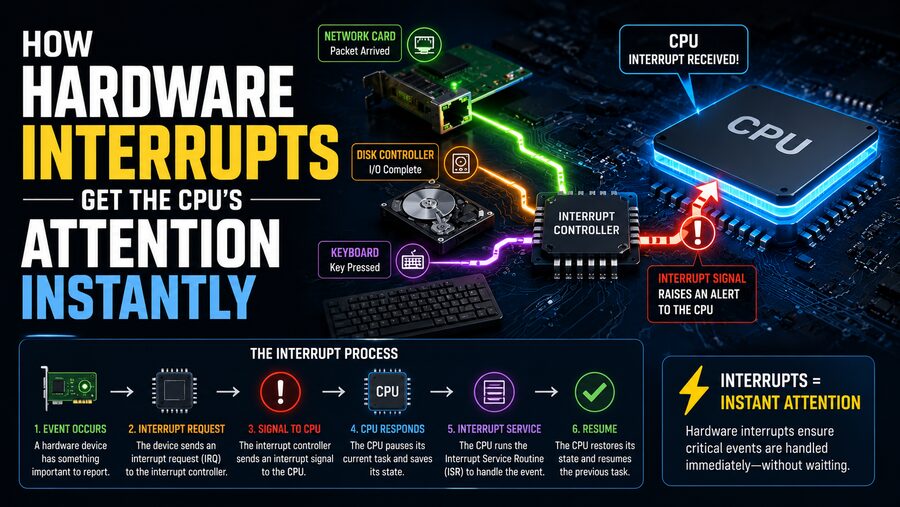

Modern computers constantly interact with hardware devices. A keyboard may receive a keypress, a network card may receive a packet, a storage device may finish reading data, or a timer may signal that a scheduled task should run. The CPU must react to these events quickly, but it cannot continuously stop what it is doing to check every device.
Instead, computer systems use hardware interrupts. 🚨
A hardware interrupt is a signal sent by a hardware device to the processor indicating that something requires attention. Rather than forcing the CPU to repeatedly ask every device whether it needs service, the device can notify the CPU only when an important event occurs.
This mechanism makes computers more responsive and efficient. Hardware interrupts are essential to operating systems, networking, storage, input devices, real-time systems, and embedded electronics.
Although people sometimes say an interrupt gets the CPU’s attention “instantly,” the process actually involves carefully coordinated hardware and software steps that usually happen extremely quickly—often within microseconds or less, depending on the processor and system.
🧠 Why CPUs Need Interrupts
Imagine a computer without interrupts.
If the CPU wanted to know whether you had pressed a key, it would have to repeatedly check the keyboard controller.
It might perform a loop such as:
Check keyboard → Check network → Check storage → Check timer → Repeat
This technique is called polling.
Polling can work, but it wastes processing time if most devices have nothing new to report.
Suppose the keyboard receives only a few keystrokes per second. Checking it millions of times per second would be inefficient.
Interrupts reverse the relationship.
Instead of the CPU repeatedly asking:
“Do you need me?”
the hardware says:
“CPU, I need attention now!” 🚨
The processor can spend most of its time performing useful work and respond only when devices generate important events.
🔌 What Is a Hardware Interrupt?
A hardware interrupt is an electrical or logical signal generated by a hardware component.
Potential interrupt sources include:
- ⌨️ Keyboards
- 🖱️ Mice
- 🌐 Network interface cards
- 💾 Storage controllers
- ⏱️ Hardware timers
- 🎧 Audio devices
- 🔌 USB controllers
- 🎮 Game controllers
- 📡 Communication interfaces
When one of these devices needs processor attention, it sends an interrupt request.
The processor temporarily suspends its current execution, identifies the interrupt, runs a special piece of software to handle the event, and then normally resumes what it was doing.
This entire sequence is known as interrupt handling.
🚦 Interrupt Requests and IRQs
Hardware devices traditionally communicate interrupt events through signals known as Interrupt Requests, commonly abbreviated as IRQs.
An IRQ informs the interrupt-handling hardware that a device needs service.
Older computer architectures often had dedicated interrupt lines connecting devices to an interrupt controller.
Modern systems can use more advanced mechanisms, including message-signaled interrupts, where a device effectively sends a special data message rather than toggling a traditional physical interrupt wire.
Regardless of implementation, the principle remains the same:
A hardware device signals that an event requires CPU attention.
🧭 The Interrupt Controller
Computers may contain many devices capable of generating interrupts.
The processor cannot efficiently manage all of these signals directly, so an interrupt controller helps organize them.
The controller receives interrupt requests from devices and determines which one should be presented to the CPU.
On older PCs, this role was performed by devices such as the Programmable Interrupt Controller (PIC).
More modern processor architectures commonly use advanced interrupt-controller designs that can:
- Manage many interrupt sources
- Assign interrupt priorities
- Route interrupts to specific processor cores
- Support multiprocessing
- Handle interrupt masking
The interrupt controller acts like a traffic manager between hardware devices and the CPU. 🚦
⚙️ What Happens When an Interrupt Occurs?
Consider a simple example: you press a key on a keyboard.
The sequence can be simplified into several steps.
1. ⌨️ The Hardware Event Happens
You press a key.
The keyboard controller detects the keypress and converts it into information the computer can process.
2. 🚨 An Interrupt Is Raised
The controller sends an interrupt request through the system’s interrupt mechanism.
The interrupt controller receives it and forwards an appropriate interrupt signal to the processor.
3. 🧠 The CPU Detects the Interrupt
The CPU notices the interrupt at a defined point in instruction execution.
Processors generally do not abandon an instruction halfway through an unpredictable state.
Instead, they normally complete an appropriate execution boundary and then respond to the interrupt.
4. 💾 CPU State Is Preserved
Before running the interrupt-handling code, the processor must preserve enough information to resume its previous task later.
Depending on the architecture, saved information can include:
- Program counter
- Processor status
- Stack information
- Selected registers
The operating system’s interrupt-handling code may save additional registers if required.
5. 🧭 The Correct Handler Is Located
The CPU determines which function should handle the interrupt.
This function is commonly called an Interrupt Service Routine, or ISR.
6. 🔧 The ISR Runs
The interrupt handler communicates with the hardware and performs the urgent work required.
For a keyboard event, it might read the keyboard controller’s data and store information about the pressed key in an operating-system buffer.
7. ↩️ Normal Execution Resumes
After interrupt processing is finished, the saved processor state is restored.
The CPU continues executing the program it was running before the interruption.
This entire process can occur so quickly that users perceive the computer as responding immediately.
🧩 What Is an Interrupt Service Routine?
An Interrupt Service Routine (ISR) is a special function designed to execute when a particular interrupt occurs.
Different devices or interrupt types can have different handlers.
For example:
- Keyboard interrupt → keyboard ISR
- Network interrupt → network driver ISR
- Timer interrupt → timer handler
- Storage interrupt → storage driver ISR
An ISR should generally perform urgent work quickly.
Why?
Because while the CPU is servicing one interrupt, other work may be waiting.
Operating systems therefore often divide interrupt processing into two conceptual stages:
Immediate processing handles the time-critical actions.
Deferred processing performs less urgent or more expensive work later.
This design helps keep the system responsive.
📋 Interrupt Vector Tables
How does the processor know which handler to run?
Processors generally maintain a structure that maps interrupt identifiers to handler locations.
This structure is often called an interrupt vector table or a similarly named architecture-specific table.
Each interrupt type has a number or vector.
Conceptually, the table might look like:
Interrupt 32 → Timer handler
Interrupt 33 → Keyboard handler
Interrupt 40 → Network handler
The exact numbers and structure depend on the processor architecture and operating system.
When an interrupt occurs, the CPU uses its interrupt identifier to locate the correct handler.
This eliminates the need to search through all possible hardware devices.
⏱️ Timer Interrupts and Multitasking
One of the most important interrupt sources is the hardware timer.
The timer can generate interrupts at controlled intervals.
These timer events are crucial for many operating-system functions, including:
- Scheduling tasks
- Tracking time
- Managing delays
- Updating system counters
- Supporting preemptive multitasking
Suppose Program A is currently running.
When a timer interrupt occurs, the operating system can inspect whether Program A has used its allotted CPU time.
The scheduler may then decide to pause Program A and allow Program B to run.
This creates the appearance that many applications are running simultaneously, even on a single CPU core.
Modern operating systems use sophisticated scheduling mechanisms, but timer-driven events remain an important part of system management. ⏰
🌐 Network Cards and Interrupts
Network hardware also relies heavily on interrupts.
Suppose an Ethernet or Wi-Fi adapter receives a data packet.
Without interrupts, the CPU might have to constantly poll the network hardware to see whether anything has arrived.
Instead, the network interface can notify the processor when received data is ready.
The operating system’s network driver then processes the event.
However, extremely high-speed networks create an interesting problem.
If a network adapter generated one interrupt for every packet, millions of packets per second could create an overwhelming number of interrupts.
Modern network devices therefore use techniques such as:
- Interrupt moderation
- Interrupt coalescing
- Batch packet processing
- Polling under heavy load
These methods reduce interrupt overhead while still preserving good responsiveness.
💾 Storage Devices and Completion Interrupts
Storage devices such as SSDs also use interrupts.
Suppose the operating system asks an SSD to read data.
The CPU does not necessarily need to wait while the storage device performs the operation.
Instead, it can issue the request and continue executing other tasks.
When the storage controller finishes, it generates an interrupt.
The interrupt informs the operating system:
“The requested data is ready.”
The operating system can then process the completed operation.
This approach allows CPUs and storage hardware to work in parallel rather than wasting processor cycles waiting for slow operations to finish.
📦 Direct Memory Access and Interrupts
Hardware interrupts often work together with Direct Memory Access, or DMA.
DMA allows hardware devices to transfer data directly between themselves and main memory without requiring the CPU to copy every byte.
Consider a network card receiving a packet.
Instead of interrupting the CPU for every small portion of data, the network interface can use DMA to place the packet into RAM.
Once the transfer is complete, the device generates an interrupt.
The CPU is notified only when useful processing is required.
The sequence becomes:
Device receives data → DMA transfers data to memory → Device raises interrupt → CPU processes result
This combination dramatically improves system performance. ⚡
🔢 Interrupt Priorities
Not every interrupt is equally important.
A critical hardware condition may need faster attention than a routine peripheral event.
Interrupt controllers and CPUs therefore support interrupt priorities.
Higher-priority interrupts may be processed before lower-priority ones.
In certain architectures, a sufficiently high-priority interrupt can even interrupt an ISR that is already running.
This is known as nested interrupt handling.
Priority systems are especially important in:
- Industrial control
- Automotive electronics
- Robotics
- Medical devices
- Real-time systems
For example, a safety sensor might need to take priority over a routine communication task.
🚫 Interrupt Masking
Processors must sometimes temporarily prevent certain interrupts from being handled.
This is called interrupt masking or disabling interrupts.
An operating system may briefly mask interrupts while modifying critical data structures that must not be interrupted midway.
However, interrupts should usually remain disabled for as short a time as possible.
If interrupts remain masked too long, hardware events may experience excessive delay.
Some critical interrupts may also be designed as non-maskable interrupts.
⚠️ Non-Maskable Interrupts
A Non-Maskable Interrupt, commonly abbreviated NMI, is an interrupt that ordinary software cannot simply disable using normal interrupt-masking mechanisms.
NMIs are typically reserved for unusually important events.
Possible uses can include:
- Serious hardware faults
- Watchdog events
- Memory errors
- System diagnostics
The exact meaning depends on the hardware platform.
Because they are intended for urgent conditions, NMIs usually have special handling behavior.
🔄 Edge-Triggered vs. Level-Triggered Interrupts
Hardware interrupt signals can be implemented in different ways.
Two common approaches are edge-triggered and level-triggered interrupts.
⚡ Edge-Triggered Interrupt
An edge-triggered interrupt is detected when a signal changes state, such as transitioning from low voltage to high voltage.
The change itself represents the event.
📶 Level-Triggered Interrupt
A level-triggered interrupt remains asserted while a device requires service.
The processor or interrupt controller recognizes that the interrupt line remains at an active level.
Each approach has advantages depending on hardware design and interrupt sharing requirements.
📩 Message-Signaled Interrupts
Modern high-speed computer devices often use Message-Signaled Interrupts (MSI) rather than traditional dedicated interrupt lines.
A PCI Express device, for example, can generate an interrupt by performing a specially formatted memory write that the system interprets as an interrupt message.
This approach provides several advantages.
It can reduce physical wiring complexity and support large numbers of independently identifiable interrupt events.
Variants such as MSI-X can provide many interrupt vectors for a single device.
A high-speed network adapter, for example, can use multiple vectors so different queues can send interrupts to different CPU cores.
This improves scalability on multicore systems.
🧠 Interrupts in Multicore CPUs
Modern processors may contain many CPU cores.
Interrupt handling therefore becomes more sophisticated.
The operating system can route interrupts to specific cores.
For example, network interrupts might be distributed across several CPU cores to avoid overloading one processor.
This is sometimes called interrupt affinity.
By balancing interrupt workloads, operating systems can improve:
- Throughput
- Cache efficiency
- Responsiveness
- Multicore scalability
Large servers may carefully tune interrupt distribution for storage and networking workloads.
🚨 Interrupt Latency
The time between a hardware event and the beginning of its handler is known as interrupt latency.
Interrupt latency is influenced by factors such as:
- Processor architecture
- Operating-system design
- Interrupt priority
- Whether interrupts are masked
- Other active interrupts
- Cache behavior
- System workload
For everyday desktop systems, tiny variations in interrupt latency may not be noticeable.
For real-time systems, however, predictable response time can be critical.
An automotive braking controller or industrial safety system may need guaranteed timing behavior.
⏱️ Hardware Interrupts in Real-Time Systems
Real-time operating systems place special emphasis on interrupt handling.
In these systems, correctness depends not only on producing the right answer but also on producing it within a required deadline.
Suppose a robotic system detects that a moving component has reached a dangerous position.
A sensor may generate an interrupt that must be handled within a tightly defined interval.
For this reason, real-time systems try to minimize and control interrupt latency.
Engineers carefully design ISRs so that they execute quickly and predictably.
🖥️ Hardware Interrupts vs. Software Interrupts
Hardware interrupts originate from physical devices or hardware controllers.
Software can also deliberately trigger interrupt-like events.
These are often called software interrupts, traps, exceptions, or system-call mechanisms depending on the architecture.
For example, an application may need assistance from the operating system to open a file.
The processor transitions into privileged operating-system code using a controlled mechanism.
Although hardware and software interrupts can use related processor mechanisms, their sources are different:
Hardware interrupt: generated externally by hardware.
Software-triggered event: generated because of program execution.
💥 Exceptions vs. Interrupts
Processor exceptions are also different from ordinary hardware interrupts.
An exception usually occurs because of the instruction currently being executed.
Examples include:
- Division by zero
- Invalid instruction
- Page fault
- Access violation
Hardware interrupts, in contrast, are generally asynchronous.
A network packet can arrive regardless of which instruction the CPU happens to be executing.
This asynchronous nature is one of the defining characteristics of hardware interrupts.
🔧 Why Interrupt Handlers Must Be Fast
An interrupt handler should typically avoid performing unnecessary long-running work.
If an ISR spends too much time processing data, it can delay other interrupts and normal application execution.
Therefore, many operating systems use a strategy in which the ISR performs only essential operations.
For example, a network ISR might:
- Confirm which device generated the interrupt.
- Record necessary status information.
- Acknowledge the hardware.
- Schedule additional packet processing for later.
The remaining work can then be performed outside the most timing-sensitive interrupt context.
This keeps interrupt response efficient.
📈 Interrupt Storms
Interrupts improve efficiency, but too many interrupts can create the opposite problem.
An interrupt storm occurs when a device or system generates interrupts at an extremely high rate.
The processor may spend so much time handling interrupts that little CPU capacity remains for normal programs.
Possible causes include:
- Faulty hardware
- Misconfigured drivers
- Very high network activity
- Improper interrupt acknowledgment
- Hardware errors
Operating systems and modern devices include mechanisms designed to reduce or manage excessive interrupt rates.
🔄 Interrupts vs. Polling
Neither interrupts nor polling are always superior.
Interrupts are excellent when events are relatively infrequent and require rapid attention.
Polling can become more efficient when events occur continuously at extremely high rates.
Consider a network interface receiving millions of packets per second.
Handling an interrupt for every packet could create excessive overhead.
A system may instead temporarily switch to polling and process many packets in batches.
Modern computing frequently combines the two approaches:
Interrupts for low activity → Polling or batching during heavy activity
This hybrid strategy can provide both responsiveness and efficiency.
🔐 Hardware Interrupts and Operating-System Protection
Interrupts often cause the processor to transition from normal application execution into privileged operating-system code.
This is necessary because device drivers and low-level hardware operations require special permissions.
The processor ensures that arbitrary applications cannot simply take control of hardware interrupt mechanisms.
Operating systems configure interrupt tables, handlers, and device permissions during startup.
This separation protects system stability and security.
📱 Interrupts Beyond Desktop Computers
Hardware interrupts exist far beyond laptops and servers.
Microcontrollers use interrupts constantly.
For example, an embedded system might use interrupts when:
- A sensor value becomes available
- A button is pressed
- A timer expires
- Serial data arrives
- A motor reaches a target position
Smartphones also use interrupt mechanisms for touchscreens, wireless communications, sensors, storage, audio, and power-management hardware.
Cars contain dozens of electronic controllers that rely on interrupts for sensors, communication buses, engine systems, safety functions, and driver interfaces.
Even a simple household appliance may contain a microcontroller whose software is heavily interrupt-driven. 🏠⚙️
🌙 Interrupts Help CPUs Save Power
Interrupts also contribute to energy efficiency.
A processor does not necessarily need to run continuously while waiting for something to happen.
It may enter a low-power sleep state.
When a hardware event occurs, an interrupt can wake the processor.
This is especially important for battery-powered devices such as:
- Smartphones
- Smartwatches
- Wireless sensors
- Embedded IoT devices
Instead of constantly checking for activity, the CPU can sleep until hardware requests attention.
This saves substantial energy. 🔋
✨ Conclusion
Hardware interrupts allow devices to get the CPU’s attention quickly without forcing the processor to constantly check every component in the system.
When a device such as a keyboard, network interface, storage controller, or timer requires service, it generates an interrupt request. The interrupt controller routes the event to the processor, which preserves its current execution state and transfers control to an appropriate Interrupt Service Routine.
The handler performs urgent work, acknowledges the device, and allows the processor to resume its previous task.
Modern systems enhance this basic mechanism with interrupt controllers, priority levels, interrupt masking, message-signaled interrupts, multicore routing, DMA, and sophisticated operating-system scheduling.
Hardware interrupts are therefore much more than simple alerts. They are one of the fundamental coordination mechanisms that allow processors and external hardware to work efficiently together. ⚡🧠
Without interrupts, CPUs would waste enormous amounts of time checking devices that had nothing to report. With interrupts, hardware can communicate only when necessary, allowing computers to remain responsive while performing millions or billions of other operations.
From detecting a keypress to receiving an internet packet or completing an SSD transfer, hardware interrupts ensure that important events reach the CPU at exactly the moment they need attention. 🚨💻