
You open a video-call app and its background blurs smoothly. A photo editor removes an unwanted object in seconds. Your laptop’s webcam keeps your face centered while a writing tool suggests a clearer sentence.
These features can feel like ordinary software improvements. Increasingly, though, they rely on a new piece of hardware inside many recent computers: the NPU, or neural processing unit.
Its arrival does not mean every new PC is suddenly “thinking,” nor does it make a computer useful only for AI. It changes where certain calculations happen, how much power they use, and which kinds of AI features can run without constantly sending data to an online service.
Understanding the NPU makes product labels less mysterious and helps separate genuinely useful local AI from marketing language.
🧩 The New Chip Showing Up in PCs
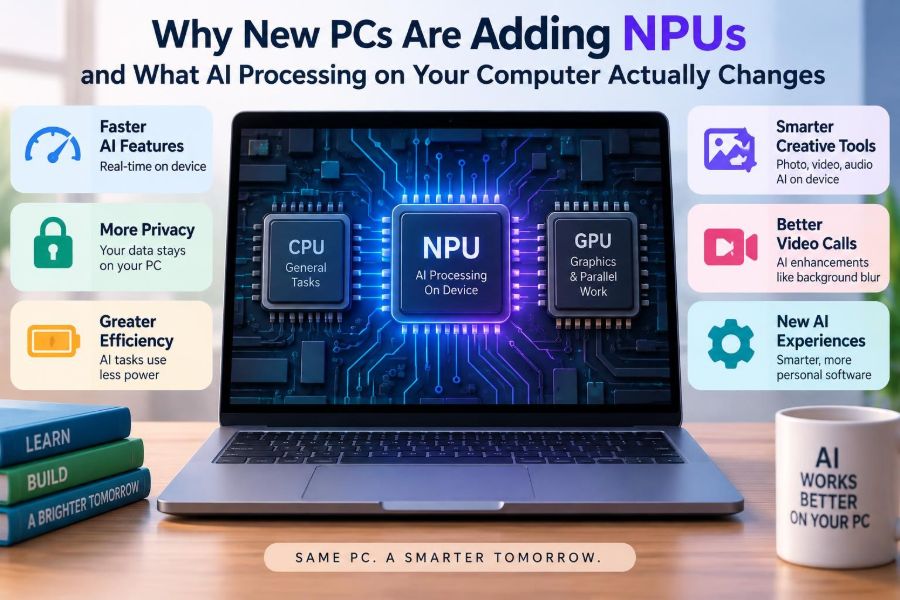
An NPU is a processor designed to perform the mathematical operations used by many machine-learning models efficiently. It sits alongside the central processing unit (CPU) and graphics processing unit (GPU), rather than replacing either one.
“Neural” refers to neural networks: software models made of many adjustable numerical connections that learn patterns from examples. An NPU does not imitate a human brain in a general sense. It is specialized hardware for rapidly handling the model calculations behind tasks such as recognition, enhancement, classification, and generation.
🏭 Why PC Makers Are Adding NPUs Now
AI features have moved from experimental web services into common programs: cameras, meeting software, search tools, creative apps, accessibility tools, and operating systems. Running every one of those features through a distant data center can add delay, consume bandwidth, and raise privacy questions.
At the same time, modern AI models are becoming compact enough for some useful tasks to run on personal devices. PC makers therefore have an incentive to include a low-power engine for work that may run repeatedly throughout a day.
🧠 CPU, GPU, and NPU Have Different Jobs
A computer is not choosing a single “AI chip.” It has several kinds of processors, each good at different work. The CPU handles broad, sequential tasks and system coordination. The GPU excels at performing many similar calculations in parallel, which makes it valuable for graphics and demanding AI workloads.
The NPU is tuned for a narrower family of AI calculations, usually with less energy than a GPU for supported models. Software can assign work to whichever processor makes sense.
| Processor | Best suited to | Typical AI role |
|---|---|---|
| CPU | General-purpose logic and operating-system work | Preparing data, coordinating tasks, running smaller models |
| GPU | Massively parallel graphics and compute | Large local models, image generation, training, demanding effects |
| NPU | Efficient inference on supported models | Continuous camera, audio, language, and enhancement features |
🔍 Inference Is the Main Local Workload
Most discussion of AI hardware needs one useful distinction: training versus inference. Training adjusts a model after processing very large collections of examples. It is expensive and commonly done in specialized data centers.
Inference uses an already-trained model to make a result. When your computer identifies speech, separates your voice from noise, or predicts the next word, it is doing inference. NPUs are primarily intended to make this repeated, everyday inference efficient.
🔢 What an NPU Actually Calculates
At a low level, neural networks repeatedly multiply and combine large arrays of numbers, then apply transformations to the results. The input might be pixels, audio samples, or text converted into numerical representations.
NPUs are designed to move this data through hardware efficiently and perform many such operations in parallel. They may also use lower-precision number formats where appropriate. Lower precision can reduce memory traffic and power use, but the model and software must be designed to preserve adequate output quality.
🔌 Why Efficiency Matters More Than Peak Speed
A desktop GPU can often run a larger AI model faster than an NPU. But a laptop feature such as eye-contact correction or noise suppression may need to work continuously during a meeting. If it creates substantial heat, fan noise, or battery drain, users may simply switch it off.
An NPU targets this efficiency problem. Its value is often measured in useful results per watt, not just its fastest possible benchmark. That makes it especially relevant to thin laptops, tablets, and battery-powered devices.
📏 What TOPS Numbers Can and Cannot Tell You
Manufacturers often advertise NPU performance in TOPS, meaning trillions of operations per second. This provides a rough indication of potential computational throughput, but it is not a universal measure of how helpful a PC will feel.
Different chips may count operations differently, use different numeric precision, or perform differently depending on memory bandwidth and software support. A higher TOPS figure does not by itself guarantee faster image generation, better meeting calls, or compatibility with a specific operating-system feature.
- Check whether the application actually supports the NPU.
- Consider memory capacity, CPU, GPU, battery life, and display alongside AI hardware.
- Treat published requirements for a desired feature as more useful than a single peak number.
📷 Camera Effects Are an Early Everyday Example
Webcam effects are a clear fit for local AI. A model can segment a person from a background, estimate framing, adjust lighting, or apply portrait effects to individual video frames.
When the operating system provides these effects, multiple meeting apps may be able to use one efficient processing path rather than each program implementing its own. Results vary with lighting, camera quality, and the model, so an NPU cannot turn a poor webcam into a professional studio camera.
🎙️ Audio Cleanup Can Run Continuously
Noise suppression, voice focus, live captions, and speaker separation also involve pattern recognition. A model can estimate which parts of an audio stream are likely to be speech and reduce other sounds, such as a fan or nearby traffic.
Local processing can lower the delay between speaking and hearing the cleaned result. It also avoids the need to upload every audio sample solely for the enhancement feature, although the meeting service itself may still transmit your call audio.
🖼️ Photo and Video Editing Gain Useful Shortcuts
Some editing tools use local models for tasks such as selecting a subject, enlarging an image, reducing noise, creating masks, or removing background distractions. These operations are not new, but an NPU can make supported effects more responsive or less disruptive to battery life.
The result remains an algorithmic estimate. Generative fill and object removal can produce implausible details, especially around text, hands, reflections, or complex patterns. Review edits rather than assuming the output is an accurate record of a scene.
✍️ Language Tools May Feel More Immediate
On-device models can help with transcription, translation, summarization, rewriting, and search. A small local language model may be useful for a focused task, such as sorting notes or offering phrasing alternatives, without waiting for a network request.
However, local does not automatically mean correct. Language models can misunderstand context, omit qualifications, or generate confident but inaccurate statements. Their output needs the same review you would give a draft from any automated tool.
♿ Accessibility Is a Strong Use Case
AI processing can support live captions, speech recognition, descriptive tools, voice control, and visual assistance. For someone who relies on captions during a class or meeting, fast local processing can be more than a convenience.
Availability differs by operating system, language, hardware, and application. Accessibility features should be judged by accuracy and reliability in the situations where they are needed, not simply by whether a device carries an “AI PC” label.
🔎 Search Can Become More Contextual
Traditional file search mostly matches names, dates, and exact words. AI-assisted local search may interpret broader descriptions, such as finding a slide deck that discussed a project schedule or locating an image by its contents.
This can reduce time spent organizing files, but it introduces trade-offs. Indexes may consume storage and processing time, and a semantic result is a best match rather than proof that the file contains exactly what you need. Sensitive folders should remain subject to the device’s access controls.
🏠 Local AI Means the Device Does More Itself
Local AI means the model runs on your computer. The input is processed on the device, though an app may still use the internet for syncing, updates, account features, or other parts of its service.
This distinction matters because product descriptions can blur it. A feature can have an NPU-assisted local component and still send requests to the cloud for larger models or information retrieval. Check the application’s privacy documentation when the data is sensitive.
☁️ Cloud AI Still Has a Place
Cloud systems can use much larger models and access computing resources beyond what fits in a laptop. They may be better for complex generation, large-scale analysis, collaborative services, or tools that need current information from online sources.
The trade-off is dependence on a connection, possible service limits or subscriptions, and a need to understand what data leaves the device. The practical future is likely hybrid: small, quick tasks locally and larger tasks remotely when needed.
🔐 Privacy Improves Only Under Specific Conditions
Keeping a model local can reduce exposure because raw camera, microphone, or document data need not be sent away for that particular calculation. It can also allow features to work when offline.
But privacy is a property of the whole system, not a chip. An application may log data, synchronize results, request analytics, or connect to another service. Device encryption, account security, application permissions, and clear data policies remain essential.
📶 Offline Capability Changes Reliability
A locally supported feature can continue working on a plane, during an unreliable connection, or in a location where sending data is restricted. Captions, dictation, and image categorization are examples where that can be practical.
Not every feature becomes offline-capable merely because an NPU exists. The required model must be installed, fit within local memory and storage limits, and be integrated by the software developer.
⚡ Battery Life Depends on the Alternative
An NPU can be more efficient than using the CPU or GPU for the same supported task. That does not mean turning on every AI feature always saves battery. The camera, microphone, screen, wireless connection, and the rest of the application still consume power.
Battery results depend on what would otherwise have done the work. An NPU may reduce the cost of background blur, while a heavy generative task can still warm the computer and drain the battery quickly because it uses several components at once.
🌡️ Heat and Fan Noise Are Part of the Experience
Efficient dedicated processing may help a laptop sustain certain features without aggressively raising temperature or fan speed. This is especially useful in quiet classrooms and meetings.
Thermal design still matters. A compact computer can limit performance under prolonged work to control heat, and an NPU cannot compensate for a poor cooling system, a high-resolution game, or a demanding GPU workload running at the same time.
🧠 Memory Often Limits Local AI First
Models, their temporary working data, and the application itself need memory. A computer with limited RAM may be unable to load a useful local model comfortably, even if its processor advertises substantial AI capability.
Some systems use shared memory, where the CPU, GPU, and NPU draw from the same pool. This can simplify data movement, but it also means several workloads can compete for capacity. For buyers who expect to use creative software or local models, memory capacity deserves careful attention.
💾 Storage and Updates Matter Too
Local models can occupy meaningful storage space, particularly if several languages or creative tools install their own resources. Operating-system updates may also add or replace models over time.
Keep enough free storage for temporary files and updates. If a feature appears after an update, read what it downloads and whether it can be removed; this is a sensible maintenance habit, not an anti-AI measure.
🧰 Software Support Determines the Real Benefit
Hardware alone does not create a useful feature. Developers must convert or optimize their models for available NPU runtimes, test accuracy, manage memory, and provide a clear user interface. Older apps may never use the NPU at all.
Operating systems also provide frameworks that help software select an appropriate accelerator. As support improves, one computer can gain new uses through updates, but promised features should be evaluated on their current availability rather than future possibility.
🪟 A Label Is Not a Standard Experience
Terms such as “AI PC” are broad marketing categories, not a guarantee that every device has the same capabilities. Hardware generations differ, and operating-system features may require particular processors, memory configurations, regions, languages, or account settings.
Think of the label as an indication that the machine includes AI-oriented hardware. Then ask the more useful question: Which specific tools I need run locally on this exact configuration?
🛒 What Students Should Check Before Buying
For many students, a reliable keyboard, enough memory, long battery life, a comfortable screen, and software required by their course matter more than maximum NPU performance. An NPU is valuable if it supports tools you will actually use, such as captions, transcription, or creative editing.
- Confirm compatibility with required school applications and exam policies.
- Choose sufficient RAM and storage before prioritizing a headline AI metric.
- Test keyboard, portability, ports, webcam, and battery claims where possible.
- Do not pay extra solely for features unavailable in your language or region.
💼 What Working Professionals Should Evaluate
Professionals should start with workflows, not novelty. A local transcription feature may help interviewers; efficient video effects may help remote workers; image tools may help designers. Someone whose work depends on specialized desktop applications should verify those applications’ actual hardware acceleration.
Organizations also need to consider management, data handling, model updates, and accessibility. A locally processed prompt may be preferable for internal material, but company policy and the application’s behavior still determine what is appropriate.
🚫 Common Misunderstandings to Avoid
One mistake is assuming an NPU makes any AI task private, fast, or free. Another is assuming it can replace a capable GPU for every creative or technical workload. Both claims ignore the model, software, memory, and service involved.
It is also misleading to treat an NPU as intelligence installed in the machine. It is an efficient calculator for certain model operations. The quality of the result depends on the model’s design, its training, its input, and the way the application uses it.
⚖️ Accuracy, Bias, and Human Review Still Matter
Local execution changes where a model runs, not the fundamental limitations of machine learning. Speech recognition can struggle with accents or noisy rooms. Image tools can misidentify objects. Writing tools can flatten a person’s voice or introduce factual errors.
Use AI results as assistance where the consequences are modest, and apply more careful verification where grades, professional decisions, safety, legal obligations, or other people’s rights are involved. Faster output should not lower your standard for checking it.
🛠️ Practical Ways to Use an NPU Well
Begin with a feature that removes a real irritation. Try local noise suppression on a call, captions for a recorded lecture, or background processing in a photo workflow. Compare the result with the feature disabled so you can decide whether it improves your work.
Review permissions, keep the operating system and applications updated, and turn off effects that distract or reduce quality. If an app offers local and cloud modes, choose based on the sensitivity of the material, the task’s complexity, and whether you need to work offline.
🔮 What NPUs Are Likely to Change Next
Expect more software to treat local AI as one ordinary computing resource, much like graphics acceleration. The most useful additions may be quiet ones: better search, smoother accessibility features, more responsive media tools, and less battery-intensive background processing.
Progress will not be uniform. Larger models still face memory, storage, and power limits, and developers must decide which features genuinely earn a place in everyday software. Capability will grow, but so will the need for transparent controls and sensible defaults.
🎯 The Core Takeaway: Match the Tool to the Task
NPUs are being added to PCs because they offer an efficient way to run certain AI models near the user. They can reduce delay, enable some offline features, and lower the energy cost of supported tasks. They do not make all software AI-powered, eliminate cloud computing, or guarantee useful results.
The best way to assess an NPU is practical: identify the features you use, verify that they run on the device, and consider the entire computer around it. CPU performance, GPU capability, memory, storage, battery, software support, and privacy controls remain part of the decision.
An NPU is not a reason to stop thinking about computer fundamentals; it is a reason to apply them more carefully when evaluating what a modern PC can actually do. 🧠💻🔍