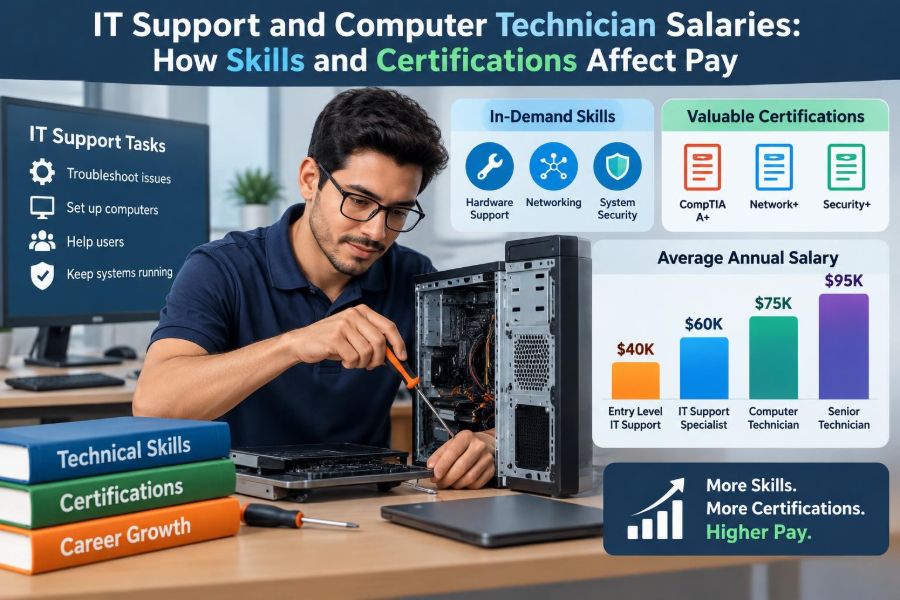

A printer stops working ten minutes before a client presentation. A new employee cannot sign in to email. A laptop is infected, a shared drive disappears, or an office Wi-Fi network slows to a crawl. In many workplaces, the person who calmly turns these disruptions into working systems is an IT support professional or computer technician.
These roles are often described as entry points into technology, but they are not all the same job. One technician may replace laptop batteries and reset passwords; another may manage cloud identities, troubleshoot network switches, or protect a company during a security incident. The difference in responsibility can strongly affect pay.
Salary questions can feel frustrating because job titles are inconsistent. “Help desk analyst,” “desktop support technician,” “field service technician,” and “IT support specialist” can overlap, while each employer may attach a different scope, schedule, and salary range to the title.
The useful question is not simply which certificate pays the most. It is how to build skills that solve more valuable problems, demonstrate those skills credibly, and move toward roles with greater technical ownership.
🧭 What IT Support and Computer Technician Work Includes
IT support is the practice of helping people use technology reliably and safely. Computer technicians often focus on diagnosing, repairing, installing, and maintaining devices, while broader support roles may also cover accounts, software, networks, and business systems.
A typical day can include resolving tickets, documenting fixes, preparing computers for new staff, installing updates, recovering files, and explaining technical steps in plain language. The work is practical: success is measured by restored service, fewer repeat problems, and users who can continue working.
🏷️ Why Job Titles Do Not Tell the Whole Salary Story
Titles are a starting point, not a salary guarantee. A “computer technician” at a small repair shop may mainly repair consumer hardware, while the same title at a hospital may involve managed devices, strict access controls, and after-hours escalation.
Read job descriptions for scope. Pay usually follows the systems you support, the consequences of downtime, the complexity of troubleshooting, and whether you are expected to work independently.
💵 Understanding Salary as More Than Base Pay
Base salary is only one part of compensation. Some support jobs include overtime, shift differentials for evenings or nights, on-call pay, travel reimbursement, bonuses, retirement contributions, health coverage, training budgets, or paid certification exams.
A lower base salary with predictable hours and strong benefits may be preferable to a higher offer that requires frequent unpaid travel or constant on-call availability. Compare offers as a complete package, including commuting costs, equipment requirements, and realistic weekly hours.
📍 Location and Cost of Living Change the Numbers
Support salaries often vary by city, region, and local demand. Areas with expensive housing or dense concentrations of employers may offer higher nominal pay, but higher rent, taxes, and transportation can reduce the practical advantage.
Remote work adds another layer. Some employers pay according to the employee’s location, some use national bands, and others set pay by role. Never assume that a remote position automatically pays like a position based in a high-cost city.
🏢 Employer Type Shapes Both Work and Pay
Large enterprises, government agencies, schools, healthcare organizations, managed service providers, retailers, and small businesses all need support, but their environments differ. Highly regulated or always-available operations may pay more for people who can work within formal processes and handle critical systems.
Small organizations can offer broad experience because one technician may touch many systems. Larger organizations may offer clearer specialization, established training, and formal promotion paths. Neither option is universally better; the useful choice depends on the experience you need next.
🪜 Experience Increases Value When It Builds Independence
Early-career technicians commonly handle well-defined issues with procedures and supervision. With experience, they recognize patterns, collect useful diagnostic evidence, prevent recurring issues, and know when an incident must be escalated.
The pay-related milestone is not merely time served. It is becoming trusted to own work from report to resolution: clarifying the problem, choosing safe steps, documenting the outcome, and communicating impact without creating new risks.
🧰 Core Troubleshooting Skills That Employers Notice
Good troubleshooting is a method, not a sequence of guesses. Strong technicians define the symptom, ask what changed, reproduce the issue when safe, isolate likely causes, test one meaningful change at a time, and confirm the result with the user.
For example, “the internet is down” might be a disconnected cable, a local Wi-Fi issue, a failed DNS lookup, an expired account, a router outage, or an application problem. A technician who separates these possibilities efficiently saves more time than someone who immediately reinstalls software.
🖥️ Hardware Knowledge Still Has Market Value
Understanding hardware remains useful, especially in desktop support, field service, repair, manufacturing, retail, education, and data-center environments. Technicians may diagnose power faults, storage failures, overheating, display problems, docking issues, and peripheral conflicts.
Hardware work pays best when it is paired with wider responsibility. Replacing a drive is useful; migrating a user safely, preserving encryption and data access, documenting the asset, and returning a secure device to service is more valuable.
🪟 Operating System Administration Expands Your Scope
Most support roles require comfort with Windows, macOS, Linux, or a combination of operating systems. Beyond navigating settings, employers value the ability to manage users, permissions, updates, storage, device encryption, logs, services, and remote support tools.
Operating-system knowledge helps technicians explain causes rather than only symptoms. It also makes it easier to automate repetitive work and collaborate with system administrators when an issue crosses into server or identity management.
🌐 Networking Knowledge Raises Troubleshooting Capability
Networking skills often separate basic desktop support from more advanced technical support. You do not need to design a large network to benefit from understanding IP addresses, DHCP, DNS, Wi-Fi, VLANs, VPNs, routing, and common connectivity tests.
DNS, for example, translates a name such as an internal application address into an IP address. A technician who can recognize that a device has network access but cannot resolve names can investigate more precisely and escalate with better evidence.
☁️ Cloud and Identity Skills Are Increasingly Relevant
Many organizations now use cloud-based email, file storage, collaboration platforms, and device-management services. Support staff may provision accounts, apply access policies, assist with multi-factor authentication, manage mobile devices, and troubleshoot synchronization.
Identity is especially valuable because it connects people to nearly every system. Learning how accounts, groups, roles, single sign-on, and access reviews work can lead toward endpoint administration, cloud support, or identity and access management roles.
🔐 Security Awareness Is Part of Modern Support
Support technicians are frequently the first people to see suspicious login prompts, malware alerts, lost devices, unusual account behavior, and phishing reports. They need to recognize warning signs, follow incident procedures, and avoid actions that erase useful evidence.
Security skill does not mean promising to stop every attack. It means applying least privilege, protecting credentials, maintaining patches, using approved tools, and escalating quickly when an event exceeds normal support work.
🤖 Automation Can Turn Repetitive Work Into Higher-Level Work
Automation is valuable when a task is repeated often and must be performed consistently. Simple scripts can collect device information, check disk space, create routine reports, install approved software, or standardize onboarding steps.
Tools such as PowerShell, shell scripting, and basic APIs are common starting points. The goal is not to automate blindly: a script that changes accounts or devices needs testing, safeguards, clear logging, and a rollback plan.
🗣️ Communication Is a Technical Career Skill
A correct fix is less useful if the user does not understand what happened or what to do next. Strong support professionals ask focused questions, set realistic expectations, explain steps without jargon, and write ticket notes that another technician can follow.
Communication also affects escalation. “User cannot connect” is weak evidence. “User receives a specific authentication error on two networks; account is active; device time is correct; reset did not resolve the issue” gives the next team a useful starting point.
📚 Documentation Makes Skills Visible
Documentation is sometimes treated as administrative overhead, but it is evidence of professional judgment. Clear notes reduce repeated work, preserve troubleshooting history, support audits, and make handoffs safer.
Useful documentation records the symptom, affected scope, observations, actions taken, outcome, and any follow-up. A concise knowledge-base article for a recurring problem can have more long-term value than resolving the same issue individually twenty times.
🎓 What Certifications Actually Signal
Certifications usually show that a candidate has studied a defined body of knowledge and passed an assessment. They can help a new technician gain interviews when work experience is limited, and some employers use them for training plans or role requirements.
They are not automatic pay increases. A certification carries the most weight when it matches the employer’s technology and is supported by practical skill. Hiring managers will still ask whether you can diagnose a real issue, document work, and operate safely.
🧩 Entry-Level Certifications and Their Best Uses
Broad foundational certifications can be useful for people entering hardware, operating systems, networking, support processes, or security basics. Vendor-neutral options generally emphasize transferable concepts, while vendor-specific credentials focus on a particular platform.
Choose based on the jobs you want, not on a long list of exam names. A desktop support applicant may benefit from foundational hardware and operating-system knowledge; a cloud support applicant should prioritize the identity, administration, and service tools used in those roles.
🎯 Vendor Certifications Matter When the Platform Matches
Credentials tied to common business platforms can be especially relevant when a job description repeatedly names those products. They may help demonstrate readiness for endpoint management, cloud administration, networking equipment, virtualization, or enterprise software support.
There is a trade-off. Vendor knowledge can open targeted opportunities, but it may be less portable if you only learn button-clicking. Build the underlying concepts too: networking, permissions, authentication, change control, backups, and troubleshooting logic.
🧪 Labs and Hands-On Practice Make Credentials Stronger
A home lab, virtual machines, spare hardware, or carefully chosen cloud practice environment can turn exam knowledge into operational confidence. Practice creating users, troubleshooting permissions, analyzing logs, configuring a small network, backing up data, and restoring from failure.
Keep a record of what you built and learned. In an interview, a short, honest explanation of a lab project is more persuasive than claiming broad expertise without examples. Never present personal experimentation as production experience.
📊 A Practical Skill-to-Role Progression
| Career stage | Typical focus | Skills that can support the next move |
|---|---|---|
| Entry support | Tickets, devices, accounts, basic fixes | Structured troubleshooting, documentation, operating systems |
| Desktop or technical support | Endpoint management, deeper incidents, user productivity | Networking, identity, scripting, security procedures |
| Specialized support | Cloud, networks, applications, field systems, security tools | Platform administration, monitoring, automation, project work |
| Administration or engineering path | Design, standards, reliability, complex changes | Architecture knowledge, change management, leadership |
This is a common progression, not a rigid ladder. Some people specialize early in repair, audiovisual systems, healthcare technology, point-of-sale systems, or networking and build rewarding careers there.
📈 Why Specialization Can Change Earning Potential
Generalists are valuable in small environments, but specialization can increase pay when the skill addresses a difficult, business-critical, or regulated need. Examples include network support, cloud operations, endpoint management, security operations, enterprise application support, and field support for specialized equipment.
Specialization also carries responsibility. The more critical the system, the more employers may expect reliable change practices, accurate documentation, incident response discipline, and occasional after-hours work.
🕒 Shifts, On-Call Duty, and Travel Have a Price
Some roles pay more because they cover hospitals, factories, retail sites, international teams, or services that cannot pause overnight. Shift differentials, overtime rules, travel demands, and on-call compensation vary widely, so ask directly during the hiring process.
Higher pay for inconvenient schedules is not “extra money” in a simple sense. Consider sleep, family responsibilities, commute safety, recovery time, and how often an on-call rotation actually creates interruptions.
🤝 Customer Service Influences Advancement
Users often judge IT by whether they feel heard and whether their work is restored. That makes empathy commercially relevant: it reduces conflict, helps technicians gather better information, and strengthens trust during stressful outages.
Customer service does not mean agreeing to every request. It means explaining constraints respectfully, offering safe alternatives, and being clear about priority. A technician who combines technical judgment with calm communication is often trusted with more visible work.
🧾 Build a Résumé Around Outcomes, Not Tool Names
A résumé full of product names can be hard to interpret. Describe the work you performed, the environment, and the result. For example, state that you prepared devices for new employees, resolved account-access issues, maintained asset records, or created a repeatable troubleshooting guide.
Use accurate scope. If you assisted with a migration, say so; do not imply that you led it. Honest detail earns more trust than inflated titles, and it prepares you to answer interview questions clearly.
🧑💼 Interviews Test Thinking as Well as Knowledge
Technical interviews may present a vague scenario: a user cannot print, a laptop will not connect to Wi-Fi, or a team cannot access a shared folder. Interviewers usually want to hear a safe troubleshooting sequence, not an instant guess.
Explain how you would confirm the scope, check simple causes, preserve security, test hypotheses, communicate with the user, document actions, and escalate when needed. Mention what you would avoid, such as resetting access without verifying identity.
💬 Negotiating Pay With Evidence
Negotiation is easier when it is based on the role’s requirements and your demonstrated capabilities. Review the description, identify the systems and responsibilities that match your experience, and prepare examples of problems you solved or processes you improved.
Ask about the full package and the review process. If an employer cannot move on base salary, a discussion might include training support, certification reimbursement, a title aligned with responsibilities, a scheduled salary review, or clearer on-call terms. Outcomes depend on budget and internal pay structures, so treat negotiation as a professional conversation rather than a demand.
⚠️ Common Mistakes That Can Limit Pay Growth
- Collecting certifications without practicing the skills they represent.
- Staying only with repetitive password resets when opportunities exist to learn systems behind them.
- Skipping ticket notes, which hides your contribution and creates repeat work.
- Accepting responsibility for systems without understanding on-call, travel, or overtime expectations.
- Making risky changes in production without approval, backups, testing, or a rollback plan.
- Undervaluing communication because technical work feels more interesting.
None of these mistakes is permanent. The remedy is usually deliberate: learn one adjacent skill, document outcomes, ask to observe more complex work, and build a record of reliable execution.
🛤️ Creating a Deliberate Career Plan
Choose a direction for the next six to twelve months rather than trying to learn every technology at once. Look at several job descriptions for your target role and identify recurring requirements. Then choose a small set of skills, a practical project, and—if useful—a related certification.
A useful plan might include improving networking fundamentals, completing an endpoint-management lab, writing two automation scripts, and volunteering for device deployment at work. Progress becomes easier to demonstrate when each goal produces an artifact, a documented result, or a new responsibility.
🌟 The Core Principle: Pay Follows Useful, Trusted Capability
IT support salary growth is not driven by credentials alone, years alone, or job titles alone. It usually reflects a combination of technical breadth, relevant specialization, independence, communication, reliability, and the business impact of the systems you can support.
Certifications can open doors and organize learning. Hands-on practice proves that you can use the knowledge. Consistent documentation and professional communication make colleagues willing to trust you with more complicated work—the work that often creates the strongest path to higher pay.
The most durable way to increase earning potential is to become the person who can solve increasingly valuable problems safely, explain the solution clearly, and prevent the problem from returning. Build that capability step by step, and salary conversations become grounded in real evidence rather than hopeful promises. 🖥️ 📈 🔐