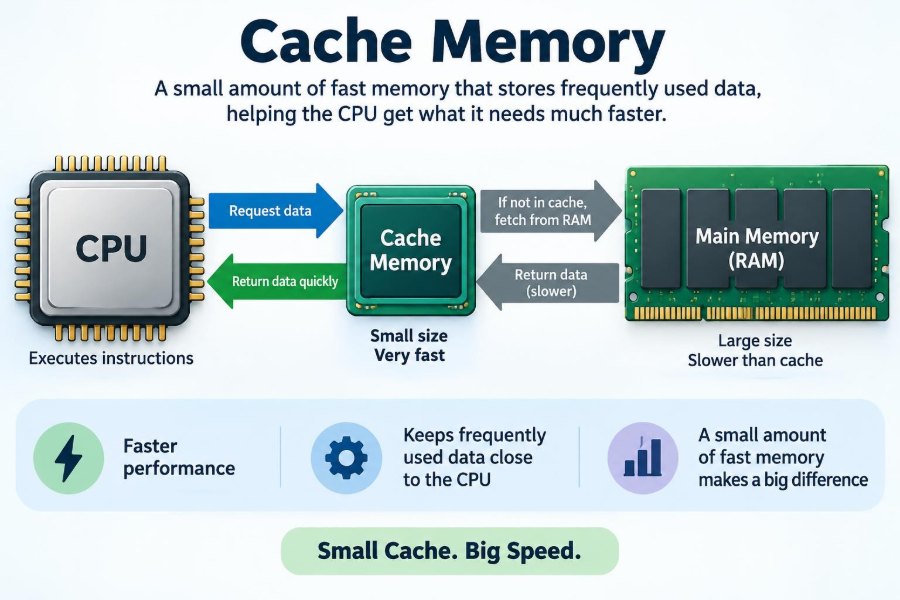

You open a document you were editing moments ago, switch back to a browser tab, or launch a familiar application. The computer often responds so quickly that it feels immediate. Yet the processor is not fetching every instruction and every piece of data from the same place at the same speed.
Modern processors can perform work extraordinarily quickly, while main memory and storage take comparatively longer to supply what they need. That difference creates a waiting problem: a fast worker can be slowed down by a distant filing system.
Cache memory is one of the key design choices that keeps this delay from dominating everyday computing. It is small, expensive, and extremely fast memory placed close to the processor.
Understanding cache explains why processor specifications matter, why some programs feel unexpectedly quick or slow, and why adding more RAM does not always solve a performance issue.
⚡ The Speed Gap Inside a Computer
A computer contains several kinds of memory and storage. They differ dramatically in capacity, cost, and access speed. A processor may need an instruction or data value for nearly every step it performs, so even small delays can accumulate.
The central processing unit, or CPU, operates much faster than conventional main memory, called RAM. If the CPU had to pause for RAM every time it needed a value, much of its potential performance would be lost to waiting.
Cache memory narrows this gap by holding likely-needed information in a location the CPU can access far sooner than RAM.
🧠 What Cache Memory Actually Is
Cache memory is a small, high-speed memory area that keeps copies of recently used or likely-to-be-used instructions and data. Most CPU cache is built into the processor chip or located extremely close to its processing cores.
Cache does not normally replace RAM. Instead, it acts as a fast intermediary between the CPU and RAM. When the CPU requests an item, the system checks the closest cache first.
If the item is present, the CPU gets it quickly. If not, the item must usually be retrieved from a slower level of memory, and a copy may be placed in cache for later use.
🏠 A Helpful Desk-and-Archive Analogy
Imagine a researcher working at a desk. The papers currently on the desk are easiest to reach. A nearby drawer takes longer, a filing cabinet across the room takes longer still, and a remote archive is slower again.
In this analogy, the desk resembles the CPU’s closest cache, the drawer resembles a larger cache level, the filing cabinet resembles RAM, and the archive resembles an SSD or hard drive.
The researcher does not put every document in the desk area. Space is limited. Instead, they keep the documents they are actively using nearby and move less urgent material farther away.
🪜 The Memory Hierarchy
Computer memory is arranged as a hierarchy: memory nearer the CPU is generally faster, smaller, and more costly per unit of storage. Memory farther away is generally larger, slower, and cheaper.
| Level | Typical role | Relative capacity | Relative speed |
|---|---|---|---|
| CPU registers | Values being used immediately | Very small | Fastest |
| CPU cache | Recently or predictably needed data | Small | Very fast |
| RAM | Programs and active working data | Much larger | Slower |
| SSD or hard drive | Long-term files and software | Largest | Slowest |
This arrangement gives a computer access to a great deal of storage without forcing every request to use the slowest available option.
🎯 Why a Small Cache Can Help So Much
Cache works because many programs repeatedly use a relatively small portion of their instructions and data over short periods. A word processor, for example, repeatedly executes code for drawing text, handling keystrokes, checking formatting, and updating the cursor.
If those frequently used pieces remain close to the CPU, repeated RAM accesses are avoided. The gain is not that cache holds everything; it is that it holds the right things at the right time often enough.
This is a practical example of designing around typical behavior rather than the impossible goal of making all storage equally fast and inexpensive.
🔁 Temporal Locality: Reusing Recent Information
Temporal locality means that if a program uses an item now, it is likely to use that same item again soon. A loop that repeatedly updates a counter is a simple example.
When the counter and the instructions for the loop are cached, later iterations can reuse them without returning to RAM. User interfaces also show temporal locality when they repeatedly run the same code while responding to clicks and typed input.
Cache systems take advantage of this tendency by retaining recently accessed items, although they must eventually remove some items to make room for new ones.
📍 Spatial Locality: Using Nearby Information
Spatial locality means that after accessing one memory location, a program is likely to access nearby locations soon. Reading a list from beginning to end is a classic case.
For this reason, caches transfer data in small fixed-size groups called cache lines, rather than fetching only one tiny value at a time. When the CPU requests one item, nearby bytes often arrive with it.
If the program continues through adjacent values, those values may already be available in cache. This approach is useful for arrays, images, audio samples, and many scientific or business data-processing tasks.
📦 Cache Lines: The Units That Move
A cache line is the chunk of contiguous memory that the cache stores and transfers as a unit. Its exact size varies by processor design, but the central idea is consistent: bringing related nearby data together can reduce future requests.
This choice involves a trade-off. Fetching a line can be efficient when nearby data will be used, but it can waste space and bandwidth when a program touches one value and ignores the rest.
Programmers do not usually manage cache lines directly, but data layout and access order can strongly affect how well software uses them.
🏷️ How the CPU Knows What Is Cached
Each cache location needs more than stored data. It also keeps identifying information, commonly called a tag, that indicates which part of main memory the cached line represents.
When the CPU requests a memory address, cache hardware compares identifying bits from that address with its stored tags. A matching valid entry means the requested data is available there.
This matching must happen extremely quickly. Cache design therefore balances capacity against the circuitry needed to search and select entries without slowing the processor’s normal work.
✅ Cache Hits and Their Value
A cache hit occurs when requested data or an instruction is found in the cache level being checked. The CPU can then continue with a much shorter delay than if it had to obtain the item from RAM.
Good cache performance is often described in terms of a hit rate, but one number alone does not tell the whole story. The cost of a miss, the program’s workload, and which cache level is involved all matter.
Still, frequent hits are the basic reason a relatively small cache can have an outsized influence on real application speed.
⏳ Cache Misses and Waiting Time
A cache miss occurs when the requested item is not found in the checked cache. The system then searches a lower cache level or RAM, which adds delay known as a miss penalty.
One miss is not necessarily noticeable. However, a program that repeatedly misses while processing a large or poorly organized data set may leave CPU execution units waiting more often.
Processors use several techniques to continue useful work while some data is arriving, but they cannot always hide the delay. That is why memory-access patterns can affect performance as much as raw calculation speed.
🥇 L1 Cache: The Closest Level
Level 1, or L1 cache, is usually the smallest and fastest general-purpose cache associated with a CPU core. It is positioned for extremely low-latency access because the processor relies on it constantly.
Many designs separate L1 into an instruction cache and a data cache. This allows the core to fetch the next instructions while also reading or writing program data, reducing competition between those common tasks.
Its limited capacity means L1 cannot hold a full program or large data set. Its purpose is to serve the immediate working set: the information a core is actively using now.
🥈 L2 Cache: More Room, Slightly More Delay
Level 2, or L2 cache, is generally larger than L1 and slower to access, though it remains much faster than RAM. It provides another opportunity to satisfy a request before the processor goes farther out in the memory hierarchy.
Depending on the processor, L2 may be private to one core or arranged differently. A private cache can offer predictable local access, while shared designs can simplify data sharing in some situations.
L2 is especially valuable when the active workload is too large for L1 but still small enough to benefit from remaining close to the CPU.
🥉 L3 Cache: Shared Space for Many Cores
Level 3, or L3 cache, is commonly larger than L1 and L2 and is often shared by several CPU cores. It is slower than those nearer levels, but it can prevent expensive trips to RAM.
Shared L3 can help when cores work with related information. It also provides a common layer before data leaves the processor package. Its exact arrangement varies significantly across processor families.
A larger L3 cache may help certain workloads, especially those with substantial reusable data, but capacity alone does not determine overall performance. Core design, clock behavior, RAM, software, and power limits also matter.
🧩 Instruction Cache and Data Cache
Processors need two broad kinds of information: the instructions that tell them what to do and the data those instructions operate on. Keeping separate paths for these needs at the closest cache level is common.
Consider a spreadsheet recalculating formulas. The processor repeatedly fetches code that performs arithmetic while reading cell values and writing results. Separate instruction and data caches can help both streams progress efficiently.
At deeper levels, designs may use a unified cache that stores both kinds of content. The best arrangement depends on engineering trade-offs such as space, power, complexity, and typical workload behavior.
🗺️ Mapping Data into Cache
Cache capacity is limited, so hardware needs rules for deciding where a memory line can be placed. In a direct-mapped cache, each memory line has one possible location. This is simple and fast, but unrelated lines can repeatedly collide.
A fully associative cache can place a line almost anywhere, reducing placement conflicts but requiring more complex searching. Many practical caches use set associativity, a middle ground where a line can occupy one of several positions in a designated set.
These choices are usually invisible to users, yet they influence which access patterns perform smoothly and which create avoidable misses.
🚪 Why Useful Data Must Sometimes Be Replaced
When a cache set is full and new information needs to enter, an existing line must be removed. This is called eviction. Hardware uses replacement policies to estimate which line is least likely to be needed soon.
A policy may favor keeping recently used lines, but no policy can predict every future request. A program can return to data that was removed, causing another miss.
This is not a malfunction. It is the inevitable consequence of using a small, fast workspace to represent a much larger body of memory.
✍️ Reading Is Easy; Writing Adds Choices
Writing data introduces extra design decisions because the cache and RAM must eventually agree. With write-through behavior, a write to cache is also promptly sent to lower memory, which keeps copies synchronized but can create more traffic.
With write-back behavior, a changed cache line is marked as modified and written to lower memory later, often when it is evicted. This can reduce traffic, but it requires careful tracking of changed lines.
Processors may also decide whether to bring newly written data into cache immediately. These policies are implementation details, but they show why cache is more than a simple read-only shortcut.
👥 Multi-Core CPUs and Cache Coherence
In a multi-core processor, different cores may hold copies of the same memory location in their private caches. If one core changes its copy, the others must not continue using an outdated value.
Cache coherence is the collection of hardware rules and messages that keeps these copies consistent enough for programs to work correctly. A core may invalidate another core’s old copy or arrange for the updated value to be shared.
This coordination is essential, but it has a cost. Programs that make many cores constantly modify the same small piece of data can spend time coordinating rather than performing useful work.
🔄 Why Sharing Can Slow Parallel Programs
Parallel software can divide work across cores, but speed does not automatically increase in proportion to the number of cores. If workers repeatedly access and alter shared data, cache-coherence traffic and synchronization can become limiting factors.
A subtle problem called false sharing can occur when separate variables used by different cores sit on the same cache line. The cores are not logically sharing a variable, yet updates can still force the line to move or be invalidated.
Well-designed parallel software reduces unnecessary shared writes, assigns independent data to each worker where practical, and combines results at sensible points.
📊 Programs That Usually Benefit Most
Cache is especially helpful when a program repeatedly works with a compact set of instructions and data. Common examples include interactive applications, many office tasks, game logic, repeated database operations, and calculations that reuse intermediate values.
Algorithms that scan contiguous arrays often use spatial locality effectively. Code that repeatedly revisits recently used records can benefit from temporal locality.
- Sorting or processing data in manageable blocks can improve reuse.
- Keeping related fields close together can reduce unnecessary memory traffic.
- Reusing prepared results can avoid repeated computation and repeated fetches.
The result depends on the workload, not simply on the application category.
🌊 Workloads That Can Overrun Cache
Large data sets do not make cache useless, but they can exceed its capacity quickly. High-resolution media processing, large simulations, analytics jobs, and virtual machines may constantly introduce new data faster than a cache can retain it.
Irregular access patterns can be difficult too. If a program jumps unpredictably through a large structure, nearby prefetched data may not be useful, and recently cached information may be displaced before reuse.
In these cases, RAM bandwidth, memory latency, storage speed, algorithm design, and available capacity may become just as relevant as the CPU’s cache size.
🔮 Prefetching: Guessing What Comes Next
Many processors use prefetching, which attempts to load data or instructions before the CPU explicitly asks for them. Sequential access is a relatively easy pattern to anticipate: after one array element, the next element is a reasonable guess.
Successful prefetching can make later accesses feel like cache hits. Incorrect guesses, however, consume bandwidth and may occupy cache space that would have been more useful for actual requests.
Prefetching is therefore a prediction technique, not a guarantee. Predictable program behavior generally gives it more opportunity to help.
🧮 Why Data Layout Matters to Developers
Software developers can often improve cache behavior without writing processor-specific code. The main question is simple: does the program access memory in an order that reuses nearby data before moving on?
For example, a two-dimensional image is commonly stored row by row. Processing pixels across each row in storage order often works better with cache lines than repeatedly jumping down columns. The correct choice can depend on the language, library, and representation, so measurement remains valuable.
In large systems, changing data layout may involve trade-offs in readability and maintenance. A small optimization is worthwhile only when profiling identifies memory access as a real bottleneck.
🛠️ Practical Habits for Cache-Friendly Code
For learners and working developers, cache-aware thinking is most useful when it guides clear design rather than premature micro-optimization.
- Prefer sequential traversal when the problem allows it.
- Process large collections in chunks when each chunk can be reused.
- Avoid repeatedly converting or copying large structures without a reason.
- Keep frequently used data compact when that does not damage clarity.
- Measure with profiling tools before assuming cache is the cause of slowness.
These habits can reduce memory traffic, but they are not universal rules. A more suitable algorithm can outweigh a cache-focused adjustment.
💾 CPU Cache Is Not the Same as RAM
A common mistake is to treat cache and RAM as interchangeable upgrades. RAM holds the operating system, running applications, and active files in much larger quantities. CPU cache holds only a tiny, automatically managed subset of recently relevant memory.
When a computer lacks sufficient RAM, it may move data to storage more often, which can cause obvious slowdowns. More RAM can help that situation even though it does not increase CPU cache.
Conversely, a workload with adequate RAM may still benefit from a processor whose cache and core design handle its access patterns more effectively.
🗃️ CPU Cache Is Not Browser Cache Either
The word “cache” is used broadly. A web browser cache stores copies of web resources such as images and style files, helping pages load without downloading unchanged content again. An operating system may also cache files in RAM.
These caches work on the same broad idea—keep useful material nearby for reuse—but they operate at different layers and on different time scales. Browser cache is managed by software and storage policies; CPU cache is hardware-managed and operates at an extremely fine-grained level.
Clearing a browser cache does not clear the CPU’s L1, L2, or L3 cache in the everyday sense people usually mean.
📱 Cache in Phones, Laptops, and Servers
Cache memory is not limited to desktop computers. Smartphones and tablets use it to help their processors respond efficiently within tight battery and heat limits. Laptops balance performance with power consumption, while servers may use substantial caches to support many demanding tasks.
The underlying principle remains the same across these devices: retain frequently needed information close to the processing units. The details differ because each system has different goals for energy use, cooling, cost, and sustained performance.
This is why comparing cache sizes across unrelated chips can be misleading. Architecture and workload context are necessary for a meaningful comparison.
🌡️ Power, Heat, and the Cost of Speed
Fast on-chip memory consumes chip area and electrical power. Making cache larger can reduce some RAM accesses, but it also increases manufacturing complexity and may add delay within the cache itself.
Designers must balance many competing needs: more cores, graphics hardware, security features, battery life, cooling limits, and manufacturing cost. There is no single “maximum cache” that is best for every device.
For this reason, cache design is an engineering compromise. A smaller, faster cache and a larger, slower cache can each be sensible choices in different parts of the hierarchy.
🔍 Reading Processor Specifications Sensibly
Processor listings often show L2 and L3 cache amounts, which can be useful context but should not be treated as a simple leaderboard. A processor with more cache is not automatically faster for every task.
Look at the complete situation: the processor generation, number and type of cores, sustained power limits, cooling, RAM configuration, and the software you actually use. Independent workload-specific benchmarks can be more informative than one specification.
If your work involves compiling code, editing large media, running virtual machines, or analyzing data, test results for comparable tasks are more useful than a generic comparison of cache capacity.
🧪 Measuring Cache Effects Carefully
Cache behavior is often difficult to see from a stopwatch alone because operating systems, background activity, processor frequency changes, and input/output can affect results. A fair test should repeat the same task under similar conditions.
Developers may use profilers and hardware performance counters to observe cache misses, memory stalls, and related events. These tools require careful interpretation: a high count does not automatically identify the best fix.
Start by locating the part of a program that consumes meaningful time. Then test one reasonable change at a time and verify both performance and correctness.
🚫 Common Misunderstandings About Cache
Several simple claims obscure more than they explain. Cache is fast, but it is not a permanent storage area, a manual filing system for ordinary users, or a replacement for enough RAM.
- “More cache always means faster.” Capacity helps only in combination with architecture and workload behavior.
- “A cache miss means something is broken.” Misses are normal; the goal is to reduce costly repeated misses.
- “Clearing cache always speeds a computer up.” Removing useful cached data can briefly make repeated work slower.
- “Clock speed tells the whole story.” Instruction design, cache, memory, and software all influence observed performance.
🧭 A Simple Way to Diagnose Slowness
When a computer feels slow, cache is rarely the first thing an ordinary user can or should change. Begin with observable causes: too many active programs, low free RAM, storage nearly full, thermal throttling, outdated software, or a task that simply requires more computing power.
For a software project, determine whether time is spent computing, waiting for memory, reading storage, communicating over a network, or waiting on another task. Each bottleneck needs a different response.
Cache awareness is valuable because it prevents simplistic conclusions. A fast processor cannot fully compensate for a program that spends much of its time waiting elsewhere.
🚀 The Core Principle: Keep Active Work Close
Cache memory embodies a powerful computing principle: keep the information needed most often and most soon as close as possible to the component that uses it. This reduces waiting without requiring every byte of memory to be built from the fastest, most costly technology.
Its success depends on locality. Programs that reuse recent data and move through nearby data give cache the patterns it can exploit. Programs with enormous, random, or heavily shared working sets present harder conditions.
From processor engineering to everyday software design, the lesson is the same: performance often improves when the path between active work and required information becomes shorter.
Cache memory makes computers quicker not by storing everything, but by making the small, frequently needed part of current work available with very little delay. Once you see that hierarchy at work, many performance differences become easier to understand. ⚡🧠🖥️