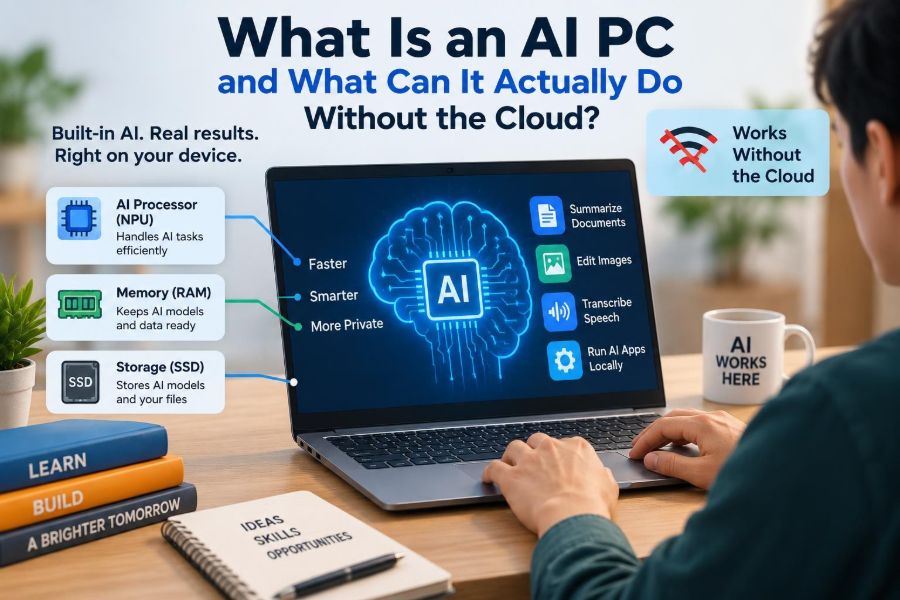

You are on a train with unreliable Wi-Fi, trying to turn a meeting recording into notes. Or you are editing photos on a flight, searching a long document, or asking your laptop to blur a distracting background before a video call. For years, tasks like these often sent data to a remote server for processing.
A new label is now appearing on laptops and desktops: AI PC. It can sound like a promise that the computer is somehow thinking independently, but the practical change is simpler: some AI work can happen directly on the device.
That matters for speed, privacy, battery use, and whether a feature works when the internet does not. It also has limits. An AI PC is not automatically more useful for every person, and it cannot replace the huge cloud systems behind many popular AI tools.
Understanding the difference helps students, professionals, and buyers look past the label and decide which features are genuinely useful.
🤖 The plain-English meaning of an AI PC
An AI PC is a personal computer designed to run certain artificial intelligence tasks efficiently, often using dedicated hardware in addition to its normal processor and graphics chip. It is still a regular laptop or desktop: it runs applications, stores files, connects to the internet, and needs an operating system.
The difference is that it is better prepared for AI inference. Inference is the stage where a trained AI model uses patterns it already learned to produce an output, such as transcribing speech, recognizing an object, or rewriting a sentence.
🧩 Three processors, different jobs
Modern computers commonly divide work among a CPU, GPU, and NPU. This division is central to the AI PC idea.
| Component | Best suited to | Typical AI role |
|---|---|---|
| CPU | General instructions and app logic | Managing tasks and smaller AI operations |
| GPU | Many calculations in parallel | Graphics, image generation, and larger AI workloads |
| NPU | Efficient repeated neural-network calculations | Always-on or low-power local AI features |
The neural processing unit, or NPU, is the newer piece in many consumer PCs. It is not universally faster than a GPU; its value is doing selected AI operations with less power and less disruption to other work.
🧠 What an NPU actually does
Neural networks are software models made of many mathematical operations. An NPU is designed to perform common operations in those models efficiently, particularly when an application must repeat them many times.
For example, a camera application may repeatedly analyze video frames to separate a face from its background. Running that job on an NPU can leave the CPU available for the operating system and the GPU available for games, design software, or display work.
☁️ Local AI versus cloud AI
Local AI runs a model on your computer. Cloud AI sends a request over the internet to data-center computers, which process it and return a result. Many real products combine both approaches.
Local processing avoids a network round trip and can keep the input on the device. Cloud processing can use much larger models and more powerful hardware. Neither approach is automatically superior; the right choice depends on the task.
📡 Why “without the cloud” needs qualification
A feature can work offline only if its model, required application code, and necessary data are already stored locally. Downloading a model for the first time may require an internet connection, and some features still need online account checks or updates.
Also, an application may process a prompt locally but use the cloud for web search, current information, file syncing, or a larger follow-up request. Read feature descriptions carefully rather than assuming an AI-branded capability is fully offline.
⚡ The first benefit: faster responses
For small, frequent tasks, local processing can feel immediate because there is no need to upload data and wait for a server response. Live captions, microphone noise reduction, and webcam effects are good examples.
Speed is not guaranteed, however. A large local model may respond slowly on modest hardware, while a fast connection to a powerful cloud service can outperform it. The advantage of local AI is often predictable responsiveness, not unlimited performance.
🔒 Privacy changes, but does not become automatic
If audio, images, or text are analyzed entirely on-device, they do not need to leave the device for that particular computation. This can be valuable for confidential meeting notes, personal photos, health-related documents, and work material governed by company rules.
But local processing does not make an app inherently private. The app may still collect diagnostics, synchronize files, save outputs online, or share information if its settings allow it. Check the application’s privacy controls and your organization’s policies.
🔋 Battery life and quiet operation
Video effects and speech features can run for long periods. If those jobs fall entirely on the CPU or GPU, they may consume more power and create more heat. An NPU can often handle compatible tasks more efficiently.
That can mean better battery life, less fan noise, and a smoother system during a call. Results vary with the software, screen brightness, network activity, and model size, so hardware claims should be treated as potential capacity rather than a fixed outcome.
🎙️ Live captions and transcription
Speech recognition is one of the clearest local AI uses. A computer can convert spoken words to text during a lecture, interview, or meeting, potentially producing captions even when no connection is available.
Accuracy depends on the language, accent, recording quality, specialized vocabulary, and overlapping speakers. Treat automatic transcripts as a strong draft, not an unquestionable record—especially for grades, legal matters, medical details, or decisions at work.
🎧 Cleaning up your voice on calls
AI audio tools can identify steady background sounds, reduce keyboard noise, and help isolate a speaker’s voice. Some apps can also improve microphone clarity or simulate eye contact by adjusting the video image.
These features are especially practical in shared homes, classrooms, and busy offices. They are not magic: a loud nearby conversation or poor microphone can still defeat them, and aggressive noise removal can make speech sound unnatural.
📷 Smarter webcams without a server
Many video-call effects use local AI to blur a background, frame a face, adjust lighting, or keep a speaker centered. Because these effects must react frame by frame, low-latency on-device processing is useful.
They can improve presentation, but they also make mistakes around hair, hands, glasses, and objects that resemble part of the person. Test settings before an important call rather than discovering the limits during it.
🖼️ Photo organization and editing
Local image models can classify photos, find images containing broad subjects, remove backgrounds, create masks, or improve selected areas. A photographer may use this to locate pictures of a whiteboard or separate a product from its background.
Search results are probabilistic, not a perfect catalogue. An image model identifies visual patterns rather than understanding every detail as a person would. Always inspect edits closely, particularly around faces, text, and edges.
✍️ Writing help that can stay on the device
Smaller language models can help rewrite a sentence, summarize supplied notes, adjust tone, or suggest an outline. On-device tools are attractive when the text should not be uploaded to a third-party service.
A model can still misread context, omit a qualification, or confidently generate an incorrect statement. It is best used as an assistant for drafting and revising, with the writer responsible for facts, citations, and final judgment.
📄 Searching and summarizing personal files
An AI-enabled search tool may build an index of documents, images, or recordings so you can search by meaning rather than exact file names. Instead of remembering a folder, you might search for “the budget discussion with the supplier.”
Local indexing can be useful offline, but it raises a separate security question: who can access the device and its searchable index? Strong account protection and disk encryption remain essential.
🌍 Translation when connectivity is limited
Offline translation models can help with travel, field work, and classrooms where connectivity is inconsistent. They may translate typed phrases, downloaded languages, captions, or short conversations without sending each phrase away.
Translation quality differs greatly by language pair and context. Idioms, technical terms, names, and culturally specific phrasing deserve human review when precision matters.
🧑💻 Coding assistance on the machine
Developers can run compact code models locally for autocomplete, explanation, test ideas, or navigation within a project. This can be useful with proprietary code that should not leave a controlled environment.
Local tools still require careful review. Generated code can contain security weaknesses, incorrect assumptions, or incompatible library calls. A fast suggestion is not a substitute for testing, code review, and understanding what the program does.
🎨 Creative generation: possible, with trade-offs
Some AI PCs can generate images, audio, or text locally. GPUs often remain especially important for demanding generative workloads, while an NPU may help with selected parts of an application.
Compared with cloud systems, local generation may be slower, use smaller models, or offer fewer features. The trade-off can be worthwhile when privacy, offline access, experimentation, or avoiding repeated uploads matters more than maximum output quality.
🧮 Why model size sets the boundary
AI models need memory to store their parameters and working context. Larger models generally demand more memory, more computation, and more power. A thin laptop cannot always hold or run the same model a data center can deploy across many specialized machines.
This is why an AI PC is better understood as a computer that can run appropriate local models, not as a private replacement for every online AI service. Efficient models can be remarkably useful without being enormous.
🗂️ RAM, storage, and memory bandwidth matter too
The NPU label alone does not describe the whole experience. Local models need sufficient system memory, and model files can take substantial storage space. Moving data quickly between memory and processors also affects responsiveness.
When comparing PCs, consider the complete system: RAM capacity, storage, CPU, GPU, NPU support, cooling, battery capacity, and the actual applications you use. A specification sheet cannot guarantee that your preferred software supports the hardware well.
🧰 Software support is the deciding factor
Hardware capability becomes useful only when operating systems and applications use it. An NPU sitting idle does not improve a spreadsheet, browser, or photo editor that has not been designed to call on it.
Before buying, look for specific features in the applications you rely on. Ask whether they work locally, which processor they use, whether they require a subscription, and whether they are available on your chosen operating system.
🏷️ AI PC is a category, not a single standard
There is no one consumer experience guaranteed by the phrase “AI PC.” Manufacturers may emphasize different kinds of processors, performance measures, operating-system features, or bundled software.
That makes broad marketing comparisons difficult. A better question is: which local AI task will this machine run, in which application, and with what limitation? Concrete answers are more valuable than a badge on the box.
🛒 A practical buying checklist
Choose a computer for your ordinary workload first, then evaluate AI features as an added capability. A student writing essays has different needs from a designer editing large images or a developer running local models.
- List the two or three AI tasks you expect to use weekly.
- Verify that the relevant apps support your operating system and hardware.
- Choose enough RAM and storage for normal work plus local models.
- Check portability, keyboard, display, ports, repair options, and battery life.
- Test or research the feature itself, not merely a general AI performance claim.
🎓 What students can realistically gain
Students may benefit from captions, transcription, translation, document search, and writing assistance during travel or unreliable campus connectivity. Local features can also reduce the need to upload sensitive class discussions or drafts.
They should not be used to bypass learning. A summary can help organize notes, but it cannot replace reading the source material. Check institutional rules for AI use, especially in assessed work, and disclose assistance where required.
🏢 What working professionals should consider
For professionals, local AI can support meeting accessibility, routine document work, and controlled use of internal material. It may fit organizations that restrict sending client data or intellectual property to external AI services.
Local does not remove governance obligations. Employers may require approved software, device management, retention controls, and human review. A private device feature can still be inappropriate for regulated or confidential work if policy prohibits it.
⚠️ Common misunderstandings to avoid
- “AI PC means no internet is needed.” Many features still use online services or need downloads and updates.
- “The NPU makes every app faster.” Only compatible AI workloads benefit directly.
- “Local output is always accurate.” Models can mishear, misclassify, invent details, or reflect bias.
- “Local means secure by default.” Device security, app behavior, and user permissions still matter.
- “A newer chip is enough.” Software compatibility and overall system design determine real usefulness.
🛡️ Secure the data that stays local
Keeping processing on the device shifts more responsibility to the owner of that device. Use a strong sign-in method, enable full-disk encryption where available, install updates, and keep backups of important files.
If you share a computer, use separate accounts. Be careful with screen recording, shared folders, and applications that retain history. Local AI may create transcripts, indexes, or generated files that deserve the same care as the original material.
🔄 The likely future is hybrid
Most useful computing will probably remain hybrid. A laptop can handle immediate, private, low-power tasks locally while handing larger or current-information tasks to the cloud when a connection is appropriate.
This division is practical. A local model can caption a call in real time, while an online service may be better for searching current public information or tackling an unusually large request. Good software should make the boundary understandable to users.
✅ The core takeaway: capability close to your data
An AI PC is not defined by a chatbot alone. Its meaningful promise is the ability to run selected AI features near your files, microphone, camera, and applications—often with less delay and less need to transmit raw input elsewhere.
The best reason to choose one is not novelty. It is a clear match between local capabilities and your own needs: offline access, private processing, efficient calls, accessible captions, smarter file work, or creative tools that fit your workflow.
An AI PC is most useful when local AI solves a specific everyday task better than a cloud-only alternative—not when the label asks you to imagine unlimited intelligence. Choose the features, protect the data, and keep a human check on every important result. 🧠💻🔒