
You open a video meeting, keep a dozen browser tabs running, and start downloading a large file. At first, everything feels normal. Then the cursor hesitates, the fan becomes louder, and one application seems to take far too long to respond.
Moments like this make people ask whether they need a “faster processor.” The answer is often more complicated than one number on a product page. A computer processor, or CPU, has several characteristics that affect how it handles work.
Three of the most visible are cores, threads, and clock speed. They are related, but they do different jobs. Understanding the distinction makes it much easier to compare laptops, desktops, and phones without getting distracted by marketing labels.
This knowledge also helps with realistic expectations. More cores do not automatically make every program faster, and a higher clock speed does not guarantee a faster computer in every situation.
🧠 The CPU as Your Computer’s Working Engine
The central processing unit, usually shortened to CPU, carries out the instructions that make software work. When you type, calculate a spreadsheet formula, load a webpage, or apply an edit to a photo, the CPU is involved.
A useful analogy is a kitchen. The CPU is not the whole restaurant: storage holds ingredients, memory keeps active items close by, and the graphics processor handles many visual tasks. But the CPU is a key coordinator that reads instructions and performs general-purpose work.
📋 What a CPU Instruction Really Means
Programs are built from many small instructions: compare two values, move data, add numbers, test a condition, or request information from memory. Modern CPUs process enormous numbers of these operations while also managing interruptions from the operating system and devices.
Not every instruction takes the same amount of time. Some are simple; others must wait for data, depend on an earlier result, or involve a more complex calculation. That is why CPU performance cannot be reduced to a single specification.
🧩 A Core Is an Independent Worker
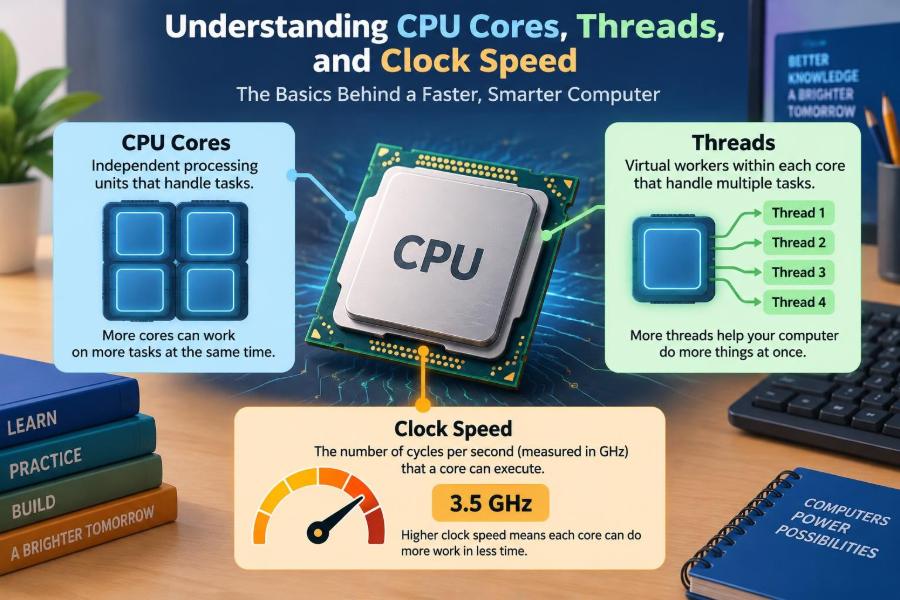
A CPU core is a processing unit inside the processor. A dual-core CPU has two such workers; an eight-core CPU has eight. Each core can work on a separate stream of instructions at the same time, subject to the software and operating system.
Using the kitchen analogy, adding cores is like adding capable cooks. One cook may prepare one dish quickly, but several cooks can prepare different dishes concurrently. This is especially helpful when many tasks are active.
🔢 Why Core Counts Have Increased
For many years, processors improved mainly by raising clock speeds. Eventually, higher speeds became harder to sustain because electrical power turns into heat. Designers increasingly improved performance by adding cores and making each core more efficient.
This shift matches how people use computers. A typical system may have a browser, cloud syncing, security software, notifications, media playback, and background updates working at once. Multiple cores give the operating system more room to keep those jobs moving.
🚦 The Operating System Schedules the Work
Programs do not normally choose a core directly. The operating system has a scheduler, which decides where and when runnable pieces of work should execute. It tries to keep the computer responsive while sharing processor time fairly.
Scheduling is dynamic. A task may run on one core briefly and later run on another. The system also considers priorities, power use, temperature, and whether a core is already busy.
🧵 Threads Are Streams of Work
A thread is an individual sequence of instructions that a program can schedule for execution. A program can contain one thread or many. For example, a browser may use separate threads for page rendering, network activity, video playback, and user interaction.
Threads are software-level work units. Cores are physical processing resources. This distinction matters: a computer can have many active threads even when it has only a few cores.
🔄 Multitasking Is Not Always Simultaneous
When more threads need attention than there are available processing resources, the operating system switches among them. This is called context switching. The switches can happen so quickly that applications appear to run at once.
That illusion works well for tasks that spend time waiting, such as downloading data or waiting for a person to click. But frequent switching has some overhead, and CPU-heavy tasks still compete for limited processing time.
🪞 What Simultaneous Multithreading Does
Some CPU cores can support more than one hardware thread. Intel often calls this Hyper-Threading; the broader technical term is simultaneous multithreading, or SMT. An eight-core processor with two hardware threads per core may appear to the operating system as 16 logical processors.
This does not turn eight physical cores into 16 fully independent cores. The hardware threads share parts of the same core. SMT can use resources that might otherwise sit idle, but the gain depends strongly on the workload.
⚖️ Physical Cores and Logical Processors Compared
| Term | What it describes | Practical meaning |
|---|---|---|
| Physical core | A real processing unit on the CPU | Can independently execute work alongside other cores |
| Hardware thread | An execution path exposed by a core using SMT | May improve efficiency when a core has unused capacity |
| Logical processor | What the operating system sees as schedulable processing capacity | Often equals cores plus additional SMT threads |
| Software thread | A sequence of instructions created by a program | Can be scheduled on a logical processor |
Product listings sometimes state “8 cores, 16 threads.” That usually means eight physical cores with SMT enabled. It is a useful capability, but comparing it directly with 16 physical cores would be misleading.
⏱️ Clock Speed Measures Timing
Clock speed describes how rapidly a CPU’s timing signal cycles, usually measured in gigahertz (GHz). One gigahertz means one billion clock cycles per second. The clock helps synchronize the CPU’s internal operations.
A higher clock speed can help a core finish certain work more quickly, especially when the task relies heavily on one core. However, a clock cycle is not a fixed amount of completed work across different CPU designs.
📐 Why GHz Alone Cannot Compare Processors
Two processors running at the same GHz may perform differently. Their designs may complete different amounts of useful work per cycle, access memory differently, include different caches, or support different instruction sets.
Think of clock speed as the pace of a worker’s steps, not the number of boxes they can pack per step. A faster pace helps, but skill, tools, workspace layout, and the job itself also matter. Compare CPUs within the context of their generation and intended class rather than treating GHz as a universal score.
🚀 Base Clock and Boost Clock Serve Different Purposes
A base clock is a sustained reference frequency under specified operating conditions. A boost or turbo clock is a higher speed the CPU may reach temporarily, or on some cores, when power, heat, and workload allow.
Boost figures are not promises that every core will run at that speed forever. A thin laptop doing a long video export may reduce speed as it reaches thermal or power limits, while a short task may benefit from a quick boost.
🌡️ Heat, Power, and Sustained Performance
Electrical power use produces heat. If cooling cannot remove enough heat, the CPU may lower its frequency or power consumption to protect itself. This behavior is commonly called thermal throttling.
That is why a larger laptop or desktop can sometimes sustain demanding work better than a slim device using a related processor. Cooling design, airflow, charger capacity, and system settings affect real performance, not just the CPU name.
🧱 CPU Architecture Changes the Meaning of Specs
Architecture is the underlying design of a processor: how it predicts upcoming instructions, handles calculations, uses cache, and manages power. Improvements in architecture can make a newer CPU noticeably faster at the same clock speed and core count.
Different manufacturers and processor families also make different design choices. A fair comparison should use reliable reviews or benchmarks that test similar machines and relevant tasks, rather than matching only the headline numbers.
🏗️ Performance Cores and Efficiency Cores
Some modern CPUs use a mixed design. Performance cores are built for demanding, time-sensitive work, while efficiency cores are designed to handle lighter or background work using less power.
This can improve battery life and multitasking, but it makes a simple “total core count” less descriptive. Eight cores arranged as four performance and four efficiency cores do not behave exactly like eight identical high-performance cores.
🗃️ Cache Keeps Frequently Needed Data Close
CPU cache is very fast memory located on or near the processor. It stores instructions and data that the CPU is likely to need again. Accessing cache is far quicker than fetching everything from main system memory.
Cache is one reason processors with similar core counts and speeds can behave differently in real workloads. Its usefulness depends on the task’s data patterns, so a larger cache is not a complete performance verdict by itself.
💾 Memory Can Become the Bottleneck
Random-access memory, or RAM, holds the programs and data currently in use. If there is too little available RAM, the operating system may move data to slower storage, causing pauses that a faster CPU cannot fully solve.
Memory speed and the way memory channels are configured can also affect CPU performance in certain workloads. When a computer feels slow, check the broader system before assuming the processor is the sole cause.
🎮 The GPU Handles Many Visual Workloads
In games, 3D design, and some video or creative software, the graphics processing unit (GPU) may do much of the demanding work. A fast CPU cannot compensate completely for a weak graphics processor when the GPU is the limiting component.
The CPU still matters: it prepares game logic, processes input, manages background tasks, and feeds work to the GPU. But performance depends on the slowest important part of the chain, which is often called a bottleneck.
🌐 Everyday Browsing Uses Mixed Kinds of Work
Web browsing is not one simple workload. Loading a page can involve network waits, security checks, page layout, scripts, images, video decoding, and advertising or extensions. A responsive browser benefits from good single-core performance, sufficient RAM, and sensible background activity.
More cores help when many tabs, applications, or browser processes are active. Yet an extra-heavy webpage can still feel slow if its scripts are inefficient or the network connection is delayed.
📊 Spreadsheets and Office Work Vary Widely
Writing documents and handling email rarely need many cores. Large spreadsheets are different: recalculating formulas, importing data, sorting, and creating complex reports can use substantial CPU time.
Some office features are designed to use multiple threads; others remain partly sequential, meaning one step must finish before the next can begin. For typical office work, balanced hardware and enough RAM often matter more than buying the largest available core count.
🎬 Video Editing and Rendering Reward Parallel Work
Video editing can combine CPU work, GPU acceleration, storage speed, and memory capacity. Rendering or encoding a project may split frames or effects among several cores, so additional cores can shorten long exports when the software supports parallel processing.
However, codec choice, effects, footage resolution, drive speed, and GPU support all influence results. A creator should check how their specific editing application uses hardware instead of assuming that core count alone determines export time.
💻 Programming and Virtual Machines Need Headroom
Software development may involve compiling code, running tests, using containers, and keeping documentation or browser tools open. Builds and tests can often run several jobs in parallel, making more cores valuable.
Virtual machines are especially demanding because each virtual machine behaves like another computer sharing the host’s resources. Assigning too many virtual CPU cores to several active virtual machines can overload the host; RAM and fast storage are equally essential.
🔗 Amdahl’s Law Explains Diminishing Returns
A program only speeds up from extra cores when it has work that can be divided. The part that must happen in sequence limits the total improvement. This general principle is often described by Amdahl’s Law.
Imagine a task with one setup step followed by several independent jobs. More workers help with the independent jobs, but everyone still waits for setup. This is why a 16-core CPU is not automatically twice as fast as an eight-core CPU for a given application.
🧍 Single-Core Performance Still Matters
Many everyday actions depend on one busy thread or on a short chain of dependent tasks. Launching an application, interacting with an interface, and processing parts of a game can benefit from strong per-core performance and quick boost behavior.
For a person who mostly browses, writes, attends meetings, and uses general business software, strong single-core responsiveness may feel more meaningful than a high core count that rarely gets fully used.
🔀 Multicore Performance Matters Under Load
Multicore performance becomes more visible when you do several demanding things together or run software that deliberately divides work. Examples include rendering while working in another application, compiling a large project, or processing many images in a batch.
The benefit is not merely finishing one task sooner. More available processing capacity can also preserve responsiveness while background jobs run, provided the system has adequate cooling, memory, and storage.
🧪 Benchmarks Need Context
Benchmarks can be useful because they test a defined task under controlled conditions. Single-core and multi-core scores can reveal different strengths. But a benchmark reflects its own workload, software version, power settings, and test system.
Use results as evidence, not as a universal ranking. Look for tests that resemble your work: code compilation for developers, export tests for video editors, or battery and responsiveness evaluations for mobile users.
🛒 How to Read a CPU Product Listing
When comparing systems, begin with the full processor model rather than isolated numbers. Then examine the complete computer: RAM capacity, storage type, graphics hardware, display needs, ports, battery design, cooling, and upgrade options.
- For basic use: prioritize a current, efficient CPU, sufficient RAM, and fast solid-state storage.
- For frequent multitasking: seek a balanced processor with enough cores and memory headroom.
- For creative or technical work: verify application-specific CPU, GPU, memory, and storage requirements.
- For gaming: balance CPU capability with the graphics card and the target resolution.
A configuration is a system, not a collection of independent specification winners.
⚠️ Common CPU Comparison Mistakes
One frequent mistake is treating threads as identical to cores. Another is assuming the highest listed boost clock will be sustained during every task. A third is choosing a CPU before considering the workload and other components.
- Do not compare GHz across unrelated architectures as if they were equal.
- Do not assume a program uses every available core efficiently.
- Do not ignore laptop cooling and power limits when comparing it with a desktop.
- Do not diagnose every slowdown as a CPU problem; RAM, storage, heat, malware, or software issues may be involved.
🔍 Checking CPU Use on Your Own Computer
System monitoring tools can show overall CPU utilization, per-logical-processor activity, memory use, disk activity, and running processes. A single busy logical processor can indicate a task limited by one thread, even when overall CPU use looks modest.
Interpret these readings carefully. High CPU use during a game, update, export, or scan may be normal. Persistent high use while the computer is idle is worth investigating by identifying the responsible process and checking for legitimate software activity.
🛠️ Practical Ways to Improve Responsiveness
Before replacing hardware, reduce unnecessary startup applications, close browser tabs that are actively consuming resources, update software, and leave adequate free storage space. Restarting can also clear temporary processes or memory pressure.
For older machines, adding RAM or moving from a hard disk to a solid-state drive can make everyday use feel far more responsive when those parts are the bottleneck. Hardware upgrades should follow diagnosis, not guesswork.
🎯 Choosing for Your Actual Workload
Make a short list of the applications you use most and the moments when your current machine struggles. Is the problem long exports, too many simultaneous apps, slow startup, weak game performance, or poor battery life? Each points toward a different balance of hardware.
Also consider how long the task lasts. Brief bursts favor boost performance; hours of rendering favor sustained cooling and multicore capacity. A sensible purchase leaves some headroom without paying for resources your work is unlikely to use.
🧭 The Core Principle: Balance Beats One Big Number
Cores increase the amount of work a CPU can handle in parallel. Threads let software organize work, while hardware threading can improve how efficiently a core stays busy. Clock speed affects timing, but architecture, cache, cooling, power limits, memory, storage, and software design shape the final experience.
The best CPU is therefore not simply the one with the most cores or the highest GHz. It is the one whose strengths match the applications you run, inside a well-balanced computer that can sustain those strengths.
Choose a processor by matching cores, threads, clock behavior, and the rest of the system to the work you actually do—not by trusting one headline specification. 🖥️⚙️📚