
You open a laptop to join a video call, clean up a noisy recording, summarize a long document, and search for a file whose name you cannot remember. A few years ago, each task might have required separate software, a reliable internet connection, or a wait while the computer sent work to a remote server.
Now, many new computers advertise “AI” as a built-in capability. The label can feel vague, especially when it appears beside familiar specifications such as processor speed, memory, and storage.
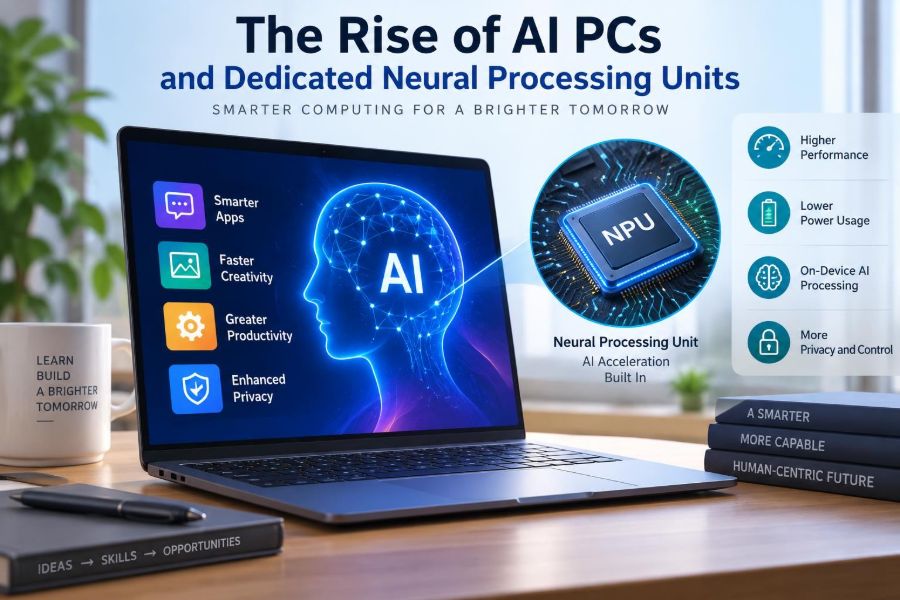
A major reason for this shift is a small component called a neural processing unit, or NPU. It is designed to handle particular kinds of artificial-intelligence calculations efficiently, often on the device itself.
Understanding AI PCs is useful whether you are choosing a new laptop, managing workplace devices, or simply trying to separate meaningful changes from marketing language. The technology affects performance, battery life, privacy, software design, and the kinds of features applications can offer.
🧠 What an AI PC Actually Means
An AI PC is a computer built to run AI workloads using more than one kind of processor. It usually combines a central processing unit (CPU), a graphics processing unit (GPU), and an NPU.
The phrase does not mean that every task is automatically intelligent, nor does it guarantee that a computer can run every large AI model locally. It describes hardware prepared for AI-assisted features, particularly those that benefit from fast, repeated processing.
In practical terms, an AI PC may improve tasks such as live captions, background effects during calls, image analysis, voice transcription, accessibility tools, and some local writing or search features.
⚙️ The Three Processing Engines
Modern PCs already contain specialized components because no single processor is ideal for every job. AI PCs make this division more visible.
| Component | Primary strength | Typical role in AI work |
|---|---|---|
| CPU | Flexible, general-purpose computing | Coordinates software, prepares data, handles logic and short tasks |
| GPU | Many calculations performed in parallel | Runs demanding visual and AI workloads, especially when speed matters |
| NPU | Efficient repeated neural-network operations | Handles sustained, lower-power AI inference on the device |
Think of these as different teams in a workshop. The CPU is the coordinator, the GPU is a large crew that can tackle many similar jobs at once, and the NPU is a purpose-built station for a recurring class of tasks.
🔤 Defining the Neural Processing Unit
An NPU is a processor optimized for the mathematical patterns used by neural networks. Neural networks are software models that transform inputs—such as pixels, audio samples, or words—through many layers of calculations to recognize patterns or produce an output.
NPUs commonly accelerate operations involving large arrays of numbers, especially matrix multiplication and related operations. These are central to many machine-learning models.
Unlike a CPU, an NPU is not intended to replace the rest of the computer. Its value comes from doing a narrow range of work with less energy and less interruption to other tasks.
🧮 Training Versus Inference
A useful distinction is between training and inference. Training is the resource-intensive process of adjusting a model using large quantities of data. It is commonly performed in data centers or on powerful specialized systems.
Inference is using a trained model to make a prediction or generate a result. For example, identifying speech in an audio stream, separating a speaker from background noise, or suggesting a reply is inference.
Most NPUs in personal computers are aimed primarily at inference. They may support limited model adaptation in some software, but they are not a substitute for infrastructure used to train large, general-purpose models.
📱 Why AI Is Moving onto Devices
Cloud-based AI remains useful because remote servers can run very large models and can be updated centrally. But sending every request to the cloud creates dependencies: an internet connection, server capacity, transfer time, and policies governing data handling.
Local processing can reduce those dependencies for suitable tasks. A laptop may blur a background, translate a short phrase, or transcribe a meeting segment without repeatedly sending raw audio or video away from the device.
This is not an all-or-nothing change. Many products use a hybrid approach, performing lightweight or sensitive work locally while sending complex requests to cloud services when the user allows it.
🔋 Why Power Efficiency Matters
Battery-powered devices have a strict energy budget. Running an AI feature continuously on a CPU or GPU can consume more power than a specialized processor designed for that task.
An NPU can be especially useful for persistent features, such as webcam framing, eye-contact correction, noise reduction, or live captions. Efficiency matters because these functions may run for an entire meeting rather than for a few seconds.
Lower energy use does not make a feature free. Display brightness, network use, model size, memory traffic, and the quality setting can still affect battery life noticeably.
🎥 Everyday Examples of Local AI
Many AI PC features are modest rather than dramatic, and that is often where they are most useful. A webcam can keep a face centered, remove distracting background sounds, or adjust lighting for a call.
Photos and files can become easier to organize when software recognizes broad categories, text inside images, or spoken words in recordings. Accessibility tools may create captions, improve speech clarity, or provide alternative ways to interact with a device.
These examples are not equally available on every computer. Whether a feature works locally depends on the operating system, application, model, language support, and hardware configuration.
🗣️ Speech, Audio, and Meetings
Audio is a natural fit for on-device AI because sound arrives as a continuous stream. Software can identify speech, estimate which sound belongs to a speaker, or suppress consistent noise such as a fan or keyboard.
Results are helpful but imperfect. A noise filter can occasionally soften part of a word, and transcription can mishear names, technical terms, accents, or overlapping speakers.
For important records, treat AI transcripts as drafts. Review them before sharing, especially when accuracy has professional, academic, legal, or safety consequences.
🖼️ Image and Video Workloads
Image-based models can classify objects, detect text, segment a person from a background, or improve a low-light image. These capabilities can support editing tools and user-interface features without requiring a full cloud round trip.
Different workloads use different hardware. A demanding image-generation task may still run best on a powerful GPU or a cloud service, while real-time background separation may be well suited to an NPU.
Do not assume an “AI photo” label explains image quality. Camera sensors, lenses, software processing choices, and the original lighting remain more important than a single marketing term.
🔎 Smarter Search and Personal Context
Some applications use AI to make search more descriptive. Instead of recalling an exact filename, a person might look for a presentation about a topic, a photo containing an object, or a note from a particular meeting.
For this to work locally, the device may create an index: structured information derived from files or activity. That can be convenient, but it raises an important question—who can access that index?
Users should check account permissions, device encryption, sign-in security, retention settings, and whether a feature processes personal content locally, remotely, or both.
🔒 Privacy Benefits and Boundaries
Local AI can reduce the amount of personal data that needs to leave a device. This is particularly appealing for audio, camera input, health-related notes, proprietary documents, or work conversations.
However, “processed on device” does not automatically mean “private in every respect.” An application might still synchronize results, collect diagnostic information, request cloud assistance, or expose content to anyone who can unlock the computer.
Privacy depends on the entire system: application design, permissions, accounts, encryption, updates, organizational policies, and user choices—not just the presence of an NPU.
☁️ The Continuing Role of the Cloud
Cloud AI is not disappearing. It remains valuable when a task needs a model too large for a personal device, access to current online information, collaboration across users, or more computing capacity than a laptop can provide.
Local and cloud tools therefore solve different problems. A sensible design may begin with on-device processing and offer cloud processing only when it adds a clear benefit.
When evaluating a feature, ask a simple question: what happens if the device is offline? The answer often reveals which part of the experience is genuinely local.
📦 Model Size, Memory, and Storage
An AI model is not merely a program file. It needs memory while operating, and it may require additional space for language data, caches, indexes, and updates. This is why memory capacity matters alongside processor capability.
A computer with an NPU but limited memory may still struggle when several applications are open or when a model is large. The operating system may move data to storage, which is slower than using memory directly.
When comparing devices for local AI, examine the whole configuration: processor generation, installed memory, storage capacity, cooling, operating-system support, and the applications you actually use.
📏 Understanding AI Performance Claims
Manufacturers often describe NPU capability using a measurement of operations per second. This can offer a rough idea of potential compute throughput, but it is not a universal measure of real-world usefulness.
Performance depends on model architecture, precision, memory bandwidth, software optimization, power limits, and whether an application can use the NPU at all. A higher number alone does not guarantee faster results in a specific program.
Look for demonstrations or testing based on the same workloads you expect to run. Video effects, transcription, and image generation place very different demands on hardware.
🧩 Software Support Is the Deciding Factor
Hardware capability becomes useful only when software knows how to use it. Developers rely on operating-system frameworks, drivers, libraries, and runtime tools to direct a model toward the CPU, GPU, or NPU.
A capable NPU may sit mostly idle if an application has not been updated to support it. Conversely, well-designed software can select the most appropriate processor dynamically based on speed, power use, and availability.
This is why two computers with similar specifications can feel different over time. Operating-system updates and application releases may improve supported AI features after purchase.
🧰 Compatibility and AI Frameworks
AI software is created with frameworks that describe models and computations. Before a model can run efficiently on a given PC, it may need to be converted, optimized, or compiled for that device’s supported runtime.
Compatibility is not always seamless. An application may run a model on the GPU because its NPU path is unavailable, incomplete, or slower for that particular workload.
For professionals, the practical question is not “Does this PC have an NPU?” but “Does the software in my workflow support this hardware configuration?” Check the application’s current documentation rather than relying on broad labels.
💻 What AI PCs Mean for Students
Students may encounter AI capabilities in note-taking, transcription, language support, reading assistance, and media projects. On-device features can be useful in classrooms or travel situations where internet access is limited.
They also require judgment. A generated summary can miss nuance, a citation tool can be wrong, and a writing assistant can produce polished but shallow material. Course rules may also limit how AI tools can be used.
Use AI to support learning rather than replace it: compare a summary with the original source, verify calculations, and make sure you can explain work submitted under your name.
🏢 What AI PCs Mean at Work
In workplaces, local AI can assist with routine tasks such as meeting cleanup, document search, drafting, translation, and accessibility. It may reduce friction for employees without requiring every small request to travel to an external service.
Yet organizations must consider data classification, identity management, audit requirements, and approved software. A local model working on confidential material still needs strong endpoint security.
IT teams should test features with representative documents and users. A tool that works well for ordinary email may be unsuitable for regulated records, sensitive customer data, or decisions requiring human accountability.
♿ Accessibility as a Practical Use Case
AI processing can make a computer easier to use for people with different needs. Live captions can support users who are deaf or hard of hearing, while speech input can help users who find typing difficult.
Visual descriptions, text recognition, translation, and voice enhancement can also remove barriers. Local processing may make some of these features more responsive and more available when connectivity is poor.
Accessibility tools should be evaluated by the people who rely on them. An inaccurate caption or image description is not just a technical imperfection; it can change whether information is understandable.
⚠️ Bias, Errors, and Confident Mistakes
AI models find patterns; they do not possess human understanding. They can misclassify an image, misunderstand context, produce an incomplete summary, or generate text that sounds plausible but is incorrect.
Bias can enter through training data, model design, and the setting in which a tool is used. A feature that performs adequately for one language, accent, lighting condition, or group of users may work less well for another.
Keep human review where errors matter. This includes grading, hiring, medical or legal information, financial decisions, security actions, and any context where a mistaken output could unfairly affect someone.
🛡️ Security Still Starts with the Basics
An NPU does not protect a PC from phishing, stolen passwords, malicious downloads, or unpatched software. AI features add another reason to keep operating systems, drivers, and applications updated.
Use strong sign-in protection, device encryption, backups, and separate accounts where appropriate. Be cautious about granting microphone, camera, file, or screen permissions to unfamiliar software.
If a feature creates a searchable local history or index, understand how to pause it, erase data, and restrict access. Convenience features deserve the same security review as any other data-handling tool.
🌡️ Heat, Sustained Work, and Form Factor
Specialized hardware can improve efficiency, but laptop design still matters. Thin systems have limited space to move heat away, and sustained workloads may cause a device to reduce performance to stay within safe temperature limits.
For occasional captions or camera effects, this may not be noticeable. For long video processing, development work, or repeated local-model use, cooling, charger capacity, and power settings can influence the experience.
A larger laptop is not automatically better, but it may provide more room for cooling and battery capacity. Choose based on the tasks you will perform for hours, not only the tasks shown in a short demo.
🛒 Buying an AI PC Without Guesswork
Start with your normal computing needs: applications, display size, keyboard comfort, portability, repair options, ports, battery expectations, and budget. AI capability should be one factor, not the entire decision.
- Identify the AI features you genuinely expect to use.
- Confirm that those features work in your operating system and preferred applications.
- Choose sufficient memory for multitasking and local models.
- Check whether key functions work offline and what data they store.
- Prefer clear specifications and software support over vague “AI-ready” claims.
If no current feature solves a problem you have, buying a reliable conventional PC may be the wiser choice. An NPU is valuable when it supports your workflow, not simply because it is new.
🚫 Common Misconceptions to Avoid
One common mistake is assuming an AI PC always has better general performance. The CPU, GPU, memory, storage, and cooling still determine how well ordinary programs, games, spreadsheets, and creative tools run.
Another is assuming local AI never uses the internet. Some features are entirely local; others combine device processing with online services. Read the settings and privacy description for each feature.
A third mistake is treating generated output as authoritative. Fast results can be useful, but speed does not establish accuracy, fairness, originality, or suitability for a high-stakes decision.
🔄 The Shift in Application Design
As NPUs become more common, software developers can design features that assume a modest amount of AI compute is available on many PCs. This may encourage more real-time assistance that does not feel like a separate online service.
The best uses may be subtle: removing repetitive steps, helping people find information they already have permission to access, or adapting an interface to a user’s needs.
That shift also puts pressure on developers to explain data flows clearly. A feature should make it understandable what is processed, where it runs, and what the user can control.
🌍 Environmental Trade-Offs
Efficient on-device inference can reduce the energy required for some individual tasks compared with repeatedly sending data to remote systems. It may also reduce network traffic for suitable workloads.
But hardware production has environmental costs, and more frequent replacement of devices creates electronic waste. Running larger local models can also consume meaningful power.
The responsible approach is not to assume that “local” is automatically greener. Keep devices in service when they meet your needs, choose durable products where possible, and use AI features when they provide a real benefit.
🧭 A Sensible Way to Adopt AI Features
Begin with low-risk tasks: captions, noise suppression, transcription of non-sensitive recordings, or organizing your own files. Compare the output with your expectations before relying on it.
Then decide what data you are comfortable processing, which features need an internet connection, and when a human should review the result. For workplace use, follow organizational policies before experimenting with confidential content.
This measured approach avoids two extremes: dismissing useful tools because they are imperfect, or trusting them simply because they are fast and convenient.
🔮 What Comes Next for AI PCs
Future AI PCs will likely offer more capable NPUs, better software integration, and models that can operate with less memory or power. Improvements in tools and standards may also make it easier for developers to support multiple kinds of hardware.
Progress will not be uniform. Some capabilities will remain cloud-based because they require large models, rapidly changing information, or centralized services. Others will become ordinary local features and eventually stop being marketed as AI at all.
The lasting change is architectural: personal computers are increasingly built to divide AI work across specialized components instead of forcing every task through the CPU alone.
✅ The Core Takeaway
AI PCs are not defined by a magical new category of software. They are computers that include dedicated hardware—especially NPUs—to run certain AI tasks more efficiently alongside the CPU and GPU.
The most useful benefits are likely to be practical: responsive accessibility features, cleaner calls, local processing for appropriate data, and assistance woven into everyday applications. Their value depends on software support, privacy controls, accuracy, and whether they solve a real problem for the user.
Choose AI PC features for what they reliably help you do, while keeping human judgment, security, and clear data controls at the center of the experience. 🖥️🧠🔐