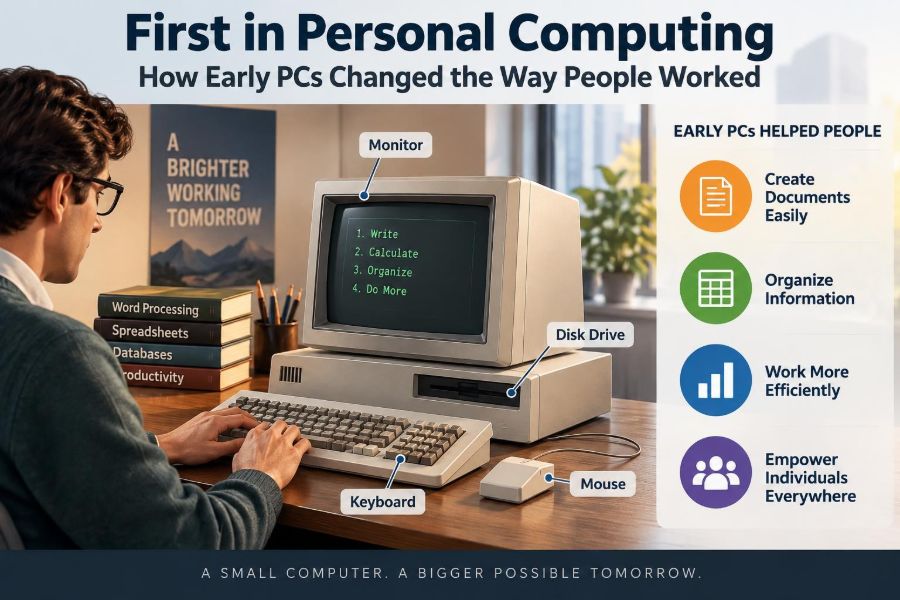

Imagine preparing a report when every revision means retyping an entire page. A misplaced figure in a budget can require rebuilding a spreadsheet by hand, and a colleague in another office may wait days for a copied document to arrive.
For much of the twentieth century, that was ordinary office work. Typewriters, paper files, calculators, carbon copies, and mainframe terminals each did a narrow job, often in separate places and under separate rules.
The arrival of the personal computer did not merely put a smaller machine on a desk. It shifted who could create documents, analyze information, and control the pace of everyday work. Tasks once routed through specialists became possible for individual employees, students, and small businesses.
Early PCs also introduced new burdens: learning unfamiliar software, managing fragile disks, and deciding which version of a file was correct. Understanding this transition explains many work habits that still shape offices today.
🧭 Before the PC: Work Moved at the Speed of Paper
Before personal computers became common, office information usually existed as paper. Letters were typed, copied, filed, mailed, and retrieved by people who knew where the cabinets and folders were.
This system could be dependable, but changing information was expensive in time. A revised contract, price list, or report might need to be retyped and redistributed. Calculations were done with adding machines, calculators, or ledger books, which made large revisions especially labor-intensive.
Paper also constrained access. A file could be on only one desk at a time, and finding it depended on orderly filing and physical proximity.
🏢 Mainframes Served Organizations, Not Individuals
Large organizations had computers before the personal computer era. Mainframes were powerful centralized systems used for tasks such as payroll, inventory, scientific calculation, and record keeping.
But a mainframe was not usually a personal work tool. Employees often submitted jobs through a specialist department or used terminals connected to the central machine. A terminal displayed or entered information but generally did not contain the independent processing power of a PC.
This arrangement made sense when hardware was costly and scarce. It also meant that many workers had little direct control over computing resources, schedules, or program changes.
🔬 Microprocessors Made Personal Machines Practical
The key technical change was the microprocessor: a processor integrated onto a small electronic chip. Earlier computers required many large components to perform processing tasks; microprocessors helped reduce size, cost, and power requirements.
This did not instantly make computers inexpensive or simple. Early personal computers still required technical knowledge, and their memory and storage were tiny by modern standards. Yet the economics changed enough for a machine to be purchased for a department, a small business, or an individual home.
That shift created a new idea: computing could happen where the work was being done, rather than only in a dedicated computer room.
🧰 Hobby Machines Pointed Toward a New Market
Some of the earliest microcomputers were built for enthusiasts who enjoyed programming and electronics. Machines such as the Altair 8800 became notable because they showed that a small computer could be owned and experimented with outside a large institution.
These systems were not ready-made office appliances. Users might interact through switches and lights, add components themselves, or write their own programs. Still, hobby computing nurtured software skills, hardware experimentation, and small companies that later served a broader public.
The lesson is useful: technologies often begin with users willing to tolerate complexity before becoming tools for routine work.
📺 The First Ready-to-Use Personal Computers
By the late 1970s, systems such as the Apple II, Commodore PET, and TRS-80 brought keyboards, screens, and accessible programming to more people. They were still limited, but they were far easier to use than assembling a machine from parts.
For schools and homes, these computers introduced basic programming, games, and simple data handling. For small organizations, they suggested a practical alternative to handwritten records and expensive centralized systems.
Ease of use mattered as much as raw technical capability. A computer becomes useful to a wider audience when people can turn it on, understand its input methods, and complete a task without rebuilding it.
🧑💼 The IBM PC Standardized the Business Conversation
IBM introduced its Personal Computer in 1981. IBM was already a familiar name in business computing, so its entry gave many managers confidence that desktop computers could be serious workplace tools.
The IBM PC was not the only important computer, nor was it the first personal computer. Its influence came partly from an architecture that other companies could imitate. Compatible machines and a growing range of software made the platform increasingly attractive to buyers.
As compatibility spread, workplaces could train people on similar systems and exchange software more easily. This is a common pattern in technology: a shared standard can be more valuable than any single machine.
🧩 Compatibility Created an Ecosystem
A computer platform is more than its processor and screen. It includes operating systems, application software, storage formats, printers, expansion cards, repair knowledge, and trained users.
When many manufacturers produced compatible hardware, customers gained choices in price and features. Developers had a larger possible audience for their software, while accessory makers could serve a recognizable market. This feedback loop helped PCs spread through offices.
Compatibility had trade-offs. Not every product worked perfectly with every other product, and technical standards could become confusing. Even so, common formats and interfaces reduced the risk of buying a machine that would soon stand alone.
⌨️ From Typewriter Keys to Editable Text
Word processing was one of the clearest early PC advantages. A word processor lets a user create, revise, store, and print text electronically. Unlike a typewriter, it separates composing from final printing.
That changed the practical meaning of a “draft.” A secretary, student, manager, or writer could correct a paragraph, move a section, reuse a standard letter, or update a name without beginning again. Spelling tools and templates later added more support.
The benefit was not simply faster typing. It was cheaper revision. When editing becomes easier, documents tend to be revised more often, formatted more consistently, and customized for different audiences.
📊 Spreadsheets Turned Numbers into Scenarios
Early spreadsheet software, especially VisiCalc and later Lotus 1-2-3, gave personal computers a powerful business purpose. A spreadsheet organizes values in rows and columns, then recalculates results when an input changes.
Consider a small shop estimating next month’s costs. On paper, changing expected sales might require recalculating many totals. In a spreadsheet, changing one cell can update connected formulas immediately. This is called automatic recalculation.
Spreadsheets made “what if?” analysis accessible. Managers could explore possible outcomes before committing to a budget, although the results were only as reliable as the assumptions and formulas entered.
🗃️ Databases Improved Everyday Record Keeping
A database stores related information in a structured way so it can be searched, sorted, updated, and reported. Early PC database programs helped smaller organizations manage customer lists, parts inventories, mailing lists, and membership records.
Instead of maintaining separate index cards or ledgers, staff could filter records by a field such as city, product code, or payment status. This reduced repetitive searching and made recurring reports easier to produce.
However, digitizing records did not automatically make them accurate. Misspelled names, inconsistent categories, and missing entries could still produce poor results. Good data practices became an increasingly important office skill.
🖨️ Printing Connected Digital Work to Paper Offices
Early offices did not become paperless when PCs arrived. Printers were essential because most customers, managers, and official processes still expected physical documents.
Dot-matrix printers were common for forms and continuous paper, while other printing technologies offered different trade-offs in quality, noise, speed, and cost. A printed report made digital work visible to people who did not use a computer themselves.
This connection mattered culturally as well as practically. Employees could compose and calculate on screen, then deliver a familiar paper result. The PC first blended into existing workflows before it transformed them.
💾 Floppy Disks Made Files Portable
Floppy disks were removable magnetic storage media widely used to load programs, save documents, and move files between machines. Their capacity was extremely small by current standards, but they gave users a way to carry their work.
A disk could hold a report, a budget, or a customer list that would otherwise remain tied to one machine. It also made backups possible, at least when people remembered to create and label them.
Portability introduced a persistent problem: version confusion. If two people edited copies on separate disks, which one was final? Modern cloud storage changes the tools, but the underlying need for clear version control remains.
🖱️ Graphical Interfaces Changed Who Could Learn
Many early business PCs used text commands. Users typed instructions or selected menu options using the keyboard. This could be efficient, but it required people to remember commands and file locations.
Graphical user interfaces, or GUIs, use visual elements such as windows, icons, menus, and pointers. Systems including the Apple Macintosh made this approach more visible in the workplace, while graphical environments later became widespread on PC-compatible machines.
A GUI did not remove the need for training, but it made software functions more discoverable. The visual metaphor of folders, documents, and a desktop helped users connect computer actions with familiar office concepts.
🧠 New Tools Required New Forms of Literacy
Operating a PC involved more than typing. Workers needed to understand files, folders, disks, backups, software installation, printers, and basic troubleshooting. These skills became part of practical workplace literacy.
People also had to learn how software represented work. A spreadsheet cell is not merely a box for a number; it may contain a formula. A database field is not merely a blank space; it needs consistent values if records are to be searched reliably.
This learning curve could be uncomfortable. Yet it enabled many employees to handle tasks independently that had previously required a typist, programmer, or data-processing department.
🔀 Desktop Publishing Changed the Look of Documents
Desktop publishing combined personal computers, page-layout software, and increasingly capable printers to give smaller organizations more control over newsletters, brochures, reports, and manuals.
Before these tools, sophisticated page layout often required specialist typesetting or print services. With a PC, users could arrange text and graphics on screen, adjust spacing, and prepare a design for printing.
This democratized visual communication, but it also created a familiar risk: software made it easy to use too many fonts, styles, and effects. Good design still required judgment about hierarchy, readability, and the needs of the reader.
📨 Electronic Communication Began to Shorten Loops
Early personal computing did not immediately create the always-connected office. Many PCs began as standalone machines. But modems and local networks gradually allowed computers to exchange files and messages.
A modem converts computer data into signals suitable for transmission over communication lines. Connections could be slow and unreliable by modern expectations, but they reduced dependence on mailed disks and paper memos.
Electronic mail, file transfer, and shared systems began shortening the feedback cycle between coworkers. The modern expectation of rapid response has roots in these early changes, even though early digital communication was far less immediate.
🌐 Networks Changed the Meaning of a Workplace
When PCs were connected on local area networks, or LANs, they could share printers, files, and certain applications within an office or building. This lowered the cost of providing common resources and encouraged collaboration around digital documents.
Networking also created administration challenges. Someone had to manage user access, maintain equipment, organize shared files, and respond when a network or printer failed. The individual desktop became part of a larger technical system.
As networked work expanded, physical location mattered somewhat less for information tasks. That long-term trend helped set the stage for later remote work, though reliable internet-based collaboration arrived much later.
🏪 Small Businesses Gained Capabilities Once Reserved for Larger Firms
A small retailer could use a PC for invoices, stock lists, mailing labels, and basic accounting. A consultant could prepare professional proposals without outsourcing every revision. A local organization could maintain a member database and produce a newsletter.
The point was not that PCs eliminated the need for expertise. Accountants, designers, and administrators still brought specialized knowledge. Instead, the computer gave smaller teams tools for producing and managing information at a scale previously difficult to afford.
This helped narrow some operational gaps between small and large organizations, while also increasing expectations for speed, polish, and record keeping.
👩🏫 Schools Prepared a Generation for Digital Work
Computers entered classrooms through programming lessons, computer labs, educational software, and typing practice. Access was uneven, and a computer in a school did not guarantee deep instruction, but exposure familiarized many students with digital tools.
Schools faced a difficult question that continues today: should students learn how to operate current software, or should they learn broader concepts that remain useful when software changes? The strongest programs generally connect both.
Understanding files, logic, data organization, and responsible use offers longer-lasting value than memorizing the buttons in a particular application.
🧑💻 Some Jobs Changed; Others Were Created
PCs altered the distribution of work rather than simply replacing workers. Managers could create their own charts, professionals could draft their own reports, and clerical roles increasingly involved maintaining digital systems as well as handling paper.
New occupations and specialties grew around support, software development, network administration, training, and digital publishing. Existing professions also adapted their methods: engineers used computer-aided tools, accountants used electronic worksheets, and offices adopted shared document systems.
Technology changes tasks unevenly. It can remove repetitive steps while raising the value of interpretation, communication, checking, and problem solving.
⏱️ Faster Production Also Raised Expectations
Once a document could be revised quickly, coworkers and clients often expected revisions quickly. Once reports could be generated from stored data, decision-makers could request more versions and more frequent updates.
This is a recurring effect of productivity tools. They reduce the time required for one output, but they may increase the volume of output expected. Faster tools do not automatically produce calmer workplaces.
A practical response is to define the purpose of a document or analysis before refining it endlessly. Speed is most useful when paired with clear priorities and sensible boundaries.
⚠️ Early PCs Introduced New Points of Failure
Paper can be misplaced or damaged, but digital work added different risks: corrupted disks, incompatible formats, failed hardware, forgotten passwords, and accidental deletion. A file may appear permanent while depending on a fragile storage device and an application able to read it.
Security also became relevant at smaller scales. A customer list copied to a disk could leave an office easily. Shared passwords and open access to network folders could expose sensitive material.
The core protection habits emerged early and still apply: make backups, control access, label files clearly, test recovery methods, and avoid assuming that one copy is enough.
🧾 The Garbage-In, Garbage-Out Principle
Computers can calculate rapidly, sort thousands of records, and generate polished reports. They cannot determine whether flawed input is reasonable without rules and human review. This idea is often summarized as garbage in, garbage out.
A spreadsheet with the wrong formula can produce a neat-looking but misleading budget. A database with duplicate customer records can produce inaccurate mailing lists. A word processor can correct spelling without confirming that a sentence says what its writer intended.
The PC increased the importance of verification. Users needed to check source data, formulas, assumptions, and outputs rather than trusting a result because it came from a machine.
🧍 The Digital Divide Was Present From the Start
Early access to personal computers depended on income, workplace resources, location, school funding, and confidence with technology. Not everyone had a machine at home or training at work.
Differences in access could affect who gained useful experience with software and who remained dependent on others to complete digital tasks. Accessibility was also often inadequate for people with disabilities, although later hardware and software features expanded possibilities.
Personal computing created opportunities, but it did not distribute them automatically. Effective adoption requires equipment, training, support, accessible design, and time to learn.
🧑🏫 Training Was an Investment, Not an Extra
Organizations sometimes bought PCs because competitors had them, then underestimated the work needed to integrate them. A machine without suitable software, clear procedures, and user training can become an expensive typewriter.
Useful training focuses on real tasks. A finance team benefits from learning formulas, error checking, and reporting workflows; a reception team benefits from contact records, scheduling, and document templates. Generic lessons are helpful, but context makes skills stick.
Peer support also mattered. Informal “power users” often helped colleagues solve practical problems, though relying on one person without documentation created its own risk.
🗂️ File Organization Became a Professional Habit
As people created more digital work, naming and organizing files became essential. A folder full of items called “report,” “report new,” and “report final final” wastes time and invites mistakes.
A simple structure is usually strongest: organize by project or period, use descriptive names, include dates where useful, and agree on a version convention for shared work. For example, a team might use 2025-06_budget_draft rather than vague labels.
This may seem minor compared with processors or networks, but information retrieval is a major part of productivity. Work has little value if people cannot find, identify, and trust it later.
🔄 Central Control and Personal Control Needed Balance
Personal computers moved computing power closer to users, but organizations still needed shared rules. Without standards, teams could end up with incompatible software, inconsistent data, unlicensed programs, and unprotected files.
Too much central control, however, can make employees wait unnecessarily for small changes or prevent them from solving local problems. The challenge was—and remains—finding a balance between flexibility and reliability.
Good governance defines what must be consistent, such as security, backups, and official records, while leaving reasonable room for teams to choose efficient ways of working.
📱 The PC Set Patterns That Continue Today
Modern laptops, tablets, smartphones, cloud services, and web applications differ greatly from early PCs. They are faster, more connected, and often simpler to operate. Yet many familiar concepts come directly from the personal computing era.
Files, folders, applications, spreadsheets, local storage, printing, passwords, software updates, and personal productivity tools all reflect the idea that an individual has a digital workspace. Even cloud-based systems retain many of these patterns.
The biggest continuity is cultural: people expect to create, revise, search, calculate, and communicate directly through their own devices.
🧪 A Useful Way to Evaluate New Work Technology
The history of early PCs offers a practical test for any new tool, including automation and AI-based software. Ask what specific task it improves, who needs training, what data it uses, and what new errors or dependencies it may introduce.
- Does it reduce a real bottleneck, or merely add a new interface?
- Can users check and correct its output?
- How will files, permissions, backups, and privacy be managed?
- Will it make a process clearer, or only faster in its current flawed form?
A tool is most valuable when it strengthens sound work practices instead of hiding weak ones behind a polished screen.
🎯 The Core Lesson of Personal Computing
Early PCs changed work because they combined computing power with individual access. They put writing, calculation, data management, and eventually communication tools within reach of people who were closest to everyday decisions.
That shift increased autonomy and speed, but it also made users responsible for organization, accuracy, security, and continuous learning. The machine did not replace judgment; it changed where judgment was applied.
The enduring lesson is that successful technology adoption depends on people, processes, and information practices as much as on hardware. A computer is powerful not because it sits on a desk, but because people use it thoughtfully to solve real problems.
Personal computing transformed work by giving individuals the ability to create and manage information directly—and by making digital responsibility part of everyday professional life. 🖥️📁🚀