
You are editing a meeting recording into notes, removing background noise from a video call, or searching thousands of photos for a particular moment. A few years ago, those tasks often meant sending data to an online service and waiting for a remote server to do the hard work.
Now, many newer laptops and desktop computers can perform parts of that work locally. The change is being driven by a small but specialized component called an NPU, or neural processing unit.
This does not mean every PC has suddenly become an artificial-intelligence machine, nor does it mean cloud AI is disappearing. It does mean that AI features can become faster, more private, and more practical when the right kind of processing happens directly on the device in front of you.
Understanding NPUs helps students, buyers, and working professionals see past marketing labels and ask a more useful question: which AI tasks will this computer actually handle well?
🧩 What an NPU Is
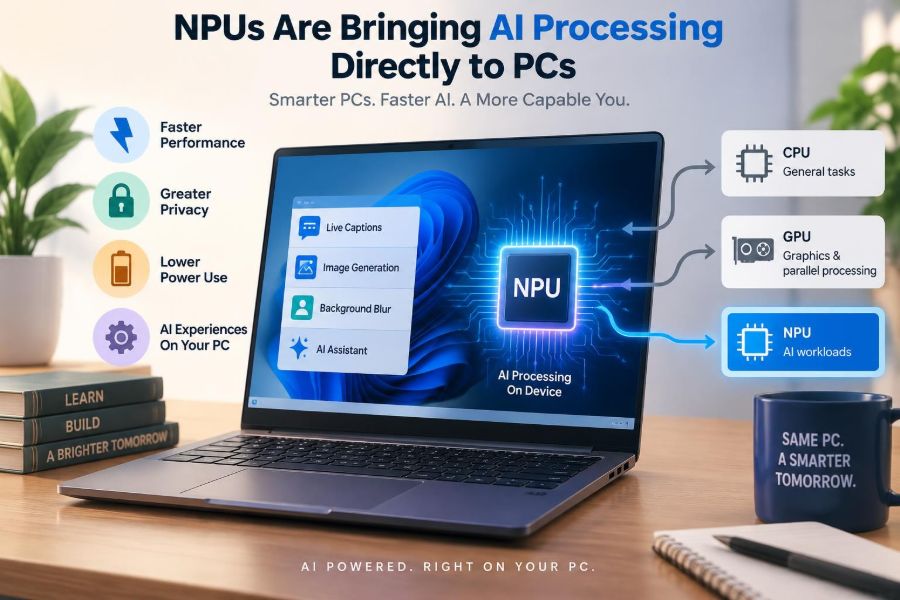
An NPU is a processor designed to run the mathematical operations used by many AI models efficiently. It is especially suited to neural networks: software systems that identify patterns in data such as words, voices, images, and video frames.
Rather than replacing a computer’s main processor, an NPU joins it as a specialist. Think of a busy office: the CPU coordinates general work, the GPU handles many visual or parallel jobs, and the NPU repeatedly performs a particular kind of AI calculation with less wasted effort.
💻 The Traditional Parts of a PC
To understand where an NPU fits, start with the familiar hardware. The CPU, or central processing unit, runs the operating system, applications, and countless step-by-step tasks. It is flexible, but it is not always the most power-efficient choice for AI inference.
The GPU, or graphics processing unit, was built to draw images but is also good at doing many similar calculations at once. That ability made GPUs valuable for training and running larger AI models.
Memory, storage, and networking remain essential too. An NPU cannot compensate for too little RAM, a slow storage drive, or an application that was never designed to use it.
⚙️ Why AI Work Has Different Needs
Many AI models turn input into large collections of numbers, then repeatedly multiply, add, compare, and transform those values. A task such as blurring a video-call background may perform similar calculations on every frame.
General processors can do this work, but they may consume more energy than necessary. NPUs are tuned for the repeated, highly parallel patterns common in neural-network inference, the stage where a trained model makes a prediction or generates an output.
🔄 Training and Inference Are Not the Same
Training creates or adjusts a model by exposing it to very large datasets. It is resource-intensive and commonly performed in data centers using powerful GPUs or dedicated accelerators.
Inference uses an already trained model. Transcribing speech, detecting a face to focus a webcam, or categorizing an image are inference tasks. NPUs in personal computers are primarily intended for this second stage.
Some local tools can fine-tune or adapt small models, but an NPU should not be viewed as a miniature replacement for a data-center training system.
📦 The Rise of the AI PC
An “AI PC” generally refers to a computer with hardware and software intended to run AI workloads locally, often including an NPU. The label is useful only when paired with details: NPU performance, available memory, supported software, and the kinds of models the system can run.
A computer does not become more useful merely because its specification sheet says AI. The meaningful change occurs when applications assign suitable tasks to local hardware in a way that improves speed, battery life, privacy, or accessibility.
🔢 Understanding TOPS Without the Hype
NPU capability is often described in TOPS, meaning trillions of operations per second. It is a rough measure of potential calculation throughput, not a universal score for every AI feature.
Results depend on the model, numerical precision, memory bandwidth, software optimization, and the task itself. Two machines with similar TOPS figures can behave differently in a real application. Use the figure as one clue, not as a complete buying decision.
🚦 How Software Chooses a Processor
Modern applications can divide their work across the CPU, GPU, and NPU. A video editor might use the GPU for visual effects, the CPU for application logic, and the NPU for a model that separates speech from noise.
This is called heterogeneous computing: using different processors for the jobs they handle best. Ideally, the user does not need to choose manually. In practice, support depends on the operating system, drivers, software framework, and app developer.
🎥 Better Video Calls as an Everyday Example
Video conferencing provides an easy-to-see use case. Background blur, automatic framing, eye-contact correction, portrait lighting, and noise suppression can all use AI models that examine live audio or video.
When these models run efficiently on an NPU, a laptop may avoid placing the entire task on the CPU or GPU. That can leave more resources for presentation software, browser tabs, or recording while helping preserve battery life.
The result is not magic: difficult lighting, poor microphones, and weak internet connections still create problems. But local acceleration can make these features more consistently available.
🎙️ Speech, Captions, and Translation
Speech recognition and audio enhancement are natural candidates for local AI. A device can convert speech to text for captions, distinguish voice from background noise, or help power accessibility features without constantly uploading raw audio.
Translation is more demanding because quality varies with the language pair, model size, and context. A local model may be useful for short phrases or basic assistance, while a cloud service may offer broader language coverage or more sophisticated results.
🖼️ Photo and Video Organization
Photo applications can use on-device models to identify broad subjects, group similar images, suggest edits, or make searches more descriptive. Instead of remembering a filename, a person might search for a photo showing a bicycle near water.
These features should be interpreted carefully. Image recognition is probabilistic, not a perfect record of reality. Mislabeling, missed objects, and bias in recognition remain possible, especially in varied real-world conditions.
✍️ Local Writing Assistance
Some AI writing tools can summarize selected text, suggest revisions, organize notes, or help draft short material locally. For routine transformations, such as turning bullet points into a first draft, this can feel immediate.
However, fluent output is not automatically accurate. A local model can still misunderstand instructions, omit crucial context, or state incorrect information confidently. Review remains necessary for schoolwork, business communication, and any consequential decision.
🔒 Privacy Benefits of On-Device Processing
Local AI can reduce the need to send sensitive input away from the computer. That matters when a webcam sees a home office, a transcription contains a discussion, or a document includes internal company information.
“On device” does not automatically mean “private.” An application may still sync data, request online features, store outputs, or collect diagnostics according to its settings and policies. Check what the specific app does, not just where its NPU calculations occur.
📡 Why Cloud AI Will Still Matter
Cloud systems can use far larger models than most personal computers can store or run quickly. They are useful for tasks requiring extensive computing power, current online information, collaboration across devices, or specialized services.
A likely direction is a hybrid approach. A PC handles immediate, private, or lightweight tasks locally, while the cloud handles larger requests when the user permits it. The best location depends on the task rather than ideology.
🔋 Battery Life and Heat
Laptops have a limited energy budget. If an NPU can perform an AI task with less power than a CPU or GPU, it may help reduce battery drain and heat during sustained use.
That benefit is workload-specific. A device running a large local model continuously can still consume substantial power, warm up, and slow down to protect its components. Efficient hardware improves the situation; it does not remove physical limits.
🧠 Memory Is Often the Real Constraint
AI models and their working data must fit somewhere, usually in system memory or dedicated graphics memory. A capable NPU cannot run a model comfortably if the computer lacks enough memory for the operating system, application, model, and input data.
For buyers interested in local AI, RAM capacity matters alongside processor specifications. The right amount depends on the programs and model sizes you intend to use, so avoid treating an NPU rating as the only meaningful number.
🗂️ Storage and Model Downloads
Local models also occupy storage space, sometimes along with language files, image assets, and updates. A small AI feature may be modest; a collection of creative tools can use a noticeable amount of disk space.
Fast solid-state storage helps models load more promptly, but it does not determine inference speed by itself. Leave practical free space for applications, documents, operating-system updates, and temporary files.
🧱 Models Must Be Optimized for Devices
Developers often adapt models before deploying them to PCs. They may reduce numerical precision, compress weights, or restructure operations so a model needs less memory and works with an NPU’s supported instructions.
This process, sometimes called quantization, can make local AI feasible but may affect output quality. It is an engineering trade-off: smaller and faster does not always mean equally capable.
🛠️ Frameworks and Compatibility
An NPU needs a software path to be useful. Operating-system APIs, drivers, model formats, and development frameworks help apps send appropriate work to the hardware.
This explains why a new computer may have an NPU yet show few visible changes at first. Hardware adoption can move faster than application support. Features improve as developers update software and as platforms mature.
🪟 Operating Systems Shape the Experience
The operating system manages permissions, power, memory, and access to hardware accelerators. It can provide shared AI services such as speech recognition or image effects so individual app developers do not need to build every capability from scratch.
Platform features may also have specific hardware requirements. Before assuming a feature will work, verify the operating-system version, device requirements, regional availability, and whether an internet connection is still needed for part of the experience.
🧑💻 What Developers Gain
For developers, local acceleration can make AI interactions feel more responsive because requests do not always wait for a network round trip. It can also lower dependence on per-request cloud computing for certain features.
But development becomes more complex. Teams must test across hardware, provide fallbacks for older computers, manage model updates, and assess quality on real inputs. Designing a good AI feature involves much more than calling a model.
📚 What Students Can Use It For
Students may encounter NPUs through live captions, reading support, note organization, language practice, photo cleanup, or creative software. These are helpful aids when they reduce routine friction and make materials easier to access.
They are not a substitute for learning. If a tool summarizes a chapter, compare the summary with the original; if it explains a problem, work through the reasoning yourself. The strongest use is assistance that supports understanding rather than disguises its absence.
🏢 What It Means for Workplaces
Businesses may value local AI for responsiveness and for keeping some data within managed devices. Common possibilities include meeting assistance, document classification, transcription, and support tools embedded in everyday applications.
Organizations still need governance. They should decide which tools are approved, what information may be entered, how outputs are reviewed, and whether local model files and logs are protected. Local processing reduces some exposure; it does not eliminate security responsibilities.
🛡️ Security Risks Do Not Vanish
AI-enabled software can be vulnerable to ordinary risks such as malicious files, weak permissions, outdated drivers, or unpatched applications. Models may also produce unreliable output when given misleading or unusual input.
Do not treat an AI-generated recommendation as an authority simply because it ran on your own PC. Keep software updated, use trusted sources for model downloads, and apply the same judgment you would use with any automated tool.
⚖️ Accuracy, Bias, and Human Review
An NPU accelerates calculations; it does not make a model fair, factual, or context-aware. Recognition tools can fail across accents, languages, lighting conditions, or cultural contexts. Generative tools can invent details.
For low-stakes convenience, occasional errors may be manageable. For hiring, grading, healthcare, legal, financial, or safety-related use, people need clear oversight, appropriate validation, and an understanding of what the tool cannot reliably decide.
🛒 How to Shop for an NPU PC
Start with your actual workload. A person who mostly browses, writes documents, and attends occasional calls should prioritize a balanced computer with sufficient memory, storage, display quality, keyboard comfort, and battery life—not an NPU number alone.
- Check whether the applications you use already support local AI acceleration.
- Look at RAM, storage, CPU, and GPU together with NPU capability.
- Read independent reviews for noise, heat, battery behavior, and real software performance.
- Confirm whether desired features run locally, require a subscription, or need an internet connection.
- Prefer a device that is strong at your ordinary work even if AI features change.
🚫 Common Buying Mistakes
A frequent mistake is assuming every AI feature will use the NPU. Some programs use the CPU, GPU, cloud servers, or a mixture. Another is purchasing for a promised feature without checking whether it is available in the relevant software and region.
It is also easy to overlook long-term basics. A laptop with attractive AI branding but inadequate memory, poor battery life, or limited ports can become frustrating long before its NPU becomes outdated.
🔧 Getting the Most From an Existing PC
You do not need a new machine to use AI responsibly. Many useful tools run in a browser or use a GPU, while others work well on ordinary CPUs. The practical question is whether a tool solves a real problem within your hardware and privacy limits.
On a newer NPU-equipped system, install operating-system and driver updates, then look for acceleration settings in supported applications. Avoid installing unknown “AI optimizer” utilities; they often add little value and can create privacy or stability problems.
🌱 The Environmental Trade-Off
Efficient local inference may reduce energy used for certain repeated tasks and can limit unnecessary data transfer. These are worthwhile design goals, particularly for battery-powered devices.
Yet manufacturing new hardware has environmental costs, and running models locally still uses electricity. Extending the life of a capable existing PC is often sensible when it continues to meet your needs. Efficiency should include the whole lifecycle, not just a single feature.
🔮 What Is Likely to Change Next
Local models will likely become smaller, better optimized, and more integrated into applications. More software may use a mix of CPU, GPU, NPU, and cloud resources without asking users to understand every technical handoff.
There will also be growing pressure for clearer disclosures: what runs locally, what leaves the device, what data is retained, and what limitations apply. Those details will matter more than broad labels as AI becomes a normal part of computing.
🧭 The Core Principle: Put Each Task in the Right Place
NPUs represent a practical shift, not a complete reinvention of the PC. They give computers a more efficient place to run certain AI models, especially recurring tasks involving audio, images, video, and language.
The strongest outcome is not “AI everywhere.” It is thoughtful computing: local processing when responsiveness, privacy, and efficiency benefit; cloud computing when scale and broader capability are needed; and human judgment whenever an answer affects people or decisions.
An NPU is most valuable when it quietly makes a useful task faster, more efficient, or more private without asking you to trust it beyond its limits. As applications catch up, that quiet specialization may become one of the most meaningful improvements in everyday PCs. 🧠💻🔒