
A student opens a laptop to edit a video, research a project, and join a class call at the same time. A professional uses a desktop to analyse spreadsheets, clean up a presentation, and summarize meeting notes. A few years ago, several of those jobs might have required separate tools, extra waiting, or a powerful office workstation.
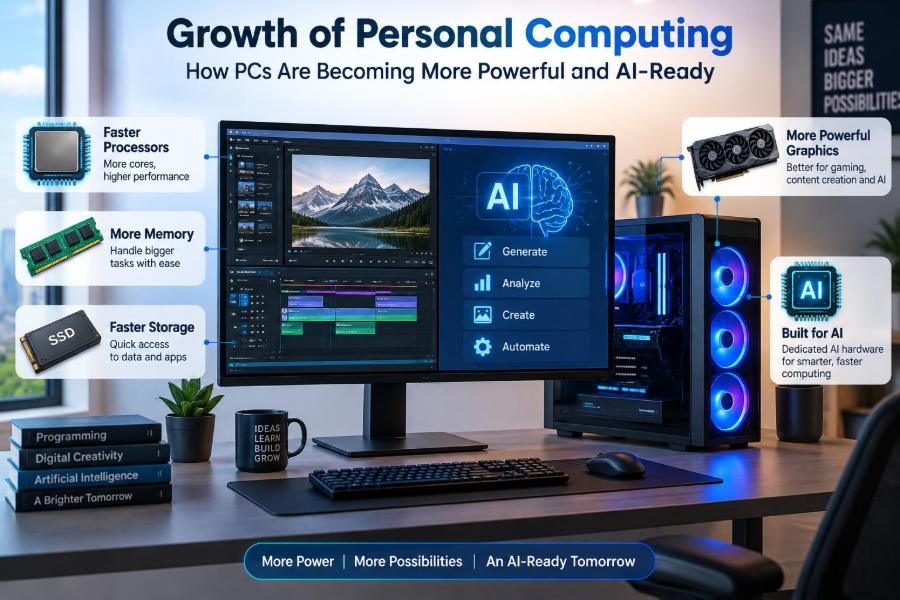
Personal computers are changing because the work we ask them to do is changing. Faster processors still matter, but modern PCs are also being designed to handle graphics, media, security, and artificial intelligence tasks more efficiently.
This shift can feel confusing. Terms such as CPU, GPU, NPU, on-device AI, and AI PC appear in product descriptions, yet they describe different parts of a larger system.
Understanding that system helps students and working professionals choose equipment wisely, use new features realistically, and recognize that more power is useful only when it solves a real problem.
💻 From a Single Task to Many Workloads
Early personal computers were mainly used for documents, simple calculations, and basic communication. Modern machines routinely manage many demanding tasks at once: browser tabs, cloud files, video calls, security checks, media playback, and background updates.
The growth of personal computing is not simply about making one calculation faster. It is about keeping the whole experience responsive when several programs compete for processing power, memory, storage, and network access.
🧠 What “More Powerful” Actually Means
PC performance is a combination of components rather than one number on a specification sheet. A fast processor can be limited by too little memory, slow storage, weak cooling, or software that does not use its capabilities well.
For everyday use, power often means shorter wait times and smoother multitasking. For creative work, engineering, gaming, or AI tasks, it may mean handling larger files, more detailed visuals, or complex models locally.
⚙️ The CPU Remains the General-Purpose Core
The central processing unit, or CPU, is the computer’s flexible problem solver. It runs operating-system tasks, follows program instructions, manages many everyday actions, and coordinates other hardware.
CPU improvements come from faster designs, more cores, better efficiency, and smarter ways of handling instructions. More cores can help when software divides work into parallel pieces, but they do not automatically speed up every application.
🎮 Why GPUs Became Essential Beyond Gaming
A graphics processing unit, or GPU, was originally associated mostly with drawing games and visual interfaces. Its strength is performing many similar calculations in parallel, which also helps with video editing, 3D design, scientific visualization, and many AI workloads.
A GPU is not a replacement for a CPU. Think of the CPU as a versatile manager and the GPU as a large team that can process many closely related jobs at once.
🧩 The Arrival of the NPU
Many newer computers include a neural processing unit, or NPU. This is specialized hardware designed to run certain machine-learning operations efficiently, especially the repeated mathematical operations used in AI inference.
Inference means using an already trained model to produce an answer, classification, transcription, or generated result. Training large models is usually far more demanding and commonly done in data centers, while inference can increasingly happen on a personal device.
🔄 How CPU, GPU, and NPU Work Together
An AI-ready PC does not send every task to its NPU. The operating system and application choose the most suitable processor based on the job, performance needs, battery use, and available software support.
| Component | Best suited to | Typical examples |
|---|---|---|
| CPU | Flexible, general computing | Apps, documents, operating system tasks |
| GPU | Large parallel workloads and graphics | 3D scenes, effects, some AI generation |
| NPU | Efficient supported AI inference | Background AI effects, speech and image features |
The practical goal is not to use every chip at once. It is to place each workload where it can run well without wasting energy.
📈 Efficiency Is a Major Form of Progress
A powerful laptop that becomes noisy, hot, and short-lived away from a charger is not ideal for many people. Modern chip design increasingly focuses on performance per watt: how much useful work a device completes for the electricity it consumes.
Efficiency affects battery life, fan noise, heat, compact design, and sustained speed. It also matters in desktops, where lower heat can make a quieter system easier to cool.
🔋 Battery Life Depends on More Than the Battery
A larger battery can help, but software behavior and component efficiency matter just as much. A browser page with heavy scripts, a bright high-refresh display, or a background synchronization task can raise power use substantially.
Specialized processing helps because it may complete a suitable task with less energy than a general-purpose processor. That benefit depends on the application actually supporting the specialized hardware.
🌡️ Heat Sets Real-World Performance Limits
Chips produce heat while working. If a computer cannot remove enough of it, it may reduce clock speeds to protect components, a behavior often called thermal throttling.
This is why two laptops with similarly named processors can perform differently in long exports, renders, or compilations. Case size, fan design, power settings, and room temperature all influence sustained performance.
🧮 More Cores Do Not Solve Every Slowdown
Some programs split work effectively across many CPU cores. Video rendering, code compilation, and certain data tasks can benefit greatly. Other tasks rely on one main sequence of instructions and benefit more from strong single-core performance.
Before buying a machine for “more cores,” consider the applications you actually use. A system can be excellent for rendering yet offer little visible advantage when writing documents or reading email.
🗂️ Memory Keeps Active Work Within Reach
Random-access memory, or RAM, is the short-term workspace where active programs and data are kept. When RAM is scarce, the system may move data to storage, which is much slower and can make multitasking feel sluggish.
Large spreadsheets, many browser tabs, virtual machines, photo projects, and local AI tools can all increase memory needs. Enough RAM improves comfort and reliability, but unused excess memory does not make every task faster.
⚡ Fast Storage Changes Everyday Responsiveness
Solid-state drives, especially modern NVMe SSDs, access data far faster than older hard drives. They improve startup time, application launches, file searches, and loading of large project assets.
Storage speed is only one factor, but it is highly noticeable because a PC constantly reads and writes files. Capacity matters too: a nearly full drive can complicate updates, temporary files, backups, and creative workflows.
🌐 Connectivity Extends the Personal Computer
Cloud services allow a modest laptop to access shared documents, remote desktops, online storage, and web-based tools. Fast, dependable networking can therefore be as valuable as a faster local component for certain work.
However, cloud dependence introduces delays, service availability concerns, and privacy choices. Local capability remains valuable when travelling, working with sensitive material, or facing unreliable internet access.
🤖 What Makes a PC “AI-Ready”
The phrase AI-ready usually means that a computer has hardware and software capable of supporting AI features efficiently. It does not guarantee that every AI application will run locally, nor does it promise that a device can train advanced models.
A genuinely useful AI-ready system combines suitable processing hardware, sufficient memory, updated drivers, an operating system that can use those capabilities, and applications designed to take advantage of them.
📍 Local AI Versus Cloud AI
With local AI, a model or feature runs on the device. This can reduce dependence on an internet connection, improve response time, and keep some data from leaving the computer.
With cloud AI, processing happens on remote servers. Cloud services can use much larger models and more computing power, but users should understand what content is uploaded, how it is handled, and what happens if the service is unavailable.
🔒 Privacy Benefits Have Limits
On-device processing can be a privacy advantage when sensitive audio, images, or documents remain local. Yet “runs locally” should not be treated as a complete privacy guarantee.
An application may still synchronize data, collect diagnostics, use online accounts, or combine local and cloud processing. Read settings and product documentation, especially when handling workplace records, customer information, or confidential files.
🗣️ Everyday AI Features Are Often Subtle
Many useful AI features are not dramatic chatbots. They include live captions, voice cleanup, background blur, image search, accessibility tools, predictive typing, photo organization, and noise reduction during calls.
These features can save small amounts of effort repeatedly. Their value depends on accuracy and control: a transcript is helpful only if users can review mistakes, and an automated summary should not replace checking the source material.
🎥 Media Creation Gains New Tools
Creative software increasingly uses AI-assisted selection, object removal, upscaling, color adjustment, transcription, and editing suggestions. Specialized hardware can make some of these features run more smoothly on a laptop or desktop.
Automation can speed routine work, but it does not eliminate judgment. An editor still decides whether a cut serves the story, whether an image alteration is appropriate, and whether generated material is accurate and permitted.
♿ Accessibility Is a Powerful Use Case
Speech recognition, real-time captions, image descriptions, translation support, and voice control can make computing more usable for people with different needs. Local processing may make some assistive features faster or available without a constant connection.
Accessibility features should be evaluated in practical conditions. Accents, background noise, technical vocabulary, and visual context can affect results, so users need correction tools and alternatives rather than blind trust in automation.
🧑💼 Productivity Needs Human Review
AI can help draft a first outline, sort ideas, rewrite a sentence, or identify patterns in a large set of notes. That can reduce repetitive work and give people a useful starting point.
It can also produce plausible but incorrect statements, miss context, or expose information if used carelessly. Treat output as a draft: verify facts, preserve accountability, and follow your organization’s policies for confidential content.
🧑🎓 Students Need Skills, Not Just Features
A more capable PC can help students research, create, code, and collaborate. AI tools may also assist with brainstorming, practice questions, transcription, or feedback on clarity.
But learning depends on doing the thinking. Students should be able to explain an answer, check sources, show their process when required, and follow their institution’s rules about AI assistance.
🛡️ Security Must Keep Pace With Capability
New capabilities can improve security through biometric processing, suspicious-behavior detection, and smarter filtering. They also create more opportunities for convincing scams, manipulated media, and poorly secured applications.
Core habits remain effective: install updates, use unique strong passwords or a password manager, enable multi-factor authentication, back up important work, and be cautious with unexpected attachments and login requests.
🧱 Software Compatibility Is the Hidden Question
Hardware features matter only when software can use them. An NPU may sit mostly idle if applications have not added support, while an older but compatible computer can remain more useful for a required specialized program.
Check the software you rely on before changing platforms or architectures. This is especially relevant for professional plugins, device drivers, virtual machines, older peripherals, and organization-specific applications.
🧰 Choosing a PC by Your Actual Work
Start with your workload rather than marketing labels. A web-and-document machine needs a different balance from a system for 3D design, software development, data analysis, video production, or local AI experimentation.
- General study and office work: prioritize reliable battery life, comfortable keyboard, enough RAM, and SSD capacity.
- Creative work: consider display quality, storage, memory, graphics capability, and cooling for long projects.
- Technical workloads: check application requirements, virtualization support, ports, memory expansion, and sustained performance.
- AI experimentation: verify model requirements, supported frameworks, memory needs, and whether GPU or NPU support is available.
💰 Avoid Buying Specs You Will Not Use
It is easy to assume the highest specification is safest. Yet a costly graphics processor may add little value for email and spreadsheets, while a poor display, limited storage, or uncomfortable keyboard affects daily use immediately.
Spend according to the work you expect to do for the life of the device. Leave reasonable room for future needs, but do not confuse maximum specifications with the best overall fit.
🔧 Upgradeability and Repairability Matter
Some computers allow memory, storage, batteries, or wireless components to be replaced; others integrate many parts tightly to save space. Neither approach is automatically right, but the trade-off affects longevity and repair options.
Before purchase, check whether storage can be expanded, whether memory is fixed, what ports are available, and how easily a battery can be serviced. A repairable device can remain useful longer when one component fails or needs updating.
♻️ More Computing Power Has Environmental Costs
Making computers requires materials, energy, packaging, and global transport. Running powerful hardware also uses electricity, particularly for intensive tasks and large-scale cloud services.
Keeping a suitable PC longer, repairing it when practical, choosing efficient settings, and recycling through responsible channels can reduce unnecessary waste. The most sustainable upgrade is often the one that solves a genuine limitation rather than replacing a functional device for a minor gain.
⚠️ Common Misunderstandings About AI PCs
One mistake is assuming that an AI PC will make every application intelligent or fast. Another is believing that local AI is always private, or that cloud AI is always unsafe. Reality depends on the feature, settings, data, and provider.
A third mistake is focusing on a single chip label. A balanced computer with compatible software, adequate memory, solid storage, and effective cooling is usually more useful than a machine optimized for one impressive-sounding component.
🔮 The Likely Direction of Personal Computing
Personal computers will probably continue to divide work across specialized processors. More features may run locally when they benefit from low delay, reduced data transfer, or better energy efficiency, while larger tasks will still use cloud resources.
The exact pace of change is uncertain because it depends on software development, cost, standards, power limits, and user trust. The durable trend is toward computers that are more adaptive, efficient, and capable of assisting with varied workloads.
🧭 The Core Principle: Match Capability to Purpose
The growth of personal computing is best understood as a move from one general-purpose processor toward coordinated systems: CPUs for flexible control, GPUs for parallel work, NPUs for supported AI tasks, and cloud services for work that needs remote scale.
For users, the key question is not “Which PC has the most AI?” It is “Which computer handles my work reliably, securely, comfortably, and efficiently?” A well-matched device supports better work without making technology itself the goal.
The best personal computer is not simply the most powerful one; it is the one whose performance, AI features, privacy choices, and design fit the tasks you genuinely need to accomplish. 🖥️🧠⚙️