
Modern computers can appear to do many things at once. You might be streaming music 🎵, browsing the web 🌐, downloading a file 📥, editing a document 📝, running antivirus software 🛡️, and receiving notifications 🔔—all without thinking about how the machine keeps every program organized.
Behind the scenes, the operating system performs an enormous amount of coordination. It keeps track of which programs are running, how much memory each one is using, which files they can access, how much processor time they receive, and when they should pause or resume.
This ability is called multitasking, and it is one of the most important responsibilities of an operating system.
A computer does not simply allow every program to use the processor whenever it wants. Instead, it creates carefully managed units called processes and threads, then uses scheduling, memory management, interrupts, and resource tracking to make sure many programs can operate without interfering with one another. ⚙️🧠
🧩 What Is a Process?
When a program is stored on a disk, it is essentially a collection of instructions and data.
When you open that program, the operating system loads what it needs into memory and creates a process.
A process is a running instance of a program.
For example, if you open a web browser, the browser application becomes one or more active processes.
Each process may contain information such as:
- the program instructions,
- current CPU state,
- allocated memory,
- open files,
- security permissions,
- network connections,
- process identification number,
- execution status.
The operating system keeps track of all this information so that each running program can continue from exactly where it left off.
🆔 Process IDs Help Identify Programs
Every running process is usually assigned a unique identifier called a Process ID, or PID.
Imagine a computer running:
PID 1042 → Web Browser
PID 2317 → Music Player
PID 3150 → Text Editor
PID 4271 → File Download Service
The PID allows the operating system to distinguish one process from another.
This is especially important because multiple copies of the same program may run simultaneously.
For example, several browser-related processes may exist at once. Each can have its own PID even though they belong to the same application family.
System-monitoring tools such as Windows Task Manager, macOS Activity Monitor, and Linux commands like ps display information based on processes and their identifiers. 🔍
🗂️ The Process Control Block
To manage each process, the operating system stores important information in a data structure often called a Process Control Block, or PCB.
The PCB acts somewhat like a digital record card for a running process.
It may contain:
- process ID,
- current state,
- CPU register values,
- program counter,
- memory-management information,
- scheduling priority,
- open resources,
- accounting information.
When the operating system temporarily stops one process and later resumes it, information stored in the PCB helps restore the process to the correct state.
This allows a program to continue as though it had never been interrupted. 🧠💾
⚡ How One CPU Appears to Run Many Programs
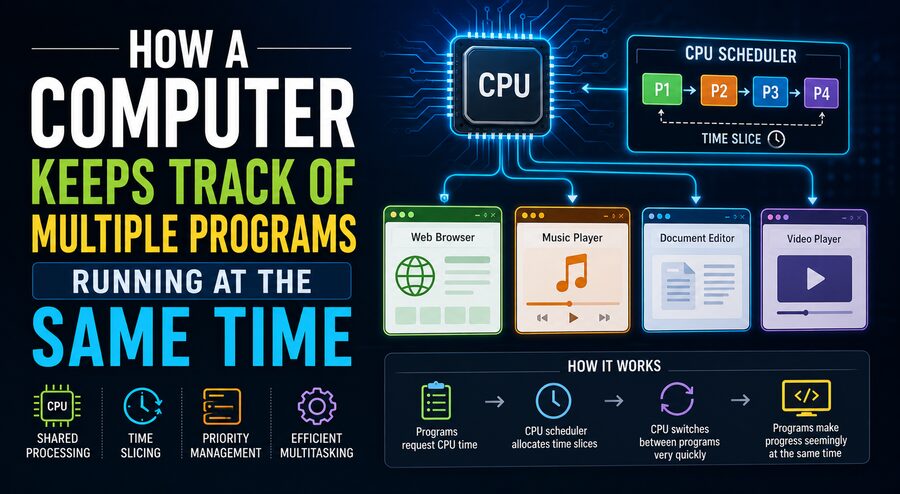
On a computer with a single CPU core, only one thread of instructions can normally execute on that core at a particular instant.
So how can several programs appear to run simultaneously?
The answer is rapid switching.
The operating system gives one program a small amount of processor time, then pauses it and gives another program a turn.
For example:
Browser → 5 ms
Music Player → 5 ms
Editor → 5 ms
Background Service → 5 ms
Browser → 5 ms
...
These switches happen extremely quickly—often many times per second.
Because human perception is much slower, the applications seem to be running simultaneously.
This technique is known as time-sharing or preemptive multitasking. ⏱️
🧠 The Scheduler Decides Who Runs Next
The operating system component responsible for choosing which process or thread receives CPU time is called the scheduler.
The scheduler examines runnable tasks and decides which should execute next.
Its goals may include:
- keeping the CPU busy,
- making interactive applications feel responsive,
- ensuring important tasks receive enough processor time,
- preventing one program from monopolizing the system,
- balancing work across multiple CPU cores.
Different operating systems use different scheduling algorithms.
Some systems consider priority levels, while others track how much CPU time a task has already received.
The scheduler continuously makes decisions—often thousands of times during ordinary computer use. ⚙️
🔄 What Is a Context Switch?
When the CPU stops running one process and begins running another, the operating system performs a context switch.
Suppose Program A is performing calculations.
Before switching to Program B, the operating system must save Program A’s current state.
This may include information such as:
- CPU register values,
- instruction position,
- stack information,
- processor flags.
The operating system then loads Program B’s saved state and allows it to continue.
Later, Program A can be restored.
A simplified sequence looks like:
Run Program A
       ↓
Save A's CPU state
       ↓
Load Program B's state
       ↓
Run Program B
       ↓
Save B's state
       ↓
Restore Program A
A context switch takes a small amount of time, so operating systems try to balance responsiveness against switching overhead.
🧵 Processes Can Contain Multiple Threads
A process can contain one or more threads.
A thread is a sequence of instructions that can be scheduled for execution.
For example, a web browser might use different threads for:
- displaying the user interface,
- loading network data,
- decoding images,
- playing video,
- running JavaScript,
- handling background tasks.
Threads within the same process often share memory and resources, which makes communication between them efficient.
Modern processors contain multiple CPU cores, so several threads can sometimes execute truly in parallel.
If a processor has eight cores, for example, multiple tasks may physically run at the same instant rather than merely taking turns. 🧵⚡
🖥️ Multitasking vs. Parallel Processing
These two concepts are related but not identical.
Multitasking means the operating system manages multiple active tasks.
Parallel processing means multiple instructions or tasks are actually executing at the same time on different processing units.
A single-core processor can multitask by switching rapidly between programs.
A multi-core processor can do both:
- switch between many tasks,
- run several tasks simultaneously.
This is why modern multi-core computers can handle demanding workloads such as gaming, video editing, web browsing, and background synchronization at the same time. 🎮🎥🌐
📊 Process States Help the Operating System Stay Organized
A process is not always actively using the CPU.
Operating systems usually place processes into different states.
Common states include:
🟢 Running
The process is currently executing on a CPU.
🟡 Ready
The process is able to run but is waiting for processor time.
🔵 Waiting or Blocked
The process cannot continue until something happens.
It may be waiting for:
- data from a disk,
- a network response,
- keyboard input,
- a timer,
- another process.
⚫ Terminated
The program has finished or has been stopped.
By tracking these states, the operating system avoids wasting CPU time on programs that cannot currently make progress.
⌨️ Interrupts Tell the CPU Something Needs Attention
Computers constantly receive events from hardware.
A keyboard key may be pressed.
A network packet may arrive.
A disk operation may finish.
A timer may expire.
Hardware uses signals called interrupts to notify the CPU that an event requires attention.
When an interrupt occurs, the processor temporarily pauses its current work and runs special operating-system code called an interrupt handler.
After the event is processed, the previous task can usually resume.
Timer interrupts are especially important for multitasking because they help the operating system regain control of the processor at regular intervals. ⏰
Without such mechanisms, a badly behaved program could potentially keep the CPU indefinitely.
🧠 Memory Must Also Be Shared Safely
Processor time is only one resource that programs need.
Each running application also requires memory.
The operating system uses virtual memory to give each process the illusion that it has its own private address space.
Program A might think it is using a particular memory address, while Program B can use what appears to be the same address.
Behind the scenes, the operating system and CPU hardware map those virtual addresses to different physical memory locations.
This provides several important benefits:
- programs are isolated from one another,
- memory can be allocated more flexibly,
- applications cannot normally read another process’s memory,
- crashes are less likely to damage unrelated programs.
🔐 This isolation is essential for both reliability and security.
💾 What Happens When RAM Runs Low?
If many programs are running, they may collectively require more memory than the computer has physically available.
The operating system can use storage as an extension of memory through mechanisms such as paging or swap space.
Less frequently used memory pages may be moved temporarily from RAM to an SSD or hard drive.
When the program needs that data again, it is loaded back into RAM.
This allows more programs to remain active, although storage is much slower than physical memory.
If excessive swapping occurs, the computer can become noticeably sluggish. 🐢
This is one reason adding more RAM can improve performance when many applications are used at once.
📁 The Operating System Tracks Files and Devices
Programs also need access to files, printers, cameras, microphones, network adapters, and other resources.
The operating system acts as a manager between applications and hardware.
Instead of allowing every program to control a disk directly, applications typically request services through the operating system.
For example, a program might request:
Open this file.
The operating system checks permissions, locates the file, communicates with the storage device, and returns the requested data.
This centralized management helps prevent programs from interfering with each other or corrupting shared resources. 💾🔒
🔐 Permissions Keep Processes Under Control
Operating systems also enforce security boundaries.
A normal application should not automatically be allowed to:
- read protected system memory,
- modify operating-system files,
- access another user’s private information,
- control hardware directly,
- terminate critical system services.
Processes therefore run with specific permissions and privilege levels.
The operating system checks whether a process is allowed to perform requested operations.
This helps protect the system from bugs and malicious software. 🛡️
📡 Processes Need Ways to Communicate
Sometimes programs must exchange information.
For example, a browser may communicate with a helper process, or one application may send data to another.
Operating systems provide mechanisms called inter-process communication, often abbreviated IPC.
Common IPC techniques include:
- pipes,
- shared memory,
- message queues,
- sockets,
- signals.
These mechanisms allow processes to cooperate while maintaining controlled boundaries.
Shared memory can be extremely fast because multiple processes can access the same memory region, but it requires careful synchronization to prevent conflicts.
🔒 Why Synchronization Matters
When multiple threads or processes access the same data, problems can occur if they modify it simultaneously.
Suppose two threads both try to update a bank-account balance at the same time.
Without proper coordination, one update might overwrite the other.
This type of problem is called a race condition.
Operating systems and programming languages provide synchronization tools such as:
- mutexes,
- locks,
- semaphores,
- condition variables,
- atomic operations.
These tools control access to shared resources.
For example, a mutex may allow only one thread at a time to modify a particular piece of data. 🔐🧵
⚠️ What Is a Deadlock?
Synchronization solves many problems, but it can introduce another one: deadlock.
Imagine:
- Program A holds Resource 1 and waits for Resource 2.
- Program B holds Resource 2 and waits for Resource 1.
Neither can continue.
They are stuck waiting for each other indefinitely. 🔄⚠️
Operating systems and application designers use careful resource-allocation strategies to reduce the risk of deadlocks.
Some systems detect deadlocks and recover, while others attempt to prevent them through design rules.
🎯 Priorities Help Important Tasks Run First
Not every process has equal importance.
A system may assign priorities to tasks.
For example, audio playback may need regular CPU access to prevent sound from stuttering.
A large background file-indexing job may be less urgent.
The scheduler can therefore favor latency-sensitive tasks while giving background jobs lower priority.
However, operating systems must avoid starvation, where a low-priority task never gets enough CPU time because higher-priority processes continuously take precedence.
Good scheduling algorithms attempt to balance responsiveness and fairness. ⚖️
💤 Programs Often Spend Most of Their Time Waiting
Interestingly, many programs do not continuously use the CPU.
A browser may wait for network data.
A text editor may wait for keyboard input.
A media player may wait until the next audio buffer needs processing.
When a program is waiting, the operating system can give the CPU to another program.
This is a major reason multitasking works so efficiently.
Instead of letting processing power sit idle, the operating system continuously finds useful work to perform. ⚡
📱 The Same Principles Apply to Smartphones
Smartphones also run many processes.
Your phone may simultaneously handle:
- music playback 🎵,
- notifications 🔔,
- GPS location 📍,
- messaging 💬,
- app updates 📲,
- network communication 📡,
- background synchronization ☁️.
Mobile operating systems use process scheduling and memory management just like desktop systems.
However, phones place additional emphasis on battery efficiency.
Background applications may be suspended, restricted, or terminated when they are not actively needed.
This helps conserve energy while keeping the device responsive. 🔋
🖥️ What Task Manager Actually Shows You
When you open a system-monitoring application such as Task Manager, you are seeing part of the operating system’s internal bookkeeping.
The tool may display:
- process names,
- process IDs,
- CPU usage,
- memory consumption,
- disk activity,
- network activity,
- energy usage,
- process priority.
These measurements allow users and administrators to see how system resources are being distributed.
If one program consumes unusually high CPU or memory, the monitor can help identify the cause. 📊
🚀 Why Modern Computers Feel So Responsive
Modern multitasking depends on several technologies working together:
Processes keep programs separated.
Threads allow individual programs to perform multiple activities.
Schedulers decide what runs next.
Context switches allow tasks to take turns.
Multiple CPU cores allow genuine parallel execution.
Virtual memory isolates applications.
Interrupts handle hardware events.
Permissions enforce security.
Synchronization mechanisms prevent shared-data conflicts.
Together, these systems allow a computer to manage hundreds or even thousands of active processes and threads without requiring the user to think about them. 🧠⚙️
🌐 One Computer, Many Activities
What appears to the user as effortless multitasking is actually a carefully coordinated system operating at extraordinary speed.
Every time you move a mouse while music plays in the background and a file downloads, the operating system is deciding which tasks need attention, preserving their internal states, managing their memory, handling hardware events, and ensuring they do not interfere with one another.
On a single CPU core, programs may take turns so rapidly that they appear simultaneous. On modern multi-core processors, several tasks can actually run in parallel. ⚡💻
The operating system makes all of this possible by treating each program as a controlled process with its own identity, memory, resources, and execution state.
The central principle is simple: a computer keeps many programs running by carefully tracking each task, giving it processor time when needed, protecting its resources, and switching among activities faster than humans can notice.
That invisible coordination is one of the fundamental reasons modern computers can feel fast, responsive, and capable of doing so many things at once. 🚀🖥️