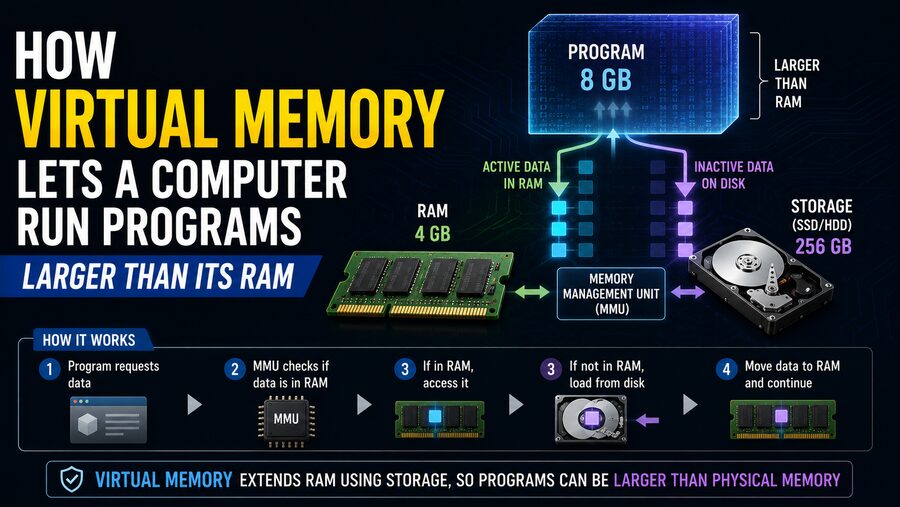

A computer’s RAM (Random Access Memory) is one of its most important resources. Programs use RAM to store instructions, data, temporary results, open documents, browser tabs, game assets, and countless other pieces of information while they are running.
But what happens when a program needs more memory than the computer physically has available? 🤔
This is where virtual memory becomes essential.
Virtual memory is a memory-management technique that allows an operating system to give programs the illusion that they have access to a large, continuous block of memory—even when the available physical RAM is much smaller.
Instead of requiring every piece of a running program to remain in RAM at all times, the operating system keeps the most actively used parts in RAM and can temporarily place less-used data on a storage device such as an SSD.
This allows computers to run larger programs, keep more applications open, isolate programs from each other, and manage memory much more flexibly. 🧠⚙️
🧩 What Is Virtual Memory?
Virtual memory is an abstraction created by the operating system and supported by the computer’s processor.
A running program does not normally work directly with the exact physical locations inside RAM.
Instead, it works with virtual addresses.
The operating system and hardware translate those virtual addresses into actual locations in physical memory.
Conceptually:
Program virtual address ➡️ Address translation ➡️ Physical RAM location
This means a program can behave as though it owns a large, orderly memory space even though its data may actually be scattered across different areas of physical RAM.
Some portions may not even be in RAM at that moment.
They may temporarily reside on disk.
🧠 Why Do Computers Need Virtual Memory?
Suppose a computer has 8 GB of RAM.
The operating system itself may already use several gigabytes. A browser could consume more memory, while a photo editor, messaging application, and background services use even more.
Eventually, the programs might collectively request more memory than the available physical RAM.
Without virtual memory, the operating system would have fewer options. It might need to refuse memory requests or terminate programs.
Virtual memory gives the system another possibility.
Data that is not currently being used heavily can be moved from RAM to a reserved area of storage.
That frees physical RAM for data that is needed immediately.
When the older data is needed again, it can be loaded back into RAM. 🔄
📄 Memory Is Divided Into Pages
Most modern virtual-memory systems divide memory into fixed-size blocks called pages.
Physical RAM is divided into corresponding blocks often called page frames.
A page might contain:
- Part of a program’s executable code
- Variables
- Images
- Application data
- Stack information
- Dynamically allocated memory
Instead of moving an entire application between RAM and storage, the system can work with individual pages.
That is much more efficient.
For example, imagine a program using 6 GB of virtual memory but actively accessing only 2 GB at the moment.
The operating system may keep the most useful 2 GB in RAM while other pages remain elsewhere until needed.
🗺️ What Is a Page Table?
The computer needs some way to remember where each virtual page is located.
This is the job of a page table.
A page table is a data structure maintained by the operating system that maps virtual memory pages to physical memory frames.
Conceptually, it may contain information like:
Virtual Page 1 → Physical Frame 42
Virtual Page 2 → Physical Frame 108
Virtual Page 3 → Not currently in RAM
Virtual Page 4 → Physical Frame 17
Every process usually has its own virtual address space and associated mapping information.
When a program tries to access a virtual address, hardware translates that address using these mappings.
This translation happens extremely frequently—potentially billions of times during normal computing.
⚡ The Role of the MMU
The hardware component responsible for much of virtual-address translation is called the Memory Management Unit, or MMU.
The MMU is built into modern processors.
When a program requests data from a virtual address, the MMU determines which physical memory location corresponds to it.
The basic process is:
CPU generates virtual address ➡️ MMU translates it ➡️ RAM is accessed
Because memory accesses happen so often, this translation must be extremely fast.
Processors therefore include additional mechanisms to speed it up.
🚀 What Is the TLB?
A Translation Lookaside Buffer, or TLB, is a small, extremely fast cache that stores recently used virtual-to-physical address translations.
Without a TLB, the processor might have to consult page-table structures in memory for every address translation.
That could significantly reduce performance.
Instead, the processor first checks the TLB.
If the translation is already there, the CPU can quickly determine the correct physical memory location.
This is called a TLB hit.
If the mapping is not available, additional page-table lookup work is required.
Virtual memory therefore relies on several layers of hardware and software working together extremely efficiently. ⚡
💾 What Happens When RAM Fills Up?
When physical RAM becomes heavily used, the operating system may decide that certain memory pages are not currently important enough to remain there.
It can move some of them to a reserved storage area.
Depending on the operating system, this may be called:
- A page file
- A swap file
- A swap partition
- Backing storage
Once a page has been moved, the corresponding RAM frame becomes available for other data.
The program still believes that the virtual page exists at the same virtual address.
It does not need to know that the operating system temporarily placed the underlying data somewhere else.
This transparency is one of virtual memory’s most powerful features.
🚨 What Is a Page Fault?
Suppose a program tries to access a virtual page that is currently not present in physical RAM.
The processor cannot immediately complete that request.
Instead, it triggers an event called a page fault.
A page fault is not necessarily an error.
It often means:
“The requested page exists, but it must be loaded into RAM first.”
The operating system handles the fault.
A simplified sequence looks like this:
- 💻 The program accesses a virtual address.
- 🧠 The MMU determines that the required page is not currently in RAM.
- ⚠️ A page fault occurs.
- 💾 The operating system finds the page in storage or another backing source.
- 📥 The page is loaded into a free physical-memory frame.
- 🗺️ The page table is updated.
- ▶️ The program continues.
From the application’s perspective, the access usually just appears to take longer than a normal memory access.
🐢 Why Is Storage Slower Than RAM?
Virtual memory is useful, but it does not magically make storage as fast as RAM.
RAM has extremely low access latency and high bandwidth.
Even modern SSDs are much slower than RAM for the kinds of small, random accesses common in virtual-memory paging.
Therefore:
Data already in RAM ➡️ Fast
Data that must be retrieved from storage ➡️ Much slower
If page faults happen occasionally, the slowdown may be manageable.
If they happen constantly, performance can become extremely poor.
🔄 What Is Swapping?
The term swapping is often used to describe moving memory contents between RAM and storage.
Historically, entire processes could be swapped in and out.
Modern systems more commonly move individual memory pages, but the term “swap” is still widely used.
Suppose RAM is nearly full.
The operating system may identify pages that have not been accessed recently.
It moves those pages to swap space and uses the freed RAM for active applications.
Later, if one of those old pages becomes necessary again, the OS loads it back.
This creates the appearance of having more usable memory than the physical RAM alone provides.
📉 What Is Thrashing?
Virtual memory becomes problematic when the computer does not have enough physical RAM for its active workload.
Suppose many programs are trying to use large amounts of memory simultaneously.
The operating system might repeatedly:
Move page A out ➡️ Load page B ➡️ Move page C out ➡️ Reload page A ➡️ Move page B out…
The computer spends more time moving pages between RAM and storage than doing useful work.
This condition is called thrashing. 🐌
Common symptoms can include:
- Severe system slowdown
- Applications freezing temporarily
- High storage activity
- Delayed window switching
- Slow application response
Adding more physical RAM can greatly reduce thrashing because more active data can remain in fast memory.
🎯 How Does the OS Decide Which Pages to Remove?
The operating system uses page-replacement algorithms to decide which memory pages should be removed from RAM when space is needed.
An ideal algorithm would remove the page that will not be needed for the longest time.
Unfortunately, the operating system cannot perfectly predict future memory accesses.
Instead, it uses approximations based on recent behavior.
A common concept is Least Recently Used, or LRU.
The basic idea is:
Pages that have not been used recently are more likely to be good candidates for removal.
Real operating systems often use sophisticated approximations and additional information, such as whether a page has been modified.
✏️ Clean Pages vs. Dirty Pages
Memory pages can be described as clean or dirty.
A clean page has not been modified since it was loaded.
If the operating system needs to remove it from RAM and the original data is already available elsewhere—such as in an executable file—it may simply discard the page.
If needed again, it can be reloaded from the original source.
A dirty page has been modified.
Its current contents may not exist anywhere else.
Before reusing that physical-memory frame, the operating system may need to write the page to storage.
That requires additional I/O and can take more time.
🔐 Virtual Memory Also Improves Security
Virtual memory is not only about extending available memory.
It also provides process isolation.
Imagine two applications running simultaneously.
Program A may use virtual address:
0x1000Program B could also use:
0x1000But those virtual addresses can map to completely different physical memory locations.
As a result, each program can operate inside its own virtual address space.
Normally, Program A cannot simply read or overwrite Program B’s private memory.
The operating system and hardware enforce access permissions.
This isolation significantly improves system reliability and security. 🔒
🛡️ Memory Protection
Page-table entries can contain permissions describing how memory may be used.
A page might be:
- Readable
- Writable
- Executable
- Accessible only by the operating-system kernel
- Unavailable to a particular process
For example, a page containing program instructions may be marked executable but not writable.
A page containing user data may be writable but not executable.
These protections help prevent accidental corruption and can make certain security attacks more difficult.
📚 Shared Memory Saves Space
Virtual memory can also allow multiple programs to share the same physical memory.
Suppose several applications use the same system library.
Instead of placing a separate copy of the library’s unmodified code in RAM for every application, the operating system may map the same physical pages into multiple virtual address spaces.
Conceptually:
Program A virtual page ➡️ Shared physical frame
Program B virtual page ➡️ Same physical frame
This reduces memory usage.
At the same time, private application data can remain isolated.
🧬 Copy-on-Write
Another clever virtual-memory technique is called copy-on-write.
Suppose two processes initially need identical memory contents.
Rather than immediately creating two physical copies, the operating system can allow both processes to reference the same physical page.
As long as neither process changes the data, only one copy is needed.
If one process tries to modify the page, the operating system creates a private copy at that moment.
This improves efficiency and can significantly reduce unnecessary memory duplication.
📂 Memory-Mapped Files
Virtual memory can also connect files directly to a process’s address space.
This technique is called memory mapping.
Instead of manually reading pieces of a large file into buffers, a program can map the file into virtual memory.
The operating system loads the required portions when they are accessed.
This is especially useful for:
- Large databases
- Multimedia files
- Executable programs
- Shared libraries
- High-performance file processing
Memory mapping demonstrates that virtual memory is much broader than simply “using disk when RAM is full.”
It is a general mechanism for organizing and controlling a process’s memory.
🖥️ 32-Bit vs. 64-Bit Virtual Address Spaces
The size of a program’s virtual address space is strongly influenced by processor architecture.
A 32-bit system has a theoretical address space of approximately:
2³² bytes = 4 GB
That creates significant limitations for memory-intensive applications.
A 64-bit architecture can theoretically represent a vastly larger address range.
In practice, modern processors and operating systems usually implement fewer than the full 64 address bits, but the available virtual address space is still enormous compared with 32-bit systems.
This allows modern applications to work with very large memory mappings.
🧮 Example: Running a Large Program With Limited RAM
Imagine a computer with:
8 GB physical RAM
Now suppose a scientific application has a virtual-memory footprint of:
12 GB
That does not automatically mean the application cannot run.
Perhaps the application is actively working with only 5 GB of its data at a particular moment.
The operating system can keep those important pages in physical RAM while leaving less frequently used pages on storage or backed by files.
When the application later accesses another section, the OS can load the necessary pages.
Therefore:
Virtual memory footprint > physical RAM
can still be possible.
However, if the application actively needs nearly all 12 GB at once, the 8 GB system may experience constant paging and severe slowdown.
🎮 Virtual Memory in Games and Creative Software
Modern games, video editors, 3D applications, and engineering programs can consume huge amounts of memory.
A game may need:
- Textures
- Maps
- Character data
- Audio
- Physics information
- Shader data
Not all of that information must necessarily stay in RAM simultaneously.
Some assets may be loaded only when needed.
Similarly, a video-editing program can map enormous files into virtual memory without loading the entire video into physical RAM at once.
Virtual memory helps make these workloads practical.
⚙️ Virtual Memory Is Not a Replacement for RAM
It is important to distinguish between capacity and performance.
Virtual memory can increase the amount of addressable and usable memory available to programs.
But it cannot make a slow storage device behave like physical RAM.
If a workload regularly exceeds available physical memory, adding more RAM can dramatically improve performance.
A computer with sufficient RAM spends more time directly accessing memory and less time handling page faults and storage transfers.
Virtual memory is therefore best viewed as a memory-management system, not as free additional RAM.
🧠 A Simple Analogy
Imagine RAM as your desk and storage as a filing cabinet. 🗄️
Your desk is fast to access, but it has limited space.
The filing cabinet can hold far more information, but retrieving documents takes longer.
You keep the papers you are currently working with on your desk.
When the desk becomes crowded, you put less important papers into the filing cabinet.
If you need them later, you retrieve them and place them back on the desk.
Virtual memory works similarly.
The operating system continually decides which information belongs in fast physical RAM and which information can temporarily remain elsewhere.
🌟 The Bigger Picture
Virtual memory is one of the fundamental technologies that makes modern operating systems possible.
It allows programs to work with large, organized address spaces without needing to know the exact physical locations of their data.
Using pages, page tables, the MMU, TLBs, page faults, swapping, and memory protection, the computer dynamically maps virtual addresses to physical resources.
When RAM becomes limited, less-active memory pages can be moved or backed by storage, allowing programs to continue running even when their total memory usage exceeds physical RAM. 💾🔄
Virtual memory also provides major benefits beyond capacity, including:
- Process isolation
- Memory protection
- Shared libraries
- Memory-mapped files
- Copy-on-write
- Flexible memory allocation
The tradeoff is performance. Accessing data already in RAM is extremely fast, while retrieving swapped-out pages from storage is much slower.
When paging becomes excessive, the system can begin thrashing and feel painfully slow.
Ultimately, virtual memory lets a computer treat physical RAM as part of a much larger and more flexible memory system. Instead of requiring every program and every piece of data to fit into RAM simultaneously, it keeps the most important information close to the CPU and moves less-active information out of the way until it is needed again. 🧠💻⚡