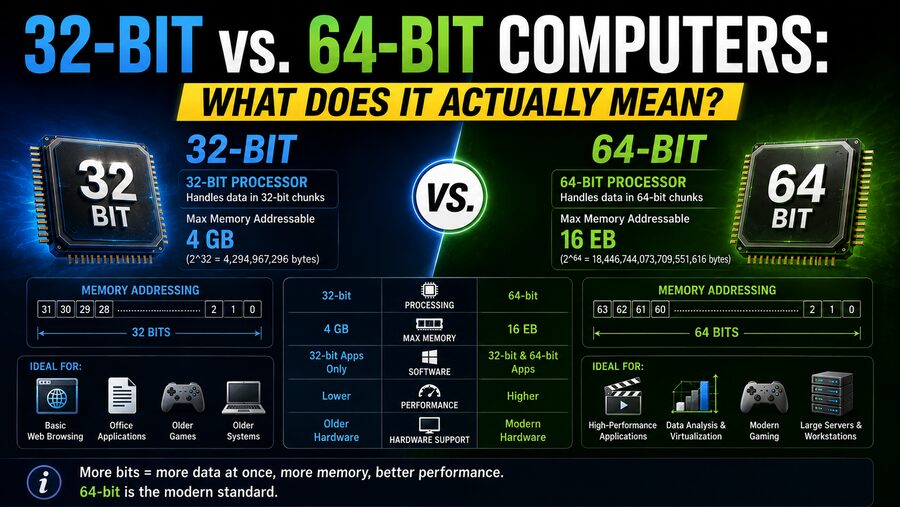

If you have ever downloaded software, installed an operating system, or looked at a computer’s specifications, you have probably seen terms such as 32-bit, 64-bit, x86, and x64. At first glance, it might seem that a 64-bit computer is simply twice as powerful as a 32-bit computer.
But that is not really what the numbers mean. 🤔
The terms 32-bit and 64-bit describe important aspects of how a computer’s processor handles data and memory addresses. They affect how much memory a system can use, what software it can run, how efficiently certain calculations can be performed, and how modern operating systems are designed.
Understanding the difference requires looking inside the processor itself. ⚙️
🔢 What Does “Bit” Mean?
A bit is the smallest basic unit of digital information.
A bit can have one of two values:
0 or 1
Because computers use binary, larger values are represented by combining many bits.
For example:
8 bits = 256 possible combinations
16 bits = 65,536 possible combinations
32 bits = 2³² possible combinations
64 bits = 2⁶⁴ possible combinations
That exponential growth becomes enormously important when computers use binary values to represent memory addresses and large integers.
However, when we call a computer “32-bit” or “64-bit,” we are not simply describing the size of every piece of data inside the machine.
The term usually refers to characteristics of the processor’s architecture, particularly its registers, instruction set, and address-handling capabilities.
🧠 What Is a CPU Register?
Inside every CPU are extremely small, extremely fast storage locations called registers.
Registers hold values that the processor is actively working with.
Imagine the CPU needs to calculate:
25 + 17
The processor may load those numbers into registers, perform the addition, and store the result in another register.
In a 32-bit architecture, many general-purpose registers are designed to naturally handle values up to 32 bits wide.
In a 64-bit architecture, general-purpose registers can typically operate on 64-bit values.
A 64-bit register can represent dramatically more possible bit patterns than a 32-bit register.
For unsigned integers:
32 bits can represent values from 0 to 4,294,967,295.
A 64-bit unsigned value can represent numbers from 0 to:
18,446,744,073,709,551,615
That is more than 18 quintillion possible values. 🤯
📍 Memory Addresses Are a Major Part of the Difference
One of the most important consequences of processor bitness involves memory addressing.
Think of RAM as an enormous collection of storage locations.
Each location needs an address so the processor can find it.
It is somewhat like houses on a street. 🏠
If a computer wants to retrieve a piece of information, it needs to know the address where that information is stored.
A system with a 32-bit address space has:
2³² = 4,294,967,296 possible byte addresses
Because memory is normally byte-addressable, this corresponds to approximately:
4 GiB of address space
This is where the famous statement that a 32-bit computer can only use around 4 GB of memory comes from.
🧮 Why 32-Bit Systems Often Have a 4 GB RAM Limit
With 32 bits available for addressing, there are roughly 4.29 billion possible address values.
If each address represents one byte:
4,294,967,296 bytes = 4 GiB
In practice, a typical 32-bit operating system may make somewhat less than the full 4 GiB available to applications and users.
Why?
Some parts of the address space may need to be reserved for things such as:
- Hardware devices
- Graphics memory mappings
- Operating-system structures
- Memory-mapped input/output
As a result, older 32-bit PCs with 4 GB of installed RAM sometimes reported only around 3 to 3.5 GB as usable.
There are technologies such as Physical Address Extension, or PAE, that allow some 32-bit systems to access more physical memory overall. However, individual 32-bit processes still have limited virtual address spaces.
So the simple “32-bit equals 4 GB” rule is useful, but the full technical reality is more complicated. 🧠
🚀 How Much Memory Can 64-Bit Computers Address?
A theoretical 64-bit address space contains:
2⁶⁴ possible addresses
That is:
18,446,744,073,709,551,616 bytes
which is about 16 exbibytes of addressable space.
That is an enormous amount of memory. 🌌
For comparison, one exbibyte is more than a billion gibibytes.
However, modern 64-bit processors generally do not implement all 64 address bits for ordinary memory addressing.
There is little practical reason to do so today, and implementing the complete theoretical space would add complexity.
Real processors and operating systems therefore support smaller—but still enormous—address spaces.
The exact maximum memory depends on factors such as:
- CPU architecture
- Processor generation
- Motherboard
- Operating system
- Operating-system edition
- Hardware configuration
Even so, 64-bit systems can support vastly more memory than traditional 32-bit systems.
🖥️ 64-Bit Does Not Mean “Twice as Fast”
One of the most common misconceptions is:
64-bit = twice the performance of 32-bit
That is incorrect. ❌
A 64-bit processor is not automatically twice as fast simply because its registers are twice as wide.
Performance depends on many other factors, including:
- CPU clock speed
- Number of cores
- Cache size
- Processor architecture
- Memory speed
- Storage performance
- Software optimization
- Instruction-level parallelism
A modern 64-bit processor will usually be dramatically faster than an old 32-bit processor, but much of that difference comes from decades of architectural improvements—not simply the jump from 32 to 64 bits.
⚡ When Can 64-Bit Processing Improve Performance?
Although 64-bit does not automatically double performance, it can provide important benefits.
Applications that work with large integers or large amounts of memory may benefit significantly.
Examples include:
- Video editing 🎥
- 3D rendering
- Scientific simulations 🔬
- Large databases
- Engineering software
- Machine learning 🤖
- Virtual machines
- Professional image editing
- Large software development projects
A 64-bit processor can manipulate 64-bit integers directly, whereas a 32-bit processor may need multiple operations to perform certain calculations involving large values.
Modern 64-bit architectures may also include additional registers and architectural improvements that help software run more efficiently.
📦 What Is a 32-Bit Program?
Applications themselves can also be compiled as either 32-bit or 64-bit software.
A 32-bit program is built to run using the conventions and instruction environment of a compatible 32-bit architecture.
Such programs typically use 32-bit pointers, meaning memory addresses stored by the application occupy 32 bits.
This limits how much virtual memory a single 32-bit program can conveniently address.
For older desktop applications, this was rarely a problem.
But imagine editing an enormous video project or loading a dataset requiring 20 GB of memory.
A 32-bit application cannot simply address all of that memory within one conventional 32-bit address space.
A 64-bit application can handle much larger address spaces. 📊
🧠 What Is a Pointer?
A pointer is a value that identifies a location in memory.
Suppose a program stores a photograph somewhere in RAM.
Instead of copying that entire photograph every time it needs to access it, the software may keep a pointer telling it where the image begins.
In a typical 32-bit environment, pointers are usually 32 bits wide.
In a typical 64-bit environment, pointers generally occupy 64 bits in the program’s data structures, even though not every possible bit pattern corresponds to an implemented memory address.
This has an interesting consequence.
64-bit applications can sometimes use more memory than equivalent 32-bit applications because their pointers and certain data structures are larger.
So 64-bit computing provides a much larger address space, but it can also introduce some memory overhead.
🪟 What About 32-Bit and 64-Bit Operating Systems?
Operating systems also have architectures.
A 32-bit operating system is designed around a 32-bit software and memory environment.
A 64-bit operating system is designed to take advantage of 64-bit processor capabilities.
Modern versions of major desktop operating systems are overwhelmingly 64-bit.
A 64-bit OS can support larger amounts of RAM and run modern 64-bit applications.
In many environments, it can also run older 32-bit programs through compatibility mechanisms.
However, the reverse generally does not work:
A 32-bit operating system cannot normally run a 64-bit application.
The 32-bit OS does not provide the execution environment that the 64-bit software expects.
🔄 Why Can Some 64-Bit Computers Run 32-Bit Software?
Compatibility was extremely important when the computing industry transitioned from 32-bit to 64-bit systems.
Millions of existing programs had already been written for 32-bit processors.
For this reason, many 64-bit CPU architectures and operating systems were designed with compatibility features that allow older software to continue working.
On x86-based PCs, 64-bit processors historically supported execution modes that allow many 32-bit applications to run.
The operating system may provide compatible libraries and translation layers that help these programs function.
However, support varies by operating system and platform, and some modern environments have gradually reduced or eliminated support for older 32-bit software.
🧩 What Do x86 and x64 Mean?
The terminology can be confusing.
Historically, x86 refers to the processor family descended from Intel’s 8086 architecture.
Processors such as the:
- 80286
- 80386
- 80486
helped establish the x86 name.
Over time, “x86” became commonly associated with 32-bit PC software, particularly in installer menus.
Meanwhile, x64, x86-64, and AMD64 commonly refer to the 64-bit extension of the x86 architecture.
AMD originally introduced the widely adopted x86-64 architecture, and Intel later implemented compatible technology.
So if a download page provides:
x86 → usually 32-bit
x64 → usually 64-bit
that is generally what it means.
📱 Are Smartphones 32-Bit or 64-Bit?
Modern smartphones are largely 64-bit as well.
Most use processor architectures based on ARM rather than traditional desktop x86 designs.
ARM’s 64-bit architecture is commonly known as AArch64, while its instruction set is associated with ARM64 terminology.
Like desktop computers, the move to 64-bit mobile processors allows phones and tablets to support larger memory spaces and modern software architectures.
This is increasingly important because smartphones now perform demanding tasks such as:
- 4K and 8K video processing
- Gaming 🎮
- Artificial intelligence
- Computational photography 📸
- Augmented reality
- Desktop-style multitasking
Modern mobile devices are essentially powerful 64-bit computers that happen to fit in your pocket. 📱
🎮 Why 64-Bit Became Important for Gaming
Games increasingly require large amounts of RAM.
High-resolution textures, detailed 3D models, large open worlds, physics simulations, audio assets, and game-engine data can consume many gigabytes of memory.
Older 32-bit games were constrained by limited address spaces.
Moving to 64-bit applications allowed developers to work with much larger memory allocations.
This is one reason most modern PC games and game engines are designed primarily for 64-bit operating systems.
The same applies to professional graphics and content-creation software. 🎨
🗄️ Does 64-Bit Affect Storage Size?
Not directly.
A computer being 64-bit does not mean it can store twice as much data on its SSD or hard drive.
Storage capacity is a separate issue.
A 64-bit computer can have:
- A 256 GB SSD
- A 1 TB SSD
- A 10 TB hard drive
- Many petabytes of networked storage
Likewise, older 32-bit systems could use large storage devices when their operating systems, filesystems, and storage interfaces supported them.
Bitness primarily concerns processor architecture and addressing, not simply how many files can fit on a disk. 💾
🔢 Does 64-Bit Mean Everything Uses 64 Bits?
No.
A 64-bit CPU still handles data of many sizes.
It may process:
- 8-bit values
- 16-bit values
- 32-bit values
- 64-bit values
- 128-bit or wider vector data
For example, a single pixel color component might need only 8 bits.
A standard integer might use 32 bits.
A memory pointer may use a 64-bit representation.
A vector-processing instruction may operate on hundreds of bits at once.
Therefore, calling a machine “64-bit” does not mean every operation or piece of data is exactly 64 bits wide.
🧮 What About 128-Bit Computers?
If 64-bit is better than 32-bit, will computers soon become 128-bit?
Not necessarily.
The transition from 32-bit to 64-bit was strongly motivated by memory-address limitations.
Moving to 128-bit general-purpose addressing would provide an almost unimaginably large address space that ordinary computers do not remotely need.
Processors already perform some 128-bit, 256-bit, and even wider operations through specialized vector instructions.
But that does not make them “128-bit computers” in the same everyday architectural sense.
A future transition to a larger general-purpose architecture would need practical engineering reasons, not simply a desire for a larger number. 🚀
🔐 64-Bit Systems and Security
Modern 64-bit platforms can also support security improvements.
A larger address space gives operating systems more flexibility when using security mechanisms such as Address Space Layout Randomization, or ASLR.
ASLR makes it harder for attackers to predict exactly where important code and data will be located in memory.
Modern 64-bit CPU generations also commonly include newer security features and instruction-set protections.
However, this does not mean that 64-bit software is automatically secure.
Security still depends on software quality, operating-system protections, updates, system configuration, and user behavior. 🛡️
🔍 How Can You Tell Whether Your Computer Is 32-Bit or 64-Bit?
Most relatively modern computers are 64-bit.
Operating systems usually display architecture information in their system-information or device-information settings.
You may see descriptions such as:
64-bit operating system, x64-based processor
This means both the processor and installed operating system are running in a 64-bit environment.
Another possibility on older machines might be:
32-bit operating system, x64-based processor
This means the CPU supports 64-bit operation, but a 32-bit operating system was installed.
In that situation, the computer cannot fully take advantage of the processor’s 64-bit software environment without changing the operating system.
📊 32-Bit vs. 64-Bit at a Glance
The major differences can be summarized like this:
32-bit systems:
- Smaller address space
- Traditionally limited to around 4 GiB of addressable memory per 32-bit address space
- Common in older computers
- Runs 32-bit software
- Cannot normally run 64-bit applications
64-bit systems:
- Vastly larger theoretical address space
- Can support far more RAM
- Designed for modern operating systems and applications
- Can efficiently manipulate 64-bit integer values
- Often supports older 32-bit applications depending on the platform
The key advantage of 64-bit computing is therefore not simply speed.
It is the ability to work efficiently within a much larger and more capable computing environment.
🌟 Final Thoughts
The difference between 32-bit and 64-bit computers comes down to how processors represent and manipulate information, particularly register values and memory addresses. 💻🔢
A 32-bit architecture can represent roughly 4.3 billion distinct address values, which leads to the familiar roughly 4 GiB address-space limit.
A 64-bit architecture has a theoretical address space so enormous that today’s computers use only a small fraction of what 64 bits could ultimately represent.
But 64-bit does not mean “twice as fast,” nor does it mean every piece of information inside the computer is stored in exactly 64 bits.
Instead, it provides processors and operating systems with a much larger numerical and memory-addressing environment.
The transition from 32-bit to 64-bit computing became essential as applications grew more demanding and computers began using much larger amounts of RAM.
Today, 64-bit computing is standard across desktops, laptops, servers, and smartphones. 🖥️📱
So the next time you see x86, x64, 32-bit, or 64-bit on a software download page, you will know that those labels are describing much more than a number.
They reveal something fundamental about how the processor thinks, how the operating system manages memory, and how software communicates with the hardware beneath it. ⚙️🧠