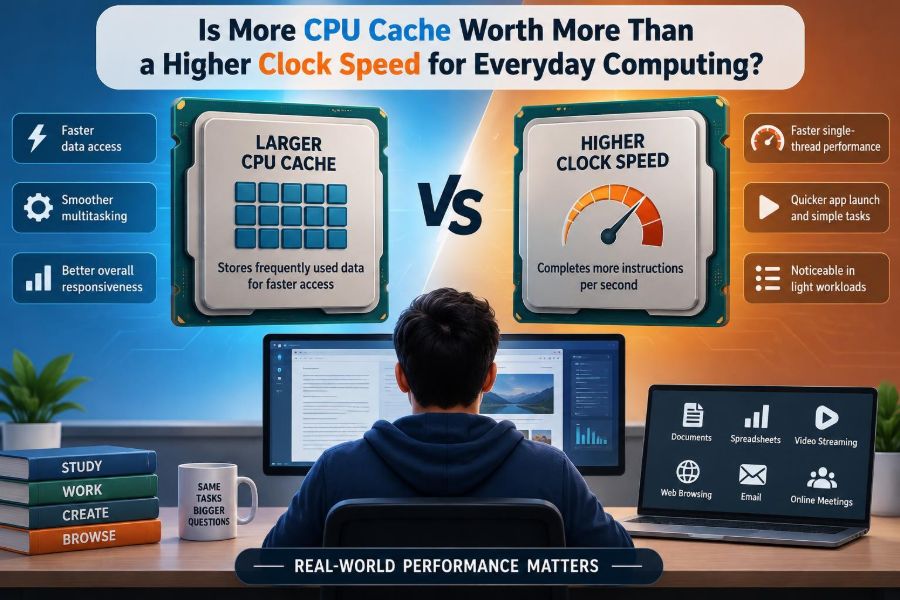

You are comparing two laptops. One advertises a higher CPU clock speed. The other highlights a larger cache, but its headline speed looks lower. Both have similar memory, storage, and price. Which one will feel faster when you open browser tabs, switch between work apps, join a video call, or edit a spreadsheet?
The tempting answer is to choose the biggest number in gigahertz. Clock speed is easy to spot and easy to understand: more cycles per second sounds like more work completed. But processors do not spend every cycle doing useful work. A great deal depends on whether the data and instructions they need are already nearby.
That is where CPU cache matters. Cache can prevent a fast processor from waiting on much slower system memory, making it a major part of real-world responsiveness. Yet more cache is not automatically a better purchase, either.
The useful question is not whether cache or clock speed wins in every situation. It is which limit is more likely to affect the work you actually do.
🧠 The Short Answer: It Depends on the Workload
For everyday computing, a processor with more cache can sometimes feel faster than one with a modestly higher clock speed, especially when programs repeatedly reuse data. Web browsing, office work, coding, and many general applications often benefit from quick access to small, frequently used pieces of information.
A higher clock speed can be more valuable when both processors have similar designs and cache arrangements, and when the task keeps the CPU busy with calculations that already have their data ready. Short bursts of single-threaded work can respond well to additional frequency.
However, a purchase decision should rarely rest on cache size or clock speed alone. CPU generation, architecture, core count, power limits, integrated graphics, RAM capacity, cooling, and the software itself can have larger effects.
⚙️ What Clock Speed Actually Measures
Clock speed, usually stated in gigahertz (GHz), describes how many timing cycles a CPU can perform each second. A processor running at 4 GHz has four billion clock cycles per second. This is a timing rate, not a direct measure of completed tasks.
During a cycle, a CPU may complete useful work, begin work that takes several cycles, process multiple instructions in parallel, or wait because required data has not arrived. Modern processors are designed to make productive use of cycles, but they cannot eliminate every delay.
Think of clock speed as the pace of a chef’s hands. Faster hands help, but not if the next ingredient is still in a distant storeroom.
📦 What CPU Cache Is
CPU cache is a small amount of very fast memory built into, or placed extremely close to, the processor. It stores copies of data and instructions that the CPU is likely to need again soon.
Programs ultimately use data stored in RAM, or random-access memory. RAM has far more capacity than cache, but it is much farther away in performance terms. Fetching information from RAM can make a CPU pause for many cycles.
Cache reduces those pauses by keeping commonly needed material close at hand. It does not replace RAM; it is a fast working area that helps the processor use RAM more efficiently.
🪜 Why Processors Use Several Cache Levels
Most modern CPUs organize cache into levels. The smallest, quickest levels sit nearest to each core, while larger levels are generally shared or somewhat farther away. This hierarchy balances speed, capacity, cost, and power use.
| Cache level | Typical role | General characteristic |
|---|---|---|
| L1 cache | Holds the most immediately needed instructions and data | Very small and extremely fast, usually private to a core |
| L2 cache | Provides a larger nearby reserve when L1 does not contain what is needed | Fast, but generally slower and larger than L1 |
| L3 cache | Helps serve multiple cores and retain larger working sets | Usually much larger, often shared, and slower than L1 or L2 |
When people compare advertised cache amounts, they often mean total L3 cache. That figure is useful context, but it does not tell the whole story about L1 and L2 sizes, latency, sharing design, or how efficiently the cache works.
🎯 Cache Hits and Cache Misses
A cache hit happens when the CPU finds required data in a cache level. It can continue working with relatively little delay. A cache miss happens when the data is absent and must be found in a lower cache level or retrieved from RAM.
Not every miss is equally costly. Missing L1 but finding the data in L2 is much less disruptive than having to obtain it from main memory. If the data is not in RAM at all and must come from storage, the delay is dramatically greater.
This is why a CPU’s performance cannot be summarized by its frequency. A processor may be ready to run at a high clock speed but still spend time waiting for information.
🔁 Why Repeated Data Benefits Most
Cache works best when software displays locality: a tendency to reuse the same data soon after using it, or to access nearby pieces of data in sequence. Many common programs behave this way.
A browser may repeatedly access code for page layout, font rendering, and scripting. A spreadsheet may work through neighboring cells and reuse formulas. An operating system repeatedly uses routines involved in scheduling, file handling, and user-interface tasks.
More cache can hold a larger portion of this active working set. If it fits well, the CPU makes fewer slower trips to RAM.
🌐 Browsing and Web Applications
Modern browsing is not simply reading text. A browser parses pages, runs JavaScript, manages tabs, draws interfaces, decompresses media, and coordinates with extensions and security features. These tasks alternate between short bursts of CPU work and waits for the network, storage, or graphics system.
Cache can help with the CPU portions, particularly on pages with complex scripts or when many tabs are active. But a bigger cache cannot make a slow internet connection load a website faster, and it will not fix a browser consuming excessive memory.
For a typical browsing machine, sufficient RAM and a responsive SSD often matter as much as small differences in processor specifications.
📝 Office Work and Multitasking
Word processing, presentations, email, calendar tools, and spreadsheets usually do not demand sustained maximum CPU performance. They benefit more from consistent responsiveness: opening files promptly, moving between windows smoothly, and keeping background tasks from interrupting the foreground app.
Cache may help these programs because their code and recently used data are often revisited. Still, a noticeable improvement may be hard to detect if both CPUs are already comfortably capable.
When office software becomes slow, common causes include limited RAM, large or formula-heavy files, cloud synchronization, antivirus scanning, or too many background applications. Cache is only one possible factor.
💬 Video Calls Have Different Bottlenecks
Video conferencing mixes several kinds of work: audio processing, video encoding and decoding, network transfer, camera handling, and screen sharing. A capable CPU and cache can support smooth operation, but the limiting component may be the network, camera software, graphics hardware, or a power-saving setting.
Many systems use specialized media engines or graphics hardware for parts of video processing. In those cases, comparing CPU cache alone says very little about call quality.
If meetings stutter, check connection stability, available RAM, temperature, and whether the laptop is plugged in before assuming that a cache specification is the problem.
📊 Spreadsheets Can Reveal CPU Differences
Small spreadsheets rarely challenge a modern processor. Large workbooks with extensive formulas, lookups, data transformations, or recalculation can behave differently. Some operations benefit from fast single-core performance, while others can use several cores.
Cache can help when calculation repeatedly accesses related values or instructions. Higher clock speed can help when a key calculation path depends heavily on one fast core. The design of the spreadsheet matters as much as the processor.
A poorly structured workbook may remain slow even on excellent hardware. Reducing unnecessary volatile formulas, duplicated calculations, and overly broad ranges can sometimes produce a larger gain than changing CPUs.
💻 Coding and Compiling
Programming workloads range from editing a few scripts to compiling a large application. Editors, language servers, version-control tools, containers, and local test suites all create different patterns of CPU and memory use.
Compiling can benefit from core count, clock speed, cache, fast storage, and ample RAM. A build system may run many tasks at once, while individual compilation jobs repeatedly process source code and intermediate data. No single spec predicts every project.
For developers, cache deserves attention, but so do memory capacity and SSD performance. If a project repeatedly reads many small files or runs out of RAM, those constraints may dominate the experience.
🎮 Gaming Is Not the Same as Everyday Desktop Use
Some games respond strongly to larger caches because simulation, world data, draw-call preparation, and game logic can reuse large amounts of data in patterns that fit cache well. This is one reason certain CPUs with unusually large cache designs can perform impressively in specific games.
That result should not be generalized to every application. A cache-focused processor may not provide the same advantage in office software, photo export, or video encoding. At a given resolution, the graphics card can also become the main limit.
Gaming benchmarks are useful for gaming purchases. They are not a universal ranking of desktop responsiveness.
🖼️ Creative Workloads Need a Broader View
Photo editing, illustration, audio production, and video work include many distinct tasks. Applying a filter, navigating a large project, exporting a video, and rendering a three-dimensional scene may stress different parts of the system.
Cache can improve some stages, but creative applications may depend heavily on GPU acceleration, memory bandwidth, storage speed, codec support, or many CPU cores. A high clock speed can help interactive tools, while core count may help rendering and export.
Check performance information for the exact application and task you use. “Content creation” is too broad to describe one reliable CPU behavior.
🧮 Clock Speed Is Not a Fair Cross-Generation Comparison
A 4 GHz processor from one generation is not automatically equivalent to a 4 GHz processor from another. CPU architectures differ in how much work they can complete per clock cycle, often described as instructions per clock or IPC.
Architecture also affects branch prediction, execution resources, cache latency, memory controllers, and power management. These choices influence real performance even when two chips show the same frequency.
Compare clock speed mainly within closely related CPU families, and even then, consider the full model rather than one number on a retail listing.
🏗️ Cache Size Alone Is Also an Incomplete Measure
More cache is usually useful only if software can effectively use it. Its location, speed, organization, and sharing behavior matter. A smaller, lower-latency cache can be preferable for some access patterns, while a larger cache may help other workloads despite taking longer to access.
Manufacturers may report total cache in different ways, combining or emphasizing levels that are not directly comparable. A total-cache number therefore makes a poor standalone performance score.
It is better to ask whether two CPUs belong to the same design family and how they perform in relevant applications than to treat cache capacity like storage capacity.
🚦 Turbo Boost Makes Advertised Speeds Tricky
Many processors adjust their clock speed automatically. They may briefly boost one or more cores above a listed base frequency when temperature, power limits, and workload allow it. Sustained speed can be lower when all cores are active or when cooling is limited.
A laptop’s thin chassis may not sustain the same performance as a larger laptop using the same CPU name. Battery mode, charger capacity, manufacturer settings, and room temperature can also change behavior.
For this reason, a maximum boost clock is best viewed as a capability under favorable conditions, not a promise of constant speed.
🌡️ Cooling Can Matter More Than a Small Spec Difference
Heat is a practical limit on CPU performance. When a system cannot remove heat effectively, it may lower clock speeds to stay within safe operating conditions. This process is often called thermal throttling.
Two laptops with similar processors can feel different during a long update, compile, export, or gaming session because one has better cooling and more generous power settings. The cooler system may maintain useful performance longer.
For sustained work, read reviews that test the exact laptop or desktop configuration. A processor specification cannot describe the entire thermal design.
🔋 Battery Mode Changes the Equation
On battery power, many laptops reduce performance to extend runtime and control heat. The processor may use lower sustained clocks, limit boosts, or favor efficiency-oriented cores. A large cache can still reduce some memory traffic, but it does not override system power policy.
Plugging in can change performance substantially on some machines, particularly during demanding tasks. That does not mean the battery mode is broken; it is a deliberate trade-off between speed, temperature, fan noise, and battery life.
If portability matters, evaluate a laptop’s performance in the mode you will use most often.
🧩 RAM Capacity Is a Separate Requirement
Cache is measured in relatively small amounts and is managed automatically by the CPU. RAM is the larger working memory used to keep applications, documents, browser tabs, and operating-system data available at once.
When RAM becomes scarce, the operating system may move some data to storage. Even a fast SSD is far slower than RAM, and the result can be stutters, delays when switching apps, and reduced responsiveness.
More CPU cache cannot compensate for insufficient RAM. For people who keep many tabs, large documents, virtual machines, or creative applications open, RAM capacity is often a more meaningful buying consideration.
🗄️ Storage Still Affects How Fast a Computer Feels
Startup, application launching, large file opening, updates, and searches can be limited by storage performance. Moving from an older hard drive to a solid-state drive often produces a much more obvious everyday improvement than a modest CPU specification change.
Even among SSDs, workload matters. A fast drive helps most when software needs to read or write files. Once data is in memory and the CPU is calculating, cache and clock speed become more relevant.
Assess the whole path: storage gets data into the system, RAM holds active data, cache keeps the hottest data near the CPU, and the CPU processes it.
🧵 Single-Core and Multi-Core Performance
Some everyday actions depend mostly on one busy core: responding to an interface action, running a small script, or processing a sequential calculation. For these, strong single-core architecture and responsive boost behavior can matter greatly.
Other tasks divide well across multiple cores, such as some exports, compression jobs, builds, and background processes. More cores can keep a system responsive while another task runs.
Cache interacts with both situations. Per-core cache can help individual threads, while shared cache can help cores access related data. But the balance varies by CPU design and software.
📱 Efficient Cores and Modern CPU Designs
Many current processors use a mix of high-performance cores and efficiency-focused cores, or otherwise use sophisticated power-management strategies. Operating systems try to place tasks on suitable resources based on urgency and power needs.
This makes simple comparisons harder. Two CPUs may have similar headline clock speeds but different mixes of cores, different cache layouts, and different behavior under light versus heavy workloads.
For everyday use, the practical outcome is usually more valuable than the design label: quick application response, quiet operation, acceptable battery life, and reliable performance under your normal workload.
🔍 How to Read a CPU Specification Page
Specification pages provide useful clues, but they require context. Look beyond the largest frequency and the total cache figure.
- Identify the CPU generation and architecture family.
- Check the number and type of cores, plus supported threads where applicable.
- Distinguish base clock from maximum boost clock.
- Note cache levels when the manufacturer lists them, not just one total.
- Check supported memory and integrated graphics features if they matter to you.
- Consider the device’s cooling, battery, and power limits, especially for laptops.
These details help you narrow options. They do not replace testing in the applications that matter to you.
🧪 Why Relevant Benchmarks Are Better Than Spec Shopping
Benchmarks measure a defined task under particular conditions. They are imperfect, but they can show how a complete system performs more clearly than a list of specifications.
Choose benchmarks that resemble your use. Someone editing photos should look for photo-editing tests; a programmer should seek compile or development-workflow testing; an office user may care more about battery behavior, noise, and general responsiveness.
Use several sources where possible, and watch for differences in RAM, cooling mode, graphics card, and power settings. A benchmark result is evidence about a scenario, not a permanent ranking for every computer.
⚖️ A Practical Comparison Framework
When comparing two otherwise similar CPUs, start with generation and overall platform. If one is substantially newer, its architectural improvements may outweigh a lower advertised clock speed or different cache total.
Next, consider the workload. For light web, office, and communication tasks, either capable modern CPU may feel nearly identical. For a workload known to benefit from cache, a larger-cache option can be worthwhile. For frequent short, serial tasks, stronger single-core performance may deserve more weight.
Finally, compare the actual computers, not just chips. A well-cooled laptop with enough RAM and storage can be a better daily tool than a theoretically faster configuration constrained by heat or memory.
🛒 When More Cache Is Worth Paying For
Paying extra for cache is most defensible when it comes as part of a CPU that has demonstrated gains in the programs or games you use. This may apply to certain game-focused systems, workloads with large reused data sets, or professional software with known cache sensitivity.
It can also be reasonable when two models are close in price and the larger-cache option has no meaningful drawback in battery life, thermals, or other features. In that case, it offers useful headroom without requiring you to predict every future workload.
Do not pay a large premium merely because a cache number is bigger. The benefit may be tiny, invisible in your tasks, or offset by another CPU’s stronger architecture.
⏱️ When Higher Clock Speed Is Worth Prioritizing
A higher clock speed deserves more attention when comparing processors from the same family with similar power limits, cache design, and core configuration. In such a close comparison, additional frequency can improve work that is constrained by a busy core.
This is often relevant for responsive desktop use, older or lightly threaded applications, and certain calculations that do not scale efficiently across cores. Even then, sustained speed and cooling matter more than a brief peak figure.
A high maximum clock is less meaningful when it belongs to an older architecture, a severely power-limited laptop, or a system with less suitable memory and cooling.
🚫 Common Mistakes When Comparing CPUs
The first mistake is assuming GHz is a universal speed rating. It is not. The second is assuming total cache is a universal intelligence rating. It is not that either.
- Comparing maximum boost speeds without checking generation or sustained behavior.
- Assuming all cache is equally fast and equally useful.
- Ignoring RAM capacity because the CPU appears powerful.
- Using gaming results to predict office or creative-app performance.
- Comparing laptop CPUs without considering cooling and manufacturer power settings.
- Buying for a hypothetical extreme workload while overlooking daily comfort features.
A balanced decision is less exciting than chasing one specification, but it is far more likely to produce a computer you enjoy using.
🧭 Recommendations for Typical Buyers
For web browsing, office work, study, streaming, and video calls, choose a recent, efficient CPU from a reputable platform, then prioritize enough RAM, solid-state storage, a good display, keyboard comfort, and battery life. Cache and boost clock are secondary tie-breakers.
For developers, analysts, and advanced multitaskers, choose based on the size of your projects and applications. More RAM, a fast SSD, adequate cores, and dependable sustained performance commonly matter alongside cache.
For gamers or specialists, consult task-specific testing. A cache-heavy design may be an excellent fit, but only if it improves the titles or tools you genuinely use.
🏁 The Core Principle: Reduce the Right Bottleneck
Cache and clock speed solve different parts of the same performance problem. Clock speed helps the processor work faster when it has what it needs. Cache helps it avoid waiting when the needed information would otherwise come from slower memory.
The best choice depends on where your computer spends its time. If your task is CPU calculation with ready data, frequency and architecture may lead. If it repeatedly revisits data that can remain close to the processor, additional cache can make a real difference. If storage, RAM, graphics, heat, or the network is limiting you, neither CPU specification is the main answer.
That is why the most reliable buying habit is to match a complete system to your actual workload rather than searching for a single winning number.
More CPU cache is worth more than higher clock speed only when it addresses the bottleneck your everyday tasks actually have; in many real computers, the best result comes from a balanced combination of CPU design, RAM, storage, cooling, and software. 🖥️⚙️📚