
A student opens a laptop to edit a presentation, checks a spreadsheet, joins a video call, and saves everything to the cloud—often within the same hour. A professional may do much the same work from a phone while travelling. Computing feels personal, portable, and almost invisible.
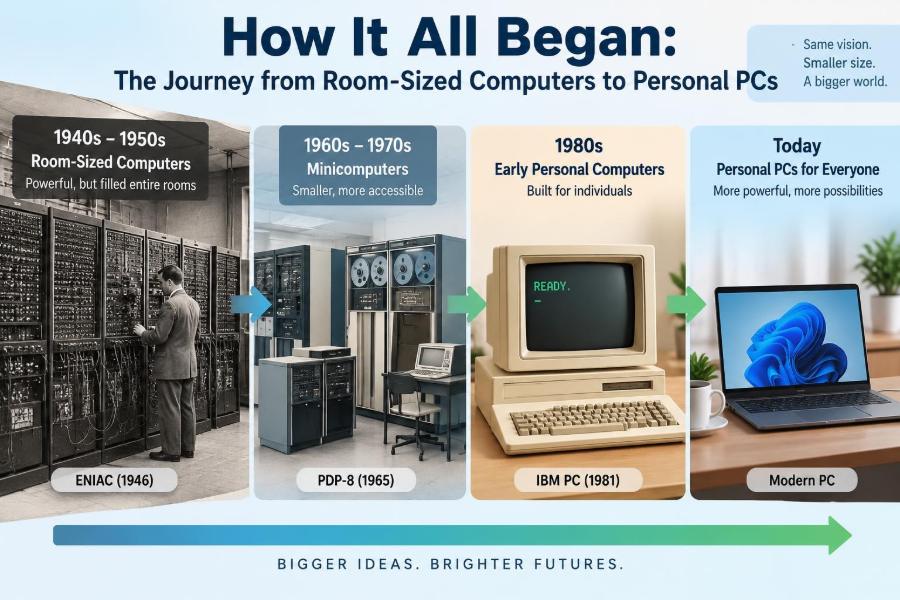
That ordinary experience is the result of a remarkable shift. Early electronic computers filled rooms, consumed enormous amounts of power, and were operated by specialist teams. Most people could not walk up to one, let alone own one.
Understanding how computers changed from institutional machines into personal tools explains many features we still use: keyboards, screens, stored programs, files, operating systems, and networks. It also helps us see why hardware became smaller without becoming simpler.
The journey was not one straight line of invention. It was a sequence of practical problems, new components, business decisions, and changing expectations about who should be able to use a computer.
🧭 What “Computer” Meant Before Electronic Machines
Before electronic computers, the word computer could refer to a person whose job was to perform calculations. Governments, observatories, engineering offices, and insurance organizations employed people to calculate tables by hand or with mechanical aids.
Machines such as abacuses, slide rules, and mechanical calculators sped up particular arithmetic tasks. They did not automatically follow long, changeable sequences of instructions in the way modern computers do.
The key idea that emerged was programmability: a machine should be able to perform different tasks when given different instructions, rather than being built for only one calculation.
⚙️ Mechanical Ideas That Pointed Forward
In the nineteenth century, Charles Babbage designed the Analytical Engine, a proposed mechanical machine with concepts resembling a processor, memory, input, and output. It was never completed as a fully working general-purpose computer in his lifetime, partly because precision engineering was difficult and expensive.
Ada Lovelace wrote notes describing how such a machine could manipulate symbols according to rules, not merely calculate numbers. Her work is often associated with the early idea of writing instructions for a general machine.
These designs mattered because they separated the machine from the task. The same hardware could, in principle, run many procedures.
🧵 Punched Cards and Stored Instructions
Punched cards became an important bridge between mechanical automation and computing. A pattern of holes could represent data or instructions, and a machine could read that pattern repeatedly with much less ambiguity than handwritten directions.
Herman Hollerith used punched-card equipment for data processing in the late nineteenth century, demonstrating how large record sets could be sorted and counted mechanically. Later systems used cards both to hold data and to submit programs.
Cards were useful but physically demanding. A dropped or misordered deck could disrupt a program, and changing one instruction often meant punching a new card. Still, they established a lasting principle: programs could be represented as data.
🌍 War, Science, and the Demand for Speed
The first half of the twentieth century created urgent needs for rapid calculation. Ballistics, cryptanalysis, scientific modelling, and large administrative records involved work that was too slow or error-prone when done entirely by people.
Different teams in several countries developed electromechanical and electronic machines for different purposes. Some were specialized, while others moved closer to general-purpose computing.
This context is important: early computers were usually funded because an institution had a difficult calculation problem. They were not designed as household products. Their size and cost made centralized use the practical model.
🔌 Vacuum Tubes: The First Electronic Switches
Many early electronic computers used vacuum tubes, components that could control the flow of electricity and act as switches. A computer performs logic by combining vast numbers of switching decisions, so fast electronic switching was a major breakthrough.
Vacuum tubes were much faster than moving mechanical parts, but they were large, generated heat, used substantial power, and could fail. A machine containing thousands of tubes required constant maintenance.
The limitation was not simply inconvenience. Heat affected reliability, power requirements affected building design, and failures interrupted valuable work. Early computing therefore depended as much on technicians and infrastructure as on mathematical ideas.
🏢 Why Early Computers Filled Rooms
Machines such as ENIAC, completed in the 1940s, illustrate why “computer” once suggested an entire room. The circuitry, power equipment, cooling needs, storage devices, and operator space all occupied substantial physical area.
Size alone did not make these machines primitive. For their era, electronic computers could solve selected numerical problems at extraordinary speed. But operating them involved setup, checking, and scheduling that could take far longer than the calculation itself.
Imagine reserving a laboratory just to run one program. That is closer to the early experience than opening an app on a laptop.
🧠 The Stored-Program Breakthrough
A decisive advance was the stored-program concept. Instead of rewiring a machine or physically configuring it for every task, instructions could be held in memory alongside the data they processed.
This made a computer far more flexible. A program could perform a sequence, branch when a condition was met, repeat a step, and use intermediate results without requiring a person to reset hardware connections.
Modern computers still follow this broad model. Although their internal designs are far more sophisticated, they load instructions into memory and execute them in an organized sequence.
🗣️ From Wiring Panels to Programming Languages
Programming early systems could mean setting switches, connecting cables, or entering machine-specific codes. These methods gave direct control but demanded detailed knowledge of the hardware.
Assembly language introduced symbolic names for low-level instructions. Higher-level languages later allowed programmers to express tasks using more human-readable concepts such as formulas, records, and procedures.
This change expanded who could create software. It did not eliminate the need to understand computing, but it reduced the amount of hardware detail required for many tasks. A compiler or interpreter translated the programmer’s instructions into forms the machine could execute.
🧮 Mainframes Become Shared Computing Centers
By the 1950s and 1960s, large organizations increasingly used mainframes: powerful centralized computers designed to handle substantial workloads. Banks, universities, governments, airlines, and major companies used them for records, calculations, and transaction processing.
Mainframes were valuable because expensive hardware could serve many organizational needs. Their strength was not personal convenience; it was reliability, capacity, and centralized control.
Users commonly interacted through operators or terminals rather than having direct physical access to the main computer. This separation between central processing and user access would remain influential even after personal computers arrived.
📥 Batch Processing and the Waiting Problem
Many early users worked in batch processing. They prepared a job—often on punched cards or tape—submitted it, and waited for the operator to run it with other jobs.
If a small programming error appeared, the output might reveal it only after the entire job had completed. The user then corrected the problem and submitted another batch. This was efficient for the machine but frustrating for learning and experimentation.
The delay changed how people thought. Computer time was scarce, so programs were planned carefully before they were run. Today’s instant feedback encourages experimentation, but it can also make us forget the value of deliberate testing.
⏱️ Time-Sharing Makes Computing More Interactive
Time-sharing systems offered a different approach. A central computer rapidly switched its attention among multiple users at terminals, giving each person the impression of an interactive session.
The computer was not literally doing every task at once in the simplest sense; it allocated short periods of processing time among users. Because switching happened quickly, people could type commands and receive responses without waiting for an entire batch run.
Time-sharing made programming, editing, and communication feel more immediate. It also introduced practical ideas about user accounts, permissions, file storage, and shared resources that remain central to computing.
🔬 Minicomputers Shrink the Distance
During the 1960s and 1970s, minicomputers made computing available to smaller departments, laboratories, factories, and institutions. Despite the name, they were not personal desktop machines by modern standards.
They were smaller and generally less expensive than mainframes, allowing organizations to place computing closer to a specific work group or process. A laboratory could control instruments, for example, without competing for every task on a distant central machine.
This was an important cultural step. Computing began moving from a protected central facility into the everyday operations of more workplaces.
🧱 The Transistor Replaces the Vacuum Tube
The invention of the transistor transformed computer construction. Transistors could perform switching and amplification roles with far less size, heat, and power consumption than vacuum tubes.
They also improved reliability because they had no heated filament in the same sense as vacuum tubes and were better suited to compact electronic equipment. Computers could become smaller, cooler, and less demanding to operate.
A transistor did not make a personal computer inevitable on its own. Manufacturing methods, memory technology, software, and falling costs all had to develop too. But it removed one of the biggest physical barriers to miniaturization.
🧩 Integrated Circuits Pack Components Together
An integrated circuit, often called a chip, combines multiple electronic components on a small piece of semiconductor material. Rather than wiring individual transistors together one by one, manufacturers could create many connected components as a unit.
This reduced physical space and improved consistency in production. It also enabled designers to build more complex systems without turning every machine into an unmanageable web of separate parts.
The difference is similar to moving from assembling a book letter by letter to printing complete pages. The underlying information still matters, but the manufacturing process becomes far more scalable.
🎛️ The Microprocessor Puts a CPU on One Chip
The central processing unit, or CPU, carries out program instructions: arithmetic, comparisons, movement of data, and control decisions. Early CPUs were built from many separate circuits.
The microprocessor placed the essential CPU functions on a single integrated circuit. This did not create a complete computer by itself; memory, input, output, storage, power, and software were still necessary. It did, however, greatly simplify the core of a computer system.
Once processors became available as components, smaller companies and hobbyists could design machines around them. The question shifted from “Can an institution afford a computer?” toward “What can a small computer be used for?”
🏠 The Hobbyist Era Opens New Possibilities
In the mid-1970s, kits and early microcomputers attracted electronics enthusiasts. These machines often required assembly, configuration, and patience. Their interfaces could be limited to switches, lights, or a connected terminal.
For a hobbyist, the appeal was not polished convenience. It was direct access: a person could own hardware, write a small program, observe the result, and modify the system without booking time on an institutional computer.
This community helped establish the idea of a computer as an adaptable personal device. It also created demand for simpler software, displays, keyboards, and practical applications.
⌨️ Keyboard, Screen, and the Human Interface
A personal computer needed a workable way for ordinary users to communicate with it. Keyboards borrowed familiar habits from typewriters, while screens made output visible immediately instead of requiring printed reports or indicator lights.
Early text-based interfaces required users to type commands precisely. They could be efficient, but they assumed that users remembered command names and options. Graphical user interfaces later used windows, icons, menus, and pointers to make many operations easier to discover.
Neither approach is universally better. Command lines remain useful for repetitive or technical tasks, while graphical interfaces reduce the barrier for many visual, everyday activities.
💾 Memory and Storage Solve Different Problems
People often use “memory” casually to mean any place a computer keeps information, but two roles are worth separating. RAM, or random-access memory, holds programs and data that the computer is actively using; it is typically temporary.
Storage—such as disks, solid-state drives, or earlier media like floppy disks—keeps files when power is removed. A document may be loaded from storage into RAM while you edit it, then saved back to storage.
This distinction explains everyday behavior. A computer with too little available RAM may slow down when many programs are open, while a nearly full drive makes it difficult to save files or install updates.
📀 Floppy Disks Make Software Portable
Floppy disks gave early personal-computer users a practical way to distribute programs and move files between compatible machines. They were removable magnetic storage media, usually carried in protective sleeves.
Their capacity was tiny by modern standards, and they were vulnerable to damage or loss. Yet they made software feel like something a person could buy, copy within permitted contexts, exchange, and load independently.
Later optical discs, USB drives, local networks, and internet downloads changed the medium, but the underlying need remains: people need dependable ways to install programs and transfer their work.
🖥️ What Made a PC Truly “Personal”
A personal computer was not merely a small computer. It was designed to be used directly by one person or a small number of people, usually with their own keyboard, display, files, and applications.
Personal ownership changed the relationship between user and machine. A user could organize documents, customize settings, install software, and work at a self-directed pace. Computing became a general tool rather than a scheduled service.
Early PCs still had limits: modest memory, limited graphics, and less processing power than larger systems. Their significance came from access and flexibility, not from outperforming every mainframe.
📊 Spreadsheets Reveal a Killer Application
A killer application is software compelling enough to persuade people to adopt a platform. For early personal computers, spreadsheets were especially influential because they made financial and numerical modelling accessible to many office users.
Before a spreadsheet, changing one assumption in a budget could mean recalculating several dependent figures by hand. In a spreadsheet, formulas could update related cells automatically when an input changed.
This did not replace financial judgment. A spreadsheet can calculate a flawed assumption very efficiently. But it showed how personal computing could improve ordinary work rather than serving only programmers or engineers.
📝 Word Processing Changes Office Work
Word processors also helped define the PC’s value. Revising a letter, report, or proposal became easier when text could be inserted, deleted, moved, and reformatted without retyping an entire page.
The benefit was not simply faster typing. It changed drafting habits. People could create rough versions, reorganize ideas, and produce cleaner documents with fewer physical steps.
That convenience brought a new responsibility: file management. Without sensible names, folders, backups, and version habits, a computer can make documents easier to create but harder to find later.
🖱️ Graphical Interfaces Broaden Access
Graphical user interfaces, commonly abbreviated GUI, represented files and actions visually. A folder icon suggested storage; a trash icon suggested deletion; a menu displayed available choices. These metaphors made many functions easier to learn.
The mouse became a common pointing device because it allowed users to select and manipulate items on screen. Later devices added trackpads, touchscreens, pens, and voice input, but the goal stayed similar: make computer actions understandable and controllable.
Visual interfaces can hide complexity, which is useful until something goes wrong. Basic knowledge of files, settings, and error messages still helps users solve problems rather than treating the machine as a mystery.
🌐 Networks Turn Standalone PCs Into Connected Tools
Early personal computers were often standalone machines. Local area networks allowed computers in the same building to share printers, files, and resources. Wider networks eventually connected users across long distances.
The internet transformed the PC again. It became a communication device, research tool, publishing platform, and gateway to services that might run on remote servers rather than the local machine.
Connection creates trade-offs. Sharing makes collaboration easier, but it also introduces risks such as phishing, malware, weak passwords, accidental oversharing, and dependence on network availability.
🔐 Personal Computing Brings Personal Responsibility
When computing was centralized, specialists controlled much of the hardware and access. Personal devices shifted some responsibility to individual users. Each person now makes choices about updates, backups, passwords, permissions, and safe downloads.
A practical baseline is simple:
- Use unique, strong passwords and enable multi-factor authentication where available.
- Install operating system and application updates from trusted sources.
- Keep backups of important files, preferably separate from the main device.
- Pause before opening unexpected attachments or entering credentials after an unsolicited message.
These habits do not remove every risk, but they reduce the chance that one mistake becomes a major loss.
📱 From Desktop PCs to Devices Everywhere
Laptops made personal computing portable, while smartphones and tablets put many computing functions into devices people carry constantly. These devices are descendants of the same broad evolution: smaller components, efficient processors, improved batteries, accessible interfaces, and network connectivity.
They are not interchangeable in every situation. A phone is excellent for quick communication and navigation; a desktop or laptop is often better for sustained writing, programming, complex spreadsheets, or detailed creative work.
The most useful question is not which device is “best.” It is which combination of screen size, input method, software, performance, portability, and security fits the task.
☁️ Cloud Computing Rebalances Central and Personal Power
Cloud computing may seem like a departure from the personal-computer story, but it partly returns to an old pattern: powerful centralized systems serve many users. The difference is that people access those systems through personal devices over networks.
A modern laptop may edit a document locally, synchronize it online, and rely on remote servers for collaboration or storage. This hybrid model provides convenience and scale, but it can also create dependence on internet access and service providers.
Understanding where a file lives matters. A document may exist on a device, in a synchronized folder, on a shared server, or in several places. That affects privacy, backup planning, and what happens when access changes.
⚖️ Smaller Does Not Mean Simpler
A phone or laptop can fit in a bag, yet it contains layers of engineering: processors, memory, storage, operating systems, wireless radios, sensors, encryption, and applications. Physical miniaturization has made computing easier to carry, not necessarily easier to understand.
This is why basic computer literacy remains valuable. Users do not need to repair circuit boards to benefit from knowing the difference between an application and an operating system, RAM and storage, a local file and an online account.
Knowing these foundations helps people make better choices, diagnose ordinary problems, and communicate clearly with technical support.
🛠️ Common Misunderstandings About Computer History
One common mistake is to assume that every new technology completely replaced the old one. In reality, mainframes, terminals, command lines, and centralized systems still exist because they remain suited to particular workloads.
Another mistake is to treat the PC as the achievement of one machine or one company. Personal computing emerged through connected advances in electronics, manufacturing, software, interface design, storage, networking, and user communities.
It is also misleading to measure historical machines only by modern specifications. Their importance lies in what they made possible at the time, not in whether they could run modern software.
📚 A Practical Way to Read Any Computer’s Specifications
When comparing a computer today, connect each specification to a real need. Processor capability affects demanding calculations; RAM affects how comfortably several programs can run; storage capacity and type affect file space and responsiveness; display and input affect daily comfort.
| Component | Primary role | Everyday question to ask |
|---|---|---|
| CPU | Executes instructions | Will it handle my software and workload? |
| RAM | Holds active work temporarily | Can I keep my usual apps open smoothly? |
| Storage | Keeps files and programs long term | Do I have enough space for my files? |
| Operating system | Manages hardware and software | Will it support the tools I need? |
| Network connection | Connects to other systems | How reliable and secure is access? |
This approach avoids choosing solely by one headline number. A suitable computer is a balanced system for the work you actually do.
🎓 Lessons From the Journey to Personal PCs
The history of computing shows that progress comes from combining ideas. Faster electronics mattered, but so did usable interfaces, reliable storage, affordable manufacturing, practical software, and ways for people to share information.
It also shows that “personal” does not mean isolated. Our devices are personal in ownership and use, yet they increasingly depend on shared networks and services. Good digital habits therefore combine individual control with awareness of the wider systems involved.
The core lesson is that computers became personal not when they merely became smaller, but when technology, software, and design made powerful computation directly useful to ordinary people.
From room-sized machines managed by specialists to PCs, laptops, and phones used every day, the story is one of expanding access. Seeing that path makes the device on your desk feel less like a black box—and more like the latest chapter in a long human effort to turn information into useful action. 🖥️⚙️🌐