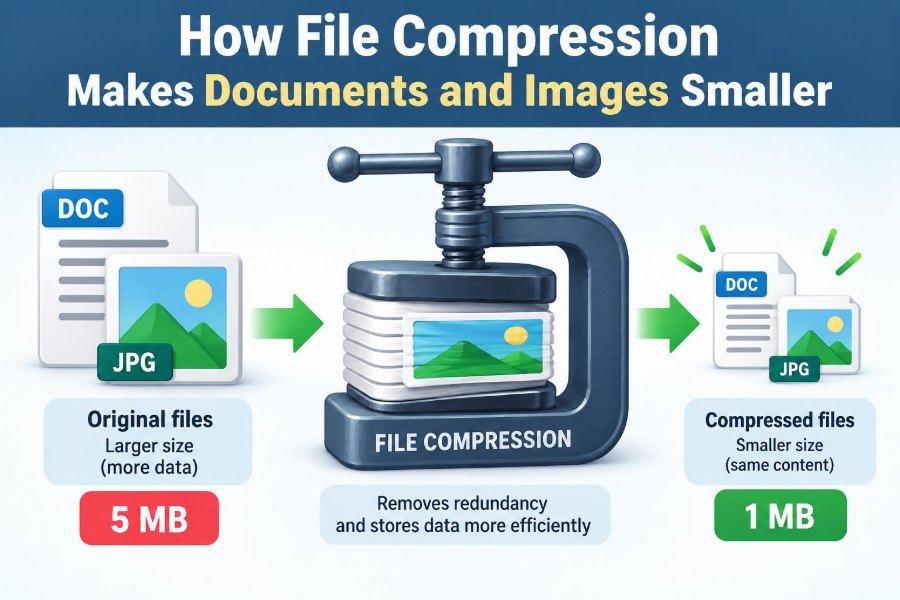

You attach a report to an email, but the mail service says the file is too large. Or you try to upload photos to a learning platform, only to watch the progress bar crawl. In both situations, file compression can make the task easier.
Compression is the reason a document can travel quickly across a network, a website can load without downloading enormous images, and a backup drive can hold far more work. It quietly affects everyday computing.
Yet “make the file smaller” is only part of the story. Some compression keeps every bit of information, while other methods deliberately remove details that people are unlikely to notice.
Understanding that difference helps students submit work safely, helps professionals share files efficiently, and helps everyone avoid accidentally damaging an important original. 📁
🧳 1. What File Compression Means
File compression is a method for representing the same data using fewer bits, or, in some cases, representing an acceptable version of that data with fewer bits. A bit is the basic unit of digital information: a zero or a one.
Compression software examines patterns in a file and writes a shorter description of those patterns. When needed, decompression software uses that description to rebuild the usable file.
A compressed folder, a JPEG photograph, an MP3 recording, and a streaming video all use compression. They differ mainly in what information they preserve and what they are willing to discard.
📦 2. Why Smaller Files Matter
Smaller files use less storage space and usually take less time to copy, upload, download, or back up. This is valuable whether a file moves across the internet, a local network, a USB drive, or a cloud-storage service.
For an organization, compression can reduce the amount of data transferred between systems. For an individual, it can mean fitting course materials, scanned documents, and photographs into limited storage.
- Emails are less likely to exceed attachment limits.
- Web pages can load faster when images are efficiently compressed.
- Backups can finish more quickly and consume less capacity.
- File sharing becomes more practical on slow or metered connections.
🔢 3. Files Are Ultimately Patterns of Bits
A computer does not see a document as paragraphs or a photo as a sunset. It stores both as sequences of bits arranged according to a file format.
Many sequences contain repetition. A blank area in an image may have many nearby pixels with similar values. A text file may repeat common letters, words, spaces, and formatting instructions.
Compression works because real-world data is often not completely random. If every bit sequence were equally unpredictable, there would be little or no redundancy to remove.
🧩 4. Redundancy Is the Opportunity
Redundancy means information that is repeated or predictable enough that it can be described more efficiently. It does not necessarily mean the information is useless; it means the computer can avoid writing it in a long, literal form.
Suppose a simple line contains the same color for a long distance. Instead of storing the color value again and again, a method might store the color once and state how many times it repeats.
Different file types contain different kinds of redundancy. Text has language patterns, images have spatial patterns, audio has predictable wave patterns, and video has similarities between consecutive frames.
🔁 5. Run-Length Encoding Handles Repeats
Run-length encoding, often shortened to RLE, is one of the easiest compression ideas to understand. It replaces a run of identical values with the value and the length of its run.
For example, a sequence written as AAAAA could be described as 5A. This is only a simplified illustration, but the underlying idea is genuine.
RLE works well for data with long repeated stretches, such as simple graphics, icons, or large flat areas of color. It can work poorly when values change constantly, because the descriptions themselves add overhead.
🗂️ 6. Dictionary Compression Reuses Familiar Pieces
Another broad approach is dictionary compression. The compressor notices repeated strings or byte patterns, records them in a dictionary, and later refers to them with shorter codes.
Imagine a document containing the phrase “project management” many times. A compressor may store that phrase once and use compact references whenever it appears again.
Methods in the LZ family use versions of this idea and are widely used in archive formats and general-purpose compression tools. The exact rules vary, but repeated patterns are the central opportunity.
🌳 7. Short Codes Can Represent Common Symbols
In written language, some characters occur more often than others. A compression method can assign shorter bit codes to frequent symbols and longer codes to less frequent ones.
Huffman coding is a well-known technique based on this principle. The decoder can still tell where one code ends and the next begins because the codes are designed to avoid ambiguous prefixes.
This approach is useful beyond plain text. After another method has identified symbols, lengths, or patterns, efficient coding can reduce the space needed to store those results.
🧾 8. Text Files Often Compress Well
Plain text can compress effectively because it contains recurring letters, words, punctuation, spaces, and language patterns. Source-code files also repeat keywords, indentation, identifiers, and syntax.
A document with formatting may contain repeated style instructions as well as repeated text. However, the exact result depends on the document’s contents and its existing format.
Text that has already been compressed, encrypted, or converted to a compact format may offer much less improvement. Compression cannot reliably create repetition where none remains.
🖼️ 9. Images Contain More Than Visible Objects
A digital image is commonly stored as a grid of pixels. Each pixel records color information, often through components such as red, green, and blue.
High-resolution images can therefore contain millions of color values. Even a photograph that looks simple to a viewer may require substantial raw data before compression.
Image formats reduce this amount by taking advantage of nearby pixels, repeating regions, and limits in human visual perception. The best choice depends on whether preserving every original detail is necessary.
✅ 10. Lossless Compression Preserves Every Bit
Lossless compression allows the original data to be reconstructed exactly after decompression. No information is intentionally removed.
This is essential for files where a tiny change can matter, including program files, spreadsheets, databases, technical drawings, and editable documents. It is also often preferred for archival originals.
ZIP archives, PNG images, and FLAC audio are common examples of formats or containers associated with lossless compression. A lossless result may still be much smaller, but the amount of reduction has practical limits.
🎨 11. Lossy Compression Removes Selected Detail
Lossy compression makes files smaller by permanently removing information considered less important for a particular use. After decompression, the result is not mathematically identical to the original.
For a photograph, a well-designed lossy method may remove subtle color differences or fine details that are difficult for many viewers to detect. For audio, it may reduce sound components that are less noticeable in context.
The benefit is potentially much smaller files. The trade-off is that the original data cannot be perfectly recovered from the compressed version.
👁️ 12. Why Lossy Images Can Still Look Good
Human vision does not notice every visual difference equally. In many viewing conditions, people are more sensitive to broad brightness structure than to tiny variations in color or extremely fine texture.
Formats such as JPEG use knowledge of these tendencies to reduce image data. They transform image information, retain more important components, and represent less important components with lower precision.
The result can look very close to the original at a suitable quality setting. But “suitable” depends on the image, screen size, intended use, and how closely someone examines it.
🎚️ 13. Quality Settings Control a Trade-Off
When saving a lossy image, a quality setting usually controls the balance between file size and visible detail. Lower quality often produces a smaller file, while higher quality usually preserves more information.
These labels are not universal measurements. A value called “80” in one application does not necessarily produce the same visual result or file size as “80” in another.
Always inspect an exported file at the size and context in which it will be used. A small web thumbnail can tolerate choices that would be unsuitable for printing or close review.
🧱 14. Compression Artifacts Reveal the Cost
Artifacts are unwanted changes introduced by processing or lossy compression. In images, they may appear as blocky areas, smudged textures, halos around edges, or bands in smooth gradients.
Artifacts are especially noticeable around text, sharp lines, high-contrast edges, and detailed patterns. These features are hard to approximate without making imperfections visible.
If artifacts interfere with readability or professional presentation, export again using a higher quality setting, a different format, or the original image dimensions. 🔍
🗜️ 15. A ZIP File Is Usually an Archive Too
People often say they will “zip a file,” but a ZIP archive can do two related jobs: it can compress data and package multiple files and folders into one convenient file.
An archive preserves a folder structure and can contain documents, images, spreadsheets, and other materials together. This makes it useful for submitting a project or sending a collection of files.
Creating a ZIP file does not guarantee dramatic savings. Its compression depends on the contents, especially whether those contents were already compressed.
📊 16. Not Every File Shrinks by the Same Amount
A plain text file may become substantially smaller inside an archive because it contains many reusable patterns. A raw bitmap image may also shrink significantly.
By contrast, a JPEG photo, MP3 audio file, MP4 video, or previously created ZIP archive may shrink very little when zipped again. These formats normally contain compression already.
| Type of content | Typical response to an archive compressor | Why |
|---|---|---|
| Plain text or source code | Often compresses well | Repeated characters and patterns remain available |
| Uncompressed image data | May compress well | Nearby pixel values can be predictable |
| JPEG, MP3, or MP4 | Often changes little | It already uses specialized compression |
| Encrypted data | Usually changes little | It is designed to appear unpredictable |
📏 17. Compression Ratio Describes the Reduction
A compression ratio compares the original size with the compressed size. If an original file is twice as large as its compressed version, it has a 2:1 ratio.
People also describe savings as a percentage reduction. Both descriptions can be useful, but they should not be confused with image-quality ratings or internet-speed measurements.
The ratio is an outcome, not a promise. It changes with the content, the format, the software settings, and whether the data has already been processed.
🧠 18. Compression Is Not Magic
Lossless compression cannot make every possible file dramatically smaller. If it could, every short bit sequence would need to represent multiple longer sequences, making exact decoding impossible.
Some inputs are already compact or behave much like random data. For those files, a lossless compressor may produce almost no reduction and can occasionally create a slightly larger file because it must store headers and other instructions.
Lossy compression gets around this limit by accepting a different result. Its smaller size comes from dropping information rather than finding a perfect shorter description.
🔐 19. Encryption and Compression Have Different Goals
Compression aims to remove predictable structure. Encryption aims to hide structure so that data cannot be understood without the correct key.
Because encrypted data is intentionally made to look unpredictable, it usually compresses poorly. For this reason, data is commonly compressed before it is encrypted, not afterward.
Do not mistake a ZIP file for strong protection simply because it is compressed. Some archive tools offer password and encryption features, but compression alone does not provide security.
📝 20. Documents May Already Be Compressed Inside
Many modern office-document formats are packages containing structured files, text, formatting information, and media. Some use internal compression as part of their design.
That is why placing a modern document into a ZIP archive may yield only a small additional reduction. A document containing many uncompressed pictures may behave differently from one containing mostly text.
If a document is too large, reducing oversized embedded images can be more effective than repeatedly compressing the whole document archive.
🖍️ 21. Choose Image Formats for the Job
Format choice matters as much as compression choice. A photo and a diagram do not have the same visual characteristics or editing needs.
Common practical choices
- JPEG: commonly suited to photographic images where some loss is acceptable.
- PNG: useful when exact pixels, sharp text, transparency, or repeated editing matter.
- GIF: supports simple animation but has limited color capability.
- WebP: supports both lossy and lossless approaches and is used in many web contexts.
A newer or smaller format is not automatically best. Consider compatibility with the application, audience, workflow, and platform where the image will be opened.
🎞️ 22. Video Compression Uses Time as Well as Space
A video is a sequence of images accompanied by audio. Storing every frame independently would require a great deal of data, especially at high resolution or frame rates.
Video codecs reduce size by storing some complete reference frames and describing changes in later frames. A stationary background, for example, does not need to be fully repeated in every frame.
This makes video compression powerful, but it also means editing, seeking, and decoding can require more processing than simply opening a still image.
⚙️ 23. Compression Trades Space for Processing
Compression saves storage and transmission space, but the computer must spend time and processing power compressing and decompressing data. Complex methods may deliver smaller files at the cost of more work.
Some formats are designed for fast decompression because people need to open or stream them quickly. Others prioritize maximum size reduction for long-term storage or distribution.
The best method depends on the task. A frequently accessed working file may need a different balance from a backup that is rarely opened.
🧪 24. Repeated Lossy Saving Causes Generational Loss
When a lossy file is opened, edited, and saved again with lossy compression, it may lose additional information each time. This is called generational loss.
The damage is not always obvious after one save, but repeated exports can gradually make artifacts more visible. Cropping, rotating, or adjusting an image should ideally begin with the highest-quality original available.
Keep an editable master file, then export separate copies for email, web use, presentations, or other delivery needs. This protects the source from accidental quality loss.
🛠️ 25. A Sensible Workflow for Sharing Files
Before compressing, identify what is making the file large. It may be a few enormous images, unused media, duplicated files, or an unnecessarily high video resolution.
- Keep an untouched original or master copy.
- Remove material that is no longer needed.
- Resize images to appropriate dimensions for their destination.
- Choose a format and quality level suited to the content.
- Package multiple related files in an archive when convenient.
- Open the final result to verify that it works and looks correct.
This process is more reliable than treating compression as a last-minute button that solves every size problem.
📤 26. Check Requirements Before You Send
A recipient may require a specific file format, maximum upload size, or naming convention. A learning system may accept PDF but not an archive, while a colleague may prefer one ZIP file containing all project materials.
Check whether the receiver needs to edit the file, print it, view it on a phone, or preserve it as a record. These needs affect whether lossless quality, broad compatibility, or compact delivery should take priority.
Also test the compressed file by opening it yourself. A smaller attachment is useful only if its contents remain accessible and fit for purpose.
🌍 27. The Core Principle: Describe Data More Efficiently
At its heart, compression finds structure in data and uses a shorter way to describe it. Lossless methods preserve every detail by eliminating redundancy, while lossy methods achieve greater reductions by keeping the details that matter most for the intended experience.
That principle explains why a text document may shrink dramatically, why a JPEG may barely change inside a ZIP file, and why lowering image quality can reduce size but introduce visible artifacts.
Use compression thoughtfully: preserve originals, match the format to the job, and balance file size against the quality and accuracy people actually need. 🗜️📁✨