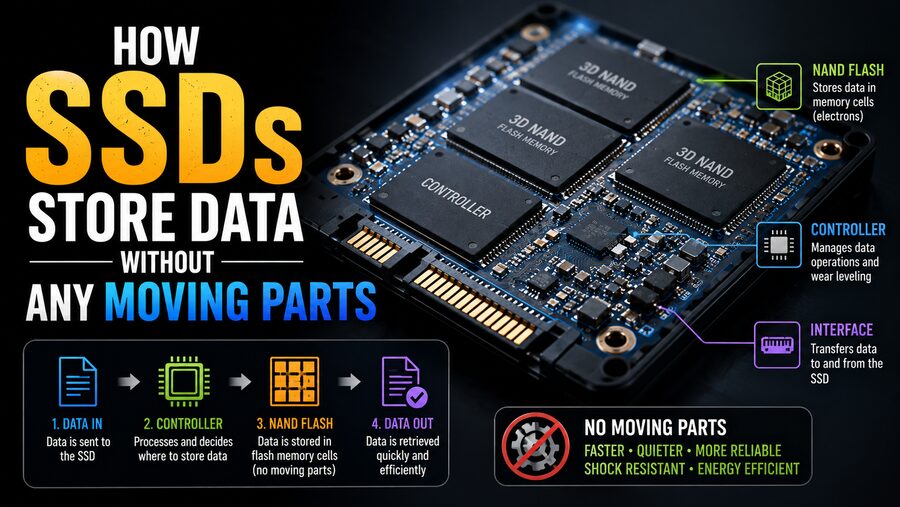

For decades, computer storage was strongly associated with spinning disks. Traditional hard disk drives, or HDDs, store information on rapidly rotating magnetic platters while tiny mechanical heads move across their surfaces to read and write data. Modern Solid-State Drives, better known as SSDs, take a completely different approach. ⚡
An SSD can store hundreds of gigabytes or even several terabytes of files without spinning platters, moving heads, or motors. Instead, it relies primarily on microscopic electronic memory cells built from semiconductor materials.
These cells can retain information even when electrical power is removed, allowing an SSD to remember your operating system, photographs, games, documents, and applications after the computer has been switched off. 🔌➡️💾
But how can an electronic chip remember data without power? And how can billions of tiny memory cells collectively become a high-speed storage drive?
The answer lies in NAND flash memory, electrical charge, sophisticated controllers, error correction, and clever algorithms that manage where every piece of data is stored.
🧠 What Is an SSD?
An SSD is a storage device that uses non-volatile semiconductor memory instead of magnetic disks.
“Non-volatile” means the memory can preserve stored information even when the device is no longer receiving power.
A typical SSD contains several major components:
- NAND flash memory chips
- An SSD controller
- Firmware
- Interface electronics
- Often a DRAM cache or other high-speed cache
- Power-management circuitry
The NAND flash chips physically store most of the user’s data, while the controller acts like the drive’s brain. 🧠⚙️
When your computer asks for a file, the controller determines where its data is located inside the flash memory, reads it, checks it for errors, and sends it to the computer.
⚡ NAND Flash: The Heart of an SSD
Most modern consumer SSDs use a type of non-volatile memory known as NAND flash.
NAND flash consists of enormous arrays of microscopic memory cells manufactured on silicon chips.
Each cell can represent digital information by storing an electrical state.
Unlike RAM, which generally loses its contents when power disappears, NAND flash is specifically designed to preserve its programmed state without continuous electricity.
That makes it ideal for long-term data storage. 💾
A single NAND chip may contain billions or even trillions of individual storage elements organized into a carefully structured hierarchy.
🔬 How a Flash Memory Cell Stores Information
At the microscopic level, NAND flash stores data by controlling electrical charge inside specially designed transistor structures.
Historically, many flash-memory cells used floating-gate transistors.
A floating gate is an electrically isolated region inside the transistor. Electrons can be forced into or removed from this region using carefully controlled voltages.
Because the floating gate is surrounded by insulating material, trapped electrons can remain there even after power is removed. 🔒⚡
The amount of stored electrical charge influences the transistor’s threshold voltage—the voltage required to make the transistor conduct electricity.
The SSD’s electronics can measure this behavior and determine what data value the cell represents.
Modern NAND increasingly uses charge-trap technology rather than traditional floating gates, especially in 3D NAND designs, but the core principle remains similar: information is represented by a persistent electrical charge state.
0️⃣1️⃣ Turning Electrical States Into Digital Data
Computers ultimately work with binary information: zeros and ones.
The simplest flash-memory cell can store one bit.
It may use one charge state to represent:
0
and another to represent:
1
However, modern SSDs often store more than one bit per cell.
Instead of detecting only two possible voltage states, the controller distinguishes between several carefully separated threshold-voltage ranges.
That dramatically increases storage capacity.
📊 SLC, MLC, TLC, and QLC Explained
NAND flash is often categorized according to how many bits each cell stores.
⚡ SLC – Single-Level Cell
SLC stores:
1 bit per cell
This means each cell needs only two possible states.
SLC tends to offer:
- High endurance
- Fast writes
- Wide voltage margins
- Strong reliability
However, it stores relatively little data per physical cell and is expensive per gigabyte.
🔢 MLC – Multi-Level Cell
In common industry terminology, MLC generally refers to:
2 bits per cell
Two bits require four distinguishable states.
That doubles the amount of information stored per cell compared with SLC.
📦 TLC – Triple-Level Cell
TLC stores:
3 bits per cell
That requires:
8 possible voltage states
TLC is extremely common in consumer SSDs because it offers a useful balance between capacity, cost, performance, and endurance.
🗄️ QLC – Quad-Level Cell
QLC stores:
4 bits per cell
That means the controller must distinguish among:
16 voltage states
QLC provides greater storage density and can reduce cost per gigabyte, but the smaller voltage margins make writing and maintaining data more challenging.
Some newer flash technologies can store even more bits per cell, although doing so increases the complexity of accurately distinguishing the electrical states. 🔬
🏢 Why Modern NAND Is Built Vertically
Early NAND flash largely arranged memory cells across the surface of a silicon chip.
As manufacturers attempted to shrink cells further, physical limitations made continued scaling increasingly difficult.
The industry responded with 3D NAND.
Instead of placing all memory cells only next to one another horizontally, manufacturers stack layers of cells vertically. 🏢
Imagine replacing a neighborhood of single-story houses with tall apartment buildings.
The same footprint can contain dramatically more storage.
Modern 3D NAND chips can contain many dozens or hundreds of vertically stacked layers, depending on the generation and manufacturer.
This approach has helped SSD capacities rise substantially while keeping physical drive sizes small.
📄 Pages and Blocks: How NAND Is Organized
NAND memory is not written and erased one byte at a time.
Instead, it is organized into units.
Two of the most important are:
- Pages
- Blocks
A page is typically the basic unit for reading and programming data.
A block contains many pages and is normally the smallest unit that can be erased.
This creates an important limitation.
An SSD can write data to unused pages relatively easily, but it cannot simply overwrite an already programmed page in place the way RAM can.
The relevant block must eventually be erased before those cells can be programmed again. 🔄
This behavior shapes almost everything about how SSD controllers operate.
✍️ Why SSDs Cannot Simply Overwrite Old Data
Suppose you edit a document.
Your computer might logically tell the SSD:
“Replace this old data with the new version.”
But NAND flash does not usually overwrite the existing physical page directly.
Instead, the SSD may:
- Write the new data to a different free page.
- Update its internal mapping information.
- Mark the old page as invalid.
- Reclaim the old space later.
This process is called out-of-place writing.
To your computer, the file appears to have been overwritten normally.
Behind the scenes, however, the SSD may have moved the data to a completely different physical location. 🧩
🧠 The SSD Controller: The Drive’s Traffic Manager
The SSD controller is one of the most sophisticated parts of the drive.
It coordinates communication between the host computer and the NAND memory.
Its responsibilities can include:
- Locating stored data
- Managing writes
- Correcting errors
- Distributing wear
- Handling bad blocks
- Running garbage collection
- Managing caches
- Encrypting data on supported drives
- Monitoring drive health
Without the controller, NAND chips would be difficult for a normal operating system to use efficiently.
The controller hides much of the complexity and presents the SSD as a conventional logical storage device. ⚙️
🗺️ The Flash Translation Layer
Your operating system thinks about storage using logical addresses.
It might ask:
“Give me the data stored at logical block address 500,000.”
But that does not necessarily correspond permanently to one specific physical NAND location.
The SSD maintains a mapping system called the Flash Translation Layer, or FTL.
The FTL translates:
Logical addresses → Physical flash locations
This allows the controller to move data internally without the operating system needing to know.
That flexibility is essential for wear leveling, garbage collection, bad-block management, and performance optimization. 🗺️
🧹 What Is Garbage Collection?
Because SSDs often write updated information to new pages, old invalid pages gradually accumulate.
Eventually, the drive needs to recover this space.
This is handled through garbage collection.
Imagine a NAND block containing 100 pages.
Perhaps:
- 70 pages contain valid data
- 30 pages contain obsolete data
The SSD cannot erase only the 30 obsolete pages because erasure occurs at the block level.
Instead, the controller may:
- Copy the 70 valid pages somewhere else.
- Erase the entire original block.
- Return the erased block to the pool of available storage.
This background housekeeping keeps the SSD ready for future writes. 🧹💾
🗑️ What TRIM Does
Operating systems can help SSDs manage unused space through a command commonly called TRIM.
Suppose you delete a large video file.
From the file system’s perspective, that storage space is now available.
Without additional information, however, the SSD may not immediately know that the corresponding NAND data is no longer needed.
TRIM allows the operating system to tell the SSD that particular logical blocks are no longer in use.
The controller can then treat those pages as disposable during future garbage collection. ⚡
This can help maintain write performance over time.
🔄 Why NAND Flash Wears Out
One major difference between flash memory and magnetic storage is that NAND cells have a limited number of program/erase cycles.
Repeatedly adding and removing electrical charge gradually stresses the cell’s insulating materials.
Eventually, a cell may become less reliable at maintaining clearly distinguishable voltage states.
This means flash memory physically wears as it is repeatedly programmed and erased. ⚠️
However, modern SSDs are designed to manage this limitation very carefully.
⚖️ Wear Leveling Extends SSD Life
Imagine an SSD containing millions of blocks.
If the controller repeatedly wrote to the same handful of blocks while leaving others almost untouched, those heavily used blocks would wear out quickly.
Wear leveling prevents this.
The controller attempts to distribute writes across the available NAND so that wear occurs more evenly.
There are different wear-leveling strategies, but the overall objective is simple:
Avoid repeatedly stressing the same physical cells.
This greatly increases the practical lifespan of an SSD. 🔄
➕ Why SSDs Often Contain Extra NAND
An SSD usually has more physical flash capacity than the user can directly access.
This reserved capacity is known as over-provisioning.
The extra space gives the controller flexibility for:
- Garbage collection
- Wear leveling
- Replacing failed blocks
- Maintaining performance
- Managing write operations
For example, a drive advertised with a particular usable capacity may internally contain additional flash that is reserved for controller operations.
More spare area can make flash management easier, especially during heavy sustained workloads.
🛡️ Error Correction Keeps Data Reliable
As NAND becomes denser, correctly identifying stored voltage states becomes more challenging.
This is especially true with TLC and QLC, where each cell must represent many possible states.
SSDs therefore use sophisticated Error-Correcting Codes, or ECC.
When data is written, the controller stores additional error-correction information.
When the data is later read, the controller checks whether errors have occurred.
If a limited number of bits have changed or become difficult to read, the ECC system can often reconstruct the correct data automatically. 🔍🛡️
Modern controllers use increasingly advanced error-correction techniques to maintain reliability as flash density increases.
🔁 Read Retry and Data Refresh
Sometimes a NAND cell’s threshold voltage changes gradually because of aging, temperature, or electrical effects.
If the first read does not produce a sufficiently reliable result, the controller can try different read thresholds.
This process is sometimes known as read retry.
Controllers may also periodically move data from older or weakening cells to healthier locations.
Users generally never see these operations.
To the computer, the data simply appears normally.
Behind the scenes, the controller is constantly working to preserve its integrity. 🧠
🚀 Why SSDs Are So Much Faster Than Hard Drives
The enormous speed advantage of SSDs comes largely from the absence of mechanical movement.
In a hard drive, reading a random file can require:
- Moving the read/write head to the correct track.
- Waiting for the spinning platter to rotate to the desired location.
- Reading the data.
These mechanical delays may take milliseconds.
An SSD has no read head that needs to physically travel anywhere.
The controller can electrically access NAND memory channels and retrieve data with much lower latency. ⚡
This is why SSDs are especially good at random access.
Tasks such as:
- Starting an operating system
- Opening applications
- Loading game assets
- Searching files
- Accessing databases
can become dramatically faster.
🔀 Parallelism Makes SSDs Even Faster
An SSD generally contains multiple NAND dies and memory channels.
The controller can access several of them in parallel.
Instead of reading one flash chip, waiting, and then reading another, a sophisticated SSD can perform multiple operations simultaneously.
This is similar to adding more lanes to a highway. 🛣️
Parallelism is a major reason high-performance SSDs can achieve extremely high sequential transfer rates.
Modern NVMe SSDs are particularly designed to take advantage of high levels of parallel access.
🔌 SATA vs. NVMe SSDs
Not all SSDs communicate with computers in the same way.
💾 SATA SSDs
Many older and budget SSDs use the SATA interface.
SATA was originally designed around storage devices such as hard drives, and its maximum practical bandwidth limits how fast modern flash storage can operate.
⚡ NVMe SSDs
High-performance SSDs commonly use NVMe, often over PCI Express.
NVMe was designed specifically for non-volatile semiconductor storage.
It supports large numbers of commands and queues, enabling the SSD to process many operations efficiently.
A fast NVMe SSD can therefore deliver much greater bandwidth than a SATA SSD.
Importantly, SATA and NVMe describe how the storage device communicates with the computer. Both can still use NAND flash internally.
🏎️ What Is an SLC Cache?
Consumer SSDs often use TLC or QLC NAND because it provides high storage density.
Writing multiple bits per cell can be relatively slow, however.
To improve short-term performance, many SSDs temporarily operate part of their NAND in a simpler mode resembling SLC.
Instead of storing three or four bits per cell in this cache area, the drive stores fewer bits per cell.
This makes programming faster. ⚡
When you copy a file, the SSD may first write it to this high-speed cache.
Later, the controller moves the data into its normal TLC or QLC representation.
This explains why some SSDs write extremely quickly at first but slow down during very large sustained transfers after the cache becomes full.
🧠 What Does DRAM Do in an SSD?
Some SSDs contain dedicated DRAM memory.
This DRAM may store frequently needed controller information, particularly mapping data used by the Flash Translation Layer.
Because DRAM is extremely fast, keeping mappings there can improve performance.
However, DRAM is volatile—it loses its contents when power disappears.
The SSD therefore preserves essential information in non-volatile storage as required.
Not every SSD uses dedicated DRAM.
Some DRAM-less SSDs use alternative strategies, including storing mapping information in NAND and, with certain NVMe designs, using a small amount of the host computer’s RAM through technologies such as Host Memory Buffer.
🔌 What Happens If Power Suddenly Fails?
Because NAND itself is non-volatile, stored data does not normally disappear simply because the computer is turned off.
However, sudden power loss can still create challenges if the SSD is actively writing or updating internal metadata at that moment.
Enterprise-class SSDs may contain power-loss protection components, often using capacitors.
If external power suddenly disappears, stored electrical energy can give the controller enough time to complete certain critical operations and safely commit data.
Consumer SSDs may provide different levels of protection depending on their design.
So while SSDs have no moving parts, careful power-failure handling remains an important engineering concern. 🔋
🌡️ Temperature and SSD Performance
SSDs generate heat, especially high-performance NVMe models.
The controller can become particularly warm during intensive activity.
If temperature rises too high, the SSD may use thermal throttling.
This deliberately reduces performance to prevent overheating.
That is why desktop motherboards and laptops sometimes include heat spreaders or heatsinks for high-speed NVMe SSDs.
Temperature can also influence NAND retention and endurance, making thermal management part of reliable SSD design. 🌡️
⏳ Can SSDs Keep Data Forever?
No storage technology preserves information forever.
Over long periods, electrical charge stored inside NAND cells can gradually change.
Data retention depends on many factors, including:
- NAND type
- Cell wear
- Storage temperature
- Manufacturing process
- Drive quality
- Time without power
A healthy SSD is designed to preserve data for practical storage periods under appropriate conditions, but it should not be considered an eternal archival medium.
Important files should always exist in multiple independent backups. 🗂️
💥 Are SSDs More Shock-Resistant Than Hard Drives?
Generally, yes.
Hard drives contain precision mechanical components. A strong shock while a hard drive is operating can potentially damage the read/write heads or magnetic platters.
SSDs have no spinning platters or mechanically moving heads.
That makes them much better suited to laptops, portable devices, vehicles, and other environments where vibration and physical movement are common. 🎒
However, SSDs are not physically indestructible.
Circuit boards, connectors, solder joints, and memory chips can still be damaged by severe impact, heat, electrical faults, or water.
🔐 What Happens When You Delete a File?
Deleting a file from an SSD does not necessarily mean every physical cell containing that file is immediately erased.
Initially, the file system may simply mark the corresponding logical space as unused.
TRIM can then tell the SSD that the associated pages no longer need to be preserved.
Later, garbage collection can erase the NAND blocks containing those invalid pages.
Because SSD controllers constantly remap and relocate data, secure deletion on SSDs is more complicated than simply overwriting the same logical address repeatedly.
For securely disposing of an SSD, manufacturer-supported secure erase, sanitize, or cryptographic erase functions are generally more appropriate than old magnetic-drive overwrite assumptions. 🔐
🆚 SSD vs. HDD: Two Completely Different Storage Ideas
The contrast between SSDs and hard drives is fundamental.
An HDD stores data as magnetic patterns on rotating platters.
An SSD stores data as controlled electrical states inside semiconductor memory.
Hard Drive 🌀
Uses:
- Magnetic platters
- Motors
- Mechanical actuator arms
- Moving read/write heads
SSD ⚡
Uses:
- NAND flash memory
- Semiconductor transistors
- Electronic controllers
- No moving storage mechanism
The absence of moving parts gives SSDs major advantages in latency, noise, shock resistance, and power efficiency.
Hard drives can still offer advantages in cost per terabyte for very large storage capacities, so both technologies remain useful for different purposes.
🧩 What Happens When You Save a File?
Suppose you save a photograph.
From your perspective, you simply click Save.
Inside the SSD, a much more complicated sequence occurs.
The computer sends data through SATA or NVMe commands.
The SSD controller then:
- Receives the incoming data.
- Determines suitable free NAND pages.
- Calculates error-correction information.
- Programs the appropriate memory cells.
- Updates logical-to-physical mappings.
- Verifies and manages the write.
- Eventually performs background housekeeping as necessary.
Millions of microscopic cells may have their electrical states carefully adjusted.
When you later open the photograph, the controller locates the relevant physical pages, reads their voltage states, corrects possible errors, reconstructs the data, and sends it back to the computer. 📸⚡
All of this can happen in fractions of a second.
🌍 Why SSD Technology Changed Computing
SSDs have transformed computers because storage was historically one of the slowest components in many systems.
Processors and RAM became extraordinarily fast, but mechanical storage still had physical movement delays.
Solid-state storage removed that mechanical bottleneck.
The benefits are visible everywhere:
- Faster laptop startup 🚀
- Quicker application launches
- Shorter game loading screens 🎮
- Faster database access
- Silent operation 🔇
- Lower power consumption
- Smaller devices
- Better resistance to movement
Smartphones, tablets, laptops, servers, data centers, gaming consoles, and embedded electronics now depend heavily on solid-state storage.
✅ Conclusion
An SSD stores data without moving parts by using NAND flash memory, where microscopic semiconductor cells preserve electrical charge states that represent digital information. 💾⚡
Those cells are organized into pages and blocks and controlled by sophisticated electronics. Because NAND cannot simply overwrite individual programmed pages, the SSD controller constantly performs complex operations such as logical address translation, garbage collection, wear leveling, caching, bad-block management, and error correction.
Modern NAND can store multiple bits in each memory cell, allowing enormous amounts of data to fit into extremely small chips. Three-dimensional manufacturing goes even further by stacking memory cells vertically into hundreds of layers.
The absence of moving mechanical components allows SSDs to retrieve information with far lower latency than traditional hard drives. Instead of waiting for a platter to rotate and a mechanical head to move into position, an SSD electrically accesses semiconductor memory—often across multiple channels simultaneously. 🚀
Perhaps the most remarkable part is how much complexity remains invisible to the user.
When you save a file, you see a simple progress indicator. Inside the SSD, billions of microscopic cells, sophisticated error-correction mathematics, mapping tables, caches, and controller algorithms work together to preserve those bits reliably.
An SSD is therefore much more than a collection of memory chips. It is a highly intelligent storage system that uses microscopic electrical charge instead of mechanical motion to keep the digital world running at remarkable speed. ⚡💾🧠