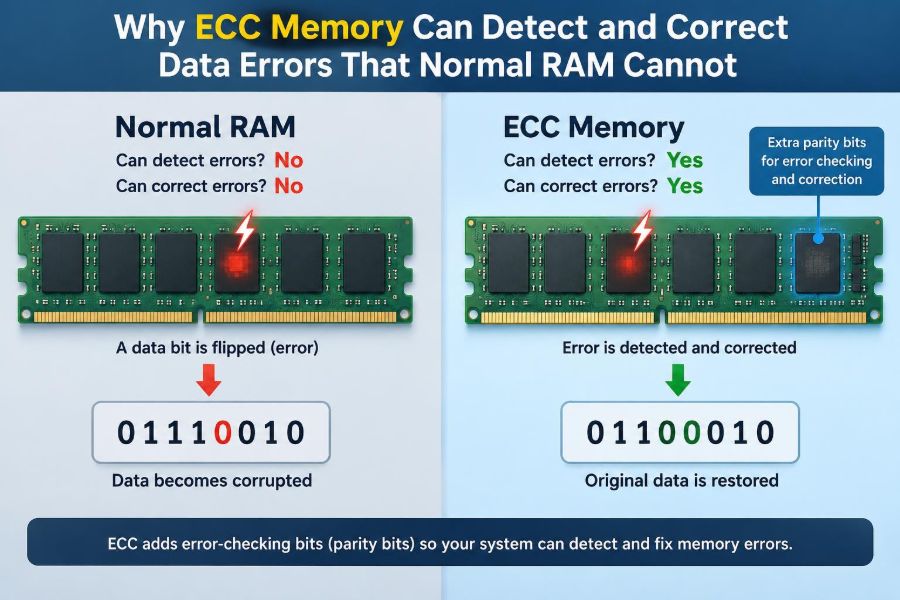

A spreadsheet saves correctly, a virtual machine keeps running, and a database accepts another transaction. From the outside, a computer may look perfectly healthy. Yet a single bit stored in memory can occasionally change from a 0 to a 1, or the other way around.
Most of the time, ordinary RAM has no built-in way to recognize that this happened. It simply delivers the value currently stored at a location, even if that value is no longer the one the processor originally wrote.
For a home PC, one bad value might cause a crashed game, a corrupted file, or an application error that is annoying but recoverable. For a server handling financial records, scientific calculations, storage, or many users’ data, silent corruption can be far harder to trace.
Error-correcting code memory, usually called ECC memory, adds information that lets a system check stored data and repair many common one-bit errors. Its purpose is not to make computers magical or invulnerable; it is to make memory failures visible and manageable before they become quietly wrong results.
🧠 RAM Is the Computer’s Short-Term Workspace
Random-access memory, or RAM, holds the instructions and data programs need while they are running. When you edit a document, render a video, browse the web, or query a database, the processor constantly reads from and writes to RAM.
RAM is fast but temporary. Its contents disappear when power is removed, unlike data saved on an SSD or hard drive. Because active work passes through memory so frequently, an incorrect bit can affect calculations, program instructions, addresses, or information waiting to be saved elsewhere.
🔢 A Bit Error Can Be Tiny but Significant
A bit is the smallest unit of digital data: a 0 or 1. A bit error occurs when a stored or transferred bit has a different value from the intended one.
The consequences depend entirely on what that bit represents. In a text character, it may produce an odd symbol. In a number, it can alter a calculation. In machine code or a memory address, it may cause a program to behave unpredictably or stop.
A bit flip is not automatically catastrophic, but computers process enormous amounts of data. The concern is not that every error causes disaster; it is that normal RAM can allow an undetected error to become part of a result.
⚡ Where Memory Errors Come From
Memory errors have several possible causes. Electrical noise, unstable power, heat, aging components, manufacturing defects, and marginal memory settings can all lead to incorrect behavior.
High-energy particles from the environment can also disturb the tiny electrical charges used by memory cells. These events are often discussed as soft errors: temporary changes to stored data rather than permanent physical damage to the memory chip.
A system may also have repeatable, hardware-related faults. A failing memory cell, poor module contact, or faulty motherboard trace can produce recurring errors. ECC helps reveal these problems, although it cannot repair every kind of fault.
🧩 What Normal RAM Usually Stores
Conventional desktop RAM commonly stores only the bits that make up the requested data. For example, a typical data path may move 64 bits at a time between the memory controller and RAM modules.
If one of those bits changes unexpectedly while held in memory, ordinary RAM generally returns the altered 64-bit value. The processor has no independent reference value to compare against, so it cannot know whether the data is valid.
This does not mean ordinary RAM is poor-quality memory. It is designed for cost-effective, high-performance use where occasional hardware faults are handled through testing, retries elsewhere in the system, backups, and the practical tolerance of the workload.
🧾 ECC Adds Check Bits Alongside Data
ECC memory stores extra bits known as check bits with each block of data. These bits are calculated from the data bits according to a defined mathematical code.
In a common arrangement, 64 data bits are paired with 8 additional check bits, creating a 72-bit-wide path. The exact implementation varies, but the key idea stays the same: the extra bits preserve a compact fingerprint of the data’s expected pattern.
When the system reads memory, it recalculates and checks that pattern. A mismatch provides evidence that one or more stored bits are no longer consistent with the original encoded data.
🧮 Parity Is the Simpler Ancestor of ECC
Before discussing correction, it helps to separate ECC from simple parity memory. A parity system adds one bit that indicates whether a group of bits should contain an even or odd number of 1s.
If a single bit changes, the parity check will disagree and signal that something is wrong. However, parity alone cannot tell the system which bit changed. It can detect many errors, but it cannot correct the original value.
ECC uses several check bits rather than just one. Their combined pattern provides enough information to locate a single incorrect bit in many common ECC schemes.
🗺️ The Syndrome Points to an Error Location
When ECC logic compares the received data and check bits with its own calculation, it creates a result often called a syndrome. Think of it as a diagnostic pattern rather than a warning light with only an on or off state.
For a one-bit error, the syndrome can identify the position of the bad bit within the protected block. The memory controller flips that bit back to its correct value before passing data to the processor.
This happens at hardware speed and normally without interrupting the application. The corrected event may still be recorded by firmware, the operating system, or server-management tools.
🛠️ Single-Bit Correction Is the Core Benefit
The ECC used in many servers and workstations is commonly described as single-error correction. If exactly one bit in a protected word has flipped, the controller can identify it and restore the intended data.
Imagine a stored value with one wrong letter and a proofreader that has both the sentence and a set of consistency rules. Those rules may reveal exactly which character is inconsistent. ECC performs an equivalent operation with binary patterns.
Correcting an error matters because the application receives the repaired value, not merely an alert that something was wrong. That reduces the chance of a transient one-bit fault becoming silent data corruption.
🚨 Double-Bit Detection Adds a Safety Signal
A widely used capability is called SECDED, short for single-error correction, double-error detection. It corrects a one-bit error and detects, but generally does not correct, an error affecting two bits in the same protected word.
When a detected but uncorrectable error occurs, the safe response is usually to report it and stop or restart the affected operation rather than guess at a repair. Servers may log a machine-check event, terminate a process, or take other platform-specific action.
Detection is valuable even when correction is impossible. A visible failure is often easier to investigate than a calculation that completes using incorrect data.
⚠️ ECC Does Not Correct Every Multi-Bit Error
SECDED should not be mistaken for complete protection against arbitrary corruption. Three or more changed bits can exceed what the code can reliably correct, and certain patterns may not be detected in the same way as one- or two-bit faults.
Some enterprise platforms use more advanced schemes, such as chipkill-style protection, memory mirroring, sparing, or stronger codes. Their abilities differ by processor, memory controller, motherboard, and module design.
ECC therefore reduces a specific class of risk. It is one layer in a reliability design, not a substitute for backups, redundant storage, sound cooling, or hardware monitoring.
🧱 The Memory Controller Performs the Checking
The RAM module contains memory chips, but ECC checking is typically coordinated by the system’s memory controller. In modern computers, that controller is often integrated into the processor.
On a write, the controller creates the check bits and stores them with the data. On a read, it evaluates the returned word, determines whether it is valid, and corrects a supported single-bit error if necessary.
This is why installing an ECC-labeled module alone is not enough. The CPU, motherboard, firmware, and memory configuration must all support ECC operation.
🔌 ECC Modules Need a Compatible Platform
Compatibility is the most common practical hurdle. Some processors support ECC only on particular chipsets or motherboard models, while others do not expose ECC support at all. Product names can be confusing, so documentation matters.
Before buying memory, check whether the platform supports the specific type required: unbuffered ECC, registered ECC, or another server-oriented format. Also verify the supported generation, capacity, rank arrangement, and memory speed.
A system may physically accept a module that it cannot use correctly. In some cases it may refuse to boot; in others it may run without active error correction. Confirming active ECC in firmware or the operating system is wiser than assuming.
🧷 Unbuffered, Registered, and Load-Reduced Memory Differ
Unbuffered ECC, often called UDIMM ECC, resembles ordinary desktop memory and is common in entry workstations and small servers. It adds error correction but does not add the buffering used by larger server configurations.
Registered memory, or RDIMM, places a register between the memory controller and parts of the module’s signaling path. This reduces electrical load and helps platforms support larger memory populations, but it requires compatible server hardware.
Load-reduced DIMMs are another specialized category. These types are generally not interchangeable, even when they share the same physical generation. A motherboard manual is the authority, not the fact that a module fits the slot.
📦 ECC Is Not the Same as Registered Memory
Two terms are frequently blended together: ECC and registered. They describe different features. ECC refers to error-detection and correction capability; registered refers to buffering of signals on the module.
A module can be unbuffered ECC, registered ECC, or non-ECC unbuffered memory. In mainstream systems, registered modules are commonly ECC-equipped, which contributes to the confusion.
| Feature | Main purpose | Typical use |
|---|---|---|
| Non-ECC unbuffered RAM | Standard data storage | Consumer desktops and laptops |
| ECC unbuffered RAM | Detect and correct supported memory errors | Workstations and smaller servers |
| ECC registered RAM | Error correction plus reduced electrical loading | Servers with high memory capacity |
🧪 Corrected Errors Can Be Early Warnings
A corrected ECC event is not necessarily an emergency. A rare, isolated correction can result from a transient disturbance. However, the fact that the system corrected it means the event was observable rather than silently ignored.
Repeated corrections associated with one module, memory channel, or address range deserve attention. They may indicate a module beginning to fail, a thermal issue, or a platform problem that warrants diagnostic testing and planned replacement.
Administrators often monitor these logs because patterns matter more than a single counter. ECC turns some otherwise invisible reliability clues into actionable maintenance information.
📊 Uncorrectable Errors Need a Deliberate Response
An uncorrectable memory error does not automatically identify the failed part with certainty. The module, slot, processor memory controller, motherboard, power conditions, or overheating can all be involved.
Useful first steps include preserving error logs, checking cooling and seating, returning memory settings to supported values, and running vendor-approved diagnostics. Replacing components without evidence can conceal the original cause.
If an uncorrectable error affects important work, restore affected data from a known-good backup or rerun the computation where possible. ECC protects data in memory; it cannot retroactively validate every file or result produced before the failure was noticed.
🗄️ Why Servers Often Prioritize ECC
Servers frequently run for long periods, use large amounts of memory, and hold shared data for many people or services. A memory error may affect a database page, a virtual machine, a filesystem cache entry, or a transaction being processed.
These workloads also make troubleshooting expensive. A sporadic application failure in a busy server can consume far more time than the memory feature that helps identify the fault.
For this reason, ECC is common where reliability, uptime, traceability, and data integrity have a higher priority than the lowest possible hardware cost.
🔬 Scientific and Engineering Workloads Benefit Too
Engineering simulations, software builds, media production, research analysis, and computer-aided design may run for hours or days. A corrupted intermediate value can invalidate an output without always causing an obvious crash.
That does not mean every student or creative professional must buy ECC hardware. It means the choice becomes more reasonable when work is difficult to reproduce, expensive to rerun, or used to make consequential decisions.
ECC is especially appealing for a workstation that doubles as a local server, development machine, or long-running compute system.
🎮 Home PCs Can Usually Use Normal RAM Sensibly
For gaming, web browsing, schoolwork, and general home use, quality non-ECC RAM is usually a practical choice. Most consumer platforms are designed around it, and users often gain more from adequate capacity, stable settings, and regular backups.
A game crash is frustrating, but it is usually visible and restartable. Many home workloads also do not maintain critical shared services continuously for months.
The right conclusion is not that normal RAM is unsafe. It is that its lack of correction represents a trade-off that is acceptable for many uses, while ECC targets workloads where silent errors carry a higher cost.
💾 ECC Protects Memory, Not Every Part of Data Integrity
Data travels through many places: processor caches, memory, storage controllers, drives, networks, and backup systems. ECC RAM specifically protects data while it is stored in and moved through the main-memory path covered by the platform’s ECC implementation.
It cannot fix a software bug that writes the wrong value, malware that alters a file, a failing SSD that reports bad data incorrectly, or a user deleting the wrong folder. It also cannot replace checksums used by filesystems and network protocols.
Reliable systems layer defenses. Examples include ECC RAM, storage redundancy, checksums, backups, access controls, monitoring, and tested recovery procedures.
🧷 Memory Testing Still Matters
ECC is not a reason to skip memory testing. New builds, upgraded systems, and machines showing instability should be tested with a reputable bootable or operating-system memory diagnostic appropriate for the hardware.
Testing can expose repeatable faults, while ECC can catch some errors during normal operation. Together, they provide stronger evidence than either approach alone.
When testing, avoid unsupported overclocks and marginal memory profiles. A configuration that completes a short benchmark may still fail during long, mixed workloads or at higher ambient temperatures.
🌡️ Stability Settings Affect Error Risk
Memory operates within electrical timing and voltage limits. Increasing speed or tightening timings can improve performance in some workloads, but it can also reduce stability margin if the CPU, motherboard, and modules are not fully capable of the selected settings.
ECC may report or correct some resulting problems, but it should not be used as permission to run unstable memory. Persistent corrected errors under an aggressive profile are a reason to return to supported settings and investigate.
Good airflow, clean contacts, a reliable power supply, and current firmware can also contribute to a stable memory environment. None offers a guarantee, but each removes avoidable sources of trouble.
🚄 Performance Overhead Is Usually Not the Main Question
ECC requires extra check bits and checking logic, and platform choices involving ECC may offer fewer consumer-oriented tuning options. The precise performance difference depends on the processor, memory generation, capacity, and workload.
In many professional systems, the practical discussion is less about a small theoretical overhead and more about total value: can the machine detect a memory error instead of delivering a bad result or creating a difficult support incident?
Capacity, bandwidth, latency, application behavior, and platform reliability should be evaluated together. Buying ECC does not compensate for insufficient RAM, which can force slow paging to storage.
💰 Cost Includes More Than the Module Price
ECC memory and compatible workstation or server platforms can cost more than a consumer configuration. Availability may also be narrower, especially for laptops and compact systems.
But hardware price is only one side of the decision. Consider the cost of rerunning work, restoring a damaged dataset, diagnosing intermittent crashes, or losing trust in a machine that stores business data.
For a casual PC, the extra platform cost may not be justified. For a small office server or a professional workstation supporting billable work, it can be a sensible form of risk reduction.
🔍 How to Verify That ECC Is Actually Active
Start with the motherboard and processor documentation, not just a retailer listing. Look for explicit statements that ECC memory is supported and whether correction operates in the chosen configuration.
Firmware setup screens may report installed memory type and ECC status. Many server operating systems and management interfaces can also display corrected-error counts and uncorrectable-error logs.
Be cautious with vague phrases such as “ECC capable.” A platform may electrically recognize ECC modules yet not enable reporting or correction in every product configuration. Verify with the system manufacturer when the requirement is critical.
🧾 Choosing ECC Memory for a New Build
Choose the platform first, then select memory from the types it supports. Match memory generation and form factor, and prefer modules whose specifications align with the vendor’s qualified-memory guidance.
- Decide whether your workload genuinely benefits from stronger memory integrity.
- Confirm CPU, motherboard, and firmware ECC support.
- Identify whether the board requires UDIMM ECC, RDIMM, or another type.
- Buy enough capacity for the workload before chasing peak memory speed.
- Test the completed system and check error reporting after deployment.
For a business-critical system, keeping a record of module positions and serial information also makes later troubleshooting much easier.
🧯 Common Misunderstandings to Avoid
One misconception is that ECC prevents all crashes. Software bugs, driver failures, overheating, storage problems, and network issues can still cause downtime. ECC only addresses certain faults in main memory.
Another is that any RAM error means data loss. A corrected single-bit ECC event may have no user-visible effect because the original data was restored before use. Conversely, normal RAM can experience a bit error without presenting a clear warning.
Finally, do not assume that “server RAM” is universally better for every computer. Registered modules may be incompatible with consumer boards, and the best memory is the compatible, stable type that fits the machine’s purpose.
🛡️ ECC Works Best as Part of a Reliability Plan
A dependable computer is built from overlapping safeguards. ECC handles supported memory errors; backups recover lost or damaged files; checksums help detect corruption in stored or transferred data; monitoring exposes developing hardware problems.
For a server, this may also include redundant storage, a suitable power-protection plan, documented recovery steps, and alerts that someone actually reviews. For a personal computer, it may simply mean good backups, stable hardware, and avoiding unnecessary overclocking.
The appropriate plan reflects consequences. The more costly it is to lose, rerun, or mistrust the work, the stronger the case for error detection at every practical layer.
🎯 The Core Difference Between ECC and Normal RAM
Normal RAM stores and returns data without enough redundant information to independently validate each protected memory word. If a bit changes, the system commonly has no direct way to distinguish the changed value from the intended one.
ECC memory stores calculated check bits alongside the data. On a read, the memory controller uses those bits to detect inconsistency, correct many single-bit errors, and flag common double-bit errors rather than silently treating them as valid data.
ECC is valuable because it turns certain memory faults from invisible corruption into corrected events or clear warnings. Whether that value justifies the compatible hardware depends on the workload, the data involved, and the cost of being wrong.
ECC memory does not make a computer error-free, but it gives the system a way to question suspicious data instead of blindly trusting it. For work where accuracy and recoverability matter, that extra check can be one of the quietest and most useful protections in a computer. 🖥️🛡️📚