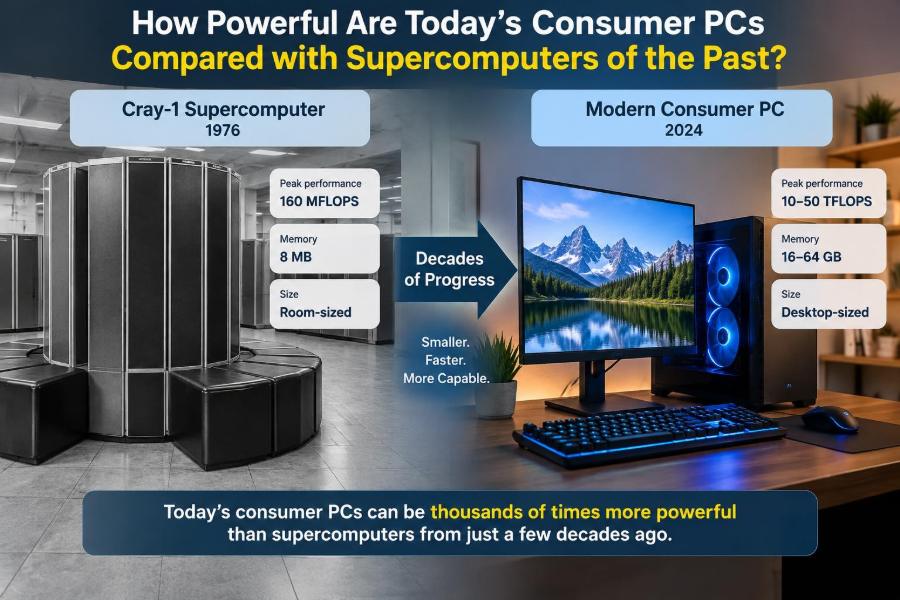

A laptop on a kitchen table can edit 4K video, run a detailed game world, translate speech, and model a spreadsheet full of data before the kettle boils. It is easy to treat that as ordinary—until you compare it with machines that once occupied rooms, demanded specialist operators, and represented the highest level of computing.
The comparison is more than a fun piece of computer history. It explains why older software sometimes feels surprisingly fast, why a phone can handle tasks once reserved for laboratories, and why a modern PC can still struggle with some problems despite its enormous raw speed.
“Powerful” is also a slippery word. A consumer PC may outperform a historic supercomputer at one task while losing badly at another. Processor design, memory, storage, graphics hardware, and the kind of calculation all matter.
So the useful question is not simply whether your computer is faster. It is faster at what, by which measure, and with what limits?
🧭 Start by Defining “Powerful”
Computing power can mean arithmetic speed, the number of jobs completed per hour, memory capacity, graphics performance, responsiveness, or energy efficiency. These measures overlap, but they are not interchangeable.
A weather model needs huge amounts of floating-point arithmetic. A database may depend more on memory capacity and storage access. A game relies heavily on graphics processing and quick response to player input.
🔢 FLOPS Measure Mathematical Throughput
Supercomputer rankings commonly use FLOPS: floating-point operations per second. Floating-point numbers represent values with a wide range, such as measurements in a climate simulation.
FLOPS are useful for scientific workloads, but they do not describe every experience. A machine with a high FLOPS rating is not automatically better at opening documents, browsing the web, or compiling a particular program.
🕰️ Past Supercomputers Were Exceptional Machines
Historic supercomputers were built for demanding scientific, engineering, cryptographic, and defense-related calculations. Their defining feature was not merely a fast processor, but an architecture designed to keep arithmetic units busy.
Examples include vector supercomputers from the 1970s and 1980s, followed by large parallel systems using many processors. They were extraordinary for their era, but their strengths were often narrow and carefully engineered.
📈 A Modern PC Often Wins the Raw-Speed Comparison
Many current desktop PCs, laptops, and high-end phones can perform floating-point work at rates that exceed famous supercomputers from several decades ago. Modern graphics processors, or GPUs, make the gap especially large for highly parallel calculations.
This does not mean every inexpensive computer surpasses every old supercomputer in every benchmark. It does mean that hardware capability once available only to national laboratories has progressively moved into ordinary devices.
📊 A Time-Scale Comparison
The following broad comparison shows why direct headlines need context. Peak figures describe an ideal workload, not a promise about daily application speed.
| System category | Typical era | Core strength | How a modern consumer PC compares |
|---|---|---|---|
| Early vector supercomputer | 1970s–1980s | Fast, repeated numerical calculations | Modern CPUs and GPUs can exceed its peak arithmetic rate |
| Large 1990s supercomputer | 1990s | Parallel scientific workloads | A capable desktop may rival or exceed selected metrics |
| Early-2000s top system | Early 2000s | Large-scale distributed computation | A high-end GPU can be formidable on suitable tasks, but lacks system scale |
| Current supercomputer | Current era | Massive simulation and AI workloads | Still far beyond one consumer machine overall |
⚙️ Clock Speed Is Not the Whole Story
Clock speed, measured in hertz, tells you how often a processor’s timing signal ticks. It does not reveal how much useful work happens in each tick.
A modern CPU can execute multiple instructions at once, predict likely branches in a program, and rearrange some operations internally. Comparing gigahertz across different processor generations is therefore misleading.
🧠 Instructions per Clock Changed the Equation
Instructions per clock, often shortened to IPC, describes how much work a processor can complete during each cycle under a given workload. Improvements in IPC are a major reason newer processors can be much faster even at similar clock speeds.
Modern processors also have sophisticated caches, branch prediction, and out-of-order execution. These features reduce time spent waiting for data or for a decision in the program.
🧮 Vector Processing Was an Early Supercomputer Advantage
A vector processor applies one instruction to many data values. For example, it can add two long lists of numbers using a repeated, streamlined operation rather than treating each addition as a completely separate task.
This suited fluid dynamics, physics, and weather calculations. Vector supercomputers were not magical general-purpose machines; they were exceptionally good at programs organized to exploit vectors.
🧩 SIMD Brings a Similar Idea to PCs
Modern CPUs use SIMD—single instruction, multiple data—for certain operations. SIMD instructions can process several values in parallel, helping with media processing, scientific code, encryption, and other data-heavy work.
The idea resembles vector computing, though implementations differ. A modern PC benefits when software is written or compiled to use these instructions effectively.
🎮 GPUs Are the Major Consumer-PC Wild Card
GPUs began as specialized hardware for drawing graphics, where many pixels and vertices can be processed simultaneously. Their large number of simpler processing units also makes them useful for many non-graphics calculations.
Video rendering, image processing, machine learning, and some scientific simulations can run remarkably quickly on a GPU. In these workloads, a gaming-oriented PC may look astonishingly powerful next to older supercomputers.
🧱 Parallelism Only Helps Parallel Problems
Not every job can be divided into thousands of independent pieces. Some steps must wait for earlier results, while others require frequent communication between workers.
This is why a GPU cannot automatically accelerate every program. A word processor, a branch-heavy business application, or a small script may benefit more from a fast CPU core than from enormous GPU throughput.
🚦 Amdahl’s Law Explains the Bottleneck
Amdahl’s law is a simple reminder: the serial part of a task limits the total speedup. If a job contains an unavoidable sequential stage, adding more parallel hardware eventually produces smaller gains.
Imagine a restaurant where one person must check every order before cooking begins. Adding more cooks helps, but the single checking step can still create a queue.
💾 Memory Capacity Has Expanded Dramatically
Older high-performance systems often had far less memory than a modern desktop, measured by today’s standards. Modern consumer devices can keep large applications, media files, and datasets in memory at once.
Capacity is not everything: memory bandwidth—the rate at which data moves between memory and processor—can be equally crucial. Scientific systems have long been designed around this challenge.
🏎️ Memory Bandwidth Can Limit Fast Chips
A processor may be capable of tremendous arithmetic speed yet spend much of its time waiting for data. This is commonly called the memory wall: computation has improved rapidly, while moving data remains comparatively expensive in time and energy.
GPUs address some workloads with very high-bandwidth memory systems, but their performance still depends on data layout and access patterns. Fast arithmetic cannot compensate for poorly fed hardware.
🗃️ Storage Is a Quiet Revolution
Solid-state drives have transformed everyday computing. They do not make a CPU perform more calculations, but they reduce delays when starting programs, loading files, swapping data, and searching large collections.
An older supercomputer could have extraordinary compute capability while relying on storage systems that feel slow by current interactive standards. Modern responsiveness comes from the whole system, not the processor alone.
🌐 Networking Was and Remains a System Challenge
Large supercomputers depend on many nodes working together. The network between them must move data quickly with low latency, meaning little delay before a message arrives.
A consumer PC usually avoids this problem because most work happens inside one machine. But once a task is spread across cloud servers or a local cluster, communication delays can become the limiting factor.
🧰 Software Determines Whether Hardware Is Used Well
Hardware capability is only potential. Compilers, operating systems, libraries, drivers, and application design decide how much of it reaches the user.
An old program may run quickly on modern hardware without using all available cores. A carefully optimized scientific or media application can make far better use of multicore CPUs and GPUs than a simple single-threaded tool.
🧵 More Cores Do Not Mean Every App Feels Faster
Consumer processors commonly have multiple cores, allowing several tasks or program threads to run at once. This improves multitasking and speeds applications designed for parallel work.
However, a program with one main thread may mainly depend on single-core performance. When choosing a PC, more cores are valuable, but they should be weighed against the software you actually use.
📱 Even Phones Carry Historic Computing Power
Modern smartphones combine CPU cores, graphics hardware, image processors, neural-processing components, memory, radios, and sensors in a small, battery-powered package. Their performance would have been remarkable in earlier computing eras.
Yet thermal limits matter. A phone can burst to high performance briefly, then reduce speed to control heat and protect the battery. A desktop with cooling can sustain demanding work longer.
🔋 Efficiency Is a Breakthrough of Its Own
Past supercomputers consumed substantial power and required major cooling infrastructure. Modern chips complete far more work per unit of energy, enabling capable laptops and mobile devices.
Efficiency does not remove energy costs. A powerful desktop GPU can still use significant electricity under load, and data centers remain major engineering projects. But the amount of useful computing delivered per watt has improved profoundly.
🌡️ Heat Limits Sustained Performance
Peak benchmark results may last seconds or minutes. Long simulations, exports, and game sessions produce heat, and hardware may lower its speed—known as throttling—to stay within safe operating limits.
Cooling design, room temperature, laptop placement, and dust buildup all affect sustained performance. A thin portable system and a well-cooled workstation should not be judged only by their advertised specifications.
🖥️ Supercomputers Were Complete Facilities
Calling a past supercomputer “slower than a laptop” can hide a crucial difference. These systems included specialized storage, networking, operating environments, job schedulers, reliability practices, and teams trained to operate them.
They enabled work that was impractical elsewhere at the time. Their historical significance is not reduced because later technology became cheaper, smaller, and faster.
🧪 Benchmark Results Need Careful Reading
A benchmark is a repeatable test, not a universal verdict. It may measure mathematical throughput, browser performance, video encoding, storage speed, or gaming frames per second.
Before accepting a comparison, ask what was tested, whether it used a CPU or GPU, whether the result is peak or sustained, and whether the software resembles your real task. Those details often matter more than the headline number.
🔍 Peak Performance and Real Performance Differ
Peak performance is a theoretical or best-case maximum, often reached with carefully chosen calculations. Real applications include memory access, input and output, synchronization, uneven workloads, and operating-system overhead.
This does not make peak figures useless. They show the hardware’s upper potential, but practical decisions should also use task-specific tests and real workflow observations.
🧾 Integer Work Is Not Floating-Point Work
Office software, operating systems, text processing, and many business applications perform large amounts of integer and control-flow work. Scientific simulations often emphasize floating-point calculations.
A comparison based only on FLOPS can therefore miss what makes a machine pleasant or productive for everyday work. Different workloads exercise different parts of a computer.
🤖 AI Hardware Adds Another Comparison Trap
Many modern chips include accelerators optimized for matrix operations, the repeated grid-like calculations common in machine learning. Their quoted performance may use reduced-precision number formats rather than the precision used in older scientific benchmarks.
That can be entirely appropriate for an AI task, but it is not a one-for-one replacement for traditional floating-point measurements. Always check the data type and workload behind the claim.
📦 Why an Old Simulation May Not Run Better Locally
A historic simulation may depend on a particular operating system, compiler, data format, or library. Moving it to a current PC can require substantial adaptation before it benefits from modern hardware.
Numerical results can also change when precision, operation order, or parallel execution changes. Faster hardware is valuable, but reproducible scientific computing requires careful validation.
🛠️ Match the Computer to the Work
For web use, documents, communication, and learning, a balanced CPU, sufficient memory, and a responsive SSD matter more than an extreme GPU. For video editing, 3D work, engineering software, or local AI experiments, graphics capability and memory bandwidth may matter more.
- Check your application’s requirements, not just a generic performance score.
- Prioritize enough RAM for the files and programs you keep open.
- Consider sustained cooling for long, heavy workloads.
- Budget for storage if projects include video, photos, or datasets.
☁️ One PC Is Not a Modern Supercomputer
Current leading supercomputers combine vast numbers of processors and accelerators, enormous memory systems, specialized interconnects, and facility-scale power and cooling. They remain far beyond a single consumer machine for major climate models, molecular simulations, and large research workloads.
A PC’s victory over older systems is best understood as progress over time, not as evidence that scale no longer matters. Modern scientific problems have grown alongside computer capability.
🌍 Bigger Capability Creates Bigger Questions
When advanced computation becomes widely available, more people can create media, analyze data, learn programming, and experiment with technical tools. That access can be genuinely empowering.
It also raises practical concerns: electricity use, electronic waste, privacy, software security, and unequal access to capable hardware. Computing progress has benefits, but it is not free of trade-offs.
🧠 The Best Mental Model: Capability Is Multidimensional
Think of a computer less like a single engine and more like a workshop. The CPU, GPU, memory, storage, network, cooling, and software are different tools and supply routes. A weakness in one part can hold back the rest.
This model explains why a modern laptop can outperform a historic supercomputer in selected calculations while still being unsuitable for a facility-scale simulation. The answer changes with the job.
🏁 What the Comparison Really Teaches
Consumer computing has advanced far enough that machines people carry or keep at home can exceed the raw capabilities of celebrated systems from the past on many measures. That is an extraordinary result of semiconductor engineering, software development, and decades of accumulated design knowledge.
But simple comparisons should not erase context. Historic supercomputers were designed for the hardest available problems of their time, and current supercomputers continue that role at a vastly larger scale.
The core lesson is that computer power is not one number: it is the useful combination of the right hardware, efficient software, enough data movement, and a workload suited to the system.
Your everyday computer is a remarkable piece of technological history—but its real value appears when its capabilities are matched thoughtfully to the task in front of you. 🚀💻🌍