
A new laptop launches with a polished keyboard, a quiet cooling system, and ports that work as expected. It is easy to imagine that the product went directly from a designer’s sketch to a factory line.
In reality, the device has usually passed through many versions that most buyers never see. Some are hand-built boards covered in wires. Others look nearly finished but hide temporary parts, diagnostic connectors, or unfinished software.
This journey matters because it explains why a promising specification is not the same thing as a dependable product. It also helps buyers, students, and IT professionals understand launch delays, early hardware revisions, firmware updates, and the limits of pre-release reviews.
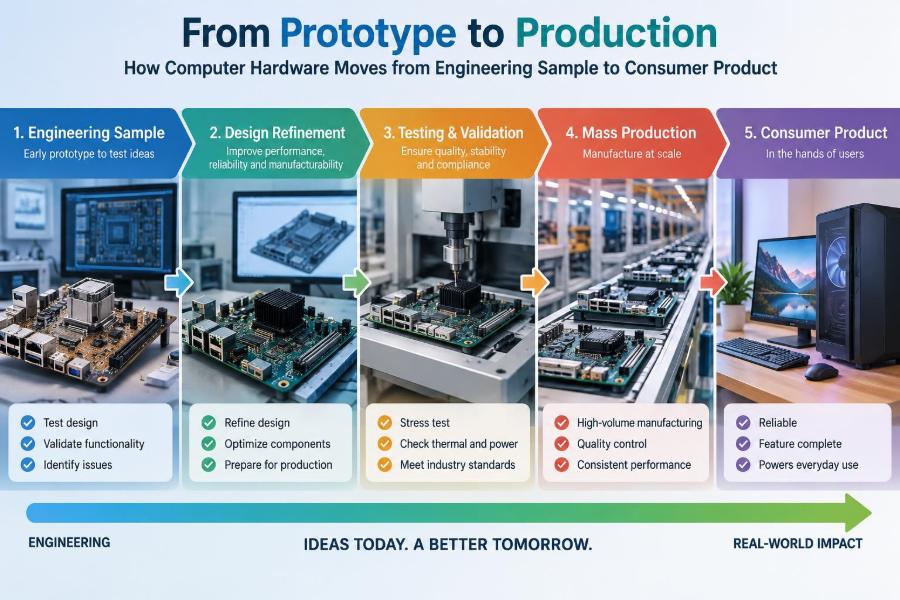
Computer hardware reaches consumers only after engineering, manufacturing, testing, supply-chain planning, and support preparation meet at the same point. Here is how that transition typically works.
🧭 The Product Journey Is a Series of Risk Reductions
Hardware development is not one straight build process. It is a sequence of decisions intended to reduce different kinds of risk: technical risk, manufacturing risk, cost risk, reliability risk, and customer-support risk.
An early prototype answers, “Can this function?” A later build asks, “Can we make thousands of these consistently?” The final retail unit must also answer, “Can an ordinary person use it safely and successfully?”
Names and exact stage definitions vary between companies. Still, the underlying progression is widely recognizable: concept, prototype, engineering validation, design validation, production validation, mass production, and post-launch improvement.
💡 A Product Requirement Starts the Work
Before engineers choose a processor or draw a circuit board, a team defines the product’s intended job. Requirements may cover performance, battery life, physical size, networking, ports, operating temperature, repairability, regulatory needs, and a target cost.
Requirements often conflict. A thinner laptop may have less room for a battery and heat sink. A faster graphics chip may require a larger power adapter. More ports can improve usefulness while increasing board space and manufacturing complexity.
A useful requirement is testable. “Long battery life” is vague; “operate through a defined workload for a defined period under specified conditions” gives engineers something they can measure.
📐 Architecture Turns Goals into a System Plan
System architecture divides the product into major functions and shows how they interact. For a laptop, this includes the CPU, memory, storage, display, battery, power-delivery circuitry, wireless module, cooling system, firmware, and mechanical enclosure.
Interfaces are especially important. Engineers must establish electrical voltages, data speeds, connector types, physical clearances, and software control paths. A component can be excellent by itself yet fail in the final system if an interface is poorly defined.
This stage also identifies dependencies. If a new processor needs a particular memory type or power-management controller, those choices affect the board layout, firmware, suppliers, and test plan.
🧱 Proof-of-Concept Builds Test the Big Question
A proof of concept is an early demonstration that a key idea can work. It may use development boards, off-the-shelf modules, 3D-printed brackets, desktop power supplies, and cables that would never appear in a retail product.
Imagine a team testing a compact computer with an external GPU. The first setup might be several separate boards on a bench. If it can boot, communicate over the intended interface, and sustain the expected workload, the core idea has gained credibility.
But it is not yet evidence that the product can fit in a small enclosure, survive shipping, meet emissions rules, or be assembled economically. Those are later questions.
🔬 Engineering Samples Bring the Design onto Custom Hardware
An engineering sample is an early build made to evaluate the actual design or a close version of it. In chip development, the term can refer to pre-production silicon. In system development, it may describe an early motherboard or near-complete device.
These samples often contain workarounds: extra test points, manually fitted components, alternate wiring paths, or components selected because the preferred part was not yet available. Their purpose is learning, not presentation.
Performance results from engineering samples should therefore be interpreted carefully. Clock speeds, power limits, firmware, memory configuration, and cooling may differ from the eventual consumer model.
🧩 Custom Circuit Boards Replace Development Kits
A development kit makes early software and interface work faster, but it is usually too large, expensive, and flexible for a finished product. The product team eventually designs a custom printed circuit board, or PCB.
PCB layout is more than placing chips on a digital canvas. High-speed signals need controlled paths, power circuits need stable current delivery, antennas need suitable placement, and sensitive audio or radio circuits must be protected from electrical noise.
Small layout changes can have large consequences. Moving a connector may make assembly easier but force signal traces to take a longer route. Changing a heat-generating component’s location can alter both cooling and wireless performance.
⚡ Power Design Determines More Than Battery Life
Modern computers use several voltage rails: different components need different voltages and must receive them in the right sequence. Voltage regulators convert incoming power into these controlled supplies.
Engineers test not only average consumption but also sudden demand changes. A processor can shift rapidly from idle to heavy work, and the power system must remain stable during that transition.
Poor power design can show up as random restarts, USB devices disconnecting, unstable performance, excess heat, or reduced battery longevity. It is one reason a device that seems fine on a workbench may struggle in real use.
🌡️ Thermal Engineering Makes Performance Sustainable
Every watt consumed by a processor, graphics chip, storage device, or voltage regulator eventually becomes heat. Cooling design determines whether the system can maintain performance without becoming uncomfortable, loud, or unreliable.
Engineers use thermal sensors, workload testing, airflow studies, and physical measurements to identify hot spots. They may change fan curves, heat-pipe routing, vent placement, enclosure materials, or processor power limits.
A short benchmark can hide a thermal problem. Sustained compilation, gaming, video rendering, or charging in a warm room reveals whether the design can dissipate heat over time.
📡 Wireless and Antenna Placement Need Real-World Testing
Wi-Fi, Bluetooth, cellular radios, and GPS depend on antennas that can transmit and receive efficiently. Metal cases, batteries, displays, cables, and even a user’s hands can affect radio performance.
Antennas are tuned for their physical environment, not treated as isolated parts. A last-minute enclosure change can require retesting because it may shift radio behavior or create interference.
Wireless testing also considers coexistence. A laptop may run Wi-Fi, Bluetooth peripherals, USB devices, and a display at the same time. The goal is not merely to connect once, but to stay dependable in realistic conditions.
🧠 Firmware Gives Hardware Its First Instructions
Firmware is low-level software stored on or closely associated with hardware. It may initialize memory, configure power systems, identify attached devices, control charging, and start the operating system.
Early boards frequently need firmware updates just to reach a stable boot process. Developers use logs, debug interfaces, and diagnostic tools to trace failures that appear before a normal operating system is available.
Firmware maturity is a major difference between a lab sample and a retail computer. A finished product needs predictable startup behavior, safe update mechanisms, recovery paths, and compatibility with supported components.
🐛 Bring-Up Finds the First Hidden Problems
Bring-up is the process of powering new hardware and making its fundamental functions work. It can begin with simple checks: Are voltage rails correct? Does the processor start? Can the board communicate with storage or memory?
Failures at this stage are normal. A misplaced component, a manufacturing defect, an incorrect resistor value, or a firmware setting can stop a board from booting. The challenge is isolating the cause efficiently.
Teams often change one condition at a time, compare a faulty board with a known-good one, and gather measurements before altering the design. Guessing may occasionally help, but disciplined diagnosis prevents new mistakes.
✅ Engineering Validation Tests Whether the Design Works
During engineering validation, often called EVT in many organizations, the focus is functional feasibility. Does the custom design do what the requirements demand, and are its key technical assumptions valid?
The build quantity is usually limited, and units may still be assembled partly by hand. Engineers expect to find defects because this is the point where a design meets physical reality.
Common findings include unstable memory, a connector that is difficult to insert, an overheating component, insufficient battery capacity, or a sensor that behaves differently once enclosed. Each finding feeds a new revision.
🔁 A Hardware Revision Is Evidence of Learning
Hardware teams revise boards and mechanical parts repeatedly. A revision may correct one clear defect, but it can also introduce a new interaction, so regression testing is essential.
For example, widening a copper path may improve power delivery but affect a nearby high-speed signal. Replacing a component with an equivalent-looking alternative may require firmware changes because its electrical behavior differs.
Revision labels are useful internally, but they do not automatically tell consumers whether a product is good or bad. Later revisions can improve a design, while an early revision may still be fully reliable once it has passed final validation.
🧪 Design Validation Tests the Near-Final Product
Design validation, often abbreviated DVT, evaluates a design that is much closer to its intended final form. The enclosure, board, display, cooling system, packaging approach, and user-facing features should be largely settled.
The question changes from “Can it work?” to “Does this complete design meet its requirements under the expected range of conditions?” Testing becomes broader, more repeatable, and closer to how customers will use the product.
A DVT unit can look almost identical to a store-bought device. That resemblance does not mean every internal component, firmware feature, or manufacturing process is final.
🧰 Reliability Testing Looks Beyond the First Week
Reliability testing seeks weaknesses that may appear after repeated use or environmental stress. Tests can include repeated port insertion, keyboard presses, lid opening, button operation, thermal cycling, vibration, and transport-oriented drops.
These tests do not predict the exact life of every individual unit. Materials, workloads, and treatment vary too much for that. Instead, they expose design vulnerabilities and help teams compare alternatives under controlled conditions.
A connector that survives casual use may fail after many automated insertions. A fan that works at room temperature may become noisy or unreliable after heat exposure. Finding such issues before production is far less costly than repairing them in the field.
🛡️ Safety and Compliance Require Separate Evidence
Consumer electronics must satisfy applicable safety, electromagnetic compatibility, radio, environmental, and market-specific requirements. Exact requirements depend on the product type and the regions where it will be sold.
Electrical safety work considers hazards such as overheating, insulation failure, battery faults, and accessible electrical energy. Electromagnetic compatibility examines whether a device emits excessive interference or is overly vulnerable to interference from its surroundings.
Compliance is not a decorative final checkbox. A design change involving the power supply, enclosure, radio hardware, cables, or shielding can require renewed evaluation. Teams plan for this early because late changes can delay a launch.
🔋 Battery Systems Demand Conservative Design
Rechargeable battery packs combine cells with monitoring and protection electronics. The system must manage charging, temperature, current, state estimation, and communication with the rest of the device.
Battery behavior is sensitive to age, temperature, manufacturing variation, and charging conditions. Engineers therefore test normal operation and fault scenarios, such as blocked airflow, unusual chargers, depleted cells, or sensor errors.
Users should not treat a swollen, damaged, or unusually hot battery as a routine software problem. Power the device down when safe to do so and seek qualified support according to the manufacturer’s guidance.
🏭 Design for Manufacturing Changes the Design Itself
A device can be technically sound yet difficult to build. Design for manufacturing, or DFM, adapts the design so factory equipment and workers can assemble it consistently at scale.
Components need practical spacing for automated placement and soldering. Screws need accessible paths. Adhesives need controlled application. Cables must route without being pinched, and fragile parts must be protected during assembly.
DFM is not simply about making products cheaper. Better manufacturability reduces variation, rework, accidental damage, and the chance that two apparently identical units behave differently.
📦 Component Supply Planning Starts Earlier Than Many People Expect
Every computer contains parts from many suppliers: processors, memory chips, displays, capacitors, connectors, cameras, fans, packaging, and more. A single unavailable component can stop a production line.
Procurement teams evaluate lead times, supplier capacity, approved alternatives, quality history, and the risk of parts becoming unavailable. Engineers may qualify more than one source for selected components, but substitutes must be tested rather than assumed equivalent.
Supply constraints can lead to redesigns, changed configurations, or delayed availability. This is not always a sign of poor engineering; sometimes a technically preferred component simply cannot be obtained in the required volume.
🤖 Production Validation Tests the Actual Factory Process
Production validation, commonly called PVT, checks whether the factory can build the product repeatedly using intended materials, tools, instructions, and test stations. This is where a successful design becomes a successful production system.
A PVT run may expose issues that lab builds did not: a fixture may misalign a board, a test may take too long, an operator instruction may be unclear, or a shipping tray may scratch a surface.
Manufacturing engineering then refines work instructions, fixtures, inspection points, software images, and test limits. The desired result is not just a working unit, but a controlled process that produces working units consistently.
📊 End-of-Line Testing Catches Unit-Level Faults
At the end of assembly, each unit normally goes through a defined set of checks. The scope depends on the device, but may include booting, display inspection, storage checks, port tests, network functions, audio, sensors, and battery or charging verification.
Factories use fixtures and software to make tests repeatable. A fixture can hold a device in position, attach connectors, simulate inputs, and record results faster than a person could reliably do by hand.
End-of-line testing is valuable, but it cannot compensate for a weak design. It catches certain assembly and component faults; robust engineering prevents whole categories of problems from reaching that point.
🔍 Quality Control Uses Data, Not Just Visual Inspection
Quality control includes inspections, measurements, audit sampling, and records that help trace a unit’s manufacturing history. Serial numbers and production data can help identify patterns if a problem later appears.
Teams monitor yields: the share of units that pass a process step without rework. A sudden yield drop may indicate a supplier issue, a machine setting change, a faulty fixture, or an unclear assembly process.
Good quality systems focus on root causes. If one connector repeatedly fails, replacing failed units is not enough; the team must determine whether the cause is the part, the board, the process, the tool, or the test.
📦 Packaging Is Part of the Engineering System
Packaging protects hardware from impact, vibration, moisture, electrostatic discharge, and cosmetic damage during shipping and storage. It must do this while remaining practical to pack, transport, open, and recycle where possible.
Packaging tests may simulate drops, vibration, compression, and changing environmental conditions. A device can leave the factory flawless and still arrive damaged if its packaging does not control movement inside the box.
Documentation matters too. Quick-start information, safety notices, chargers, cables, and region-appropriate accessories must match the exact product configuration.
🚚 Ramp-Up Is Not the Same as Full Production
After validation, factories usually increase output gradually. This ramp-up gives teams time to watch yield, component flow, test results, and shipping quality as volume grows.
Ramping too quickly can amplify a small defect into a large number of affected units. Ramping too slowly can limit availability and complicate a launch. The appropriate pace depends on process stability and demand planning.
Even during ramp-up, changes should be controlled. An unrecorded substitution or hurried process adjustment can make later troubleshooting much harder.
🛒 Retail Units Must Work for Non-Engineers
A consumer product is complete only when setup, updates, recovery, support, and documentation are ready. Engineers may be comfortable with diagnostic codes and manual firmware flashing; ordinary users should not need either for normal ownership.
This requirement affects design choices. Ports need clear markings, software setup needs understandable prompts, packaging needs the correct accessories, and support teams need known symptoms and approved solutions.
Accessibility also belongs here. Physical controls, visual indicators, keyboard layouts, audio feedback, and software setup can determine whether a product is practical for a wider range of users.
📰 Pre-Release Hardware Deserves Careful Interpretation
Reviewers, software developers, and manufacturing partners may receive hardware before public release. Such units can provide useful evidence, but they may use unfinished firmware, non-final drivers, or temporary performance settings.
When reading an early hands-on report, look for what is explicitly identified as preliminary. A reported battery result or benchmark may change if the final software, cooling profile, or component configuration changes.
The opposite mistake is dismissing every early observation. Repeated reports of the same limitation can be meaningful, particularly when the limitation comes from a physical design choice rather than unfinished software.
🔧 Launch Does Not End Hardware Development
After release, manufacturers collect warranty returns, support reports, repair data, production-test trends, and feedback from users. This field information can reveal rare issues that were difficult to reproduce during pre-launch testing.
Some problems can be improved with firmware or driver updates. Others require a revised component, a different assembly process, or a later hardware revision. Not every issue has a software fix.
Responsible post-launch work includes clear communication when updates affect behavior, careful validation of fixes, and service processes for faults that cannot be solved remotely.
🧾 Why Specifications Alone Cannot Tell the Whole Story
Two computers can list the same processor, memory capacity, and storage size yet feel different in daily use. Cooling, power limits, display quality, keyboard design, firmware, driver tuning, wireless implementation, and build quality all shape the experience.
Specifications are still useful: they establish compatibility and broad performance potential. They simply do not reveal every consequence of engineering and manufacturing decisions.
For buyers, this means looking beyond a single headline number. Consider independent reviews of sustained behavior, port selection, noise, repair options, support history, and the tasks you actually perform.
🧑💻 Practical Lessons for Students and Professionals
Students building electronics projects can borrow professional habits without needing a factory. Write requirements, test one subsystem at a time, record revisions, label cables, and define what success looks like before changing several things at once.
Working professionals selecting hardware can ask better questions: Is this a final configuration? Which firmware version was tested? Is a component substitution approved? What process verifies each unit before deployment?
- Keep a change log for boards, components, firmware, and test results.
- Test realistic workloads, not only the easiest demonstration.
- Separate a temporary workaround from a permanent design fix.
- Plan for servicing, updating, and replacing parts before deployment.
⚖️ Speed, Cost, and Quality Require Trade-Offs
Teams constantly balance time to market, unit cost, performance, durability, and design ambition. Adding more tests or a stronger material can improve confidence, but it can also add time, expense, weight, or complexity.
The right choice depends on the product’s purpose. A rugged industrial computer, a budget classroom laptop, and a high-performance workstation face different constraints and acceptable compromises.
The danger is not making trade-offs; every physical product has them. The danger is making them without understanding what is being sacrificed, or hiding limitations behind attractive specifications.
🏁 The Core Principle: A Product Is a Proven System
The route from engineering sample to consumer product is a disciplined effort to prove a complete system. Silicon, circuit boards, firmware, cooling, batteries, radios, enclosures, factory processes, packaging, and support must work together.
A polished retail device represents far more than a successful prototype. It represents repeated testing, revision, controlled manufacturing, and decisions about which risks can be reduced before the product reaches someone’s desk.
Understanding that process makes hardware easier to evaluate. It also explains why dependable products are built through iteration rather than appearing fully solved on the first attempt.
From prototype to production, the real achievement is not merely making hardware work once—it is making it work reliably, repeatably, and usefully for many different people. 🖥️🔧📦