
You are editing a document while music plays in the background, a browser downloads a file, and a video call notification appears. It feels as though the computer is doing everything at once.
Yet a single CPU core can execute only one instruction stream at any instant. The smooth experience comes from the operating system making extremely fast decisions about which task gets that core next.
Those decisions are called CPU scheduling. They affect whether a game feels responsive, whether a server handles requests fairly, and whether a laptop wastes battery power waiting for work.
CPU scheduling is not one universal rule. It is a set of algorithms and policies chosen for different workloads, hardware, and goals. Understanding them turns a mysterious background process into a practical part of computer fundamentals.
⚙️ What CPU Scheduling Actually Does
CPU scheduling is the operating system’s process of selecting a ready process or thread to run on a CPU. A process is a running program; a thread is an execution path within a process. Modern systems usually schedule threads because they are the units that actually execute.
The scheduler does not decide what a program means or whether its result is correct. It decides when that program gets processor time. It repeatedly chooses from work that is ready, pauses work when needed, and lets another task continue.
🧠 The CPU Cannot Literally Do Everything at Once
On one core, execution is sequential. The core runs one thread, then perhaps switches to another, then returns to the first. These switches can happen so rapidly that human users perceive parallel activity.
Multi-core processors add real parallelism: four cores can run up to four threads at the same instant. But once more runnable threads exist than available cores, scheduling remains necessary. A busy eight-core machine may still have hundreds of threads competing for attention.
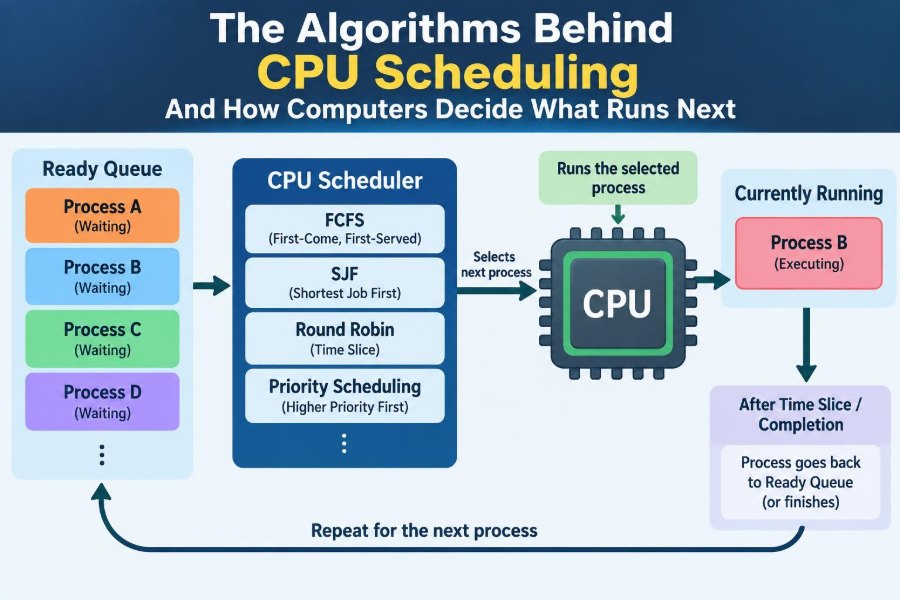
📋 The Ready Queue: Where Runnable Work Waits
A thread that could run immediately is placed in a ready queue. This is a logical scheduling structure, not necessarily one simple first-in, first-out list in memory. Different operating systems organize it differently.
A thread is not ready if it is waiting for something: disk data, keyboard input, a network packet, a lock, or a timer. While waiting, it does not need CPU time. When the event occurs, the operating system moves it back into a ready state.
🔄 The Basic Life Cycle of a Process
Scheduling makes more sense when process states are separated:
- Running: currently using a CPU core.
- Ready: able to run but waiting for a core.
- Blocked or waiting: paused until an event or resource becomes available.
- Terminated: finished and no longer scheduled.
A web browser thread that waits for a network response is blocked, not ignored. Scheduling it during that wait would accomplish nothing, so the CPU can run useful work instead.
⏱️ Preemptive and Non-Preemptive Scheduling
With non-preemptive scheduling, a running task keeps the CPU until it finishes, voluntarily waits, or reaches another defined stopping point. This design is simpler, but one long calculation can make other work wait too long.
With preemptive scheduling, the operating system can interrupt a running thread and assign the CPU elsewhere. General-purpose desktop, mobile, and server operating systems commonly use preemption because it preserves responsiveness and lets urgent work proceed.
Preemption has a cost, however: the system must save the interrupted task’s state and later restore it accurately.
🧳 Context Switching: The Cost of Changing Tasks
A context switch occurs when the CPU stops executing one thread and begins another. The operating system saves enough state—such as register values, the program counter, and stack-related information—to resume the old thread later.
Switching is essential, but it is not free. It consumes processor time and can disturb caches, which hold recently used data close to the CPU. Excessive switching may therefore reduce useful work even when the machine appears very busy.
🎯 What Makes a Scheduling Algorithm Good?
There is no single “best” scheduler because systems optimize different outcomes. A workstation needs prompt interaction; a batch-processing system may prioritize total completed work; a real-time controller must meet deadlines.
| Goal | What it measures | Why it matters |
|---|---|---|
| CPU utilization | How often the CPU does useful work | Idle capacity can be wasteful when runnable work exists |
| Throughput | Jobs completed over time | Useful for servers and batch workloads |
| Turnaround time | Submission to completion time | Shows how long a complete job takes |
| Waiting time | Time spent ready but not running | Reveals queue delays |
| Response time | Time until a task first reacts | Crucial for interactive software |
| Fairness | Whether tasks receive reasonable access | Prevents work from being neglected |
Improving one measure can worsen another. Very frequent time slices may improve response time but add more context-switch overhead.
📥 First-Come, First-Served: The Simple Starting Point
First-Come, First-Served (FCFS) runs tasks in roughly the order they arrive. The task at the front of the queue runs first, making FCFS straightforward to understand and implement.
Its weakness is the convoy effect. Suppose a lengthy compile begins just before several tiny input-handling tasks. The short tasks may all wait behind the long one, much like fast customers stuck behind a cart-full shopper at a single checkout.
⚖️ Shortest Job First and Its Appeal
Shortest Job First (SJF) selects the task with the smallest expected CPU burst—the period it will compute before waiting or finishing. If burst lengths were known perfectly, SJF can reduce average waiting time under its assumptions.
Real operating systems rarely know the future burst length exactly. They estimate from past behavior or use related heuristics. SJF can also leave long jobs waiting indefinitely if a steady stream of short tasks continues to arrive.
🔍 Shortest Remaining Time First
Shortest Remaining Time First (SRTF) is the preemptive form of SJF. If a new job arrives with less remaining CPU work than the current task, the scheduler can interrupt the current task and run the shorter one.
For example, a small command may be completed promptly even while a large background job is underway. That can improve average response for brief tasks, but the frequent comparisons and interruptions create complexity, and long tasks still risk starvation.
🔁 Round Robin and the Time Quantum
Round Robin gives each ready task a fixed interval called a time quantum or time slice. When the slice expires, an unfinished task moves behind other ready tasks, and the next task gets a turn.
This approach is naturally fairer for interactive workloads. No ordinary runnable task should monopolize a core forever while others wait. It is especially easy to picture as people taking equal turns at a shared workstation.
The quantum matters. If it is too short, the machine spends too much effort switching. If it is too long, Round Robin begins to behave like FCFS, and interactive tasks may wait noticeably.
🚦 Priority Scheduling: Serving More Urgent Work
Priority scheduling gives more urgent or more valuable tasks preference. A system may assign priorities based on task type, user policy, resource needs, or behavior. High-priority work is typically selected before lower-priority work.
Priority does not necessarily mean “more important” in a human sense. An audio-processing thread may need quick, regular CPU access to avoid glitches, while an indexing task can safely progress more slowly in the background.
🕳️ Starvation: When a Task Keeps Losing
Starvation occurs when a ready task waits for an unreasonably long time because other tasks repeatedly win scheduling decisions. Strict priority scheduling can cause it if high-priority work keeps arriving.
A scheduler may prevent this with aging: a task’s effective priority gradually increases as it waits. Aging does not promise that every task runs instantly, but it stops low-priority work from being permanently invisible to the system.
🏗️ Multilevel Queues for Different Kinds of Work
A multilevel queue scheduler separates tasks into categories, such as foreground interactive work, system services, and batch jobs. Each category may have its own queue and algorithm.
This reflects a useful truth: typing into a text editor and rendering a long video should not always receive identical treatment. The design must be balanced carefully, though. If one queue permanently outranks another, lower queues can experience starvation.
🪜 Multilevel Feedback Queues Learn from Behavior
A multilevel feedback queue (MLFQ) allows tasks to move between queues. Tasks that quickly use a small amount of CPU and then wait—often interactive tasks—can remain favored. CPU-intensive tasks may move to lower-priority queues with longer time slices.
The word “feedback” describes this adaptation. Rather than requiring a program to announce its needs perfectly, the scheduler observes its pattern. Designs commonly include periodic priority boosts so long-running work eventually gets another chance.
💬 Why Interactive Programs Need Fast Response
Users usually judge a system by the delay between an action and a visible response. A text field, menu, pointer movement, or media control feels broken if a CPU-bound background task makes it wait.
Interactive programs often work in short bursts: handle input, update a display, then wait for another event. Scheduling systems can favor this behavior without claiming that it is universally more valuable than computation. It simply has tighter response expectations.
🧮 CPU-Bound and I/O-Bound Tasks
CPU-bound tasks spend much of their time calculating. Examples include encoding video, compiling large projects, and scientific simulations. They tend to consume their time slices.
I/O-bound tasks frequently wait for input/output, such as data from storage, a network, or a person. Running another task while one waits for I/O keeps the processor productive. This overlap is one reason multitasking improves overall system use.
📈 Burst Prediction Is Helpful, Not Fortune-Telling
Some policies estimate future CPU bursts using past bursts. A common conceptual method gives recent behavior significant weight while retaining some history. If a thread has repeatedly performed brief bursts, it may be expected to do so again.
These estimates can be wrong. A program can shift from waiting on user input to performing a demanding calculation at any moment. Effective schedulers treat predictions as adjustable hints, not guaranteed knowledge about the future.
🧩 Threads Compete More Directly Than Programs
One program may contain many threads: a browser can have threads for its interface, rendering, networking, and background tasks. Scheduling a thread separately lets the interface remain responsive while another thread performs longer work.
This also means a single application can consume many CPU slots if it creates many runnable threads. The operating system must balance fairness among threads with broader policy goals, while applications must avoid creating unnecessary threads merely to gain attention.
🧠 Scheduling on Multi-Core Processors
With multiple cores, the scheduler must decide both which thread runs and which core runs it. It tries to distribute runnable work so one core is not overloaded while another sits idle.
Load balancing may move work between cores. However, movement can reduce cache locality: a thread moved to another core may lose access to data cached near its former core. Schedulers therefore balance even distribution against keeping a thread near the data it has recently used.
📌 Processor Affinity and Cache Locality
Processor affinity is a preference or rule that keeps a thread on the same core when practical. The benefit is often better cache use, because that core may still hold the thread’s recently accessed instructions and data.
Affinity should not become rigidity. If a preferred core is overloaded and another core is free, moving the task may be better. Some systems support soft affinity, which is a preference, and stronger forms used for specialized workloads.
🔢 Hyper-Threading Changes the Picture, Not the Basics
Some processors expose more logical CPUs than physical cores through simultaneous multithreading, often known by a vendor-specific name such as Hyper-Threading. These logical CPUs can share parts of one physical core.
Scheduling software sees additional execution targets, but they are not equivalent to entirely separate physical cores. Two compute-heavy threads placed on sibling logical CPUs may compete for internal resources. Modern schedulers account for hardware topology where possible.
⏰ Real-Time Scheduling and Deadlines
Real-time systems care not only about finishing work but about finishing it by a deadline. A delayed sensor-control task can be more serious than a delayed background download, even if both eventually complete.
Hard real-time workloads treat missed deadlines as unacceptable for the system’s purpose. Soft real-time workloads tolerate occasional lateness but suffer reduced quality, such as audio glitches. General desktop scheduling is usually not a guarantee of hard real-time behavior.
🧭 Common Real-Time Approaches
Rate-monotonic scheduling assigns higher priority to periodic tasks that run more frequently. Earliest-deadline-first instead favors the task with the nearest deadline. These are foundational approaches, but whether they are suitable depends on task timing, overhead, resource sharing, and system guarantees.
Real-time design requires more than selecting an algorithm. Developers must account for worst-case execution time, interruptions, locks, device behavior, and the possibility that a task waits for a resource held by another task.
🔒 Priority Inversion and Shared Resources
Priority inversion can happen when a high-priority task needs a lock held by a low-priority task, but a medium-priority task keeps running instead. The high-priority task is effectively delayed by lower-priority activity.
Priority inheritance is a common mitigation. The low-priority lock holder temporarily receives a higher priority so it can finish the protected work and release the resource. This illustrates that scheduling and synchronization must work together.
🌡️ Power, Heat, and Energy-Aware Decisions
Scheduling affects battery life and heat as well as speed. A system may consolidate work onto fewer cores so other cores can enter low-power states, or spread work to avoid concentrated heat and maintain performance limits.
There is no universal energy-saving choice. Waking a sleeping core has a cost, while keeping many cores active also uses power. Laptop and mobile operating systems continually weigh responsiveness, workload demands, and energy-management policies.
🖥️ What Modern Operating Systems Do in Practice
Production schedulers are usually hybrids, not textbook implementations of one algorithm. They combine priority levels, fairness mechanisms, accounting of recent CPU use, load balancing, affinity, and special rules for latency-sensitive or real-time work.
For example, an operating system may reward a thread that wakes to handle input, reduce the preference of a thread that has consumed substantial CPU time, and still ensure background work progresses. Exact behavior varies by operating system version, configuration, and hardware.
🛠️ What Developers Can Do About Scheduling
Application developers generally should not try to outsmart the operating system’s scheduler. They can write software that cooperates with it:
- Keep user-interface work short and move lengthy computation elsewhere.
- Avoid busy-waiting loops that consume CPU while checking for an event.
- Use blocking I/O or appropriate event mechanisms when work must wait.
- Limit unnecessary threads and coordinate shared data carefully.
- Measure real bottlenecks before changing thread counts or priorities.
Raising priority casually can make other tasks less responsive and may hide a design problem instead of solving it.
🔎 Reading Performance Symptoms Carefully
High CPU usage does not automatically mean the scheduler is failing. It may mean the computer has legitimate computational work, such as encoding media or running a simulation. Conversely, low CPU use can still accompany sluggishness if a program is waiting on storage, a network, or a lock.
Useful diagnosis asks what threads are doing: running, ready but waiting for CPU, blocked on I/O, or blocked on synchronization. System monitors and profilers can reveal these differences more clearly than a single CPU percentage.
⚠️ Common Misunderstandings About “More Priority”
A frequent mistake is assuming that higher priority makes a program faster in every way. Priority mainly changes its opportunity to obtain CPU time when there is contention. It does not make disk access, network responses, or inefficient algorithms inherently faster.
Another misconception is that more threads always improve performance. Extra threads can help when work can run independently or wait on I/O. Beyond the available cores—or when threads share heavily—they can add context switches, contention, and memory pressure.
🧪 A Simple Scheduling Thought Experiment
Imagine one CPU core with three ready tasks. Task A needs a long calculation, Task B responds to a mouse click in a short burst, and Task C performs small periodic audio work. FCFS might let A delay both B and C.
Round Robin gives each task recurring turns. Priority-aware scheduling might give C prompt access to reduce audio disruption, while an interactive policy helps B respond quickly. A feedback design can recognize that A is CPU-heavy without stopping its progress entirely.
This is hypothetical, but it shows the central trade-off: the scheduler is distributing limited execution time among tasks with different patterns and consequences.
🧾 The Core Principle Behind Every Choice
CPU scheduling is fundamentally resource management. The CPU is finite, tasks arrive unpredictably, and each task has different needs. Algorithms express a policy for deciding what “good service” means in that environment.
A fair batch system, a responsive laptop, a high-throughput web server, and a deadline-driven controller should not be expected to make identical decisions. The best scheduling policy is the one that meets the system’s requirements while controlling overhead, delays, and starvation.
Computers decide what runs next by repeatedly balancing urgency, fairness, predicted behavior, hardware limits, and the cost of switching—not by following one magic algorithm. Once that balance is visible, many everyday performance behaviors become easier to explain.
Whether you are writing software, troubleshooting a slow machine, or learning operating systems, CPU scheduling provides a useful lens: performance is often about giving the right work a chance to run at the right moment. ⚙️🧠🖥️