
A payroll system cannot wait for a replacement hard drive. A retail store cannot lose its inventory database halfway through a busy day. A video editor may have hours of client footage open when one disk suddenly stops responding.
These situations have something in common: a single storage device is a weak point. Drives eventually fail, and the effects range from a minor repair to unavailable services, interrupted work, and lost data.
RAID is one of the long-standing ways organizations reduce that risk while also shaping storage performance. It is used in everything from a small office server to racks of enterprise equipment in a data center.
Understanding RAID is useful even for people who never install it themselves. It explains why storage systems contain multiple disks, why usable capacity can be lower than the sum of those disks, and why “redundant” does not mean “safe from every problem.”
🧩 What RAID Actually Means
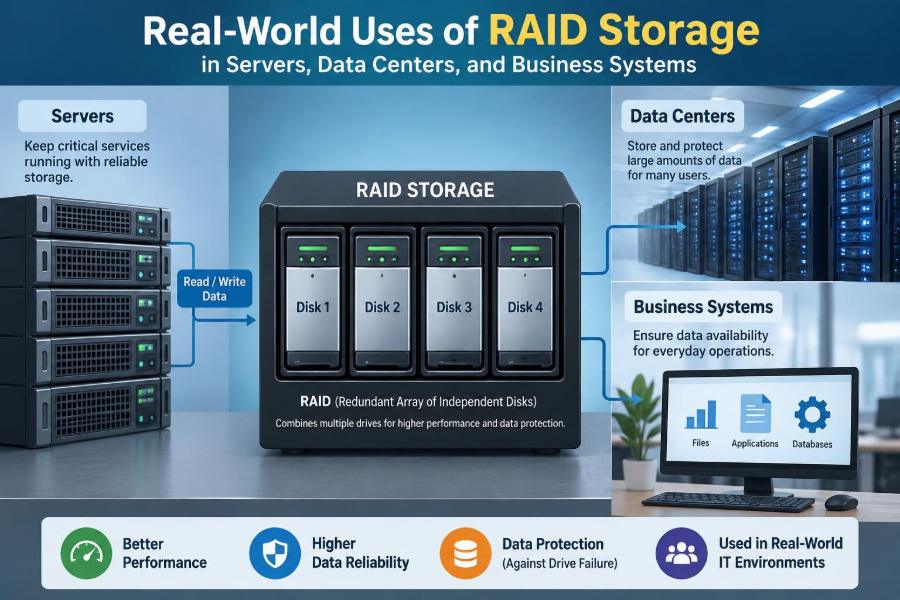
RAID stands for Redundant Array of Independent Disks. It is a method of combining multiple physical drives so that the operating system can use them as one logical storage volume.
Depending on the RAID level, the array may improve read speed, preserve access after a disk failure, or do both. The essential idea is to distribute data across drives according to a defined pattern rather than keeping each drive entirely separate.
RAID can be implemented by a dedicated controller, server firmware, an operating system, or storage software. The result is similar from the user’s perspective, but reliability, recovery tools, and performance characteristics can differ.
💾 Why One Disk Is a Business Risk
A disk contains moving parts in the case of hard drives, and even solid-state drives have finite write endurance and electronic components that can fail. A single-disk server has no local tolerance when that device becomes unreadable.
The immediate problem is often downtime rather than permanent data loss. Restoring a server from backup may take hours or longer, and staff may be unable to access shared files, business applications, email archives, or databases during that time.
RAID addresses the failure of a storage device by keeping extra information or duplicate copies on other disks. It is a continuity feature, not a promise that failures will never occur.
🧱 The Building Blocks: Drives, Arrays, and Volumes
An array is the group of drives participating in RAID. A logical volume is the storage device presented to the operating system after the array has been created.
For example, four 2 TB drives might be installed in a server. The operating system may see one volume rather than four separate disks, but its usable size depends on the chosen RAID configuration.
Array members should usually be similar in capacity and performance. When differently sized drives are mixed, most conventional RAID setups can use only the capacity of the smallest member, leaving part of larger drives unused.
📏 Striping: Splitting Work Across Disks
Striping divides data into blocks and writes consecutive blocks across multiple drives. Instead of one disk handling an entire large file, several disks can participate in reading or writing it.
This can improve throughput for workloads such as large media files, virtual machines, and database operations. The size of each block, called the stripe size or chunk size, can affect performance depending on the workload.
Striping alone provides no protection. If an array spreads a file across several disks and one disk fails, parts of many files may be missing.
🪞 Mirroring: Keeping a Second Copy
Mirroring writes the same data to two drives. With RAID 1, each member contains an equivalent copy of the volume, so the system can usually continue after one drive fails.
This design is easy to understand and often practical for operating-system drives, small file servers, and critical applications where simplicity matters. Read requests may be served from either disk, though write operations must be committed to both.
The trade-off is capacity. Two 1 TB drives in a basic mirror provide roughly 1 TB of usable storage, because the other drive holds the duplicate data.
➗ Parity: Reconstructing Missing Data
Parity RAID stores calculated recovery information alongside data blocks. If one disk fails, the missing blocks can be reconstructed from the remaining data and parity information.
RAID 5 distributes single parity across all member disks. RAID 6 distributes two independent parity values, allowing the array to tolerate two disk failures under the right conditions.
Parity is not simply an extra copied disk. It is mathematical information derived from data blocks. This provides better capacity efficiency than full mirroring, but small writes can require additional read-and-write work to update parity.
⚙️ RAID 0: Fast Storage Without Fault Tolerance
RAID 0 uses striping with no mirror and no parity. Two or more drives combine their capacity and can work in parallel, which makes RAID 0 attractive where speed and space are the priorities.
It is appropriate only when the data can be recreated easily or exists safely elsewhere. Examples can include a temporary rendering workspace, a test environment, or a cache volume designed to be disposable.
For business records, production databases, and irreplaceable files, RAID 0 adds failure exposure: any one failed member can make the whole array unavailable.
🛡️ RAID 1: A Common Choice for Essential Servers
RAID 1 is frequently used for server boot volumes because two drives can hold the operating system, application files, and basic configuration. If one drive fails, the server can normally remain online using the surviving member.
A small business may use RAID 1 for a modest accounting or document server where storage needs are limited but interruption would be disruptive. It is also common in network appliances and entry-level server hardware.
RAID 1 does not replace a backup of the configuration or data. A deleted file, ransomware-encrypted file, or damaged database block can be copied to both mirrored disks immediately.
🏢 RAID 5: Efficient Capacity for Read-Heavy Workloads
RAID 5 requires at least three disks and protects against one disk failure. Its usable capacity is approximately the combined capacity of all member drives minus the equivalent of one drive for parity.
It has traditionally been used for file shares, archival data, and systems with many reads and relatively moderate writes. In a hypothetical five-drive array of equal-sized disks, the capacity equivalent of four drives is available for data.
Its limitation becomes clear during a failure: the array has no remaining disk-failure tolerance while it rebuilds. Heavy write workloads can also expose RAID 5’s parity-update overhead.
🧯 RAID 6: Extra Protection During Rebuilds
RAID 6 requires at least four disks and can survive the loss of two members. It reserves the capacity equivalent of two drives for dual parity, making it less space-efficient than RAID 5 but more resilient.
It is often considered for larger arrays with high-capacity hard drives, where rebuilding a replacement disk may take substantial time. During that rebuild period, an additional failure in a RAID 5 array could be catastrophic; RAID 6 retains one more layer of tolerance.
RAID 6 is not automatically the best answer. Its write behavior is more complex, and workloads requiring very low write latency may be better served by mirrored designs or faster storage.
🔀 RAID 10: Mirroring and Striping Together
RAID 10 combines mirrored pairs with striping across those pairs. It needs at least four drives and offers strong performance along with redundancy.
Because data is mirrored, a failed drive is rebuilt by copying from its partner instead of recalculating every block from parity. This can be useful for transactional databases, virtualization hosts, and systems with frequent random reads and writes.
Usable capacity is roughly half of the total raw capacity. RAID 10 can survive more than one failed drive in some cases, but not if both members of the same mirror pair fail.
📊 Comparing Common RAID Levels
| RAID level | Minimum drives | Failure tolerance | Typical strength | Main limitation |
|---|---|---|---|---|
| RAID 0 | 2 | None | Capacity and speed | Any drive failure stops the array |
| RAID 1 | 2 | One drive in a pair | Simple redundancy | Half of raw capacity is usable |
| RAID 5 | 3 | One drive | Capacity efficiency | Rebuild exposure and write overhead |
| RAID 6 | 4 | Two drives | Additional fault tolerance | Less capacity and heavier writes |
| RAID 10 | 4 | Depends on failed pairs | Performance and resilience | About half of raw capacity is usable |
These labels describe broad behavior, not a complete purchasing decision. Controller quality, drive type, workload patterns, cache settings, and operational practices all influence the real result.
🖥️ RAID in Small Office Servers
A small office may have one server running shared folders, identity services, print services, and a line-of-business application. RAID reduces the chance that a single drive failure immediately disables all of those functions.
RAID 1 may suit a compact two-bay server. A four-bay system might use RAID 10 for active files or RAID 6 when capacity and tolerance are more important than high write speed.
The practical benefit is time: staff can replace a failed drive in a controlled way instead of rebuilding an entire server from backups under pressure.
🗄️ File Servers and Departmental Storage
File servers commonly store documents that many people need throughout the day: project folders, scanned records, templates, media assets, and spreadsheets. RAID helps keep the share available when a disk fails.
The right design depends on file behavior. Large documents accessed mostly for reading may fit a parity array, while an engineering team opening and saving many active project files may benefit from RAID 10 or solid-state storage.
Permissions, file versioning, and backups remain separate concerns. RAID protects drive availability; it does not determine who can access a file or recover an earlier version.
🧮 Databases Need Predictable Storage
Databases perform many small, time-sensitive reads and writes. They also maintain transaction logs, which record changes so the database can recover consistently after an interruption.
RAID 10 is commonly selected for demanding database data because it handles random I/O well and avoids parity calculations for each write. In some designs, database logs and data files are placed on separate arrays to prevent one workload from overwhelming the other.
Exact layout should follow the database vendor’s guidance and real workload testing. A configuration that works well for a reporting database may behave poorly for a busy order-processing system.
☁️ Virtualization Hosts Concentrate Risk
A virtualization host runs multiple virtual machines on one physical server. That may include web servers, directory services, application servers, and test systems, all sharing the host’s storage.
This concentration makes resilient storage especially valuable. A storage failure can affect many services at once, while poor array performance can make every virtual machine feel slow.
RAID 10 is often favored for active virtual-machine workloads, especially where many guests issue random I/O. Larger environments may move beyond internal RAID to shared storage systems with their own redundancy designs.
🏬 Retail, Point-of-Sale, and Branch Systems
Stores and branch offices may run local systems for point-of-sale operations, inventory synchronization, surveillance recording, or network services. Internet connectivity may be unreliable, so local storage can remain essential even when cloud services are used.
RAID allows a local server or appliance to remain available after one supported disk failure. For surveillance, capacity planning matters because video retention requirements can consume storage rapidly.
Organizations must still plan for site-wide events. RAID cannot protect equipment from fire, flood, theft, or a power event that damages multiple drives and the server itself.
🎞️ Media Production and Large Files
Video editing, design, audio production, and scientific imaging can create very large files that need sustained read and write speed. Striping helps multiple disks deliver data in parallel.
A production team might use RAID 0 only as a temporary scratch workspace when original footage is protected elsewhere. For active project storage, RAID 10 or another redundant arrangement is more appropriate.
Speed and protection are separate requirements. A fast workspace is useful, but its contents should be copied to independent storage before they become the only version of valuable work.
🏗️ Data Centers Use RAID as One Layer
In a data center, RAID may exist inside individual servers, storage appliances, backup targets, and dedicated storage arrays. It helps hardware remain available while an operator replaces a failed disk.
However, enterprise availability usually comes from layers: redundant power supplies, multiple network paths, clustered applications, replication to another system, monitoring, and tested recovery procedures. RAID is important, but it is rarely the entire design.
A highly available application can sometimes continue on another server after a host failure. That is a different capability from RAID, which focuses primarily on the disks within a storage system.
🔌 Hardware RAID, Software RAID, and Firmware RAID
Hardware RAID uses a dedicated controller, often with cache and management tools. Controllers can provide advanced monitoring, but they may create dependency on compatible replacement hardware if recovery is not planned carefully.
Software RAID is managed by the operating system. Modern operating systems can implement robust software RAID, and recovery may be more transparent because array metadata is not tied to one proprietary controller.
So-called firmware RAID or motherboard RAID can offer basic array features, but capabilities and operating-system support vary. The best approach depends on the platform, support requirements, and the team’s ability to manage it.
⚡ SSDs Change Performance, Not the Need for Resilience
Solid-state drives usually offer lower latency and faster random access than hard disk drives. They can dramatically improve server responsiveness, particularly for databases and virtual machines.
Yet SSDs can fail, suffer firmware issues, or become unavailable after a controller or power problem. RAID remains relevant, though administrators should use drives intended for the workload and monitor their health indicators.
Mixing slow hard drives and fast SSDs within one conventional array often produces uneven results. The array generally behaves according to its slowest or most constrained members.
🔄 What Happens During a Rebuild
After a failed disk is replaced, the array enters a rebuild or resynchronization process. It restores the missing mirror copy or reconstructs missing data onto the replacement disk.
Rebuilds consume disk activity and can reduce performance. The duration depends on drive capacity, array type, controller behavior, current workload, and whether the system is allowed to prioritize normal operations.
A rebuild is a vulnerable period, not a reason to panic. Administrators should minimize unnecessary stress, verify backups, monitor progress, and avoid assuming the work is complete until the array reports a healthy state.
🚨 Degraded Arrays Require Prompt Attention
An array is degraded when it has lost a member but can still operate because redundancy remains. This is a warning state, not a normal operating condition.
Ignoring alerts leaves the organization exposed to another failure. A RAID 5 array with one failed disk has no remaining drive-failure protection, while a RAID 6 array with one failure has reduced protection.
- Confirm which physical drive has failed before removing anything.
- Check that a current backup is available and readable.
- Use a compatible replacement drive approved for the system where possible.
- Watch the rebuild and investigate recurring errors rather than replacing disks blindly.
🔍 Monitoring Makes RAID Useful
RAID only helps if someone knows when it is degraded. Servers and storage systems should send alerts for failed disks, predictive health warnings, rebuild status, controller errors, overheating, and failed cache protection.
Monitoring should reach people who can act, not merely an unattended inbox. A documented response process helps staff identify the chassis, find the correct replacement, and avoid mistakes during an urgent repair.
Periodic review matters because silent alert failures are common operational problems. An organization may have excellent hardware but discover too late that no one received the warning.
🧰 Hot-Swap Drives Reduce Repair Downtime
A hot-swappable drive bay lets an operator replace a failed disk while the server remains powered on, provided the hardware and RAID configuration support it. This is useful for systems that cannot be shut down easily.
Hot swap does not mean “remove any drive whenever convenient.” Physical drive labels, enclosure slot numbers, and management software must agree. Pulling the wrong healthy disk can turn a recoverable fault into an outage.
Some environments use indicator lights, but staff should still verify the failed device in the management interface before acting.
💽 RAID Is Not a Backup
This distinction is one of the most important storage lessons. RAID keeps a service running after certain hardware failures; a backup preserves a separate recoverable copy from an earlier point in time.
RAID cannot reliably protect against accidental deletion, malicious encryption, application bugs, corruption copied across the array, an administrator’s mistaken command, or loss of the entire server location.
A sensible backup plan uses separate storage and regular restoration tests. Keeping only a second copy inside the same server does not provide meaningful protection from many common incidents.
🧪 Recovery Testing Reveals Hidden Gaps
A backup is useful only if it can be restored within the required time and with the required data intact. Testing may involve restoring a file, a virtual machine, a database, or a whole server into an isolated environment.
Testing also confirms that staff have credentials, encryption keys, installation media, application settings, and documented procedures. RAID recovery and backup recovery are related operational skills, but they solve different failures.
A useful question is not merely “Do we have backups?” but “Can we restore this specific service, and do we know how long it will take?”
📐 Capacity Planning Must Include Overhead
Raw disk capacity is not the capacity available to users. RAID overhead, filesystem formatting, snapshots, spare drives, database growth, and a safe amount of free space all reduce the usable amount.
For parity arrays, plan capacity after subtracting parity. For mirrors and RAID 10, expect roughly half of raw capacity for usable data. Exact figures also vary because drive manufacturers and operating systems may display capacity differently.
Running an array almost full can reduce flexibility and complicate maintenance. Growth planning is preferable to treating every unallocated gigabyte as immediately available.
🧷 Hot Spares and Spare-Drive Strategy
A hot spare is an unused drive assigned to an array or storage system. When a member fails, the system can begin rebuilding onto the spare automatically.
This can shorten the time spent in a degraded state, especially when technical staff are not on site. The spare does consume capacity or a drive bay, and it must be compatible with the array.
Other organizations keep tested replacement drives nearby instead. The better choice depends on response time, hardware design, security controls, and whether automatic rebuilding fits the organization’s operating procedures.
⚠️ Common RAID Planning Mistakes
Many RAID problems begin before a disk fails. Selecting an array solely because it offers the largest usable capacity can create poor performance or insufficient resilience for the actual workload.
- Assuming RAID eliminates the need for backups.
- Using RAID 0 for unique business data because it is fast.
- Mixing unrelated drive models, capacities, or wear levels without understanding the consequences.
- Ignoring alerts until a second failure occurs.
- Replacing a drive without verifying its identity.
- Choosing a proprietary controller without a recovery and replacement plan.
The solution is not always a more expensive array. It is matching storage design to the value of the data, acceptable downtime, workload pattern, and available support skills.
🗺️ Choosing RAID from Business Requirements
Start with questions about the service rather than the RAID number. How much downtime is acceptable? How quickly must data be restored? Is the workload mostly large sequential files, or many small database operations? What happens if the entire server is lost?
A small internal file share may prioritize simple mirrored storage and reliable backups. A busy virtualized application server may justify RAID 10 and faster drives. A capacity-focused repository may use dual parity plus independent backup copies.
There is no universally correct RAID level. The appropriate choice is the one whose failure tolerance, performance, capacity cost, and recovery process fit the system’s real requirements.
🎯 The Core Principle: Availability Is a Layered Design
RAID gives storage systems a way to withstand specific drive failures without immediate service interruption. Its real-world value is practical: it provides time to respond, replace hardware, and rebuild without necessarily stopping the work that depends on the system.
But dependable business storage requires more than an array. Monitoring detects trouble, backups preserve recoverable history, tested restoration proves readiness, and broader resilience measures protect against server, power, network, and site failures.
Think of RAID as a seat belt rather than an entire transportation system. It is a valuable protective layer, but it works best alongside careful driving, maintenance, and a plan for what happens when something still goes wrong.
RAID improves availability after drive failures, while backups and recovery planning protect the data and the business beyond those failures. Choosing the right combination turns storage from a single point of failure into a manageable part of everyday operations. 🖥️🛡️💾