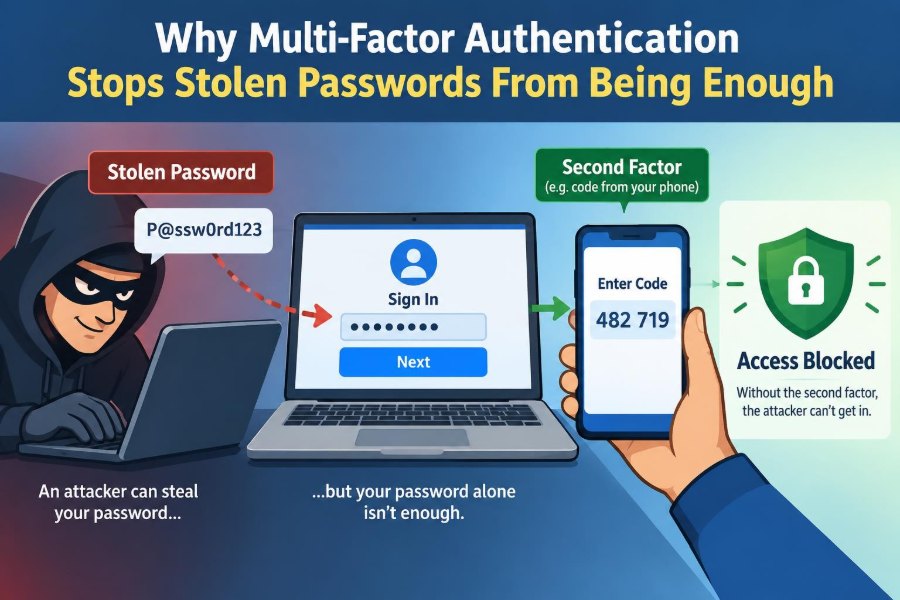

A staff member receives what looks like a routine sign-in email from a familiar service. The page is convincing, the password is entered, and the attacker now has a valid credential.
Without additional protection, that single password may be all an intruder needs to open email, cloud files, payroll systems, or customer records. The theft can happen quietly, long before anyone notices unusual activity.
Multi-factor authentication, usually shortened to MFA, changes that situation. It asks for evidence beyond the password, so a copied secret alone is no longer enough to prove that the person signing in is really the account owner.
This matters to students protecting coursework and personal accounts, as well as professionals protecting organizational systems. Understanding MFA also helps people choose stronger sign-in methods instead of simply clicking “approve” when a prompt appears. 🔐
🔑 1. A Password Is Only One Kind of Proof
A password is something a person is supposed to know. It is a shared secret: the account holder knows it, and the service checks whether the entered value matches its stored verification data.
That design works only while the secret remains secret. If another person obtains it, the system often cannot tell the legitimate user and the thief apart.
🧩 2. MFA Requires More Than One Factor
MFA requires two or more independent categories of evidence, called authentication factors. A successful sign-in must satisfy more than one of them.
The usual categories are knowledge, possession, and inherence. Adding another password question may add inconvenience, but it usually does not add another factor because both answers are still things someone knows.
🧠 3. Knowledge Factors Include Passwords and PINs
Knowledge factors include passwords, passphrases, PINs, and answers to security questions. They are easy to use, but they can be guessed, reused, observed, leaked, or submitted to a fake website.
A longer, unique password remains important. MFA does not make weak password habits harmless; it reduces the damage when a password is exposed.
📱 4. Possession Factors Prove Access to Something
A possession factor is something the user has, such as a phone, a hardware security key, a smart card, or an authenticator app. During sign-in, that device helps provide a second piece of proof.
An attacker who only copied the password generally cannot complete this step. That is the central reason MFA stops a stolen password from being enough.
🧬 5. Inherence Factors Use a Personal Characteristic
An inherence factor is something the user is, often verified through a fingerprint, face scan, or another biometric check. On many devices, biometric data is used locally to unlock a credential rather than being sent to every website.
Biometrics can be convenient, but they are not magic. Device security, enrollment controls, and a safe recovery process still matter.
🎭 6. Why Attackers Want Passwords
Passwords are valuable because many services still accept them as primary proof of identity. Attackers obtain them through phishing, malware, data breaches, password reuse, social engineering, and sometimes simple guessing.
Once a password works, attackers may try it immediately or save it for later. They may also test it on unrelated sites because people often reuse credentials.
🎣 7. Phishing Turns a Valid Password Into Stolen Property
In a phishing attack, a criminal imitates a trusted organization and directs a person to a fraudulent sign-in page. The victim may voluntarily type the correct password, believing the site is genuine.
MFA creates a second obstacle after that mistake. A basic phishing page can capture the password, but it usually cannot produce the separate confirmation required by the real service.
🔁 8. Password Reuse Makes One Breach Spread
If a password from one compromised service is reused elsewhere, attackers can attempt it against email, shopping, social, work, or school accounts. This is often called credential stuffing.
MFA means a reused password may still be recognized as correct, yet the login is blocked at the next step. Unique passwords plus MFA are much stronger than either habit used carelessly.
🗃️ 9. A Breach Does Not Always Reveal the Password Directly
Responsible services store password verifiers rather than readable passwords. Even so, breached data can sometimes be attacked offline, particularly when users chose weak or common passwords.
MFA adds a separate requirement that is normally not contained in that password database. Therefore, a password recovered from a breach is less useful for direct account takeover.
⏱️ 10. One-Time Codes Add a Short-Lived Check
Authenticator apps commonly generate short numeric codes that change regularly. The user enters the currently displayed code after entering the password.
Because a code is temporary, an old code has limited value. However, a code can still be stolen in real time by a sophisticated phishing operation, so code-based MFA is helpful but not the strongest available method.
📲 11. Push Prompts Can Confirm a Sign-In
Some services send a sign-in request to an enrolled phone or device. The user reviews the request and approves or denies it, sometimes by matching a number shown on both devices.
Number matching gives the user more context than a simple approval button. It makes accidental approval and repeated-prompt attacks less likely, though users should still inspect unexpected requests.
🔐 12. Security Keys Offer Stronger Phishing Resistance
Hardware security keys and compatible built-in device authenticators can use public-key cryptography to confirm a sign-in. They can be designed to work only with the legitimate website, not with a lookalike domain.
This is a major advantage over manually entered codes. A fake site may copy the appearance of a real page, but it cannot simply persuade the security key that it is the real site.
🧾 13. Passkeys Change the Role of the Password
A passkey is a credential that can let users sign in without typing a traditional password. It commonly uses a device-held cryptographic key pair and may require local device unlocking with a PIN or biometric check.
Passkeys can provide phishing-resistant sign-in when implemented correctly. They are often described as passwordless, but the important lesson is that the server verifies a cryptographic response rather than a reusable typed secret.
⚖️ 14. Not Every “Two-Step” Process Is True MFA
Two steps are not automatically two factors. For example, entering a password and then answering a security question usually combines two knowledge checks, not knowledge plus possession or inherence.
A useful question is: would stealing one password-like secret leave the attacker unable to pass the other check? If not, the extra step may add little independent protection.
🧭 15. The Factors Must Be Independent
MFA is strongest when compromising one factor does not automatically compromise the other. If a person stores an authenticator code beside the password in an unsecured note, the practical separation is weakened.
Independence also involves recovery. A weak account-recovery process can become an easier path around otherwise strong MFA.
📞 16. SMS Codes Are Better Than Passwords Alone, With Limits
Text-message codes can prevent many attacks that rely only on a stolen password. They are widely available and may be a reasonable starting point when stronger choices are unavailable.
However, phone numbers can be targeted through number-transfer fraud, message interception in certain situations, or social engineering. When an authenticator app, passkey, or security key is supported, those options may offer better protection.
🚨 17. MFA Is Not a Guarantee Against Every Attack
MFA reduces risk; it does not eliminate it. Attackers may trick people into approving prompts, steal active browser sessions, compromise devices, exploit weak recovery procedures, or manipulate support staff.
The correct conclusion is not that MFA has failed. It is that account security needs layers: safe devices, alert users, careful recovery, and service-side protections in addition to MFA.
🔔 18. Watch for MFA Fatigue Attacks
An attacker who knows a password may repeatedly trigger approval prompts, hoping the account owner eventually accepts one out of annoyance or confusion. This is often called prompt bombing or MFA fatigue.
Deny unfamiliar prompts. Do not approve a request merely to make notifications stop; instead, change the password and report the activity through trusted support channels if necessary.
🕵️ 19. Real-Time Phishing Can Relay Codes
Advanced phishing systems can collect a password and immediately ask the victim for an MFA code. They then relay that code to the genuine service before it expires.
This is why the difference between “MFA” and “phishing-resistant MFA” matters. Security keys and passkeys can bind authentication to the real site, making this relay technique substantially harder.
🍪 20. A Stolen Session Can Bypass the Login Screen
After successful authentication, a browser often receives a session token so the user does not need to sign in on every page. If malware or a malicious extension steals that token, an attacker may reuse the existing session.
MFA protected the original login, but it cannot automatically protect a session that has already been authorized. Keeping browsers, operating systems, and extensions secure remains essential.
🛡️ 21. MFA Helps Protect the Most Important Account: Email
Email accounts deserve special attention because they commonly receive password-reset messages for other services. Control of email can allow an attacker to reset passwords across many accounts.
Enable the strongest MFA option available for primary email first. Then review recovery addresses, recovery phone numbers, and active sessions so those routes cannot quietly undermine protection.
🏢 22. Organizations Use MFA to Reduce Account Takeover
For organizations, stolen employee passwords can lead to unauthorized access to collaboration tools, administrative consoles, remote access systems, and sensitive documents. MFA adds a checkpoint before those credentials become usable.
Administrators can also apply stronger requirements to high-risk actions, such as accessing privileged accounts or changing payment details. This approach recognizes that not all logins carry the same consequences.
🎓 23. Students Need MFA Too
Student accounts can contain coursework, research, personal information, cloud storage, and messages with instructors or classmates. An attacker who takes over such an account can cause academic and personal disruption.
Students should enroll more than one safe recovery method where possible, store recovery codes securely, and avoid sharing verification codes with anyone claiming to provide support.
🧰 24. Recovery Codes Are Emergency Tools
Many services provide one-time recovery codes when MFA is enabled. These are designed for situations such as a lost phone, damaged device, or unavailable authenticator app.
Treat recovery codes like spare keys to an important building. Store them somewhere secure and separate from the everyday device, not in an unprotected screenshot or a publicly accessible inbox.
📊 25. Choosing an MFA Method
The best available option depends on the service, the user’s devices, and the sensitivity of the account. The comparison below focuses on broad trade-offs rather than claiming that one method fits every situation.
| Method | Main strength | Important limitation |
|---|---|---|
| SMS code | Accessible and better than password-only login | Depends on phone-number security |
| Authenticator app | Codes do not rely on text-message delivery | Codes may be phished in real time |
| Push approval | Convenient confirmation on an enrolled device | Unexpected prompts can be socially engineered |
| Security key or passkey | Can resist fake-site credential capture | Requires compatible devices and setup |
🧱 26. Good MFA Setup Includes Everyday Habits
Enabling MFA is the first step, not the final task. Review your account settings occasionally, especially after replacing a phone, changing an email address, or receiving a suspicious notification.
- Use a unique, long password or a password manager-generated password.
- Prefer passkeys or security keys for important accounts when available.
- Keep a secure backup method and recovery codes.
- Verify website addresses before entering credentials.
- Remove devices and sessions you no longer recognize or use.
✅ 27. The Core Principle: One Stolen Secret Should Not Open the Door
The central idea of MFA is simple: an attacker should need more than a password to impersonate you. A second independent factor forces the attacker to obtain another form of proof, not merely another copy of the same secret.
Strongest results come from combining MFA with unique passwords, cautious approval habits, secure devices, and protected recovery options. For valuable accounts, phishing-resistant methods such as passkeys or security keys provide an especially meaningful additional barrier.
A stolen password becomes far less dangerous when it is only the first lock, not the only lock. 🔐🛡️✨