
A member of staff opens an email attachment, a phone joins the office Wi-Fi, and a cloud application receives a new login request. Each action creates network traffic: small packets of data moving between devices, applications, and services.
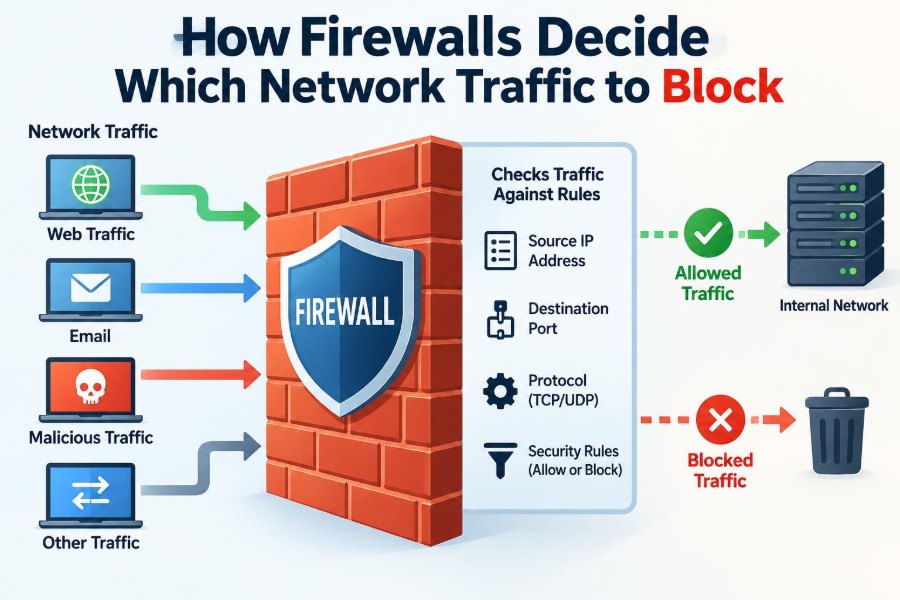
Most of that traffic is useful. Some of it may be unwanted, risky, or part of an attack. A firewall sits at an important decision point and determines whether traffic should be allowed onward, rejected, or silently discarded.
That decision is not usually a mysterious guess. Firewalls apply rules, inspect traffic details, track connections, and sometimes examine the contents of data exchanges. Their decisions affect security, privacy, availability, and everyday productivity.
Understanding how firewalls work helps students troubleshoot networks and helps professionals make safer choices about systems they use every day. 🛡️
🚦 1. What a Firewall Actually Does
A firewall is a security control that monitors and regulates network traffic according to a defined policy. It can be a dedicated hardware appliance, software on a computer, a cloud service, or a feature built into a router.
Its central job is simple: compare traffic against rules and take an action. Common actions are allow, block, reject, log, or send traffic for further inspection.
A firewall is not automatically a complete security solution. It works alongside secure configuration, endpoint protection, identity controls, software updates, backups, and user awareness.
📦 2. Traffic Arrives as Packets
Networks divide data into small units called packets. A web page, video call, or file transfer may involve many packets travelling separately and being reassembled at the destination.
Each packet contains control information called a header, plus data called a payload. The header may identify where the packet came from, where it is going, and which network service it is trying to use.
Firewalls use this available information to make decisions quickly. How much information they inspect depends on the type and configuration of the firewall.
🧭 3. The Direction of Traffic Matters
Firewalls often treat inbound and outbound traffic differently. Inbound traffic enters a protected network or device, while outbound traffic leaves it.
An organization may allow employees to browse approved websites while blocking unsolicited inbound connections from the internet. A personal firewall may allow a browser to connect outward but prevent an unfamiliar program from making its own external connection.
Rules can also apply to traffic moving between internal network segments. This is valuable because not every internal device should be able to contact every other device.
🏷️ 4. Source and Destination Addresses
One basic firewall test examines IP addresses. The source IP address identifies the apparent sender, and the destination IP address identifies the intended recipient.
A rule might permit traffic from an organization’s office network to a private application server. Another might deny traffic from a known untrusted address range.
IP-based decisions have limits. Attackers can use changing addresses, compromised legitimate systems, proxies, or spoofing techniques. Address checks are useful, but they are rarely enough on their own.
🚪 5. Ports Identify Network Services
An IP address identifies a device or interface, but a port number helps identify the service on that device. For example, different services can use different ports even when they share one IP address.
A firewall can allow traffic to a web service while blocking traffic to a remote administration service. This reduces the number of exposed entry points.
Ports are not guarantees of safety. A harmful or unauthorized application can attempt to use an expected port, so modern firewalls often inspect more than port numbers.
📨 6. Protocols Tell the Firewall How Traffic Behaves
A protocol is an agreed set of rules for communication. At the network and transport layers, common examples include TCP, UDP, and ICMP.
TCP normally establishes a connection before sending application data. UDP is connectionless and is often used where speed and low overhead are important. ICMP supports diagnostic and control messages.
A firewall may permit, deny, or limit protocols based on a security policy. Blocking a protocol indiscriminately, however, can disrupt legitimate functions such as troubleshooting or voice and video services.
📋 7. Rules Are the Firewall’s Decision Policy
A firewall rule describes conditions and an action. Conditions can include source, destination, port, protocol, direction, time, user identity, application, or security reputation.
A simplified rule can be expressed like this:
Allow TCP from employee network to web server on approved web portReal rules may be much more specific. They should clearly reflect a business or personal need rather than exist simply because a service “might be useful.”
🥇 8. Rule Order Is Crucial
Many firewalls evaluate rules in order, often from top to bottom. The first matching rule may determine the result, which makes rule placement extremely important.
Suppose a broad allow rule appears before a narrow block rule. Traffic may match the broad rule first and never reach the intended restriction.
- Put precise exceptions before broader rules when the firewall uses first-match processing.
- Use clear names and comments where the platform supports them.
- Review changes so that new rules do not accidentally override older protections.
Firewall products differ, so administrators must understand the evaluation logic of the system they operate.
🛑 9. Default Deny Creates a Safer Baseline
A strong policy often follows the principle of default deny: block traffic unless a rule explicitly permits it. This approach reduces accidental exposure.
For inbound internet traffic, default deny is common because an organization usually knows which public services it intends to offer. Only necessary services receive explicit allow rules.
Default deny requires planning. If legitimate traffic has not been identified, users may experience failures until appropriate, narrow rules are created.
✅ 10. Allow Lists and Block Lists
An allow list identifies traffic that is permitted. A block list, also called a deny list, identifies traffic that is prohibited.
Allow lists are generally more predictable for high-value systems because they define what is expected. Block lists can help stop known bad destinations, unwanted countries, risky applications, or specific attack sources.
Neither method is perfect alone. Known-bad lists cannot catch every new threat, while overly strict allow lists can be difficult to maintain in changing environments.
🔄 11. Stateless Filtering Checks Packets Individually
A stateless firewall evaluates each packet independently. It compares packet details with rules but does not retain a full record of the connection’s earlier packets.
This can be efficient and useful for straightforward filtering. Yet it may struggle to distinguish a legitimate response from an unexpected packet that merely resembles one.
Stateless filtering is often used as one layer in a broader design. On its own, it provides less context than a stateful firewall.
🧠 12. Stateful Inspection Tracks Connections
A stateful firewall maintains a state table that records active connections. It can recognize whether a packet belongs to a connection that was legitimately established.
When a user’s device starts an allowed web connection, return traffic can be allowed as part of that established session. The firewall does not need a separate broad inbound rule for every reply packet.
This context improves decision-making and simplifies many policies. It also means the firewall must manage connection state carefully, especially during heavy traffic.
🤝 13. TCP Handshakes Provide Useful Context
TCP commonly begins with a connection setup sequence known as a handshake. Stateful firewalls can examine this process to determine whether traffic appears to be starting or continuing a valid session.
Packets that claim to belong to a connection but do not fit the expected state may be blocked. This can reduce certain forms of unwanted or malformed traffic.
State tracking is helpful, not magical. Attackers may still exploit vulnerabilities in applications, credentials, or permitted services after a connection is allowed.
🔍 14. Deep Packet Inspection Looks Further Inside
Deep packet inspection, often abbreviated DPI, examines more than basic headers. Depending on the firewall, it may identify application protocols, detect patterns, or enforce content-aware rules.
For instance, a firewall may distinguish web browsing traffic from a different application attempting to hide behind a commonly allowed port. It may also detect protocol violations or suspicious signatures.
Deeper inspection can improve visibility and control, but it consumes processing resources. Encrypted traffic can also limit what the firewall can see.
🌐 15. Application-Aware Firewalls Judge the Real Service
Application-aware or next-generation firewalls can classify traffic by application rather than relying only on ports and addresses. This supports policies such as allowing a business collaboration service while restricting unrelated file-sharing activity.
Classification may use protocol behavior, signatures, connection patterns, and other indicators. It is more informative than assuming that a port always represents one application.
These controls need testing. Applications change over time, and inaccurate classification can cause unexpected blocks or create gaps in policy.
🔐 16. Encryption Changes What the Firewall Can Inspect
Encrypted traffic protects data in transit from being read by intermediaries. This is essential for privacy and security, but it can hide application-layer details from a firewall.
A firewall can still see some connection metadata, such as addresses and ports. To inspect encrypted content, an organization may use controlled decryption and re-encryption, where permitted and appropriately governed.
Decrypting traffic introduces privacy, legal, technical, and certificate-management considerations. It should never be enabled casually or without a clear policy.
👤 17. Identity Can Be a Firewall Condition
Traditional rules focus on devices and networks. Modern systems can also apply rules based on identity, such as a user, group, device posture, or authentication result.
For example, an administrator group may be allowed to reach a management interface, while other employees cannot. A device that fails security checks may be limited to a remediation network.
Identity-based controls are valuable in remote and cloud-based work because an IP address alone no longer reliably represents a person’s role or trust level.
🕒 18. Time, Location, and Context May Affect Decisions
Some firewalls support contextual conditions. A rule can apply only at certain times, from a certain network zone, or when a device meets specified requirements.
A contractor’s access might be restricted to a limited period and to a particular internal application. A sensitive administrative service may be available only through a secure management network.
Context reduces unnecessary access, but too many complicated conditions can make a policy hard to understand. Security rules should remain reviewable by the people responsible for them.
🗺️ 19. Network Zones Separate Levels of Trust
A network zone groups interfaces or networks with similar trust requirements. Typical examples include an internet-facing zone, an internal user zone, a server zone, a guest zone, and a management zone.
Traffic between zones can be controlled by explicit rules. A guest network may reach the internet but be unable to contact internal employee devices or business servers.
Zone design supports segmentation: limiting how far a problem can spread if one device becomes compromised. 🔒
🏰 20. DMZs Protect Public-Facing Services
A demilitarized zone, or DMZ, is a separate network area for systems that must be reachable from less trusted networks, often the internet. Public web servers are common examples.
A DMZ does not make a server safe by itself. It creates a boundary so that access from the public server to sensitive internal systems can be tightly restricted.
Good DMZ policy allows only required traffic in both directions. A public-facing server should not receive broad access to internal databases, file shares, or employee devices.
⚖️ 21. Block, Reject, and Drop Are Different Actions
Firewalls can deny traffic in different ways. The choice affects troubleshooting, user experience, and how much information an external sender receives.
| Action | Typical result | Why it may be used |
|---|---|---|
| Allow | Traffic continues | The request matches an approved policy. |
| Reject | The sender receives a refusal message | Useful when clear feedback helps legitimate users troubleshoot. |
| Drop | The firewall silently discards traffic | Can reveal less information to an unwanted sender. |
Terminology varies by product. What matters is understanding the actual configured behavior and its operational consequences.
🧾 22. Logs Explain Many Firewall Decisions
Firewall logs record information about allowed, denied, rejected, or suspicious traffic. A log entry may include the time, source, destination, protocol, port, rule name, action, and session details.
Logs help answer important questions: Was the traffic blocked? Which rule made the decision? Is someone repeatedly probing a service? Is a needed application failing?
Logging everything forever is rarely practical. Organizations need sensible retention, protection of log data, and monitoring that highlights meaningful events.
🚨 23. Alerts Need Tuning, Not Blind Trust
Many firewall platforms generate alerts when traffic matches threat signatures, reputation feeds, unusual patterns, or policy violations. Alerts can help defenders respond faster.
However, an alert is not automatically proof of a successful attack. It may be a harmless scan, a misconfigured application, or a false positive caused by imperfect detection.
Security teams tune alerts by adjusting rules, validating evidence, and prioritizing events that matter most. The aim is actionable visibility rather than constant noise.
🌊 24. Rate Limits Help Handle Excessive Traffic
Some firewall controls limit how much traffic or how many connection attempts are accepted over a period. This is called rate limiting or traffic policing in certain contexts.
Rate limits can reduce the impact of repeated login attempts, scanning, excessive requests, or some denial-of-service patterns. They do not solve every large-scale attack, especially when traffic exceeds available network capacity upstream.
A good limit protects resources without blocking normal bursts of legitimate activity. Testing is essential before applying restrictive thresholds to important services.
🦠 25. Threat Prevention Adds Security Intelligence
Firewalls may include intrusion prevention, malware detection, command-and-control blocking, or reputation-based filtering. These features compare observed traffic with known threat indicators and suspicious behaviors.
For example, a firewall might block a connection to a destination associated with malicious activity or stop an exploit pattern aimed at a vulnerable service.
Threat prevention is strongest when signatures, software, and policies are maintained. It cannot replace patching, because an exposed and unpatched service remains a risk even behind a firewall.
🛠️ 26. Misconfiguration Is a Major Risk
A technically capable firewall can still fail because of poor configuration. Broad allow rules, forgotten temporary exceptions, exposed management interfaces, and unused services all increase risk.
Common policy problems include rules that are too broad, rules in the wrong order, duplicate rules, expired business needs, and missing logs. Small mistakes can have large effects.
- Allow only the source, destination, service, and direction that are needed.
- Document why each rule exists and who owns it.
- Review policies regularly and remove rules that no longer serve a purpose.
Change control and peer review make firewall changes safer.
🧪 27. Testing Confirms That Rules Work
A firewall policy should be tested rather than assumed to work. Administrators can verify permitted paths, intentionally test denied paths, review logs, and confirm that applications still function as expected.
Testing should include normal use, remote access, failover behavior where relevant, and unusual cases such as software updates or changes in cloud service addresses. Documented tests make later troubleshooting much easier.
Only test systems and networks you own or are authorized to assess. Unauthorized scanning or probing can be disruptive and may violate policy or law.
🎯 28. The Core Principle: Permit What Is Needed, Restrict the Rest
Firewalls decide which traffic to block by applying policy to network facts and context: addresses, ports, protocols, connection state, application behavior, identity, zones, and threat indicators. More advanced inspection provides more context, while clear rules define the intended outcome.
The best firewall rule is usually narrow, understandable, justified by a real need, logged appropriately, and reviewed over time. A firewall is most effective when it supports least privilege: give users and systems only the access required to do their work.
Firewalls do not decide whether traffic is “good” or “bad” in a human sense; they enforce carefully designed rules about what communication should be trusted and allowed. When those rules are specific, tested, and maintained, the network becomes far harder to misuse. 🛡️🔍✅