
A laptop that becomes painfully warm during a video call, a desktop that sounds like it is preparing for takeoff during a game, and a phone that dims its screen in the sun all point to the same underlying challenge: heat.
Computers turn electrical energy into useful work, but no processor is perfectly efficient. A significant share of that energy becomes heat inside tightly packed components. If that heat is not moved away quickly enough, performance, comfort, component lifespan, and reliability can all be affected.
Cooling has therefore evolved alongside computing itself. As devices became faster, smaller, thinner, and more powerful, the simple fan and metal heat sink had to become part of far more carefully engineered thermal systems.
From room-sized computers with enormous airflow needs to vapor chambers inside slim phones, computer cooling tells a useful story about the physical limits behind digital technology.
🔥 Why Computers Produce Heat
Electronic components work by controlling the movement of electricity. In processors, billions of tiny switches called transistors repeatedly change state. Electrical resistance and switching losses convert part of that energy into heat.
The faster a processor runs and the more work it performs, the more heat it usually produces. Graphics processors, power-delivery circuits, storage controllers, and memory can also add substantially to the total thermal load.
Heat is not automatically a sign of failure. It is an expected by-product of computing. The engineering problem is keeping temperatures within the component’s designed operating range.
🌡️ Temperature, Heat, and Thermal Limits
Heat and temperature are related but not identical. Heat is energy moving from a warmer place to a cooler one, while temperature describes how hot a material is.
A small chip can become hot quickly because it produces heat in a very small area. This concentration is often called heat flux. It explains why a compact modern processor can need a sophisticated cooler even when its total power use is lower than that of an older, larger system.
Every component has thermal limits set by its manufacturer. When a sensor reports that a limit is approaching, the device may reduce power or speed to protect itself.
📉 What Happens When Cooling Falls Behind
If generated heat cannot leave a component as fast as it arrives, its temperature rises. At first, a computer may simply increase fan speed. If that is not enough, it may lower clock speeds, a protective behavior known as thermal throttling.
Throttling can appear as lower frame rates in a game, slower video exports, reduced benchmark results, or a phone that becomes less responsive while recording video. It is usually a safety mechanism rather than evidence that the processor is broken.
Persistent excess heat can also stress batteries, adhesives, circuit-board materials, and other parts around the chip. Good cooling is therefore about stable operation, not only maximum speed.
🧱 The First Approach: Large Surfaces and Open Air
Early electronic computers used bulky components and occupied large rooms. Their cooling requirements were substantial, often involving building-scale ventilation or air conditioning rather than a small cooler attached to one chip.
As electronic parts became smaller and more efficient, passive cooling became practical for many systems. A passive design relies on metal surfaces and natural airflow, without a fan.
This approach remains useful where power use is low: some embedded controllers, network equipment, tablets, and silent mini PCs use fins, vented enclosures, or the device chassis to shed heat.
🪨 Heat Sinks: More Metal, More Surface Area
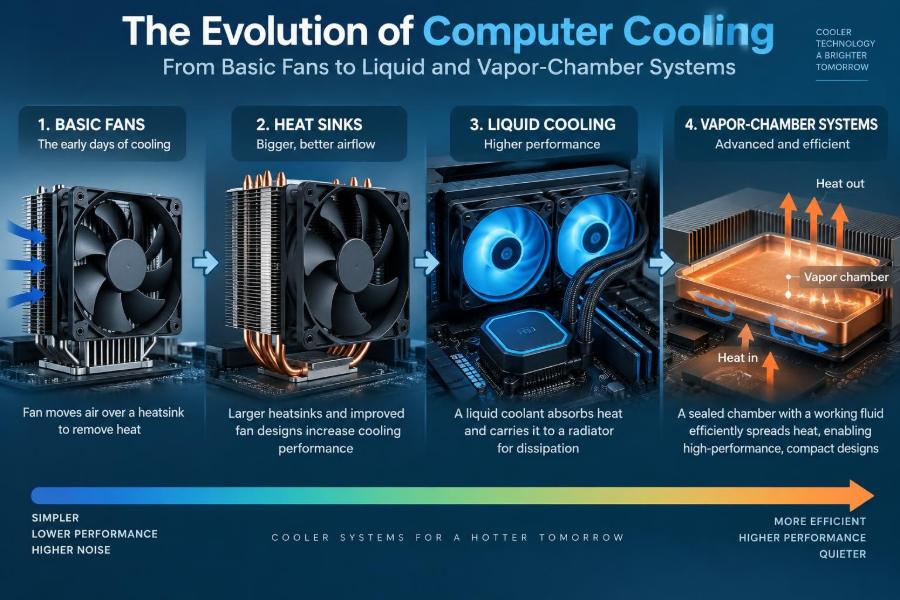
A heat sink is a metal part designed to absorb and release heat. Aluminum is common because it is relatively light and cost-effective, while copper transfers heat especially well and is often used near the hottest area.
Heat sinks are shaped into fins rather than solid blocks. Fins greatly increase surface area, giving surrounding air more material to carry heat away from.
A heat sink does not make heat disappear. It creates a better path from a hot chip to the surrounding air. Its effectiveness depends on material, fin design, airflow, mounting pressure, and the temperature of the air entering the system.
🧴 Thermal Interface Materials Close the Gap
A processor’s metal heat spreader and a cooler’s base may look smooth, but at a microscopic level both surfaces contain tiny gaps. Air trapped in those gaps is a poor conductor of heat.
Thermal interface material, commonly called thermal paste, fills those imperfections. It improves contact between the chip package and the cooler so heat can enter the heat sink more easily.
More paste is not necessarily better. The goal is a thin, continuous layer with proper cooler pressure. Poor application, dried-out material, or an unevenly mounted cooler can raise temperatures even when the cooler itself is large.
🌀 Fans Made Compact Computing Practical
Natural convection is slow. A fan dramatically improves cooling by forcing more air across heat-sink fins and through a computer enclosure. This is called active cooling.
Fans helped personal computers support increasingly fast processors without requiring enormous metal coolers. They also made it possible to direct airflow toward graphics cards, voltage regulators, drives, and other warm components.
Fan cooling is effective, inexpensive, and widely understood. Its main compromises are noise, dust accumulation, moving parts, and the physical space needed for blades and air channels.
💨 Airflow Is a System, Not a Single Fan
Adding a powerful fan does not guarantee a cool computer. Air must have a sensible path: cool air enters, travels over heat-producing parts, and warm air exits. A fan fighting blocked vents or recirculating hot air has limited value.
Desktop cases often use front or bottom intake and rear or top exhaust because warm air tends to rise and these positions suit common component layouts. Exact arrangements vary, but the principle is consistent: avoid trapping warm air around the cooler.
- Keep intake and exhaust vents clear of walls, fabric, and clutter.
- Route cables so they do not block major airflow paths.
- Use filters where practical, then clean them regularly.
- Choose fans for both airflow and their ability to push through resistance from fins or filters.
🔊 The Noise Trade-Off
Fan noise comes from motor vibration, blade movement, turbulent air, and air striking grilles or dense fins. Small fans often need very high rotational speeds to move useful amounts of air, which is why thin laptops can sound sharper than large desktop systems.
Modern systems use temperature sensors and fan curves to adjust fan speed as conditions change. A well-tuned curve avoids sudden, distracting changes while still increasing airflow before temperatures become excessive.
Quiet cooling is not the same as weak cooling. A larger heat sink, larger slower fans, clean airflow paths, and sensible power settings can often reduce noise without sacrificing normal performance.
🧹 Dust Changes the Thermal Equation
Dust acts like an insulating blanket on heat-sink fins and can reduce the open space through which air flows. It is particularly troublesome when it builds into a felt-like layer between a laptop fan and its fin stack.
Dust buildup depends on the environment. Homes with pets, carpets, smoking, construction dust, or frequent open windows may need more frequent cleaning than a cleaner office.
Before cleaning, shut down the system and follow the manufacturer’s guidance. Compressed air can help, but spinning a fan excessively with an air blast may be undesirable; holding the blades still carefully is a common precaution.
🖥️ Desktop Cooling Gains Room to Grow
Desktop computers have an advantage: internal volume. They can use tall tower coolers, wide fin arrays, several case fans, and spacious airflow paths. This makes air cooling a strong choice for many workstations and gaming PCs.
A large tower cooler commonly uses heat pipes to carry heat from its base into an elevated fin stack. It can then use one or more large fans that operate at lower speeds than a compact fan.
The limitation is physical compatibility. A cooler may interfere with tall memory modules, a side panel, or a motherboard layout. Weight and mounting quality also matter because a large cooler places mechanical load on the board.
💻 Laptops Face a Much Harder Problem
Laptops must cool capable processors within a thin enclosure while protecting the user from uncomfortable surface temperatures. They have little space for fins, use small blowers rather than large case fans, and often share thermal capacity between the CPU and graphics processor.
The available airflow is restricted by compact vents and the fact that users may place the machine on a bed, lap, or cushion. Blocking the underside intake can quickly reduce cooling performance.
A laptop is designed as a complete thermal system. Replacing a fan, changing a bottom cover, or using an inappropriate charger can affect that balance. External cooling pads may help in some designs, but they cannot overcome a heavily clogged heat sink or blocked internal path.
🚇 Heat Pipes Move Heat Without a Pump
A heat pipe is a sealed tube containing a small amount of working fluid. At the hot end, the fluid evaporates and carries heat as vapor toward a cooler region. There it condenses, releasing heat into a fin stack.
A wick structure inside the pipe returns the liquid to the hot end through capillary action, similar to how a paper towel can draw water upward. This cycle allows heat pipes to move heat efficiently across a distance without an electric pump.
Heat pipes are common in laptops, graphics cards, desktop coolers, and some compact consoles. They are especially valuable when the hottest chip cannot sit directly beneath the main exhaust fins.
🫧 Vapor Chambers Spread Heat Across a Flat Area
A vapor chamber works on a similar phase-change principle to a heat pipe, but its shape is typically broad and flat. Instead of mainly transporting heat along a narrow tube, it spreads heat across a larger surface.
This is valuable when heat comes from a small, intense source such as a powerful mobile processor or graphics chip. The chamber distributes that heat to a wider heat sink, reducing concentrated hot spots.
Vapor chambers are not magical replacements for fans. They move and spread heat very effectively, but the heat still needs to leave the device through fins, airflow, or another external cooling route.
🧭 Heat Pipes and Vapor Chambers Compared
| Feature | Heat pipe | Vapor chamber |
|---|---|---|
| Typical shape | Narrow sealed tube | Thin, flat sealed plate |
| Main strength | Moving heat between separated locations | Spreading heat over a broad area |
| Common uses | Laptops, tower coolers, graphics cards | Thin laptops, phones, high-density graphics cooling |
| Design constraint | Needs a route for one or more tubes | Can add cost and needs a suitable flat layout |
Many advanced coolers use both approaches. A vapor chamber can collect heat from the chip, while heat pipes carry it to remote fin stacks near fans.
💧 Liquid Cooling Enters the Mainstream
Liquid cooling uses a fluid loop to transport heat from a component to a radiator. At the water block, a metal cold plate absorbs heat. A pump circulates coolant to the radiator, where fans move air through thin metal fins and release the heat into the room.
Water itself is not the key advantage; the system uses a carefully selected coolant and a controlled loop. The major benefit is that liquid can carry heat to a radiator placed away from the processor, allowing a larger heat-exchange area.
Liquid cooling has long been used where heat density is high, including servers and specialized computing systems. It became common in enthusiast desktops as all-in-one units made installation simpler.
🔁 Open Loops and All-in-One Coolers
Factory-sealed all-in-one systems
An all-in-one, or AIO, cooler combines pump, tubing, cold plate, and radiator into a sealed unit. It is generally easier to install than a custom loop and requires less routine intervention, though it is still a mechanical device with a finite service life.
Custom liquid loops
Custom loops let builders cool multiple components and choose tubing routes, radiator capacity, fittings, and reservoirs. They can be visually striking and adaptable, but they require planning, compatibility checks, leak testing, and ongoing maintenance.
Neither format is automatically superior to a high-quality air cooler. The best choice depends on heat load, available space, noise goals, budget, and willingness to manage complexity.
⚠️ Liquid Cooling Risks and Limits
A well-made liquid cooler can operate reliably, but it introduces parts that air coolers do not have: pumps, tubes, fittings, seals, and coolant. Any of these can eventually wear or fail.
Leaks are uncommon in properly assembled and undamaged systems, but the potential consequence near electronics makes careful installation essential. Pumps can also make noise, and an AIO radiator still relies on fans; liquid cooling does not eliminate fan noise.
For many ordinary computers, liquid cooling is unnecessary. It is most compelling when a processor produces substantial heat in a constrained space, when a system needs a large radiator, or when the owner values its particular layout and performance characteristics.
🏭 Direct-to-Chip Cooling in Data Centers
High-performance servers place many powerful processors in a rack, where air cooling can demand large volumes of conditioned airflow. As computing density rises, some facilities use direct-to-chip liquid cooling.
In this design, cold plates carry liquid close to processors and sometimes accelerators, removing much of the heat before it enters the server room air. The building still needs to reject that heat elsewhere, but the local thermal path becomes more efficient.
Data-center cooling is a specialized field involving water quality, monitoring, plumbing design, redundancy, and facility infrastructure. It should not be confused with the small sealed liquid coolers used in home PCs.
🧪 Immersion Cooling Has a Different Role
Immersion cooling places hardware in a nonconductive fluid designed to absorb heat. Depending on the system, the fluid may circulate to an external heat exchanger or undergo a controlled phase change.
This method can reduce the need for server fans and handle dense workloads, but it requires purpose-built equipment and operational procedures. Component servicing, fluid handling, compatibility, and facility design all become different from conventional rack management.
It is a real engineering option for specific environments, not a routine upgrade for a personal computer. Its value depends heavily on deployment scale and the heat profile of the equipment.
📱 Phones and Tablets Use the Chassis as a Cooler
Phones have no room for conventional fans in most designs, so they rely on passive spreading and controlled performance. Graphite sheets, metal frames, internal heat pipes, and vapor chambers can move heat away from the processor toward a larger area.
The outer body then becomes part of the cooling system. That is why a phone may feel warm during navigation, charging, gaming, or camera use: heat is being distributed toward the surface rather than remaining concentrated at one chip.
When the environment is already hot, there is less temperature difference between the device and the air. A phone may then reduce brightness, charging speed, or processing speed because it has fewer ways to release heat.
🔌 Power Delivery Also Needs Cooling
The CPU and GPU are not the only components that get hot. Voltage-regulator modules convert power from the supply into the low, stable voltages required by processors. These circuits can produce notable heat, especially under sustained heavy loads.
Motherboards often place small heat sinks over these components. Graphics cards also cool memory chips and power circuitry, not just the graphics processor itself.
A cooler designed only around CPU temperature can miss the bigger system picture. Adequate case airflow helps support components that do not have their own large fan or radiator.
🎮 Workloads Create Different Heat Patterns
A short web search, a long video render, and a demanding game do not stress a computer in the same way. A browser may create brief bursts of CPU activity, while rendering can hold many cores near high use for extended periods.
Games often produce a mixed load: the graphics processor may run hard continuously while CPU demand varies by scene. Charging while gaming on a phone adds another heat source because battery charging also generates warmth.
This is why a computer can seem cool during everyday tasks yet become loud during a specific application. Cooling should be judged against the workloads a person actually uses, not only idle temperature.
⏱️ Short Bursts Versus Sustained Performance
Many modern processors are designed to boost to high speeds briefly when thermal and power conditions allow. A cooler’s thermal mass can absorb a short burst of heat before the fan has even reached full speed.
Over a long workload, however, the system reaches a more stable condition where heat production and heat removal approach balance. This is often where the quality of the heat sink, airflow, radiator, and room temperature matters most.
Two computers may feel equally fast opening an application, yet differ noticeably during a 30-minute compile or export. Sustained cooling capacity shapes that difference.
🌞 Room Temperature Sets the Starting Point
Coolers transfer heat to the surrounding air; they cannot cool below the temperature of that air without specialized methods. A computer that runs acceptably in a cool room may run warmer during a heat wave.
Direct sunlight, enclosed cabinets, and proximity to radiators can all reduce the cooling margin. Recirculating the computer’s own exhaust is similarly harmful because the intake air is already warm.
Before buying new hardware, check the environment. Raising a laptop off a soft surface, clearing a vent, or moving a desktop out of a closed compartment can solve a practical thermal problem.
🛠️ Sensible Maintenance and Monitoring
Temperature-monitoring software can help identify patterns, but a single number needs context. Sensor locations differ, processors have different target behaviors, and brief spikes are not equivalent to a sustained high temperature.
Useful warning signs include a sudden increase in fan noise, performance that drops during long tasks, shutdowns, or temperatures that changed markedly after years of similar use. These can point to dust, a failing fan or pump, degraded thermal material, or a blocked airflow path.
- Clean vents, filters, and accessible fins at appropriate intervals.
- Check that every fan spins normally and is connected correctly.
- Use stable surfaces that do not block laptop intakes.
- Investigate unexpected thermal changes instead of assuming they are normal.
- Seek qualified service for sealed laptops or hardware that requires extensive disassembly.
🚫 Common Cooling Mistakes
One common mistake is choosing a cooler only by appearance or radiator size. Compatibility with the processor socket, case, memory, motherboard, and power limits matters just as much.
Another is treating maximum fan speed as the universal solution. It can add noise, draw in more dust, and still fail if the heat sink is clogged or the room air has nowhere to go.
Users also sometimes remove laptop bottom panels or modify vents without understanding the intended pressure path. A change that appears to create more openings can sometimes let air bypass the heat sink instead of flowing through it.
⚖️ Choosing Air, Liquid, or Passive Cooling
Air cooling is usually the simplest and most economical option. It has few failure points and can deliver excellent sustained performance when there is enough room for a large heat sink and sensible case airflow.
Liquid cooling can place heat-exchange capacity where an air cooler cannot fit, and it can be useful for high heat loads or particular case layouts. It brings more parts and greater installation complexity.
Passive cooling is ideal when silence, low maintenance, and low power use matter more than peak output. It requires efficient hardware and an enclosure designed to release heat without relying on a fan.
The right answer is not the most advanced-looking technology. It is the solution that safely handles the expected workload within the device’s space, noise, maintenance, and cost constraints.
🔮 Where Computer Cooling Is Heading
Future cooling development is shaped by a continuing tension: users expect more performance, while devices are expected to be smaller, quieter, and more energy-conscious. Better materials, improved heat-spreading structures, more precise sensors, and software-based power management all contribute.
Chip packaging is also changing. When compute, memory, and specialized accelerators are placed closer together, designers must manage heat across a more complex physical layout. Cooling increasingly begins at the chip and package level, not only after a computer is assembled.
For personal devices, the likely direction is a mix of smarter power control and compact thermal hardware. For high-density computing, direct liquid approaches may become more common where conventional air systems reach practical limits.
✅ The Core Principle: Move Heat Along a Complete Path
Every cooling method follows the same basic chain. Heat must move from the chip, across a thermal interface, into a heat spreader or cooler, through fins or a radiator, and finally into the surrounding environment.
A weakness at any point limits the whole system. Excellent fans cannot compensate fully for poor contact at the processor, and a vapor chamber cannot help enough if the device has no practical route to release heat outside.
Understanding this path makes cooling technology less mysterious. Fans, heat pipes, liquid loops, and vapor chambers are different tools for solving the same physical problem: moving concentrated heat to a place where it can be released safely.
Computer cooling has evolved not because fans became obsolete, but because modern computing demands faster, smarter ways to carry heat from tiny, powerful chips to the air around us. A clean, well-matched cooling system protects performance and makes technology more comfortable to use. 🌬️💻🔧