
You tap an app icon, join a video call, save a document, or ask for directions. Each action feels immediate, even ordinary. Yet behind that simple screen is a chain of tiny electrical decisions happening at extraordinary speed.
Computers can seem mysterious because we usually see only the finished result: a message arrives, a game responds, a spreadsheet calculates. Understanding what happens underneath makes technology less like magic and more like a set of connected systems with clear jobs.
That knowledge is useful well beyond a computer class. It helps you choose devices, solve common problems, protect your files, and make sense of terms such as memory, processor, cloud, and binary.
Here are ten big facts about computers, unpacked from several useful angles, that explain why the machines around us work the way they do.
🔢 Fact 1: Computers Reduce Information to Binary
At their most basic level, digital computers represent information using two states: 0 and 1. These are called binary digits, or bits. A bit can be represented physically by a low or high electrical voltage, among other methods.
Binary is practical because electronic circuits can reliably distinguish between two ranges of signals. The numbers are not tiny labels stored inside the machine; they describe the state of real electronic components.
💡 Why Two States Are More Reliable Than Many
Electrical signals are affected by heat, interference, and small manufacturing differences. A system that had to distinguish ten extremely precise voltage levels would be more vulnerable to errors than one that only needs to tell “low” from “high.”
Engineers add a safety margin called noise tolerance. A slightly imperfect high signal can still be read as a 1, rather than being mistaken for a 0.
🧩 Bits Combine into Useful Units
One bit alone can express only two possibilities. Group bits together, and the number of possible patterns grows rapidly. Eight bits make a byte, which can describe 256 different patterns.
Those patterns may represent a number, a letter, a color component, or part of an instruction. Their meaning depends on the rules being used, not on the bits themselves.
| Unit | What it represents | Simple example |
|---|---|---|
| Bit | One binary state | 0 or 1 |
| Byte | Eight bits | A small encoded value |
| Kilobyte, megabyte, gigabyte | Larger groups of bytes | Text file, photo, video, or app data |
A file size measures stored data, not necessarily its usefulness. A plain text note can be tiny, while a high-resolution video needs many bytes because it contains far more visual and audio detail.
🔤 Text Is a Number Pattern, Not a Picture
When you type a letter, the computer does not store a miniature drawing of that letter. It stores a numeric code. Character encoding systems, such as Unicode, assign codes to letters, punctuation, symbols, and writing systems.
Your software then uses a font to display the code as a visible character. That is why the same text can look different in different fonts while preserving its meaning.
🎨 Images and Sound Become Samples
A digital image is usually a grid of pixels. Each pixel stores values for color, often built from red, green, and blue components. More pixels can preserve finer detail, but they also require more storage and processing.
Digital sound works by taking measurements, or samples, of a changing sound wave. The rate and precision of those measurements influence how accurately the stored signal can reproduce the original sound.
⚡ Fact 2: A Computer Thinks with Transistors
A transistor is an electronic switch that can control whether current flows in a circuit. Modern processors contain vast numbers of transistors arranged in carefully designed patterns.
A single transistor is not “intelligent.” But when transistors are connected into logic circuits, they can compare values, store a state temporarily, and select between possible actions. Complex computing emerges from enormous numbers of simple operations.
🚦 Logic Gates Make Decisions
Logic gates are small circuits that follow defined rules. An AND gate produces a 1 only when both of its inputs are 1. An OR gate produces a 1 when at least one input is 1. A NOT gate reverses its input.
These rules may sound basic, but they can be combined to create arithmetic circuits, memory controls, and the decision-making machinery used by a processor. A computer follows logic literally; it does not infer an unstated intention.
➕ Arithmetic Is Built from Simple Logic
Adding binary numbers is similar to ordinary column addition. If two 1s are added, the result is 10 in binary: write 0 in the current position and carry 1 to the next.
Circuits called adders perform this work. By connecting many adders and related circuits, a processor can handle larger numbers and operations such as subtraction, comparison, and address calculation.
🧠 Fact 3: The CPU Executes Instructions, Not Ideas
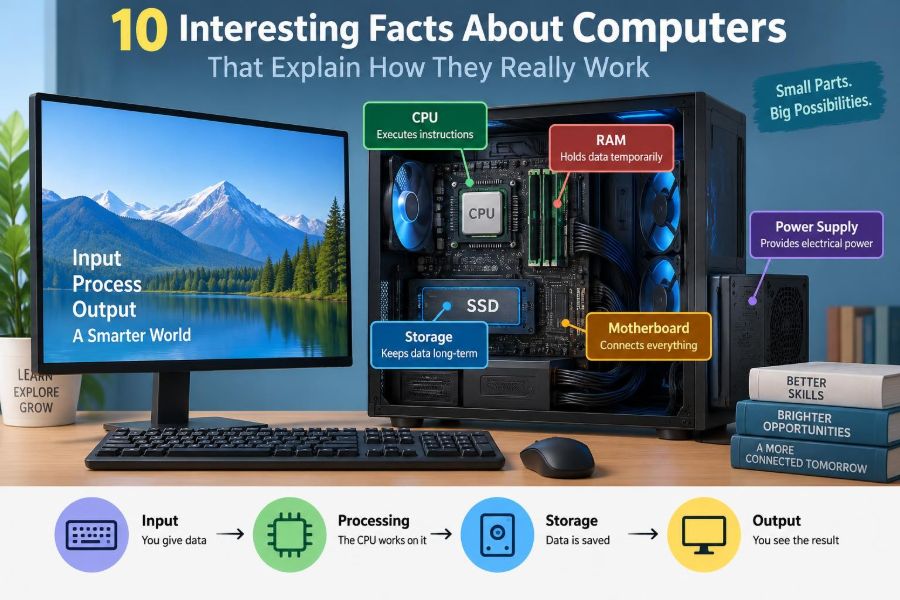
The central processing unit, or CPU, is often called the computer’s brain. The comparison is helpful only if we remember its limit: a CPU does not understand goals or meanings as a person does.
It executes instructions supplied by programs. An instruction might load data, add values, compare two values, move data to another location, or jump to a different instruction depending on a result.
🔁 The Fetch–Decode–Execute Cycle
Most CPU work follows a repeating pattern. The processor fetches an instruction from memory, decodes what the instruction requests, and executes the required operation. It then moves to the next instruction.
Many processors can overlap parts of this process or work on multiple instruction streams. Even so, the fundamental idea remains: software is turned into a sequence of very small machine-level steps.
⏱️ Clock Speed Is Not the Whole Story
A CPU clock coordinates internal timing. A higher clock frequency can allow more cycles each second, but it does not automatically make one processor faster than every lower-clocked processor.
Architecture, the number of useful operations completed per cycle, available cores, cache design, cooling, and the type of task all matter. Comparing only gigahertz is like comparing vehicles only by engine revolutions rather than by the whole design and journey.
👥 Multiple Cores Share the Work
A core is an independent processing unit within a CPU. Multiple cores can handle separate tasks at the same time, which helps when software is designed to divide work effectively.
For example, a computer may keep a video call responsive while a browser, security software, and document editor are also active. Some tasks, however, contain steps that must happen in order, so they cannot gain unlimited speed from extra cores.
📋 Fact 4: Programs Are Detailed Instructions
A program is a set of instructions that tells hardware what to do. Developers usually write source code in languages designed for people to read, such as Python, Java, C, or JavaScript.
That source code must be translated or interpreted into instructions the processor can use. Different programming languages make different trade-offs among speed, convenience, portability, and control over hardware.
🧱 Operating Systems Coordinate the Machine
The operating system manages the shared resources of a device. It decides which program gets processor time, tracks memory use, organizes files, and provides ways for applications to communicate with hardware.
Without an operating system, every program would need to manage the display, storage drive, keyboard, network adapter, and other components directly. That would be difficult and unsafe for ordinary software.
🪟 Applications Do Not Directly Own the Hardware
When an app wants to save a file or draw a window, it usually asks the operating system through controlled interfaces. The operating system checks permissions and uses device drivers to communicate with the relevant hardware.
This layering explains why a faulty application can often be closed without bringing down the entire computer. It also helps the system limit what an app can access.
🧠 Fact 5: RAM Is a Fast, Temporary Workspace
Random-access memory, or RAM, holds programs and data that the computer is actively using. It is far faster to access than long-term storage, which helps the CPU avoid waiting for every small piece of information.
RAM is generally volatile: its contents disappear when power is removed. Saving a document writes it to non-volatile storage so it can remain after shutdown.
🗄️ Storage Preserves Data When Power Is Off
Solid-state drives use flash memory, while traditional hard disk drives use spinning magnetic platters. Both preserve data without continuous power, though they work in different physical ways.
Storage capacity and speed are separate qualities. A large drive is useful for keeping many files, but a faster drive can noticeably reduce boot times and improve the responsiveness of apps that read many files.
🧺 Why Too Little RAM Slows a Computer
If active programs need more memory than the available RAM, the operating system may move less-active data temporarily to storage. This is often called paging or swapping.
It keeps the system running, but storage access is much slower than RAM access. A machine may then pause, stutter, or spend more time moving data than doing useful work. Closing unneeded apps can help more immediately than deleting old files.
⚡ Fact 6: Cache Is a Small Memory with a Big Job
A CPU can process instructions much faster than it can retrieve every item from main memory. Cache is a small, very fast memory located close to or within the processor that keeps recently used data and instructions ready.
Programs often reuse nearby data. This tendency, called locality, makes caching effective. If the needed information is already in cache, the CPU can continue quickly; if not, it must wait for data from a slower level.
🏗️ Computer Speed Depends on Bottlenecks
A powerful processor cannot fully compensate for a slow storage drive, insufficient RAM, a weak graphics processor, poor network connection, or overheating. Overall performance is constrained by the slowest relevant part of a task.
Consider opening a large online project. Storage affects loading local files, RAM affects how much stays available, the CPU processes instructions, graphics hardware renders visuals, and the network transfers remote data. “Fast computer” is always task-dependent.
🎮 Fact 7: Graphics Hardware Specializes in Parallel Work
A graphics processing unit, or GPU, is designed to perform many similar calculations in parallel. This suits graphics because a screen contains many pixels that often need related calculations at once.
GPUs are also useful for some scientific, engineering, and machine-learning workloads. They are not replacements for CPUs; the two processors are optimized for different kinds of work.
🖼️ Frames Create the Illusion of Motion
Video and games display a sequence of still images called frames. When frames are shown quickly enough, our visual system perceives smooth movement.
Rendering a frame can involve geometry, lighting, textures, shadows, and effects. Higher resolution or more detailed effects can improve appearance, but they increase the amount of work the graphics system must complete.
🌡️ Heat Is a Performance Constraint
Electrical work produces heat. If a processor becomes too hot, the system may reduce its operating speed, a response commonly called thermal throttling, to stay within safe limits.
Blocked vents, dust, aging cooling components, and using a laptop on a soft surface can make heat management worse. A device that feels slow only after extended use may be limited by temperature rather than by its basic specifications.
🌐 Fact 8: The Internet Is a Network of Networks
The internet is not a single place where websites live. It is a vast collection of interconnected networks that use shared communication rules, including the Internet Protocol suite.
When you visit a site, your device exchanges data with computers elsewhere. The route may pass through your home router, an internet provider, and several other networks before reaching a server.
📦 Data Travels in Packets
Network data is broken into small units called packets. Each packet carries addressing and control information so network equipment can forward it toward the correct destination.
Packets from one activity may travel alongside packets from many others. Protocols help the receiving device identify what belongs together, detect missing pieces, and reconstruct the original data when necessary.
📛 Domain Names Need Translation
People prefer names such as a website address, while network devices use numerical IP addresses. The Domain Name System, or DNS, acts like a distributed directory that helps translate a domain name into an address.
If DNS has a problem, a network can appear broken even when the physical connection is working. That is one reason troubleshooting should distinguish “I cannot reach this site” from “I have no internet connection at all.”
🔐 Fact 9: Encryption Protects Data, but It Is Not Magic
Encryption transforms readable data into a form intended to be unreadable without the correct key. It protects many routine activities, including secure website connections and encrypted device storage.
Encryption is powerful, but it cannot protect a password you hand to a scammer or data exposed by malware running with your permission. Security depends on technology, settings, updates, and human choices together.
🪪 Passwords Are Evidence, Not Identity Itself
A password is a secret used to help prove that someone is authorized to access an account. Reusing the same password across sites creates risk: a breach at one service can endanger accounts elsewhere.
Use long, unique passwords stored in a reputable password manager when possible. Multi-factor authentication adds another check, such as an authenticator code or security key, making a stolen password less useful on its own.
🕵️ Social Engineering Targets People
Many attacks do not require breaking sophisticated encryption. They rely on convincing someone to reveal a code, install an unsafe program, or approve a fraudulent request. This is known as social engineering.
Pause when a message creates urgency, asks for a login code, or directs you to an unfamiliar sign-in page. Verify requests through a known contact method rather than using the message’s supplied link or phone number.
💾 Fact 10: Files Are Organized Data with Names and Metadata
A file is a structured collection of data managed by a file system. Its filename and extension are useful clues, but the actual file format determines how software should interpret the contents.
Files also have metadata: information about the file, such as dates, size, permissions, and sometimes location or authoring details. Sharing a photo can share more than its visible pixels unless the app removes that metadata.
🗂️ Folders Are an Organizational Map
Folders, often called directories, provide a way to group files. The paths you see, such as a Documents folder containing a project folder, are an organized map maintained by the operating system.
A clear folder structure makes backups and recovery easier. Vague names such as “final-final-new” make sense briefly but become costly when several versions of an important document exist.
♻️ Deleting Is Not Always Immediate Erasure
When you delete a file, the operating system may first mark its storage space as available rather than instantly overwriting every byte. Until that space is reused, recovery can sometimes be possible.
The exact behavior varies by device, file system, and storage technology. For routine privacy, emptying the recycle bin is sensible; for sensitive disposal, follow the secure-erasure guidance appropriate to the device and organization.
☁️ The Cloud Is Someone Else’s Computer Infrastructure
“Cloud” usually means computing services delivered over a network: remote storage, software, databases, or processing power. Your files may be stored on servers operated by a provider rather than solely on your local device.
Cloud services offer convenient syncing and collaboration, but they still require account security, clear sharing settings, and backups for valuable information. Synchronization is not automatically a backup: an unwanted deletion can sync too.
🔄 Updates Change Software and Sometimes Firmware
Software updates can fix bugs, improve compatibility, add features, and close known security weaknesses. Firmware updates change low-level software that helps hardware operate, such as the software in a router or motherboard.
Updates occasionally introduce problems, so organizations may test them before wide deployment. For personal devices, keeping supported systems reasonably current is usually safer than postponing updates indefinitely.
🛠️ Practical Troubleshooting Starts with the Simplest Layer
When something fails, begin with the most likely and easiest-to-check cause. Is the device powered? Is the cable connected? Is airplane mode on? Did a single app freeze, or is the entire system unresponsive?
- Restart the affected app before restarting the whole device.
- Check storage space, network status, and recent error messages.
- Try a known-good cable, outlet, or network when relevant.
- Back up important files before major repairs or resets.
- Change one thing at a time so you can tell what solved the problem.
This method avoids random fixes and turns troubleshooting into a process of narrowing possibilities.
🧭 The Core Principle: Computers Are Layers of Simple Systems
The most revealing fact about computers is that no single component “does everything.” Transistors create logic, logic executes instructions, operating systems manage resources, memory holds active work, storage preserves files, and networks move packets between machines.
Each layer hides complexity from the layer above it. You do not need to understand voltage levels to edit a document, but knowing that layers exist helps explain why a problem can come from hardware, software, data, settings, or a network connection.
That layered view also replaces vague explanations with better questions: Is the file saved? Is RAM under pressure? Is the program waiting on the network? Is the account protected? Those questions lead to practical answers.
Computers work because millions of precise, simple operations are organized into layers that turn binary signals into useful human tools. Once you see those layers, everyday technology becomes easier to use thoughtfully, diagnose calmly, and protect wisely. 🖥️🔍🔐