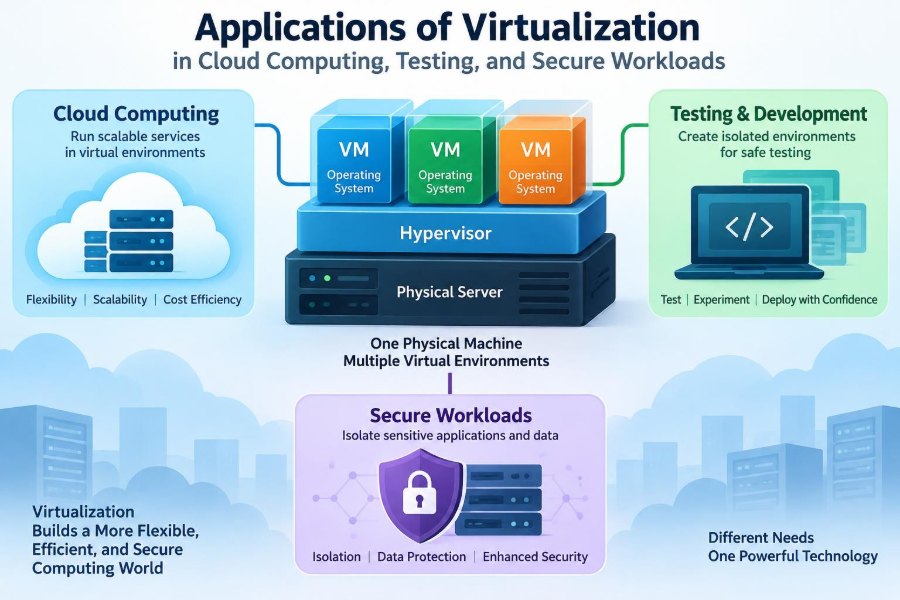

A student opens a laptop in a campus lab, runs a Linux environment for a programming exercise, and closes it at the end of class. A software team starts dozens of identical test servers before releasing an update. A hospital, bank, or government office keeps a sensitive application apart from everyday office activity.
These situations look different, but they often rely on the same computing idea: virtualization. Instead of tying one operating system and one workload to one physical machine, virtualization lets a single set of hardware resources support separate, controlled computing environments.
That separation is a major reason cloud platforms can offer servers on demand, developers can test safely, and organizations can handle high-risk work with more control. It also explains why virtualization is not simply a way to “save hardware.”
Understanding its applications helps students make sense of cloud services and helps working professionals make better choices about performance, cost, security, and reliability.
🧩 Virtualization: The Basic Idea
Virtualization is the creation of a software-based version of a computing resource. That resource may be a server, operating system, desktop, network, disk, or application environment.
A virtual machine, or VM, acts like a complete computer: it has virtual processors, memory, storage, network interfaces, and an operating system. Yet those components are presented by software rather than existing as a separate physical box under a desk.
🖥️ The Physical Host and Virtual Guests
The actual computer supplying resources is called the host. The operating systems running inside virtual environments are called guests.
For example, one powerful physical server might host a Windows VM for accounting, a Linux VM for a web application, and another VM for a database. Each guest sees its assigned resources and behaves much like it would on dedicated hardware.
⚙️ What a Hypervisor Does
The software layer that creates and manages VMs is the hypervisor. It allocates processor time, memory, storage access, and networking while helping keep one VM from directly interfering with another.
Type 1 hypervisors run directly on server hardware and are common in data centers. Type 2 hypervisors run on top of a regular operating system and are often useful for desktop learning, local development, and small-scale testing.
🏢 Why One Server Can Run Many Workloads
Many physical servers are underused for much of the day. A department may buy a machine for one application, only for that application to use a small fraction of its processor capacity except during busy periods.
Virtualization allows compatible workloads to share a larger pool of hardware. This is called consolidation. It can reduce the number of idle machines, but it must be planned carefully so that one busy application does not crowd out others.
☁️ Virtualization as a Foundation of Cloud Computing
Cloud computing delivers computing resources as services over a network. Virtualization is one of the main mechanisms that makes those resources flexible and repeatable.
When a customer requests a virtual server from a cloud provider, software can create a VM from a prepared image, connect storage and networking, and assign access permissions. The customer receives a usable environment without waiting for a physical server to be installed.
📦 Infrastructure as a Service in Practice
Infrastructure as a Service (IaaS) commonly provides virtual servers, disks, networks, and related controls. A user chooses an operating system image and a resource size, then configures the VM for a website, internal tool, or research task.
Consider a small retailer preparing for a seasonal sales event. It can create additional application servers for the busy period and remove them afterward. This is a hypothetical example, but it illustrates the practical appeal of virtual infrastructure: capacity can change without purchasing permanent hardware for a short-term demand.
📈 Elastic Scaling Without New Hardware
Elasticity means adjusting resources as workload demand changes. Virtualization supports elasticity because VMs can be created, resized, duplicated, moved, or retired through management tools.
Elasticity is not automatic in every setup. An organization needs monitoring, capacity rules, correctly designed applications, and budget controls. Adding more VMs may not solve a bottleneck caused by a slow database query or a single overloaded service.
🧱 Resource Pools and Fair Allocation
Cloud and private virtual environments group physical CPU, memory, storage, and network capacity into resource pools. Administrators then allocate portions of those pools to workloads.
Allocation can include limits, reservations, and priority rules. A payroll system might receive guaranteed resources during its processing window, while a low-priority test VM may be allowed to use spare capacity only when it is available.
🗂️ Images Make Environments Repeatable
A VM image is a reusable template containing an operating system and, sometimes, preinstalled software and settings. Images reduce the effort of building the same server configuration repeatedly.
A development team might maintain separate images for a web server, a database test environment, and a data-analysis workstation. The useful practice is to keep images updated, documented, and minimal; an old image can reproduce old vulnerabilities as easily as it reproduces convenience.
🔄 Snapshots and Fast Recovery Points
A snapshot captures the state of a VM at a particular time. Before applying a risky configuration change, an administrator may create a snapshot so the environment can be restored if the change fails.
Snapshots are valuable for short-term testing and rollback, but they are not automatically a complete backup strategy. They can depend on the underlying storage, consume space, and may not protect against every failure or data-loss scenario.
🧪 Isolated Test Environments
Software testing often requires conditions that would be unsafe or inconvenient on a production system. Virtualization lets testers create isolated environments where they can install a new version, alter configuration files, or intentionally cause errors.
Isolation helps answer a crucial question: does a problem come from the new code, or from the environment in which it runs? When the environment can be recreated from a known image, that question becomes easier to investigate.
🔁 Reproducing Bugs Reliably
Many software defects appear only under a particular operating system version, library combination, network condition, or configuration. A developer who says “it works on my computer” may simply be using a different environment.
A VM can preserve the relevant setup. Another team member can start the same image and reproduce the issue without manually guessing every installation step. This consistency improves debugging, although teams should still record application versions, test data, and configuration changes.
🧫 Safe Experiments for Students and Developers
Virtual machines are useful learning spaces. A student can practice Linux commands, configure a web server, or explore networking without replacing the main operating system on a laptop.
They are also useful for controlled experiments. If a configuration becomes unusable, the learner can discard the VM and begin again. This does not remove all risk—malicious files, shared folders, and network settings still require care—but it reduces the consequences of many ordinary mistakes.
🚦 Continuous Integration and Disposable Servers
In continuous integration, code changes are built and tested frequently. Virtualized infrastructure can provide fresh, temporary test servers for each pipeline run or test stage.
Disposable environments reduce a common testing problem: one test leaves behind files, settings, or data that affect the next test. Starting from a clean template improves consistency, provided the template itself is maintained and the tests use realistic dependencies.
🌐 Testing Across Operating Systems
An application may need to support several operating systems or server distributions. Buying a separate physical computer for every combination is often impractical, especially when the environments are needed only during testing.
VMs let a team run multiple guest operating systems on suitable hardware. They are particularly helpful for server-side compatibility checks, legacy software validation, and classroom demonstrations of how different systems behave.
🧰 Virtual Networks for Realistic Labs
Virtualization can create more than virtual computers. It can also simulate switches, routers, firewalls, and separate network segments. A student or network engineer can build a small lab containing a client network, a web server network, and a protected database network.
This setup makes abstract network concepts visible. Rules can be tested without changing the organization’s live network, and traffic paths can be inspected in a controlled setting.
🔐 Security Through Workload Isolation
One security application of virtualization is isolation: keeping workloads apart so that compromise or failure in one environment has fewer direct paths to another. A public-facing web application, for instance, should not automatically have the same access as an internal finance service.
Isolation is a risk-reduction measure, not a promise of complete safety. The host, hypervisor, management console, network configuration, and credentials all remain valuable targets that need protection.
🛡️ Sandboxes for Suspicious Files
Security teams may analyze suspicious files in a specially designed virtual environment called a sandbox. The goal is to observe behavior while limiting access to real systems and sensitive data.
A sound sandbox design restricts network access where appropriate, avoids using real credentials, and restores the environment after analysis. Sophisticated malicious software may attempt to detect virtual environments or delay its behavior, so sandbox observations must be interpreted cautiously.
🏰 Separating Sensitive Workloads
Organizations often separate systems according to sensitivity. A development environment, employee email service, payment-processing component, and research system should not necessarily share the same permissions or network exposure.
Virtualization supports this segmentation by placing workloads in distinct VMs and networks. Strong separation also requires identity controls, firewall rules, encryption where needed, patching, logging, and careful administration. A VM boundary alone is not a complete security architecture.
🧑💼 Virtual Desktops for Controlled Access
A virtual desktop provides a user with a desktop operating system that runs in a data center or cloud environment rather than entirely on the local device. The user interacts through a remote display session.
This can help organizations centralize software updates and keep sensitive files within managed infrastructure. It may also support contractors or remote staff using personal devices. However, user experience depends heavily on network quality, peripheral support, and sensible desktop sizing.
🕰️ Preserving Legacy Applications
Some organizations rely on older applications that were built for an earlier operating system or specific hardware setup. Replacing them may take time because of cost, compatibility, or regulatory requirements.
A VM can preserve a compatible environment while the organization plans modernization. This is often a practical bridge, not a permanent excuse to ignore aging software. Unsupported operating systems and old applications can still create serious operational and security risks.
♻️ Disaster Recovery and Service Continuity
Virtual machines can simplify disaster recovery because a VM is often represented by a defined set of configuration and storage files. Replication or backup processes can copy those components to another location for recovery after a major outage.
Recovery quality depends on planning. Teams need to know which services must return first, how recent recovered data must be, and whether network addresses, identities, licenses, and dependencies will work at the recovery site. A backup that has never been tested is an assumption, not proof of readiness.
🚚 Live Migration and Maintenance Windows
Some virtual platforms can move a running VM from one physical host to another with limited interruption. This is commonly called live migration.
It can help administrators maintain or replace hardware without taking every workload offline. It has limits: compatible hosts, sufficient network and storage capacity, and supported configurations are required. Workloads with strict latency requirements may need more careful planning.
⚖️ Virtual Machines and Containers
Containers are another form of virtualization-like isolation, but they work differently from VMs. A VM generally includes its own guest operating system, while containers typically share the host operating system kernel and package an application with its dependencies.
| Feature | Virtual machine | Container |
|---|---|---|
| Operating system | Usually includes a full guest OS | Usually shares the host kernel |
| Isolation model | Hardware-level abstraction through a hypervisor | Operating-system-level isolation |
| Startup and size | Often heavier and slower to start | Often lighter and faster to start |
| Common fit | Mixed OS needs, legacy systems, strong environment separation | Portable application deployment and scalable services |
Neither is automatically better. Many modern platforms use containers inside VMs, combining operational flexibility with an additional infrastructure boundary.
📊 Performance Overhead and Capacity Planning
Virtualization introduces management overhead, though modern platforms can perform efficiently for many workloads. Performance depends on processor features, storage speed, network design, hypervisor settings, and how heavily resources are shared.
Problems arise when administrators allocate more virtual CPU, memory, or storage than the host can comfortably provide. This practice, often called overcommitment, may be acceptable for workloads with uneven demand but can cause delays when many VMs become busy together.
💾 Storage Is Often the Hidden Constraint
Users frequently focus on CPU and memory, but virtual environments also depend heavily on storage input/output operations. Several VMs performing database work, updates, or boot operations at once can create a storage bottleneck.
Monitoring latency, throughput, capacity growth, and backup windows is essential. Fast storage alone does not solve every issue; poorly designed applications and excessive snapshots can still create unnecessary load.
💰 Cost Benefits and Cost Surprises
Virtualization can lower hardware, power, space, and provisioning costs by increasing the useful work done by physical equipment. It can also reduce the time needed to create a new environment.
Yet virtual resources can be created so easily that organizations accumulate forgotten VMs, oversized disks, old snapshots, and unused public addresses. Good cost management includes ownership labels, expiration rules for temporary systems, and regular reviews of actual resource use.
🧾 Licensing, Compliance, and Data Location
Technical convenience does not remove administrative responsibilities. Software licensing may have rules about virtual processors, host hardware, user access, or disaster recovery copies.
Organizations handling regulated or sensitive information may also need to consider where data is stored, who can administer systems, how access is logged, and how information is deleted. Requirements vary by sector and location, so technical teams should involve the appropriate legal, compliance, and security specialists.
🔑 Securing the Virtualization Management Plane
The management plane includes the consoles, APIs, accounts, and services used to create and control VMs. Because it can affect many workloads at once, it deserves especially strong protection.
- Use unique accounts and multifactor authentication where supported.
- Grant only the permissions needed for each role.
- Patch hypervisors and management tools on a planned schedule.
- Record administrative actions and review unusual activity.
- Keep management networks separate from ordinary user traffic when practical.
Protecting one guest VM is useful; protecting the control system that can create, alter, or delete hundreds of VMs is essential.
🧹 Avoiding Virtual Machine Sprawl
VM sprawl occurs when virtual machines multiply without clear ownership, documentation, lifecycle rules, or resource controls. A forgotten VM may waste money, remain unpatched, or contain old data.
A simple lifecycle helps: request, approve, build, monitor, review, retire. Temporary testing systems should have automatic expiry dates or a review reminder. Each VM should have an owner who can explain why it exists.
🧭 Choosing the Right Workload for Virtualization
Virtualization is a strong fit when an organization needs repeatable environments, flexible capacity, operating-system separation, recovery options, or efficient use of shared hardware. It is less ideal when an application requires specialized physical hardware, extremely low latency, or direct access patterns that the platform cannot support well.
The best question is not “Can this be virtualized?” but “What operational problem does virtualization solve here, and what new dependencies does it introduce?” That question leads to better designs than adopting technology for its own sake.
🎯 The Core Principle: Controlled Flexibility
Virtualization turns physical computing resources into configurable building blocks. In cloud computing, it enables on-demand infrastructure. In testing, it creates repeatable and disposable environments. In security work, it supports separation, sandboxes, controlled desktops, and recovery planning.
Its value comes from combining flexibility with discipline. Images must be maintained, access must be restricted, resources must be monitored, and recovery procedures must be tested. Without those practices, virtual systems can reproduce disorder just as quickly as they reproduce useful environments.
Virtualization is most powerful when it gives people faster access to computing without weakening their control over it. Used thoughtfully, it makes infrastructure more adaptable, testing more reliable, and sensitive workloads easier to separate and manage. 🖥️☁️🔐