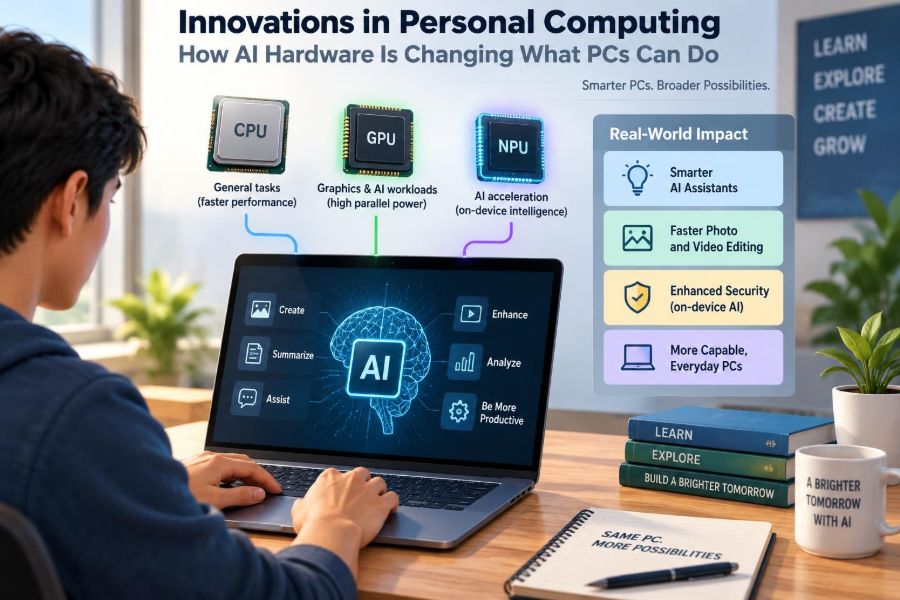

A student opens a laptop to turn a long recorded lecture into notes. A designer removes a distracting object from a photo. A remote worker joins a meeting and finds that background noise, eye contact, and live captions are being handled without opening three separate applications.
These tasks are not entirely new, but the way they are being performed is changing. More PCs now include hardware designed specifically for artificial intelligence workloads, shifting some work from distant cloud servers onto the computer sitting on a desk or lap.
That shift matters because a PC is no longer judged only by its processor speed, memory, storage, or graphics performance. It is increasingly judged by how well it can run AI features privately, efficiently, and responsively.
AI hardware does not turn every computer into a science-fiction assistant. It does, however, change the range of tasks a personal computer can handle locally—and it gives buyers new choices to understand before they upgrade.
🧠 What “AI Hardware” Means in a PC
AI hardware is computing hardware optimized for the mathematical operations used by artificial intelligence models. These models identify patterns in text, images, sound, and data, then generate or transform an output.
In a PC, AI work may be handled by the central processing unit (CPU), graphics processing unit (GPU), or a newer component called a neural processing unit (NPU). The important idea is not that one chip does everything, but that the system can assign work to the component best suited to it.
⚙️ The Three Main Processing Engines
A modern AI-capable PC is often a heterogeneous system: several types of processors cooperate. Each has different strengths, just as a workshop may use separate tools for cutting, drilling, and measuring.
| Component | Primary strength | Typical AI-related role |
|---|---|---|
| CPU | Flexible general-purpose computing | Coordinates tasks, runs applications, handles lighter AI work |
| GPU | Large amounts of parallel computation | Creates images, processes video, runs demanding local models |
| NPU | Efficient, sustained AI inference | Runs supported background and real-time AI features using less power |
Actual performance depends on the chip, software, memory, cooling, and model being used. A label claiming “AI PC” does not, by itself, reveal what the machine will do well.
🔢 Why AI Models Need Different Kinds of Math
Many AI models repeatedly perform matrix operations: large grids of numbers are multiplied and combined to detect relationships. This is very different from many traditional desktop tasks, which may involve a sequence of varied instructions.
GPUs became valuable for AI because they can perform many similar calculations at once. NPUs are designed to do particular AI calculations efficiently, often with lower precision formats that can speed processing and reduce energy use while keeping output useful.
📌 Understanding Inference Versus Training
Training is the process of adjusting a model using a large body of examples. It generally requires substantial computing resources and is commonly done in data centers or specialized systems.
Inference is using an already trained model to make a prediction or generate an answer. When your computer transcribes speech, blurs a background, or summarizes a local document, it is usually performing inference. Consumer AI hardware is mainly focused on this second task.
🌐 Cloud AI and Local AI Are Not the Same
Cloud AI sends data to remote servers, where powerful hardware processes the request and returns a result. Local AI runs on the device itself, although an application can also combine both approaches.
Cloud services can support very large models without requiring a powerful laptop. Local processing can reduce waiting time for some tasks, work without a connection, and keep certain data on the machine. Neither option is automatically better; the appropriate choice depends on the task and the data involved.
🔒 Privacy Benefits—and Their Limits
Keeping a task local can be valuable when the input includes personal notes, meeting audio, family photos, or confidential work material. The data may not need to leave the device simply to be processed.
But “local” should not be treated as a blanket privacy guarantee. An app may still collect diagnostics, synchronize files, use online features, or store results in a cloud account. Check an application’s settings and privacy documentation, especially in workplaces with rules about sensitive information.
⚡ Why the NPU Changes Battery-Life Decisions
For a small, repeated AI task, using a large GPU can consume more power than necessary. An NPU can often handle supported workloads with less energy, which is useful for features that run during video calls or continuously process audio.
This does not mean an NPU makes every AI task power-efficient. A demanding image-generation model, high-resolution video enhancement, or unsupported application may still rely heavily on the GPU or CPU. Battery life remains affected by display brightness, network use, cooling, and ordinary application activity.
🎥 Better Video Calls Through On-Device Processing
Video conferencing is one of the clearest everyday uses of AI acceleration. A PC may separate a person from the background, reduce room noise, frame the camera image, correct gaze direction, or generate live captions.
Running these effects locally can make them available across compatible calling software and may avoid sending raw audio or video to a separate processing service. Results vary: aggressive noise reduction can make speech sound unnatural, and eye-contact correction can look odd when used poorly.
🎙️ Speech Recognition Becomes More Immediate
Speech-to-text software has existed for years, but local AI hardware can make transcription and voice commands more practical in real time. Students can create searchable lecture notes; professionals can dictate drafts; users with mobility limitations can navigate or compose text by voice.
Accuracy still depends on language support, microphone quality, speaking style, background sound, and specialized vocabulary. Always review transcripts before treating them as a reliable record, particularly for names, technical terms, numbers, or decisions.
🌍 Translation and Accessibility Features
On-device models can support captions, translation, voice isolation, image descriptions, and text assistance. These tools can make a computer more usable for people who are deaf or hard of hearing, have low vision, communicate across languages, or find typing difficult.
Accessibility should not be framed as a side benefit. For many users, a dependable captioning or speech-control feature can determine whether a device is practical for study or work. At the same time, automated descriptions and translations can make mistakes, so context remains essential.
✍️ Writing Assistance Without Sending Every Draft Away
Small local language models can help rewrite a sentence, change tone, summarize selected text, or suggest a structure for notes. Because the model can operate on-device, these functions may be useful even when a connection is poor.
They are best used as drafting aids, not authorities. A fluent paragraph can still contain invented details, weak reasoning, or a misleading summary. For coursework and professional documents, the writer remains responsible for checking facts, preserving meaning, and citing real sources.
🖼️ Photo Editing Moves Beyond Simple Filters
AI-enhanced photo tools can select a subject, remove a background, reduce blur or noise, improve lighting, and search a personal library using natural descriptions. Dedicated acceleration can shorten the delay between choosing an edit and seeing a preview.
These tools are useful, but they also blur the line between correction and alteration. Removing sensor noise is different from generating details that were never captured. In journalism, research, legal work, or documentation, organizations may need clear rules about acceptable editing.
🎬 Video Workloads Show the Limits of Small Chips
AI can help video editors identify speakers, create captions, isolate a person, track objects, or clean audio. These features save time on repetitive work, especially when they are integrated into editing software.
Yet video remains demanding because it involves many high-resolution frames. An NPU may assist with a particular effect, while the GPU handles rendering and the CPU manages the project. Fast storage, adequate memory, and a good cooling design still matter greatly.
🎨 Generative Images and Their Hardware Demands
Generative image models create new images from prompts or other inputs. Running one locally can offer privacy and experimentation without relying on a remote service, but output quality and speed depend strongly on the model size and available GPU memory.
Many thin laptops can run smaller or optimized models, though generation may be slow or limited in resolution. A powerful desktop GPU can offer a smoother experience, but it consumes more electricity and costs more. The practical question is how often you will actually use the feature.
📁 Smarter Search for Your Own Files
Traditional file search relies heavily on names, folders, and exact words. AI-assisted search can sometimes recognize concepts inside documents, images, or recordings: for example, finding a slide about renewable energy even when that exact phrase is not in the filename.
This can reduce time spent organizing material, but indexing may use storage and processing power. It also needs sensible boundaries. A work computer should not silently make every sensitive file more discoverable to people who share the same user account.
🧩 Software Determines Whether the Hardware Helps
A high-capability NPU is not useful if the operating system and applications do not know how to use it. Developers need to target suitable software frameworks, model formats, and hardware instructions.
That is why two PCs with similar-looking specifications can feel different in practice. One may have software that routes a supported task efficiently to the NPU, while another may run the same task on the CPU or GPU. Compatibility matters as much as peak chip specifications.
📏 What TOPS Can—and Cannot Tell You
AI chip marketing often uses TOPS, meaning trillions of operations per second. It is a measure of theoretical computational throughput under particular conditions, not a universal score for every AI experience.
TOPS figures may use different data types, test methods, or parts of a chip. They do not directly tell you transcription accuracy, image quality, model compatibility, or real battery life. Use them as one technical clue, then look for independent demonstrations of the applications you expect to run.
💾 Memory Is an Overlooked AI Requirement
A model must fit into available memory along with the operating system and active applications. System memory, often called RAM, affects how comfortably a PC can run local models and multitask at the same time.
GPU memory can be especially important for graphics-based AI workloads. On some systems, the CPU and GPU share a common memory pool; on others, the GPU has dedicated memory. More memory does not guarantee speed, but too little can make a promising AI task impractical.
🧊 Heat, Noise, and Sustained Performance
AI demos often show a brief task completing quickly. Longer jobs tell a fuller story. If a compact computer becomes warm, it may lower processor speed to stay within safe thermal limits, a behavior called thermal throttling.
A laptop’s chassis, fan design, power mode, and room temperature affect sustained performance. Buyers who plan to transcribe hours of audio, process photos in batches, or generate media repeatedly should read reviews that test longer workloads rather than relying only on short benchmark results.
🔌 Desktop and Laptop AI PCs Serve Different Needs
Laptops emphasize portability, battery life, integrated cameras, and efficient AI features. They are often excellent for captions, audio effects, document assistance, and modest local models while traveling.
Desktops can usually accommodate more powerful GPUs, greater cooling capacity, more memory, and upgrade options. They are better suited to frequent rendering, demanding creative work, local model experimentation, or projects where a large display and sustained performance matter more than mobility.
🛒 How to Buy an AI-Capable PC Wisely
Start with your workflow, not a marketing label. Someone who mostly browses, writes, and attends meetings may benefit more from a good screen, keyboard, battery, and webcam than from the highest advertised AI throughput.
- List the specific AI features or applications you expect to use.
- Check whether those applications support your operating system and chosen hardware.
- Choose adequate RAM and storage for your normal workload first.
- For local creative AI, examine GPU capability and memory rather than NPU claims alone.
- Consider repairability, ports, display quality, battery health, and warranty alongside AI features.
🧰 Making an Existing PC More Useful
You do not necessarily need a new computer to use AI tools. Many cloud-based services and ordinary desktop applications run well on older machines, provided the device meets their basic requirements.
Practical upgrades can also help: adding RAM where possible, replacing a slow hard drive with solid-state storage, updating the operating system, and closing unnecessary background applications. An external GPU is an option in limited setups, but compatibility, cost, power requirements, and connection bandwidth make it a specialist choice rather than a universal upgrade.
🛡️ Security Risks Do Not Disappear With Local AI
Local processing can reduce data transfers, but it introduces its own responsibilities. Downloading unknown models, plug-ins, or “AI optimizers” from untrusted sources can expose a computer to malicious software or unwanted data collection.
Use reputable application stores or developer sources, keep the operating system and drivers updated, and be cautious with files that request broad permissions. In a workplace, follow IT policies before placing company documents into any AI tool—even one that claims to run locally.
⚖️ Bias, Errors, and Human Review
AI output reflects patterns in training data and the limits of the model. A transcription system may mishear an accent; an image tool may make unfair assumptions; a writing assistant may state a plausible but false claim.
Hardware makes these tools faster and more accessible, but it does not make their judgments objective or correct. High-stakes uses involving hiring, healthcare, education decisions, finance, safety, or legal matters need careful human oversight and appropriate organizational safeguards.
♻️ The Environmental Trade-Off
Efficient local inference can reduce the need to send every small request across a network to a data center. That may lower energy use for certain tasks, especially when an NPU handles a feature that would otherwise use a more power-hungry processor.
However, new hardware also requires materials, manufacturing, transport, and eventual disposal. Replacing a working PC solely for occasional AI novelty may not be a sensible environmental choice. Extending device life, repairing when practical, and recycling electronics responsibly remain meaningful actions.
🏫 What AI Hardware Means for Learning
For learners, local AI can support study guides, transcription, language practice, coding explanations, and organization. It can remove friction from routine tasks and make resources more accessible.
It can also create shortcuts that weaken learning if students submit generated work they do not understand. A healthier approach is to use the tool to ask questions, compare explanations, outline ideas, and receive feedback—then do the reasoning and verification yourself.
💼 What It Means for Everyday Work
In offices, AI hardware is likely to be most valuable when it quietly reduces repetitive effort: cleaning meeting audio, sorting files, drafting routine text, extracting action items, or helping staff find information.
The value comes from reliable workflow integration, not from an impressive demo. Teams should decide which tasks are appropriate for automation, who checks the result, where data is processed, and how mistakes are corrected before treating AI features as standard business tools.
🔮 The Near-Term Direction of Personal Computing
Personal computers are moving toward a blended model. Small, frequent, privacy-sensitive tasks can happen on the device, while larger or more specialized requests may use cloud services when a connection and permission are available.
This does not mean every application will become an AI application. Traditional strengths—fast startup, dependable files, comfortable input devices, secure accounts, and useful software—will remain central. AI acceleration is becoming another capability of the PC, much like graphics acceleration became essential for many visual tasks.
✅ The Core Principle: Match the Hardware to the Work
The clearest way to understand AI hardware is to see it as a set of specialized tools. The CPU remains flexible, the GPU handles large parallel workloads, and the NPU can run supported AI features efficiently in the background.
Choose a computer based on the work you genuinely do, the privacy level your data requires, and the software you rely on. Avoid assuming that a single specification predicts real experience, and keep human judgment involved wherever AI output affects an important decision.
AI hardware is most useful when it makes familiar computing faster, more private, more accessible, or less repetitive—not when it replaces careful thinking. A well-chosen PC should support your skills and workflow for years, whether its smartest feature is an NPU, a capable GPU, or simply a dependable keyboard. 🖥️🧠✨