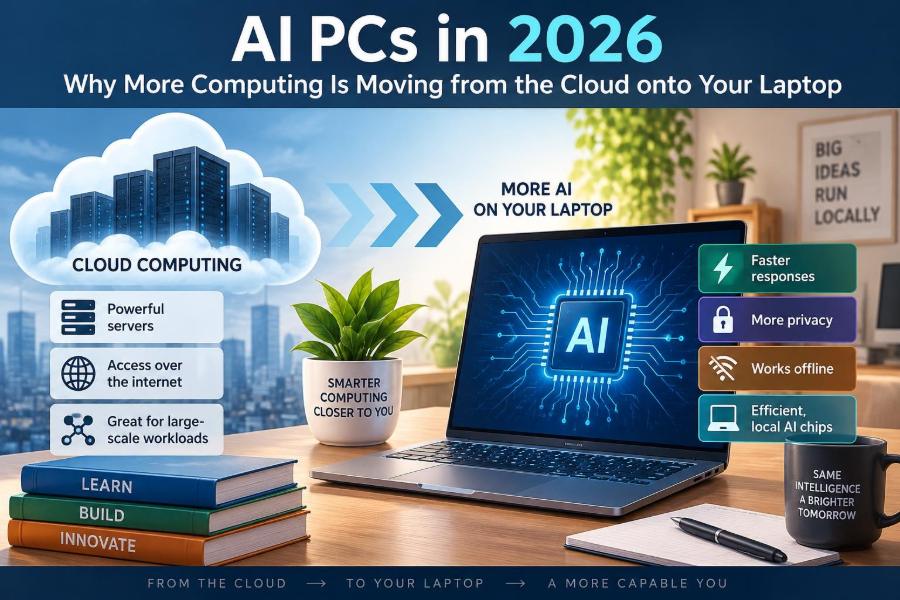

You open a document on a train, dictate a rough outline, and ask your laptop to turn a meeting recording into searchable notes. A few years ago, tools like these usually meant sending audio or text to a remote data center and waiting for a response.
Now, more of that work can happen directly on the machine in front of you. The change is subtle when everything works: suggestions appear faster, a photo editor identifies an object without an upload, and a translation feature continues when Wi-Fi disappears.
This does not mean the cloud is going away. Large online services remain essential for many tasks. But laptops are becoming better able to run useful AI features locally, changing what buyers should look for, what developers build, and where personal data is processed.
The term AI PC is often used loosely, so it helps to separate practical computing changes from marketing language. The most useful question is not whether a computer has “AI,” but which jobs it can perform well, privately, and efficiently on your device.
💻 What People Mean by an AI PC
An AI PC is a computer designed to run artificial intelligence workloads alongside ordinary applications. It generally combines a conventional processor, graphics hardware, and a specialized component called an neural processing unit, or NPU.
AI PCs are not a completely separate category of machine. They are laptops and desktops with hardware intended to make certain AI tasks practical without depending entirely on an internet connection.
The label alone does not guarantee a valuable experience. A useful AI PC also needs software that knows when and how to use its available hardware.
🧩 The Three Processors Working Together
Modern AI work is rarely handled by one chip alone. The CPU, GPU, and NPU have different strengths, and an operating system or app can assign work to the most suitable one.
| Component | Best suited to | Typical AI role |
|---|---|---|
| CPU | General instructions and responsive tasks | Preparing data, coordinating an app, light inference |
| GPU | Many calculations in parallel | Image generation, larger models, graphics-heavy AI |
| NPU | Repeated AI calculations at low power | Background effects, transcription, recognition, small models |
This division is similar to a workplace: a general manager, a large production team, and a specialist department. The best result comes from assigning each job appropriately, not from expecting every task to use the NPU.
🧠 What an NPU Actually Does
An NPU is purpose-built to perform the mathematical operations common in machine-learning models, especially repeated operations on large sets of numbers. It is optimized for inference: using an already-trained model to make a prediction, classification, or response.
For example, an NPU might help separate your voice from background noise during a call. It is usually not used to train a giant model from scratch; training remains far more demanding and is commonly performed in data centers.
☁️ Why Cloud AI Became the Default
Cloud services grew because large AI models require substantial computing power, memory, and storage. A provider can run one capable model on servers and make it available to many people through a browser or app.
This approach also simplifies updates. Improve the server-side model, and users can benefit without installing a large package on every computer. For complex reasoning, broad web-connected knowledge, and very large media-generation jobs, cloud computing remains a practical fit.
🏠 Why Work Is Moving Back to the Device
Local AI has become more feasible because chips are more efficient, models can be made smaller, and developers can tailor features to narrower jobs. A model that only needs to remove speech noise does not need the scale of a general-purpose online assistant.
The move is therefore not a rejection of cloud computing. It is a shift toward hybrid AI, where simple or sensitive work happens locally and demanding or up-to-date work can use remote servers.
⚡ Lower Latency Feels More Natural
Latency is the delay between an action and a result. If an app must send data over the internet, wait for a server, then receive an answer, even a fast service adds delay.
Local processing can reduce that round trip. This matters for live captions, voice cleanup, webcam framing, accessibility tools, and interactive creative controls, where a small pause can make a feature feel awkward.
Fast local operation still depends on the model and the computer. A large model may run slowly on a thin laptop even if it technically runs offline.
📶 Offline Use Is More Than a Convenience
Travel, unreliable home broadband, secure workplaces, and field locations all expose the limits of cloud-only tools. An offline transcription or translation feature can remain useful when a connection is unavailable or too expensive to rely on.
Offline capability is especially valuable when a task is routine and predictable. A laptop can caption a downloaded lecture or search photos in a local library without repeatedly contacting a service.
🔒 Local Processing Can Improve Privacy
When data stays on a device, it may avoid being transmitted to an external provider for that particular operation. That can be meaningful for personal images, voice recordings, drafts, customer information, or internal documents.
However, local does not automatically mean private. An app may still collect diagnostics, sync files, use online account services, or offer cloud processing as a fallback. Read the feature’s settings and data policy rather than assuming its behavior from the AI PC label.
🛡️ Security Still Depends on the Whole System
Keeping data local reduces one category of exposure, but a compromised laptop can still expose it. Device encryption, strong sign-in protection, software updates, backups, and careful permissions remain essential.
Organizations also need to consider where models, logs, prompts, and generated files are stored. A local tool used carelessly can copy sensitive information into an unprotected folder just as easily as a cloud tool can send it to the wrong account.
🔋 Battery Life Is a Major Part of the Story
Running continuous AI effects on a GPU can consume significant power. NPUs are designed to perform suitable workloads more efficiently, which can help a laptop sustain features such as background blur or eye-contact correction without draining the battery as quickly.
Efficiency is not magic. Screen brightness, video calls, browser tabs, graphics work, and the software itself still influence battery life. Think of the NPU as a better tool for a specific kind of task, not a guarantee of all-day use.
🎥 Everyday Features You May Already Recognize
Some AI PC features are easy to overlook because they solve familiar irritations rather than announcing themselves. Common examples include:
- Live captions and real-time translation for speech.
- Noise suppression that reduces keyboard sounds or nearby voices.
- Camera effects such as automatic framing, background blur, and portrait lighting.
- Photo search that recognizes broad subjects or scenes in a local library.
- Writing assistance that summarizes, rewrites, or organizes text within an application.
Whether these features run locally, in the cloud, or through both methods varies by operating system, hardware, app version, and selected settings.
🗣️ Speech Tools Are a Strong Local Use Case
Speech is often a good candidate for on-device AI because the interaction is immediate and the input can be personal. Local speech recognition can turn a spoken note into text, while a local model can identify voice patterns to suppress noise.
Accuracy still changes with accents, microphones, languages, background sound, and specialized vocabulary. For important records, such as formal meeting minutes or legal documentation, review the transcript rather than treating automatic text as final.
🎨 Creative Work Uses Both Local and Cloud Models
Photo retouching, object selection, upscaling, and background separation can work well on-device because they deal with a defined file and a focused task. The result can appear quickly without uploading high-resolution originals.
Generating long videos, complex images, or large batches of alternatives may need more memory and compute than a laptop can comfortably provide. Creative applications will increasingly choose between local and cloud processing based on the requested job and your available resources.
📁 Search and Organization Can Become More Personal
A local model can create searchable descriptions or embeddings for files. An embedding is a numerical representation that helps software find related meanings, not just matching words.
For instance, searching for “presentation about renewable energy” could potentially find a file with different wording if the software has indexed its contents. This is helpful, but it also raises practical questions: how much disk space does indexing use, what folders are included, and who can access the results?
📚 Smaller Models Are Not Simply Worse Models
A compact model can be excellent when it has a narrow job. A spell-checker does not need to plan a holiday, and a model that detects whether a camera image contains a face does not need to write code.
Developers can reduce a model’s size through techniques such as quantization, which represents some values with less precision. The trade-off is carefully managed: less memory use and faster execution may come with lower quality on certain tasks.
🧮 Memory Often Matters More Than Shoppers Expect
AI models, applications, browser tabs, and the operating system all compete for memory. A machine may have an NPU but still feel constrained if it lacks enough RAM for the apps and files you actually use.
For local AI experimentation, memory capacity and storage speed deserve as much attention as a headline AI performance rating. Check whether memory is upgradeable before buying, because many thin laptops use memory that cannot be expanded later.
📏 Performance Numbers Need Context
Manufacturers often describe AI hardware using operations-per-second figures. These can be useful for comparing similar components under similar conditions, but they do not predict every app’s experience.
A feature’s speed also depends on model size, memory bandwidth, software optimization, precision format, cooling, and whether the workload runs on the NPU, GPU, or cloud. Treat a single number as a specification, not as a complete verdict.
🧑💻 Software Support Determines Real Value
Hardware capability only matters when developers use it. An NPU can sit mostly idle if your preferred video editor, office suite, accessibility app, or programming tool does not support its acceleration path.
Before purchasing for a specific workflow, verify the exact application, operating system version, and hardware requirements. “AI-ready” is too vague if your actual goal is faster transcription, local coding assistance, or a particular image-editing feature.
🔄 Hybrid AI Is Likely to Be the Normal Design
A well-designed app can make an informed choice: run a lightweight task locally, request permission before sending a larger task online, and explain the difference. This gives users speed and resilience without pretending a laptop can replace a data center.
For example, a note-taking app might transcribe audio locally, summarize a short passage on-device, and offer a cloud option only when you request a broader analysis. Clear choices are better than hidden handoffs.
🌍 Local Computing Has an Energy Trade-Off
Processing closer to the user can reduce repeated transfers and central-server work for some tasks. Yet millions of devices running models also consume electricity, and manufacturing more capable hardware has an environmental cost.
The responsible question is not “cloud or local, which is greener?” in every situation. It is which approach completes a particular task efficiently, avoids needless repeat processing, and extends the useful life of existing devices where possible.
🏢 What This Changes for Workplaces
Local AI can help teams use sensitive material without automatically placing every draft or recording on a third-party service. It may also let distributed workers keep using tools during network disruptions.
But businesses need governance. They should define approved tools, retention practices, access controls, and review requirements. An AI-generated summary can miss context, and local execution does not remove the need for human accountability.
🎓 What This Changes for Students
Students may benefit from offline captions, study-note organization, reading support, and accessibility features. These can reduce friction when reviewing lectures or working in locations with poor connectivity.
AI assistance should support learning rather than replace it. Use a local summarizer to identify themes, then read the material, check claims, and write your own analysis. A polished answer is not the same as understanding.
⚠️ Hallucinations Do Not Disappear Offline
Generative models can produce statements that sound plausible but are incorrect, incomplete, or invented. This behavior is often called a hallucination, though it is better understood as a model generating unreliable output than as human-like perception.
Running a model locally may improve privacy and responsiveness, but it does not make answers inherently truthful. Verify facts, calculations, citations, and decisions with dependable sources or professional review.
🧾 Licensing and Model Updates Matter
Local models and AI features may have different licenses, usage limits, languages, and update schedules. Some are bundled with an operating system; others require an account, a subscription, or separate downloads.
Updates can improve quality and safety, but they can also change features or hardware requirements. Keep enough free storage for updates and understand whether a tool works entirely offline after initial setup.
🛒 How to Shop for an AI PC Without Guesswork
Start with your normal workload, not a future-looking badge on the box. A student who mainly writes and researches needs a balanced, reliable laptop; a video editor may need stronger graphics and memory; a traveler may prioritize battery life and offline tools.
- Identify the AI features you will genuinely use.
- Check whether those features run on your chosen operating system and apps.
- Compare memory, storage, display, keyboard, ports, repairability, and battery alongside AI hardware.
- Look for clear privacy controls and understandable offline-versus-online behavior.
- Avoid replacing a capable computer solely for vague AI promises.
🚫 Common Mistakes to Avoid
One mistake is assuming every AI task becomes faster with an NPU. Some workloads benefit more from a GPU, while others need an online model. Another is buying hardware based on peak performance claims without checking the applications you use.
Do not assume an AI feature is private just because it appears inside a local app. Finally, avoid accepting generated text, code, or summaries without review. Convenience can speed up a first draft; it cannot transfer responsibility for the final result.
🔮 What to Expect Through 2026
Expect more operating-system features and everyday applications to use local models for narrow tasks, especially speech, image understanding, search, accessibility, and background assistance. Better tools will make the processing location clearer and give users meaningful control.
There will also be uneven experiences. Hardware generations, regional language support, developer priorities, and model quality will vary. The transition will be gradual, with useful local features appearing alongside cloud services rather than replacing them overnight.
🧭 The Core Principle: Put the Work in the Right Place
The central idea behind AI PCs is not that every calculation belongs on a laptop. It is that computing should happen where it makes the most sense for the task: locally for responsive, private, repeatable work; remotely when a job needs massive scale, shared infrastructure, or current online information.
That balance can make technology feel less dependent on a constant connection and more respectful of the device you own. It also asks more of users: understand settings, protect data, verify outputs, and choose hardware based on real needs rather than broad claims.
AI PCs are most valuable when local intelligence gives you faster, more private, and more reliable help without hiding the limits of the technology. Used thoughtfully, they add another capable layer to the laptop rather than turning it into a replacement for judgment. 💻🧠🔒