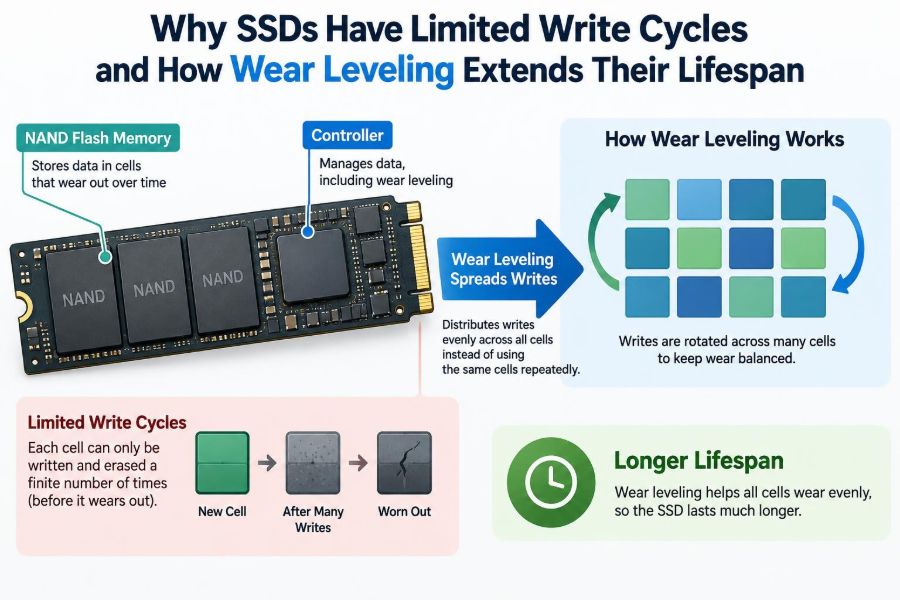

A new SSD can make an older computer feel remarkably quick. Programs open faster, boots are shorter, and copying files no longer sounds like a mechanical device working away inside the case.
Then a storage-health warning appears, or someone says that SSDs “wear out every time you save a file.” That sounds alarming, especially when the drive contains work documents, photos, software projects, or years of personal files.
The concern is based on a real physical limitation, but it is often misunderstood. SSDs do have a finite amount of writable life, yet modern drives are designed to spread that work intelligently and usually provide years of normal service.
Understanding write cycles and wear leveling helps you judge storage health sensibly, choose an appropriate drive, and protect your data without treating every write as a disaster.
💾 What Makes an SSD Different from a Hard Drive
A traditional hard disk drive stores data on spinning magnetic platters and reads it with moving heads. An SSD, or solid-state drive, stores data in NAND flash memory, a type of electronic memory with no moving parts.
This design brings major advantages: fast access times, quiet operation, low power use, and better resistance to physical shock. Its limitation comes from the way NAND cells store electrical charge.
🔋 NAND Cells Store Data as Electrical Charge
Each NAND flash cell is a tiny electronic structure that can hold charge. The amount of charge inside it represents a binary value or, in more advanced cells, one of several possible data states.
To change stored data, the SSD controller applies carefully controlled voltages. These operations are reliable, but repeated electrical stress gradually changes the cell’s physical characteristics.
🔁 A Write Cycle Means More Than Saving a File
People often call every save operation a “write cycle,” but flash memory works in larger units. Data is written to pages, while erasure happens in much larger groups called erase blocks.
A cell’s lifetime is mainly affected by repeated program/erase cycles, often shortened to P/E cycles. Programming places new data into a cell; erasing resets a whole block so it can be used again.
🧱 Why NAND Must Erase Before Rewriting
NAND flash cannot usually overwrite a used page directly in the simple way RAM can. If an SSD needs to update part of an existing block, it writes the newer data elsewhere, then later erases the old block.
Think of a whiteboard divided into large panels. You may write a new note in an empty space, but to fully reuse a marked panel, you eventually erase the whole panel. That extra work is central to SSD wear.
⚡ Why Repeated Erasing Wears Cells Down
During programming and erasing, electrons move through an insulating layer in the cell. Over many cycles, this layer slowly degrades, making it harder for the controller to distinguish one charge level from another.
Eventually a cell may no longer retain data reliably enough. The SSD marks it as unusable and substitutes spare capacity, rather than immediately losing the files stored on the drive.
🔢 More Bits Per Cell Usually Mean Less Endurance
NAND types are commonly described by how many bits each cell stores. Storing more bits reduces cost per gigabyte, but requires the controller to distinguish more closely spaced voltage levels.
| NAND type | Bits per cell | General endurance pattern | Typical role |
|---|---|---|---|
| SLC | 1 | Highest | Specialized industrial and enterprise uses |
| MLC | 2 | High | Older premium consumer and professional use |
| TLC | 3 | Balanced | Most mainstream consumer SSDs |
| QLC | 4 | Lower | High-capacity, cost-focused storage |
These are broad tendencies, not a complete ranking of drives. Controller quality, spare area, firmware, workload, and cooling also affect practical endurance.
🧠 The SSD Controller Is the Drive’s Traffic Manager
The flash chips are only part of an SSD. Its controller manages where data is placed, tracks error correction, handles bad blocks, schedules cleanup, and presents logical storage addresses to the operating system.
When your computer writes to “file location A,” it does not necessarily write to the same physical flash cells used before. This separation makes wear leveling possible.
🗺️ Logical Addresses and Physical Locations Are Separate
Your operating system sees a simple list of logical block addresses. The controller maintains a private mapping between those addresses and the actual pages of NAND flash.
That mapping can change constantly. A file that appears to stay in one folder may be moved internally several times as the drive balances wear and organizes free space.
⚖️ Wear Leveling Spreads the Work
Wear leveling is the controller’s method for distributing writes and erases across available flash blocks. Instead of repeatedly using the same convenient area, it tries to keep wear relatively even.
Without it, a frequently updated database, browser cache, or operating-system log could exhaust a small group of cells while much of the drive remained nearly unused. Wear leveling turns the drive’s total flash capacity into a shared endurance resource.
🧭 Dynamic Wear Leveling Handles New Writes
Dynamic wear leveling chooses relatively fresh blocks when the drive receives new data. Blocks that have already experienced more erasures are avoided when possible.
This works well for files that change often. For example, a video-editing application repeatedly creating temporary files can have its activity distributed across many physical locations instead of wearing out one area.
📦 Static Wear Leveling Also Moves Old Data
Some files remain untouched for years: archived photos, a rarely opened manual, or an old software installer. If they stayed permanently in low-wear blocks, dynamic wear leveling alone could not use those blocks effectively.
Static wear leveling occasionally relocates long-lived data from lightly used blocks. The newly freed blocks can then join the pool for active writes, helping equalize wear across the entire drive.
🧹 Garbage Collection Reclaims Used Space
When data is changed, the old version is marked invalid, but its block may still contain valid pages that must be preserved. Garbage collection combines valid pages into cleaner blocks and prepares old blocks for erasure.
This background work improves future write performance. It also creates additional internal writes, so its efficiency affects how quickly NAND is consumed.
📈 Write Amplification Explains the Hidden Work
Write amplification is the difference between the data your computer requests to write and the total data the SSD actually writes internally. Writing a small file can require moving valid data, updating mapping information, and erasing blocks.
A write amplification factor above one is normal. The aim is not to eliminate it entirely, but to reduce unnecessary internal activity through good controller design, sufficient free space, and suitable workloads.
🗑️ TRIM Helps the SSD Recognize Deleted Data
When you delete a file, an operating system usually marks its space as available rather than instantly clearing every byte. The TRIM command tells a compatible SSD which pages no longer need to be retained.
With that information, the SSD can clean blocks more efficiently later. Modern operating systems normally manage TRIM automatically, but it is worth confirming that it is enabled if a drive behaves unexpectedly.
🪄 Over-Provisioning Leaves Useful Space Unseen
Many SSDs reserve some flash capacity that is not shown as usable storage. This over-provisioning gives the controller room for wear leveling, garbage collection, and replacement of worn blocks.
Leaving a reasonable amount of user-visible storage free can also help. A completely full SSD has fewer places to move data during cleanup, which can reduce sustained write performance and increase internal work.
📏 Endurance Ratings Put Wear Into Practical Terms
Manufacturers commonly express SSD endurance as TBW, or terabytes written, and sometimes as DWPD, or drive writes per day over a warranty period. These figures describe a tested or warranted write allowance, not a promise that a drive fails exactly at that point.
TBW is easy to compare for personal storage. DWPD is more useful in servers, where a drive’s full capacity may be rewritten frequently. Compare ratings only among drives of similar capacity and intended use.
🧾 Warranty Limits Are Not a Countdown Timer
An SSD may reach its warranty write rating and continue operating, while another drive could fail earlier for unrelated reasons. Electronics can fail because of controller faults, power events, firmware problems, manufacturing defects, or physical damage.
The rating is still valuable because it helps match a drive to a workload. A low-cost high-capacity QLC model may be excellent for a game library or media archive, but less suitable for constant professional capture or heavy database logging.
🏠 Normal Personal Use Rarely Matches Extreme Workloads
Web browsing, office documents, study files, streaming, and ordinary gaming involve writes, but they generally do not resemble a server continuously recording transactions. Modern consumer SSDs are built with everyday computing in mind.
Heavy use is different from normal use. Regularly editing high-resolution video, compiling large projects, running virtual machines, creating large backups, or operating scratch disks can generate substantially more writes.
🎮 Reads Do Not Wear NAND in the Same Way
Reading data uses far less physical stress than programming and erasing cells. Installing a large game once and playing it many times is not equivalent to rewriting that game every day.
Reads are not entirely irrelevant: extremely heavy read workloads can require error correction management and may affect performance. But for lifespan discussions, writes and erases are the main wear concern.
🌡️ Heat Can Complicate Reliability and Performance
High temperatures can affect flash retention and make an SSD controller reduce speed to protect itself. Fast NVMe drives in compact laptops or crowded desktops may become warm during long transfers.
A heatsink, airflow, or a better drive location can help where the hardware supports it. Cooling is not a cure for worn NAND, but it supports consistent operation and avoids avoidable thermal stress.
🔌 Power Loss Is a Different Risk From Wear
Wear leveling does not protect against every storage problem. Sudden power loss during an active write can leave data or file-system metadata incomplete, particularly if the application has not finished saving.
Enterprise SSDs may include power-loss protection capacitors that provide a brief reserve of energy to finish critical internal operations. Consumer drives vary, so a reliable power source and regular backups remain sensible safeguards.
🔍 Health Tools Show Trends, Not Perfect Predictions
Many SSDs expose SMART or NVMe health information, such as data written, spare blocks remaining, temperature, media errors, and percentage of life used. Manufacturer utilities and operating-system tools can read some of this information.
These values are useful for spotting a trend, but they are not a crystal ball. A healthy-looking report does not replace backups, and one unfamiliar attribute should be interpreted using the drive maker’s documentation rather than guessed at.
🚩 Signs That Deserve Attention
Unexpected read errors, repeated file corruption, a drive disappearing from the system, or warnings about critical health status deserve prompt action. These symptoms can indicate a storage issue, though cables, ports, power supplies, drivers, or the file system may also be involved.
- Back up accessible data before extensive troubleshooting.
- Record important health information and error messages.
- Check connections and system logs where appropriate.
- Replace a drive that reports serious media errors or behaves unreliably.
Do not keep testing a failing drive with long, write-heavy benchmarks when important data has not yet been copied.
🧪 Benchmarks Can Create Writes Too
Benchmarking tools measure speed by reading and often writing test data. Running them occasionally is not normally a lifespan crisis, but repeated full-drive write tests create real wear without improving the drive.
Use benchmarks to answer a practical question, such as whether a new drive is installed correctly or whether thermal throttling occurs. Avoid treating benchmark scores as maintenance that must be repeated constantly.
🛠️ Practical Ways to Reduce Unnecessary Wear
The goal is not to avoid writing data; that would defeat the purpose of storage. Instead, remove wasteful activity and choose sensible settings.
- Keep enough free space for the controller to manage data efficiently.
- Allow the operating system to run its normal SSD optimization and TRIM routines.
- Avoid needless repeated cloning, stress tests, or full-disk rewrites.
- Place unusually write-heavy temporary workloads on a drive designed for them when practical.
- Keep firmware updated when the manufacturer provides a relevant, trusted update.
Do not disable useful features such as browser caches or virtual memory solely out of fear of wear. The performance, stability, and security trade-offs may be worse than the small amount of writes saved.
📚 Choosing an SSD for the Job
Capacity matters because a larger drive generally has more NAND blocks across which to spread writes. Two models with the same design but different capacities often have different endurance ratings.
For light personal use, a reputable mainstream TLC or QLC drive can be a practical choice. For sustained content creation, workstation tasks, or server workloads, examine endurance ratings, cache behavior, cooling needs, warranty terms, and power-loss features rather than focusing only on peak speed.
💽 Backups Matter More Than Extending Every Last Cycle
No storage technology is permanent. Hard drives can suffer mechanical failure, SSDs can fail electronically, and files can be lost through accidental deletion, ransomware, theft, or software errors.
A useful backup plan keeps another copy separate from the main drive. For valuable data, use more than one copy and consider an offline or cloud-based copy so that one failure or incident does not affect everything.
🧩 Common SSD Myths to Leave Behind
One myth is that an SSD becomes unsafe the moment it reaches a stated write rating. In reality, that rating is a useful endurance and warranty measure, not an exact failure date.
Another is that defragmenting SSDs should be performed like it was for hard drives. SSDs do not need traditional defragmentation for seek-time performance, and unnecessary rewriting is unhelpful. Current operating systems generally recognize SSDs and use appropriate maintenance routines instead.
A final myth is that wear leveling makes backups optional. It only distributes normal wear; it cannot guarantee recovery from all hardware, software, or human errors.
🧠 The Core Principle: Manage Wear, Protect Data
SSDs have limited write cycles because their NAND cells undergo physical electrical stress each time they are programmed and erased. That limitation is real, but it is measured across a large pool of cells rather than as a simple count of saved files.
Wear leveling, over-provisioning, garbage collection, TRIM, error correction, and spare blocks work together to use that pool efficiently. The controller’s job is to prevent a small area of flash from taking all the damage.
The practical lesson is balanced: choose storage suited to your workload, maintain reasonable free space, monitor meaningful warnings, and keep backups. You do not need to fear normal SSD use, but you should never assume any drive is irreplaceable.
An SSD lasts longest when its controller can spread writes intelligently—and your data stays safest when it exists in more than one place. 💾🛡️✨